
ABB
In Stock OK
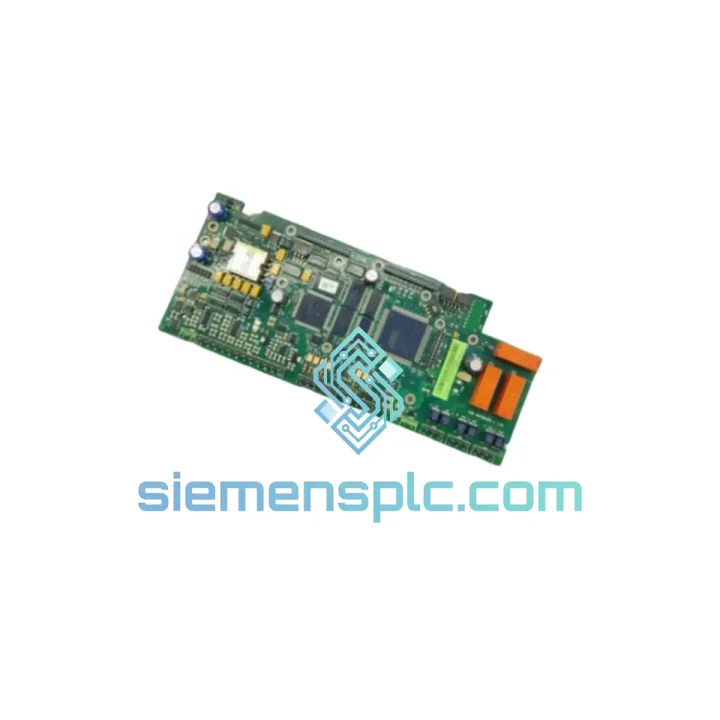
ABB RMIO-11C 3AUA0000035408 Motor Control Interface
Request verified availability, condition, replacement risk review, packing options and courier lead time for RMIO-11C.
BrandABB
Part NumberRMIO-11C
ConditionAvailability Check
Lead TimeRFQ Confirmation
DocumentsDatasheet / photos by RFQ
ShippingExport packing available
Auto-filled RFQ
RMIO-11C
Click Request Quote and the part number is inserted into the inquiry form automatically.
- Reply by email: [email protected]
- WhatsApp / Tel: +86 18359268345
- Mon-Sat 9:00-18:00 GMT+8
Procurement Data
Key Product Information
Core fields for model confirmation and RFQ routing. Detailed product narrative remains below.
- Brand
- ABB
- Primary Part Number
- RMIO-11C
- Product Type
- Motor Control Interface Module
- Series / Family
- S800
- Country of Origin
- SE
- Catalog Category
- Motor Drives
- Operating Temp.
- -15°C to +55°C (per ACS800 enclosure class)
Model confirmed for inquiry
RMIO-11C
Send quantity, destination and urgency. The RFQ form keeps this part number attached.
Request Quote
Product Overview
ABB RMIO-11C 3AUA0000035408 — Stop the Bleeding: Get Your ACS800 Drive Back Online Before the Next Shift
Every minute an ACS800 drive sits dead, your production cost clock is running. A failed RMIO-11C control board doesn’t just stop one motor — it kills the entire drive’s intelligence. Speed reference? Gone. Torque loop? Open. Fieldbus communication? Silent. If you’re reading this at 2 AM with a flashlight in your hand and a plant manager on the phone, you already know what’s at stake. We stock the ABB RMIO-11C (3AUA0000035408) and ship same-day from Xiamen. That’s the only thing that matters right now.
URGENT REQUIREMENT? Contact: [email protected] | WhatsApp: +86 18359268345
Quick Technical Datasheet
| Parameter | Specification |
|---|---|
| Part Number | RMIO-11C |
| ABB Reference No. | 3AUA0000035408 |
| Compatible Drive Series | ACS800 Single Drive (ACS800-01, -04, -07) |
| Control Algorithm | Direct Torque Control (DTC) |
| Analog Inputs | 3 × AI (0–10 V / 0–20 mA / 4–20 mA selectable) |
| Analog Outputs | 2 × AO (0–20 mA) |
| Digital Inputs | 6 × DI (24 VDC) |
| Digital Outputs | 3 × RO relay outputs |
| Fieldbus Slot | 1 × optional adapter slot (RPBA-01, RCAN-01, RETA-01/02, RDCO-02/04) |
| Encoder Interface | Via RTAC-01 pulse encoder interface module |
| Supply Voltage | Internal from drive SMPS |
| Operating Temperature | -15°C to +55°C (per ACS800 enclosure class) |
| Firmware Tool | ABB DriveWindow 2 / DriveComposer |
| Stock Status | ✅ Ready to Ship — Xiamen Warehouse |
| Origin | Germany / Finland (ABB OEM) |
| Condition | 100% Original, New or Tested Surplus |
Troubleshooting & Replacement Tips
Fault Codes That Point Directly to a Failed RMIO-11C:
- F-0001 / F-0002 (Overcurrent / DC Overvoltage): If these faults appear immediately at power-up with no load connected, suspect the RMIO-11C’s gate drive signal chain before condemning IGBTs. A corrupted DTC model on the control board can generate false firing pulses.
- F-0009 (Undervoltage): When the DC bus is confirmed healthy but the drive still trips F-0009, the RMIO-11C’s voltage measurement circuit may have failed. Swap the board before replacing capacitors.
- F-0022 (PPCC Link Fault): This is almost always the RMIO-11C or the fiber optic DDCS link. Check the RDCO module first; if the fiber is intact, the RMIO-11C is the next suspect.
- A-0006 (AI Supervision): Analog input supervision alarm with confirmed wiring integrity = failed AI circuit on the RMIO-11C. Do not waste time re-calibrating — replace the board.
- No panel communication / blank CDP panel: If the CDP-312R panel shows nothing and the drive powers up (fans spin, DC bus charges), the RMIO-11C’s panel port UART has likely failed.
Step-by-Step Replacement Procedure (ACS800 Single Drive):
- Isolate & discharge: Open the main breaker, lock out / tag out. Wait minimum 5 minutes for DC bus capacitors to discharge below 50 VDC. Verify with a calibrated meter — do not trust the drive’s own display.
- Parameter backup: If the drive still powers up partially, connect DriveWindow 2 via the panel port or DDCS and export the full parameter set (.dps file). If the board is completely dead, retrieve parameters from a previous backup or the drive’s memory module if fitted.
- Document fieldbus adapter position: Note which slot the RDCO/RPBA/RCAN module occupies and its node address DIP switch settings before removal. Photograph the wiring harness.
- Remove the RMIO-11C: Disconnect all I/O terminal blocks (X1–X5), the panel cable, the DDCS fiber connectors, and the fieldbus adapter. Release the four M3 screws securing the board to the drive chassis. Slide the board out carefully — the IGBT gate drive ribbon connector at the bottom is fragile.
- Install the replacement RMIO-11C: Seat the new board, reconnect the gate drive ribbon first, then secure the M3 screws. Reconnect all terminal blocks in reverse order. Refit the fieldbus adapter with identical DIP switch settings.
- Firmware check: Power up in local control mode. Navigate to Parameter Group 33 (Information) and verify the firmware version matches your application requirements. If the new board carries a different firmware revision, use DriveWindow 2 to flash the correct version before restoring parameters.
- Parameter restore: Load the backed-up .dps file. Pay particular attention to Group 99 (Start-Up Data), Group 20 (Limits), and Group 26 (Motor Control). Run the motor identification run (ID Run) if the motor data has changed or if the firmware version differs from the original.
- I/O verification: Before enabling the drive in remote mode, force each digital input from the PLC/DCS and confirm the drive’s I/O status display reflects the correct state. Check analog input scaling against your process transmitter range.
- Test run: Start the drive at 5 Hz in local mode, monitor current and torque feedback for 60 seconds. Ramp to 25 Hz, then 50 Hz. Confirm no fault codes. Hand back to operations.
Critical Configuration Notes:
- The RMIO-11C does not have a self-addressing DIP switch — node addressing for DDCS is set via Parameter 70.01 (Node Address). Confirm this matches your system topology before going live.
- If your application uses an RTAC-01 encoder interface, re-verify Parameter Group 50 (Encoder Module) after board swap. The encoder pulse count and channel configuration must be re-entered manually if the parameter backup is unavailable.
- Firmware versions below 7.x may not support all features of the RPBA-01 PROFIBUS adapter. If you are upgrading from an older RMIO-11C revision, check ABB firmware compatibility matrix before flashing.
Reliability in Harsh Conditions
The RMIO-11C was engineered for environments that would destroy consumer-grade electronics within weeks. ABB designed this board to operate continuously inside drive enclosures where ambient temperatures swing from sub-zero startups in Nordic paper mills to 50°C summer peaks in Middle Eastern desalination plants. The PCB uses conformal coating on critical signal traces to resist condensation and airborne contaminants — a non-negotiable requirement in coastal chemical plants and offshore platforms where salt-laden air attacks unprotected copper within months.
Vibration resistance is built into the board’s mechanical design. The through-hole construction of high-stress components — power connectors, relay outputs, and the gate drive interface — prevents the solder joint fatigue that kills surface-mount-only designs in high-vibration applications like mining conveyors and marine thrusters. In field experience across cement plants and steel mills, RMIO-11C boards routinely outlast the drive’s power section by years, only failing when subjected to sustained overvoltage events or physical damage from maintenance errors.
Every unit we ship has been visually inspected under magnification for PCB delamination, cracked solder joints, and electrolytic capacitor bulge — the three failure modes that account for the majority of field returns. Units showing any sign of rework or component substitution are rejected. What you receive is either factory-new in original ABB packaging or a tested surplus unit that has passed a full power-on functional check with I/O verification.
Global Express Logistics
Our warehouse is located in Xiamen, Fujian — one of China’s primary export hubs with direct access to international freight lanes operated by DHL Express, FedEx International Priority, and UPS Worldwide Express. For emergency orders confirmed before 15:00 CST, same-day dispatch is standard. For orders confirmed after cut-off, next-morning dispatch is guaranteed.
Typical transit times from Xiamen:
- Southeast Asia (Singapore, Thailand, Malaysia, Vietnam): 2–3 business days via DHL Express
- Middle East (UAE, Saudi Arabia, Qatar): 3–4 business days via FedEx International Priority
- Europe (Germany, Netherlands, UK, Poland): 3–5 business days via DHL Express
- North America (USA, Canada, Mexico): 4–6 business days via FedEx or UPS
- South America (Brazil, Chile, Colombia): 5–8 business days depending on customs clearance
- Africa & Oceania: 5–10 business days via DHL or FedEx
All shipments include a commercial invoice, packing list, and certificate of origin for customs clearance. For customers in countries requiring import licenses for electronic components, we provide full documentation support. Shipments are packed in anti-static ESD bags, foam-lined boxes, and outer cartons rated for international air freight handling. Real-time tracking numbers are sent via email within 2 hours of dispatch. For time-critical shipments, we can arrange door-to-door courier with dedicated customs brokerage to eliminate clearance delays.
We have shipped ABB, Siemens, Schneider, and Rockwell automation components to over 60 countries. Our export compliance team handles HS code classification, dual-use screening, and destination control statements as standard — no additional paperwork burden on your procurement team.
Contact Information
Email: [email protected]
WhatsApp: +86 18359268345
Web: siemensplc.com
© 2026 siemensplc.com. All rights reserved.
Ready to quote
[email protected]
Send This Part Number to Sales
RFQ workflow
Quality workflow ->
Confirmation Process
01Model confirmation
We check the full part number, brand, series and visible nameplate information before quotation.
02Availability reply
Sales confirms stock path, condition option, quantity and realistic lead time for export dispatch.
03Packing & courier
DHL, FedEx, UPS or buyer courier arrangements can be reviewed with packing requirements.
Continue sourcing
Browse full catalog ->
Related Automation Parts
Similar brand or category products for fast comparison and multi-item RFQ lists.
ABB
RFQ Ready
ABB SDCS-UCM-1 3ADT220090R0008 Excitation Control Board
S800
Origin SE
DC Drive Control Module
ABB
RFQ Ready
ABB SDCS-PIN-51-COAT 3ADT220090R0006 DC Drive Control Card
S800
Origin SE
DC Drive Control Card