ABB
RFQ Ready
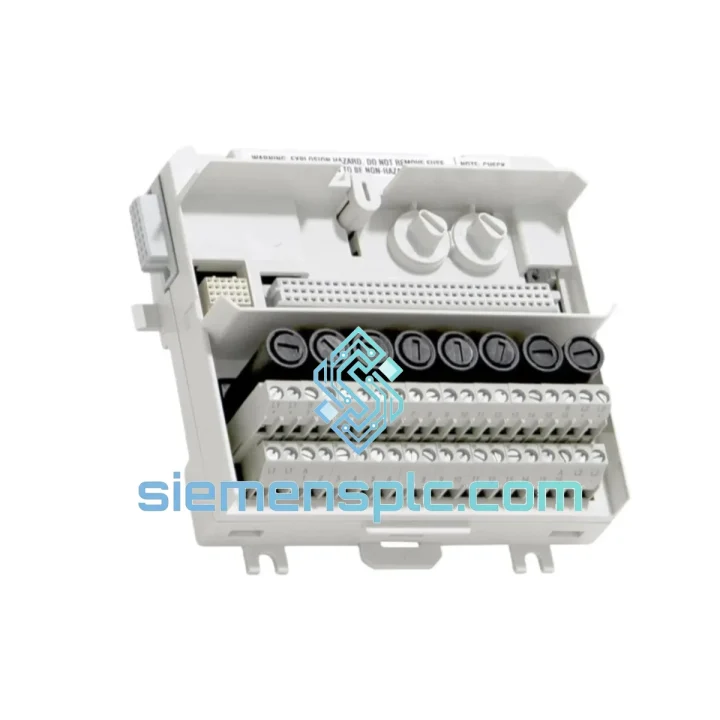
ABB HAC807B102 Analog Input Termination Unit – AC800M Series
AC800M
Origin SE
Analog Input Termination Unit
Request verified availability, condition, replacement risk review, packing options and courier lead time for TU838.
Click Request Quote and the part number is inserted into the inquiry form automatically.
Core fields for model confirmation and RFQ routing. Detailed product narrative remains below.
A failed marshalling terminal unit doesn’t just interrupt a loop — it can cascade into a full process shutdown. When your AC800M-based DCS goes dark because a TU838 has failed, you’re not looking at a maintenance ticket. You’re looking at lost throughput, emergency crew overtime, and a plant manager breathing down your neck. We’ve been there. That’s why we keep ABB TU838 units on the shelf, tested, packaged, and ready to leave Xiamen within hours of your order confirmation.
Whether you’re running a refinery in the Middle East, a chemical plant in Southeast Asia, or a power station in Europe, the math is the same: the cost of this module is a rounding error compared to one hour of unplanned downtime. Stop waiting on distributor lead times. Get the part moving now.
URGENT REQUIREMENT? Contact: [email protected] | WhatsApp: +86 18359268345
| Parameter | Detail |
|---|---|
| Part Number | TU838 |
| Manufacturer | ABB |
| Product Series | S800 I/O – Extended Marshalling Terminal Unit |
| Compatible Controllers | AC800M (PM851, PM856, PM860, PM861, PM864, PM866) |
| Compatible I/O Modules | S800 I/O Series: AI810, AO810, DI810, DO810, DI811, DO815, etc. |
| Terminal Configuration | Extended MTU – additional terminal rows vs. standard TU830/TU831 |
| Mounting | DIN Rail (35 mm) |
| Operating Temperature | 0 °C to +55 °C |
| Storage Temperature | -40 °C to +70 °C |
| Ingress Protection | IP20 (panel-mounted enclosure required) |
| Certifications | CE, cULus, IEC 61131-2, RoHS |
| Weight | Approx. 1,000 g |
| Origin | Germany |
| Stock Status | ✔ Ready to Ship – Xiamen Warehouse |
The TU838 is a passive terminal unit — it carries no firmware and holds no configuration. But that doesn’t mean swapping it is risk-free. Here’s what ten years of field work teaches you:
Step 1 — Isolate before you touch anything. Confirm the loop is in manual mode at the DCS workstation. Do not assume the operator has done this. Check yourself. A live AI810 channel pulled mid-scan will generate a spurious alarm and potentially trip a downstream interlock.
Step 2 — Photograph the wiring before disconnection. The TU838’s extended terminal layout means more field cables than a standard MTU. Label every wire with its terminal number using a marker or pre-printed tags. The wiring diagram in the as-built documentation is often out of date — trust what’s physically there.
Step 3 — Check the I/O module revision. The TU838 is mechanically compatible across S800 I/O generations, but if you’re replacing a unit that was installed alongside an early-revision AI810 (hardware rev A or B), verify that the replacement module’s firmware is consistent with the rest of the rack. Mismatched firmware revisions between I/O modules on the same ModuleBus segment can cause intermittent communication faults (error code 0x8001 or 0x8003 on the AC800M diagnostic log).
Step 4 — Inspect the ModuleBus connector on the I/O module. A failed TU838 is sometimes a symptom, not the root cause. Bent pins on the S800 module’s backplane connector, or corrosion on the MTU’s gold contacts, are the actual failure point. Clean contacts with isopropyl alcohol before seating the replacement.
Step 5 — Re-seat and verify. After installation, force a cold restart of the affected I/O module from the AC800M engineering tool (Control Builder M). Confirm all channel statuses return to GOOD before releasing the loop to automatic. Watch for the first 15 minutes — intermittent contact issues will show up as sporadic BAD quality flags on the historian.
Common fault codes associated with TU838 failure:
The TU838 was designed for the kind of environments where most electronics give up. ABB’s S800 I/O platform was built to IEC 61131-2 mechanical and climatic test standards — that means it has been subjected to sinusoidal vibration across the 5–150 Hz spectrum, shock loads of 15 g, and cyclic humidity testing at 95% RH non-condensing. The DIN rail mounting system uses a positive-locking mechanism that prevents the unit from walking off the rail under sustained vibration — a real concern in compressor rooms and pump skids.
Thermal performance is equally robust. The 0–55 °C operating range covers the vast majority of panel environments, and the -40 °C storage rating means units shipped to cold-climate sites (Siberian gas fields, Canadian mining operations) arrive without cold-soak damage. The IP20 rating is appropriate for panel-mounted use; for outdoor or wash-down environments, the enclosure — not the module — carries the IP rating burden.
Every TU838 unit we dispatch is inspected for physical integrity: terminal block condition, contact surface quality, label legibility, and mechanical fit. Units showing any sign of prior installation damage, contact oxidation, or counterfeit labeling are rejected. You receive a part that will perform identically to a factory-new unit.
Our warehouse is located in Xiamen, Fujian — one of China’s primary export hubs with direct access to DHL Express, FedEx International Priority, and UPS Worldwide Express lanes. Here’s how a typical urgent order moves:
All shipments include: commercial invoice, packing list, certificate of origin, and product datasheet. Anti-static packaging with foam insert protection is standard. Insurance is available on request for high-value orders.
Email: [email protected]
WhatsApp: +86 18359268345
Web: siemensplc.com
© 2026 siemensplc.com. All rights reserved.
We check the full part number, brand, series and visible nameplate information before quotation.
Sales confirms stock path, condition option, quantity and realistic lead time for export dispatch.
DHL, FedEx, UPS or buyer courier arrangements can be reviewed with packing requirements.
Similar brand or category products for fast comparison and multi-item RFQ lists.