Siemens
RFQ Ready
SIEMENS 6GK5108-0BA00-2AA3 Industrial Ethernet Switch
SIMATIC
Origin DE
Industrial Ethernet Switch
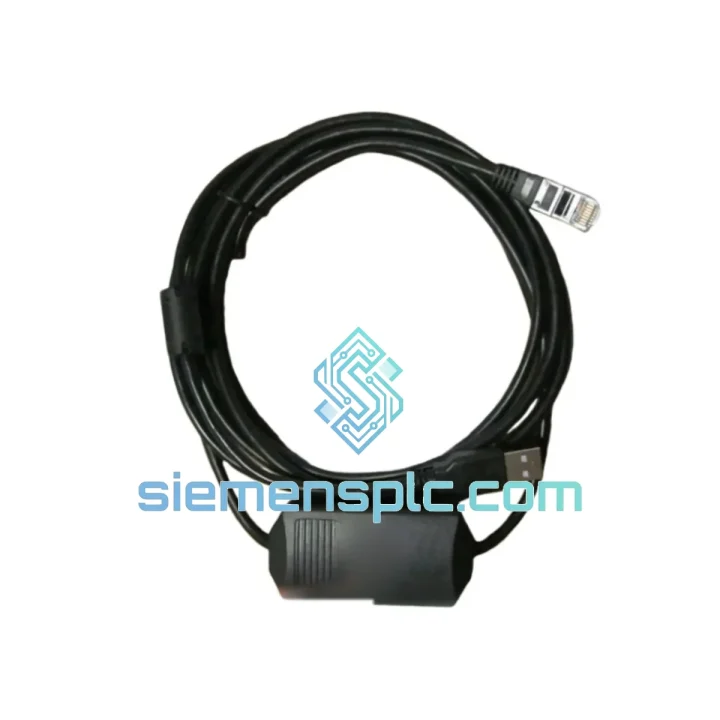
Request verified availability, condition, replacement risk review, packing options and courier lead time for CT-USB-CABLE-SP1406.
Click Request Quote and the part number is inserted into the inquiry form automatically.
Core fields for model confirmation and RFQ routing. Detailed product narrative remains below.
Your AIENSN SP-series line is down. The programming cable is dead — no COM port, no handshake, no upload. Every minute the machine sits idle, you’re bleeding production cost. The CT-USB-CABLE(SP1406) is the factory-designated USB communication cable for AIENSN SP-series PLCs, and we stock it. Not on order. Not inbound. In hand, ready to ship today.
We’ve handled enough emergency calls to know that a missing or failed programming cable is one of the most underestimated causes of extended downtime. Maintenance teams often don’t carry a spare because it’s “just a cable” — until it isn’t. When the USB-to-serial bridge chip inside fails, or the SP1406 connector pin gets bent during a rushed field swap, you’re locked out of the controller entirely. No program backup. No parameter adjustment. No restart.
That’s the situation this page exists to solve.
📧 URGENT REQUIREMENT? Contact: [email protected] | WhatsApp: +86 18359268345
| Part Number | CT-USB-CABLE(SP1406) ✅ Ready to Ship |
| Manufacturer | AIENSN |
| Compatible Series | AIENSN SP Series PLC |
| Host Interface | USB Type-A (PC / Industrial Laptop) |
| PLC Interface | SP1406 Proprietary Programming Port |
| Protocol | USB-to-Serial Virtual COM Port (VCP) |
| Driver Requirement | VCP driver (included in AIENSN software package) |
| OS Support | Windows 7 / 10 / 11 (64-bit) |
| Shielding | EMI-shielded, anti-interference construction |
| Operating Temp | 0 °C to +60 °C |
| Storage Temp | -20 °C to +70 °C |
| Certifications | CE / RoHS |
| Origin | China (Xiamen stocked) |
| Stock Status | ✅ In Stock — Ships within 24 hrs |
Symptom 1 — No COM Port Detected After Plugging In
This is the most common failure mode. The USB-to-serial bridge chip (typically CH340 or CP2102 variant) has either failed or the driver is corrupted. First, check Device Manager for a yellow exclamation mark under “Ports (COM & LPT)”. If the device shows as “Unknown Device”, the driver is missing. Reinstall from the AIENSN programming software package. If no device appears at all, the cable’s bridge IC is dead — replace the cable. Do not waste time reflashing drivers on a hardware-failed cable.
Symptom 2 — COM Port Appears But Programming Software Cannot Connect
Verify the COM port number assigned by Windows matches what’s configured in the AIENSN programming software. On machines with multiple USB hubs, the COM number can shift after a reboot. Fix: go to Device Manager → Ports → right-click the cable’s COM port → Properties → Port Settings → Advanced → set a fixed COM port number (e.g., COM3 or COM4) below COM10 to avoid software compatibility issues.
Symptom 3 — Intermittent Disconnection During Upload
Nine times out of ten this is a USB power issue. Industrial PCs with aggressive USB power management will suspend the port mid-transfer. Disable USB selective suspend in Windows Power Options. Also check the cable’s SP1406 connector — if the locking tab is worn, the connector can micro-disconnect under vibration. Replacement is the correct fix, not tape.
Replacement Procedure (Field-Verified Steps):
Configuration Note — No DIP Switch or Address Setting Required:
Unlike some fieldbus modules, the CT-USB-CABLE(SP1406) requires no hardware address configuration. It is a point-to-point programming cable. The only configuration is the virtual COM port assignment in Windows and the matching port selection in the AIENSN software. Keep it simple.
Plant floors are not lab environments. The CT-USB-CABLE(SP1406) is built for the reality of industrial commissioning and maintenance work — not for a clean desk. The cable’s shielded construction attenuates electromagnetic interference from variable frequency drives, servo amplifiers, and high-current switching equipment that share the same control cabinet or panel space. Without adequate shielding, USB-to-serial cables in these environments suffer from data corruption that manifests as CRC errors during program upload — a frustrating and time-consuming failure mode that looks like a software problem but is actually a hardware one.
The overmolded strain relief at both connector ends is engineered to handle the mechanical stress of repeated connect/disconnect cycles in field service scenarios. Technicians pulling cables at awkward angles inside cramped control cabinets put significant lateral force on connector joints — the overmold distributes that stress away from the solder joints inside. The SP1406 connector housing is rated for the insertion/extraction cycles expected over a typical service life in a maintenance environment.
Operating temperature range of 0 °C to +60 °C covers the majority of industrial indoor environments, including non-climate-controlled production halls in summer. The cable’s insulation material resists the oil mist and cutting fluid vapors common in machining and metalworking environments. For outdoor or extreme-temperature applications, additional cable protection is recommended.
We ship from Xiamen, China — one of the country’s primary export hubs with direct DHL, FedEx, and UPS gateway access. For urgent orders placed before 14:00 CST, same-day dispatch is standard. Here’s what the logistics chain looks like in practice:
We understand that when you’re ordering a replacement programming cable, the machine is already down. Speed is not a selling point — it’s the entire point. Our logistics process is built around that reality.
📧 Email: [email protected]
💬 WhatsApp: +86 18359268345
🌐 Web: siemensplc.com
© 2026 siemensplc.com. All rights reserved.
We check the full part number, brand, series and visible nameplate information before quotation.
Sales confirms stock path, condition option, quantity and realistic lead time for export dispatch.
DHL, FedEx, UPS or buyer courier arrangements can be reviewed with packing requirements.
Similar brand or category products for fast comparison and multi-item RFQ lists.