Siemens PLC sourcing desk · Multi-brand automation spares [email protected] +86 18359268345
Request Quote
Allen-Bradley In Stock OK

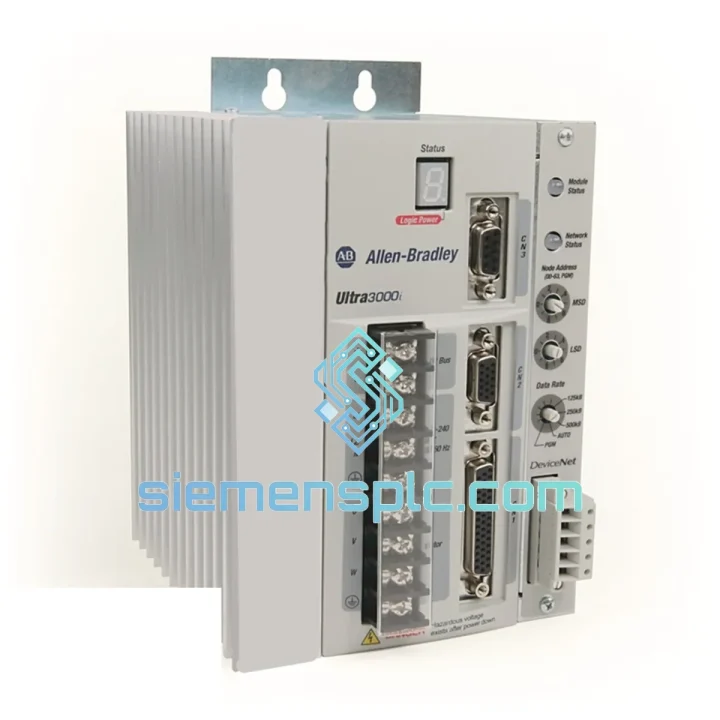
Allen-Bradley 2098-DSD-010X Servo Drive

Request verified availability, condition, replacement risk review, packing options and courier lead time for 2098-DSD-010X.

Exact part2098-DSD-010X RFQ auto-fillPart number attached Export packingDHL / FedEx / UPS Sales replyEmail or WhatsApp
BrandAllen-Bradley Part Number2098-DSD-010X ConditionAvailability Check Lead TimeRFQ Confirmation DocumentsDatasheet / photos by RFQ ShippingExport packing available
Auto-filled RFQ 2098-DSD-010X

Click Request Quote and the part number is inserted into the inquiry form automatically.

Procurement Data

Key Product Information

Core fields for model confirmation and RFQ routing. Detailed product narrative remains below.

Brand
Allen-Bradley
Primary Part Number
2098-DSD-010X
Product Type
Servo Drive
Series / Family
Fast Replacement
Manufacturer
Allen-Bradley / Rockwell Automation
Country of Origin
US
Catalog Category
Motor Drives
Model confirmed for inquiry 2098-DSD-010X Send quantity, destination and urgency. The RFQ form keeps this part number attached.
Request Quote
Product Overview

2098-DSD-010X Down? Every Minute of Downtime Costs You Money — We Ship Today

Your line stopped. The HMI is throwing faults. Maintenance has already pulled the drive and confirmed it’s dead. You’ve got a production manager breathing down your neck and a shift worth of output bleeding away. This is exactly the scenario the Allen-Bradley 2098-DSD-010X replacement stock at siemensplc.com was built for.

We maintain verified shelf stock of the 2098-DSD-010X — a single-axis digital AC servo drive from Rockwell Automation’s Ultra 3000 family — specifically because this drive appears in thousands of legacy motion control installations worldwide and fails without warning. When it goes, you need a drop-in replacement, not a six-week lead time from a franchise distributor. We cut that wait to hours.

⚡ URGENT REQUIREMENT? Contact: [email protected] | WhatsApp: +86 18359268345

Quick Technical Datasheet

Parameter Specification
Part Number 2098-DSD-010X
Series Ultra 3000 Digital Servo Drive
Manufacturer Allen-Bradley / Rockwell Automation
Drive Type Single-Axis Digital AC Servo Drive
Continuous Output Current 10 A RMS
Input Voltage 120 / 240 VAC, Single-Phase
Output Power Up to 1.0 kW
Communication Interface RS-232 / RS-485 Serial
Feedback Type Incremental Encoder, Resolver
Protection Rating IP20
Certifications CE, UL Listed
Weight 1.95 kg
Stock Status ✅ Ready to Ship — Xiamen Warehouse

Troubleshooting & Replacement Tips

After pulling hundreds of failed 2098-DSD-010X units from the field, the failure patterns are consistent. Here’s what you need to know before you swap the drive and power back up.

Most Common Failure Modes:

  • E01 / Overcurrent Fault: Usually triggered by a shorted motor winding or a failed IGBT module inside the drive. Before installing the replacement, megger-test the motor at 500 VDC between each phase and ground. If you get less than 1 MΩ, the motor is the root cause — the new drive will fault immediately on power-up.
  • E05 / Feedback Loss: Encoder cable damage or a failed encoder head. Inspect the 2090-series feedback cable for pinch points and connector corrosion before assuming the drive is at fault. A bad cable will kill a new drive within days.
  • E08 / Bus Overvoltage: Regenerative energy from a high-inertia load with no regen resistor, or a failed bus capacitor bank inside the drive. Check DC bus voltage at the drive terminals during deceleration — anything above 410 VDC on a 240 VAC input system is a problem.
  • E14 / Drive Overtemperature: Blocked ventilation slots or a failed internal fan. Clean the panel before installing the replacement and verify ambient temperature is within the 0–50°C operating range.
  • No Display / No Power: Check the 24 VDC logic supply at connector J1 first. The drive’s control board is powered separately from the AC bus — a blown fuse on the 24 V rail will leave the drive completely dark even with AC present.

Step-by-Step Replacement Procedure:

  1. De-energize the panel. Lock out / tag out per your site LOTO procedure. Verify zero energy with a CAT III meter on the AC input terminals and the DC bus terminals — bus caps hold charge for up to 5 minutes after power removal.
  2. Document the existing Ultraware parameter file before disconnecting anything. Connect a laptop via RS-232 to J4, launch Ultraware, and save the axis configuration to a named file. If the drive is completely dead, retrieve the parameter backup from your PLC program or commissioning records.
  3. Label and photograph all wiring before disconnection. The 2098-DSD-010X has seven connectors (J1–J7). A phone photo takes 10 seconds and prevents a 2-hour rewiring mistake.
  4. Remove the drive. It mounts on a DIN rail or panel with four M5 screws. Note the torque spec: 1.5 N·m on the terminal screws.
  5. Install the replacement unit. Verify the firmware revision on the front label matches your existing system requirements. If the replacement carries a newer firmware, test in jog mode before returning to auto.
  6. Restore parameters via Ultraware. Download the saved axis file to the new drive. Do not rely on default parameters — motor nameplate data, current limits, and tuning gains must match your application.
  7. Perform a low-speed jog test before enabling full-speed auto operation. Watch for oscillation or hunting, which indicates the velocity loop gains need re-tuning after the drive swap.

Reliability in Harsh Conditions

The Ultra 3000 platform was designed for industrial panel environments, not climate-controlled server rooms. The 2098-DSD-010X operates across a 0–50°C ambient range with 5–95% non-condensing humidity tolerance. Its conformal-coated control board resists airborne contaminants common in food processing, chemical, and metalworking facilities — coolant mist, cutting fluid vapor, and fine particulate that corrode unprotected PCBs within months.

The drive’s internal bus capacitors are rated for 100,000-hour service life at nominal operating temperature, though real-world installations in high-ambient environments (above 40°C continuous) will see accelerated aging. If your original drive failed after 8–12 years of service in a hot panel, that’s normal capacitor end-of-life — not a quality defect. The replacement unit from our stock is new-production or low-hour surplus, giving you a full service life reset.

Vibration tolerance is 2.5 G at 10–500 Hz per IEC 60068-2-6, making it suitable for press-side installations and mobile equipment where panel vibration is unavoidable. Units are shipped in anti-static foam with corner protection to ensure the replacement arrives in the same condition it left our warehouse.

Global Express Logistics

Our dispatch warehouse is located in Xiamen, Fujian — one of China’s primary export hubs with direct access to DHL, FedEx, and UPS international gateways. Orders confirmed before 15:00 CST ship same day. Here’s what the timeline looks like from your purchase order to your panel:

  • Order Confirmation → Warehouse Pick: Within 2 hours of payment confirmation. Each unit is photographed and serial-number logged before packing.
  • Packing → Carrier Handoff: Anti-static bag, foam-lined carton, and shock indicator label. Carrier pickup cutoff is 17:00 CST daily.
  • Xiamen → Major Hubs (DHL/FedEx Express): 1–2 business days to Europe, North America, Southeast Asia, and the Middle East.
  • Customs Clearance: We prepare a complete commercial invoice with HS Code 8537.10, accurate declared value, and country of origin documentation. This eliminates the most common cause of customs delays.
  • Delivery to Your Door: Typically 3–5 business days total for most destinations. Expedited options available — contact us for time-critical shipments requiring next-flight-out courier.

Tracking numbers are sent via email within 1 hour of carrier pickup. For orders above USD 2,000, we provide a dedicated shipment coordinator who monitors the consignment through to delivery confirmation.

Contact Information

📧 Email: [email protected]
💬 WhatsApp: +86 18359268345
🌐 Web: siemensplc.com

© 2026 siemensplc.com. All rights reserved.

Ready to quote

Send This Part Number to Sales

[email protected]
RFQ workflow

Confirmation Process

Quality workflow ->
01Model confirmation

We check the full part number, brand, series and visible nameplate information before quotation.

02Availability reply

Sales confirms stock path, condition option, quantity and realistic lead time for export dispatch.

03Packing & courier

DHL, FedEx, UPS or buyer courier arrangements can be reviewed with packing requirements.