Siemens PLC sourcing desk · Multi-brand automation spares [email protected] +86 18359268345
Request Quote
B&R Industrial Automation In Stock OK

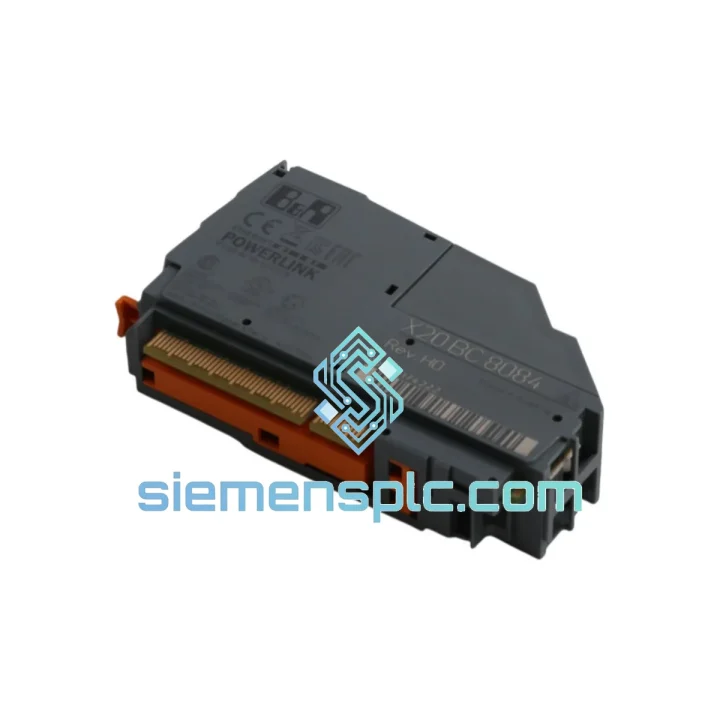
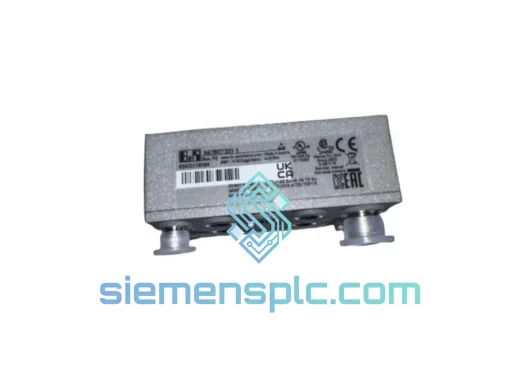
B&R X20BC8084 Redundant Power Supply Bus Controller

Request verified availability, condition, replacement risk review, packing options and courier lead time for X20BC8084.

Exact partX20BC8084 RFQ auto-fillPart number attached Export packingDHL / FedEx / UPS Sales replyEmail or WhatsApp
BrandB&R Industrial Automation Part NumberX20BC8084 ConditionAvailability Check Lead TimeRFQ Confirmation DocumentsDatasheet / photos by RFQ ShippingExport packing available
Auto-filled RFQ X20BC8084

Click Request Quote and the part number is inserted into the inquiry form automatically.

Procurement Data

Key Product Information

Core fields for model confirmation and RFQ routing. Detailed product narrative remains below.

Brand
B&R Industrial Automation
Primary Part Number
X20BC8084
Product Type
PLC Power Supply Module
Series / Family
X20 Series
Manufacturer
B&R Industrial Automation (ABB Group)
Country of Origin
AT
Model Function
Redundant Power Supply Bus Controller
Catalog Category
Power Supplies
Operating Temp.
0 °C to +55 °C
Humidity
5–95% RH, non-condensing
Model confirmed for inquiry X20BC8084 Send quantity, destination and urgency. The RFQ form keeps this part number attached.
Request Quote
Product Overview

X20BC8084 Down? Every Minute of Downtime Has a Price Tag — We Ship Today

Your X20 bus rail just lost redundancy. The primary PSU feed is gone, the backup is carrying the full load, and your maintenance window is closing fast. You need an X20BC8084 on-site before the next shift — not in three weeks. We stock this module in Xiamen, pre-inspected and ready to label. DHL Express leaves the warehouse the same business day you confirm payment. That’s the only promise that matters right now.

URGENT REQUIREMENT? Contact: [email protected] | WhatsApp: +86 18359268345

Quick Technical Datasheet

Part Number / SKU X20BC8084  ✅ Ready to Ship
Manufacturer B&R Industrial Automation (ABB Group)
Series X20 System
Function Redundant Power Supply Bus Controller
Nominal Supply Voltage 24 VDC (–15% / +20%)
Bus Output X2X Link bus power + internal I/O supply rail
Redundancy Architecture Active-active dual-feed with automatic bumpless switchover
Switchover Time < 1 ms — zero X2X Link frames dropped
Hot-Swap Yes — live replacement without system shutdown
Mounting X20 DIN-rail snap-fit, no tools required
Protection Rating IP20
Operating Temperature 0 °C to +55 °C
Storage Temperature –25 °C to +70 °C
Humidity 5–95% RH, non-condensing
Weight approx. 240 g
Certifications CE, UL, cUL, ATEX Zone 2, IEC 61131-2
Compatible CPUs X20CP series, X20BC bus controllers
Software Requirement Automation Studio 4.x and above
Stock Location Xiamen, China — same-day dispatch available

Troubleshooting & Replacement Tips

Common failure signatures for X20BC8084:

  • ERR LED solid red on the bus controller — Feed A or Feed B undervoltage. Check both 24 VDC supply rails with a multimeter before condemning the module itself. A sagging PSU output (below ~20.4 V) will trigger the same symptom.
  • X2X Link communication loss after PSU fault — If the switchover time exceeded the X2X cycle, the CPU may have logged a bus timeout. After replacing the module, force a cold restart of the X20 station (cycle 24 V to the entire rack) rather than a warm restart — this clears residual X2X state machines.
  • Module recognized in Automation Studio but shows “Module not responding” — Firmware mismatch. The replacement unit must carry the same firmware revision as the original. Check the label on the module housing; if the revision differs, update via Automation Studio’s firmware upgrade wizard before going live.
  • Hot-swap replacement causes brief I/O flicker — Expected behavior during the 80–120 ms re-enumeration window. If your application cannot tolerate this, schedule replacement during a controlled stop rather than live swap.

Step-by-step replacement procedure:

  1. Confirm both PSU feeds are isolated or that the secondary feed alone can sustain the load during swap.
  2. In Automation Studio, navigate to the physical view and note the current module slot address — the X20BC8084 uses automatic slot addressing; no DIP switches or manual address configuration required.
  3. Disconnect Feed A and Feed B wiring from the terminal block. Label polarity before removal.
  4. Slide the module off the X20 bus rail — press the release tab at the base and pull forward.
  5. Seat the replacement X20BC8084 onto the rail until the latch clicks. Do not force; misalignment will damage the X2X bus connector pins.
  6. Reconnect Feed A and Feed B. Verify LED sequence: PWR green → RUN green → ERR off. Any ERR flash pattern maps to a specific fault code in the X20BC8084 user manual (chapter 4, diagnostic LEDs).
  7. In Automation Studio, run a hardware scan to confirm the module is detected at the correct slot. Compare the firmware version shown in the scan against your project configuration.
  8. Perform a controlled transfer to RUN mode and monitor the X2X Link status for 5 minutes before releasing the line.

Reliability in Harsh Conditions

The X20BC8084 is not a data-center component — it was designed from the ground up for the factory floor. B&R’s X20 platform undergoes IEC 61131-2 environmental qualification, which means the X20BC8084 has been validated against sinusoidal vibration up to 5g across 5–150 Hz, mechanical shock at 15g / 11 ms half-sine, and continuous operation at 55 °C ambient without derating. The conformal-coated PCB resists condensation ingress during temperature cycling — a common failure mode in outdoor enclosures and unheated machine rooms.

In automotive body shops where weld spatter and EMI are constant, the X20BC8084’s shielded X2X bus connector and filtered supply inputs maintain signal integrity without additional line filters. In pharmaceutical environments where humidity control is imperfect and cleaning agents are airborne, the IP20 housing combined with conformal coating provides a meaningful barrier against corrosive contamination. This is not marketing language — it is the reason plant engineers specify X20 hardware for their most demanding stations.

Units we ship have been stored in climate-controlled conditions and pass a pre-shipment power-up verification. We do not ship modules that show any sign of capacitor bulge, connector pin damage, or label tampering.

Global Express Logistics

Our warehouse is located in Xiamen, Fujian Province — one of China’s primary export hubs with direct DHL Express and FedEx International Priority lanes to Europe, North America, Southeast Asia, and the Middle East. Here is how the process works from the moment you confirm your order:

  • Day 0 (order confirmed before 14:00 CST) — Module pulled from shelf, inspected, photographed, and packed in anti-static foam with original documentation. Shipping label generated and handed to DHL/FedEx courier same afternoon.
  • Day 1 — Tracking number sent to your email. Shipment departs Xiamen Gaoqi International Airport on the evening freight flight.
  • Day 2–4 (Europe / North America) — Typical DHL Express transit time. Customs clearance is handled under HS code 8537.10 (industrial control panels/modules); we prepare a commercial invoice with accurate HS classification to prevent customs holds.
  • Day 3–5 (Southeast Asia / Middle East / Australia) — FedEx International Priority or DHL Express depending on destination coverage.
  • Customs documentation — Commercial invoice, packing list, and certificate of origin provided as standard. CITES, dual-use, or end-user certificates available on request for regulated destinations.
  • Insurance — All shipments are fully insured at declared value. In the event of transit damage, we file the claim and ship a replacement — you are not left managing a carrier dispute during a production crisis.

If your plant is in a country with import restrictions on industrial electronics, contact us before ordering — we have experience navigating import permits for Germany, India, Brazil, and Saudi Arabia and can advise on the fastest compliant route.

Contact Information

📧 Email: [email protected]
💬 WhatsApp: +86 18359268345
🌐 Web: siemensplc.com
© 2026 siemensplc.com. All rights reserved.

Ready to quote

Send This Part Number to Sales

[email protected]
RFQ workflow

Confirmation Process

Quality workflow ->
01Model confirmation

We check the full part number, brand, series and visible nameplate information before quotation.

02Availability reply

Sales confirms stock path, condition option, quantity and realistic lead time for export dispatch.

03Packing & courier

DHL, FedEx, UPS or buyer courier arrangements can be reviewed with packing requirements.