Product Overview
FUJI NP1BS-06 — Stop the Clock on Your Downtime. Ship Today.
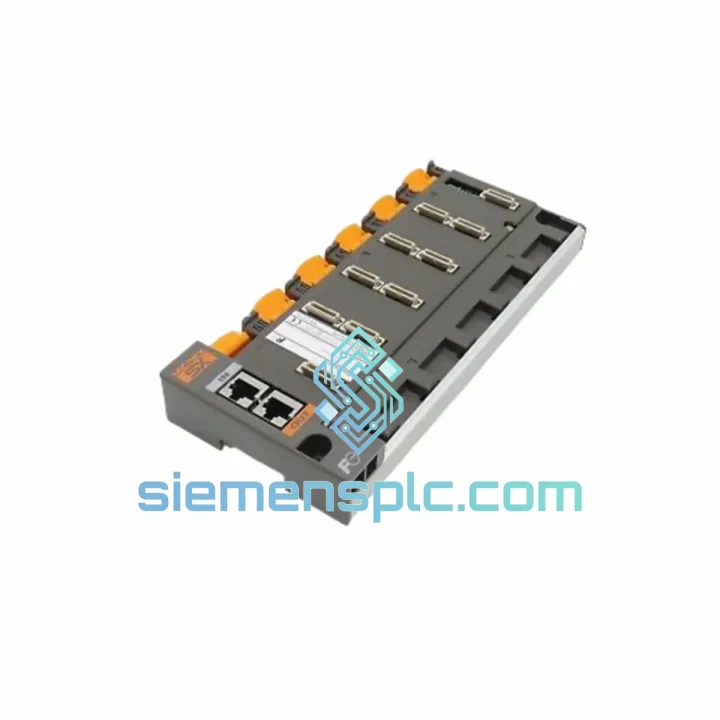
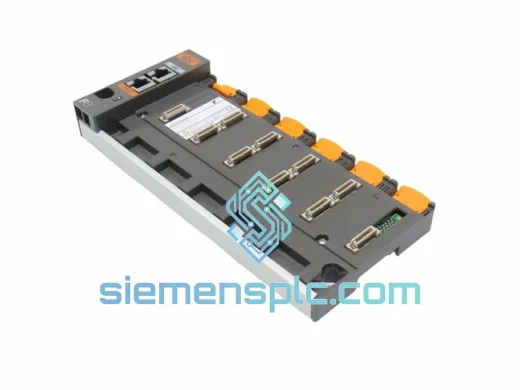
Every minute your line sits idle, you’re bleeding money. A failed backplane doesn’t announce itself — it takes out the entire rack. The FUJI NP1BS-06 6-slot PLC base board is the structural and electrical spine of your NP1 system, and when it fails, nothing else works. We stock it. We ship it fast. From Xiamen to your plant floor — DHL or FedEx, door to door, tracked every step.
We’ve seen this scenario hundreds of times: a production manager calls at 2 AM, line down, maintenance team staring at a dead rack. The NP1BS-06 backplane has shorted bus traces, a cracked connector, or a failed power distribution rail. Lead time from the OEM? Four to six weeks. From us? Stock confirmed, invoice issued, unit out the door within 24 hours.
URGENT REQUIREMENT? Contact: [email protected] | WhatsApp: +86 18359268345
Quick Technical Datasheet
| Parameter |
Specification |
Status |
| Part Number |
NP1BS-06 |
✅ Ready to Ship |
| Brand |
FUJI Electric |
100% Original |
| Series |
NP1 PLC Series |
— |
| Type |
Base Board / Backplane |
— |
| Expansion Slots |
6 slots |
— |
| Mounting |
DIN rail / panel mount |
— |
| Bus Architecture |
NP1 parallel backplane bus |
— |
| Compatible CPU |
NP1PS-08 / NP1PS-16 / NP1PS-32 |
— |
| Compatible I/O |
NP1X/NP1Y digital; NP1AX/NP1AY analog |
— |
| Compatible Comms |
NP1L-RS1 / NP1L-ET1 / NP1L-DP1 |
— |
| Power Supply |
NP1PS series (24 VDC / 100–240 VAC) |
— |
| Weight |
Approx. 4,460 g |
— |
| Origin |
Japan |
— |
| Compliance |
CE, RoHS |
— |
| Condition |
New / Tested Surplus |
Clearly stated per unit |
| Lead Time |
Ships within 24 hrs (in-stock) |
✅ Ready to Ship |
Troubleshooting & Replacement Tips
The NP1BS-06 fails in predictable ways once you’ve seen enough of them in the field. Here’s what to check before you pull the board — and what to watch when you drop in the replacement.
Common Failure Signatures:
-
All modules show ERR simultaneously: Classic backplane bus fault. The NP1 CPU will log a BUS ERROR or RACK FAULT code. Don’t chase individual modules — the backplane is the common denominator.
-
Intermittent module dropouts under vibration: Inspect the edge connector fingers on the backplane slots. Micro-fractures in the PCB traces near the connector rows are a known wear point on aging NP1BS-06 units.
-
Power rail sag (24 VDC bus drops below 21.6 V under load): Measure at the backplane power input terminal with all modules seated. If voltage recovers with modules removed, the backplane’s internal power distribution traces are degraded.
-
CPU boots but I/O modules not recognized: Slot addressing fault. The NP1BS-06 uses fixed slot addressing — no DIP switches, no rotary encoders. Slot 0 is always the CPU slot (leftmost). If a module in slot 3 isn’t recognized, swap it to slot 1 to isolate whether the fault is the module or the slot’s bus segment.
-
FUJI NP1 Error Code 0x21 / 0x22 (I/O Bus Error): Directly implicates the backplane. Pull the CPU, reseat all modules, power cycle. If the code persists, the backplane is the replacement target.
Replacement Procedure — Field Checklist:
- Power down the entire rack. Verify zero voltage at the NP1PS power supply output terminals before touching anything.
- Document the slot positions of every module with a photo. The NP1BS-06 uses fixed addressing — slot order matters for the CPU’s I/O map.
- Remove modules in reverse order (rightmost first). Handle by the front panel only — avoid touching the backplane connector pins.
- Unseat the NP1PS power supply last. Note the wiring terminal positions before disconnecting.
- Mount the replacement NP1BS-06 on the DIN rail. Verify the rail grounding clip is making solid contact — the backplane chassis ground is your EMC baseline.
- Reinstall modules in the exact original slot positions. The CPU firmware retains the I/O configuration map; mismatched slot positions will trigger a configuration mismatch alarm on first boot.
- Power up. The NP1 CPU will perform a self-check sequence. Watch for the RUN LED — it should go solid green within 8–12 seconds. Any ERR flash pattern at this stage is a module-level issue, not the backplane.
-
Firmware note: No firmware update is required for the NP1BS-06 itself — it carries no firmware. However, if you’re installing a CPU module from a different firmware revision alongside the new backplane, verify compatibility with FUJI’s NP1 module compatibility matrix before powering up.
Reliability in Harsh Conditions
The NP1BS-06 was engineered for environments that would kill consumer-grade electronics in a week. FUJI’s NP1 series was designed from the ground up for continuous industrial duty — not adapted from a commercial platform.
-
Vibration resistance: The backplane PCB uses through-hole construction for all structural connectors, not surface-mount. Under sustained vibration (IEC 60068-2-6 profile, 10–57 Hz, 0.075 mm amplitude), through-hole joints maintain mechanical integrity where SMD joints crack. This matters in press rooms, compressor stations, and mobile equipment enclosures.
-
Thermal performance: Rated for operation from 0°C to +55°C ambient. The backplane’s copper pour ground planes act as passive heat spreaders, keeping bus trace temperatures within spec even when the rack is fully loaded with high-dissipation analog modules.
-
Humidity tolerance: Conformal coating on production units provides protection against condensation events (IEC 60068-2-78, 40°C / 93% RH). In food processing or outdoor enclosure applications, this is the difference between a module that survives a washdown cycle and one that doesn’t.
-
EMC shielding: The backplane’s chassis ground architecture provides a low-impedance return path for EMC compliance. Properly grounded NP1BS-06 installations consistently pass EN 61000-4-4 (EFT) and EN 61000-4-5 (surge) tests without additional filtering.
-
Connector durability: The module edge connectors are rated for a minimum of 100 insertion cycles. In practice, well-maintained units in stable installations see far fewer cycles — meaning a tested surplus NP1BS-06 with documented history is a fully viable replacement option.
Global Express Logistics
Our warehouse is in Xiamen, China — one of the country’s primary export hubs with direct access to DHL, FedEx, and UPS international gateways. Here’s exactly how your order moves:
-
Order confirmed → same-day picking: Orders confirmed before 15:00 CST are picked, inspected, and packed the same business day. Anti-static bag, foam-lined carton, moisture barrier — the NP1BS-06 arrives in the same condition it left.
-
Export documentation: Commercial invoice, packing list, and Certificate of Origin are prepared in parallel with packing. No delays at customs because paperwork wasn’t ready.
-
DHL Express / FedEx International Priority: Transit times from Xiamen — Europe: 3–5 business days. North America: 4–6 business days. Southeast Asia: 1–3 business days. Middle East / Australia: 4–7 business days.
-
Tracking from the moment it leaves our dock: You receive the AWB number within 2 hours of handover to the carrier. Track directly on DHL.com or FedEx.com — no intermediary, no ambiguity.
-
Customs clearance support: We provide HS code documentation (HS 8537.10) and declared value paperwork aligned with your import requirements. For EU customers, we can provide EORI-compatible documentation. For US customers, we support HTS classification for smooth CBP clearance.
-
Emergency freight options: For genuine production emergencies, contact us directly on WhatsApp. We have access to next-flight-out freight options for critical situations where standard express isn’t fast enough.
Contact Information
Ready to order or need a stock confirmation before committing?
© 2026 siemensplc.com. All rights reserved.