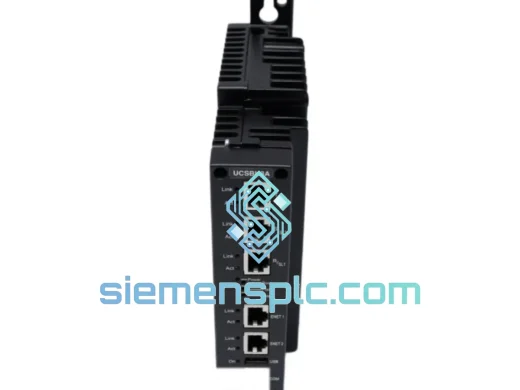
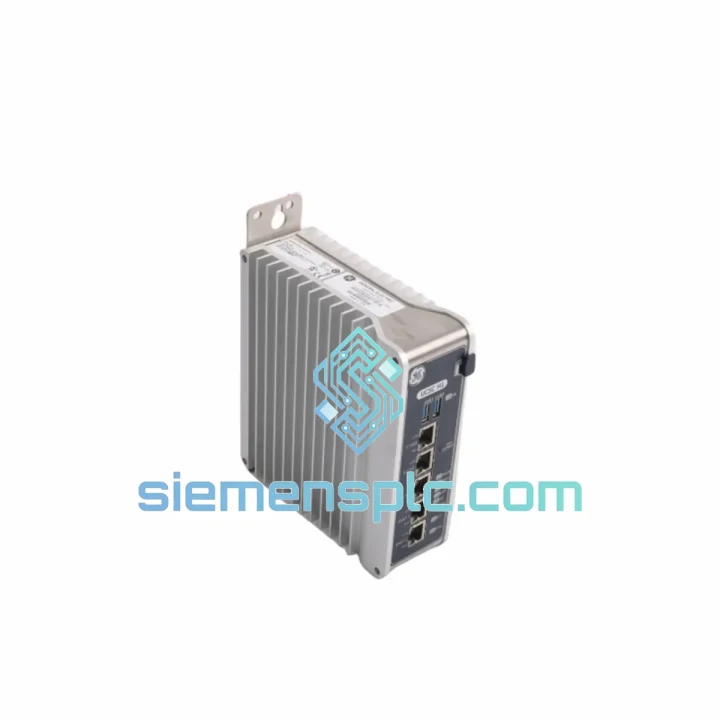
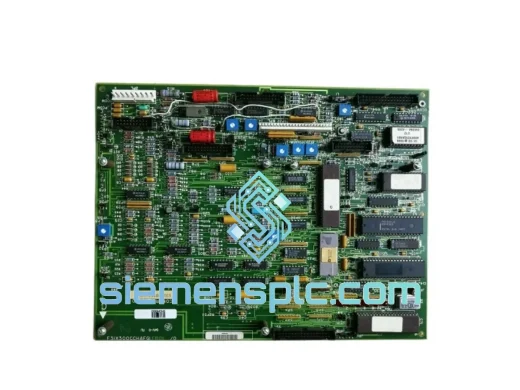
Product Overview
GE IS420UCSCH1A-F-V0.1-A: Stop the Clock on Your Downtime — Ship Within 24 Hours
Every minute a turbine or compressor train sits idle, you’re bleeding money. A failed UCSC core controller in a Mark VIe cabinet doesn’t wait for procurement cycles. We stock the GE IS420UCSCH1A-F-V0.1-A precisely for this scenario — verified, tested, and ready to leave Xiamen on the next available DHL or FedEx flight. While your OEM quotes you 8–14 weeks, we quote you a tracking number.
URGENT REQUIREMENT? Contact: [email protected] | WhatsApp: +86 18359268345
Quick Technical Datasheet
| Part Number |
IS420UCSCH1A-F-V0.1-A ✅ Ready to Ship |
| Manufacturer |
GE (General Electric / GE Vernova) |
| Series |
Mark VIe Distributed Control System (DCS) |
| Module Function |
Core Controller (UCSC) — primary CPU node |
| Firmware Revision |
V0.1-A (version-stamped hardware) |
| Form Factor |
Rack-mount; DIN-rail compatible carrier |
| Communication |
IONet (GE Ethernet), Modbus TCP, OPC-DA/UA |
| Operating Temperature |
0 °C to +60 °C |
| Storage Temperature |
-40 °C to +85 °C |
| Humidity |
5% – 95% RH, non-condensing |
| Supply Voltage |
24 V DC via Mark VIe backplane |
| Weight |
1,520 g |
| Certifications |
CE, UL, cUL, SIL 2 capable |
| Redundancy Modes |
Simplex / Dual / TMR (no hardware change required) |
| Stock Status |
✅ In Stock — Ships within 24 hours |
Troubleshooting & Replacement Tips
The IS420UCSCH1A-F-V0.1-A fails in predictable patterns. Here’s what field experience tells you before you pull the module:
Common Fault Codes & Root Causes
-
L3DIAG / Controller Fault LED solid red: Internal watchdog timeout. Nine times out of ten this is a firmware corruption event triggered by a power transient. Before condemning the module, cycle 24 V DC cleanly and observe boot sequence. If the fault persists past the POST phase, the UCSC is the culprit.
-
IONet link loss (both ports): Check the IS420ESWAH1A Ethernet switch first — a failed switch mimics a dead controller. Swap the switch before pulling the UCSC.
-
ToolboxST shows “Controller Not Found” after reboot: Verify IP address assignment. The UCSC self-assigns via DHCP on first boot; if your IONet subnet uses static addressing, you must configure the IP through the front-panel serial port before the module will appear on the network.
-
TMR vote mismatch alarms (L3TMR): Often caused by firmware version skew between the three UCSC modules. All three must run identical firmware. Confirm via ToolboxST → Hardware → Controller Properties before replacement.
Step-by-Step Hot-Swap Procedure
- Confirm the replacement module carries the same firmware revision (V0.1-A). Mismatched firmware in a TMR set will force a system trip.
- In ToolboxST, navigate to the target controller and initiate a controlled switchover to the redundant unit. Do not pull the module under load in a simplex configuration.
- Loosen the two captive screws on the UCSC faceplate. Grip the extraction handles — do not pull by the connectors.
- Seat the replacement module firmly until both connectors click. Tighten captive screws finger-tight, then a quarter-turn with a flat-blade screwdriver.
- Observe the STATUS LED: green steady = healthy boot; amber flashing = firmware load in progress (normal, wait up to 90 seconds); red = fault, check ToolboxST diagnostics.
- In ToolboxST, download the application configuration to the new module. Verify all I/O points are scanning correctly before releasing the unit to operations.
- No DIP switches or rotary address selectors on this module — the UCSC self-addresses via IONet. Address conflicts are resolved through ToolboxST network configuration, not hardware.
Critical Note on Firmware: The “-F-V0.1-A” suffix is hardware-stamped, not field-upgradeable via standard means. If your existing cabinet runs a later firmware baseline, contact us — we can source the matching revision to avoid compatibility issues.
Reliability in Harsh Conditions
Power generation and heavy process environments don’t forgive fragile electronics. The IS420UCSCH1A-F-V0.1-A is built to the same environmental envelope as the turbines it controls:
-
Vibration: Qualified to IEC 60068-2-6 sinusoidal vibration profiles — the same test standard applied to turbine-mounted instrumentation. The backplane connector system uses positive-locking retention to prevent micro-fretting under continuous mechanical vibration from adjacent rotating equipment.
-
Thermal cycling: Designed for 0–60 °C continuous operation with storage down to -40 °C. The PCB substrate and component selection account for differential thermal expansion across the full industrial temperature range, preventing solder joint fatigue over a 10+ year service life.
-
Humidity & condensation: Conformal coating on critical PCB areas provides protection against humidity ingress up to 95% RH non-condensing. For offshore or coastal installations where condensation is a risk, ensure cabinet HVAC is functional before energizing the module.
-
EMI/RFI immunity: Meets IEC 61000-4 series immunity requirements. The IONet Ethernet ports include common-mode chokes and transient voltage suppressors to handle the electrical noise environment typical of switchgear rooms and turbine control buildings.
-
MTBF: Field data from GE turbine fleets documents mean time between failures exceeding 100,000 hours under normal operating conditions — roughly 11 years of continuous service.
Global Express Logistics
Our warehouse is located in Xiamen, Fujian, China — one of the most logistics-connected export hubs on the Chinese coast, with direct access to Xiamen Gaoqi International Airport and Xiamen Port. This matters when your plant is down.
-
DHL Express Worldwide: Xiamen → most major industrial hubs (Houston, Rotterdam, Singapore, Dubai, Mumbai) in 2–4 business days. We hold a commercial DHL account with daily pickup cutoffs at 18:00 CST.
-
FedEx International Priority: Alternative carrier for destinations where FedEx has stronger last-mile coverage. Typical transit: 3–5 business days door-to-door.
-
Same-day dispatch: Orders confirmed and payment cleared before 14:00 CST ship the same calendar day. Orders after 14:00 ship the following morning.
-
Export documentation: Commercial invoice, packing list, and certificate of origin prepared to your customs requirements. HS Code 8537.10 applies to this module class. We handle CN customs clearance — you handle import clearance at destination.
-
Packaging: ESD-safe anti-static bag, foam-lined double-wall carton, fragile labeling. The module arrives in the same condition it left our shelf.
-
Tracking: AWB number provided within 2 hours of dispatch. We monitor shipments proactively and alert you to any carrier delays before you have to ask.
For plant shutdowns with hard restart deadlines, contact us directly on WhatsApp for real-time logistics coordination.
Contact Information
Email: [email protected]
WhatsApp: +86 18359268345
Web: siemensplc.com
© 2026 siemensplc.com. All rights reserved.