KUKA
In Stock OK
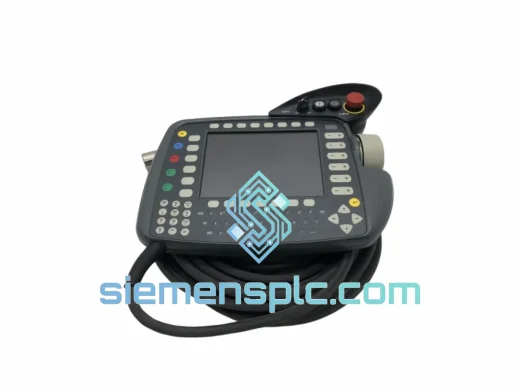
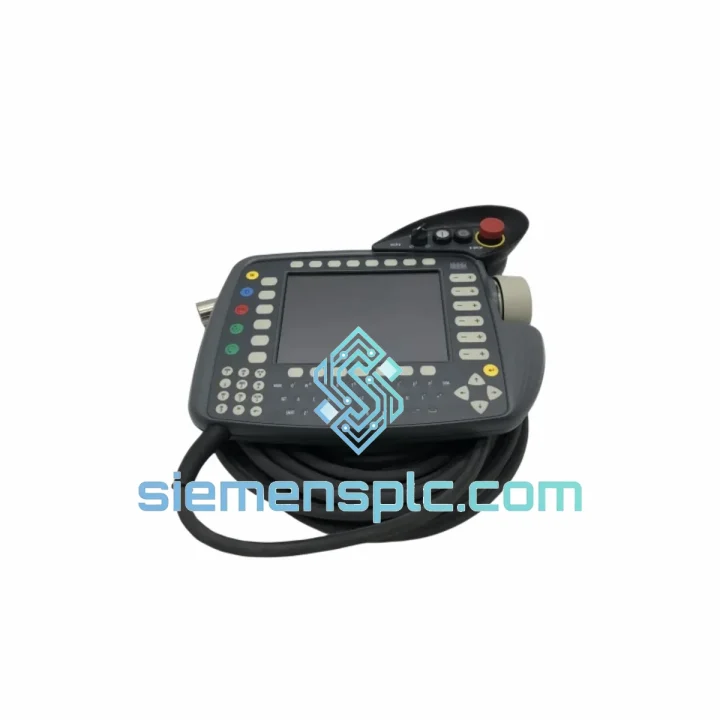
KUKA KCP2-00-154-293 Teach Pendant
Request verified availability, condition, replacement risk review, packing options and courier lead time for KCP2-00-154-293.
BrandKUKA
Part NumberKCP2-00-154-293
ConditionAvailability Check
Lead TimeRFQ Confirmation
DocumentsDatasheet / photos by RFQ
ShippingExport packing available
Auto-filled RFQ
KCP2-00-154-293
Click Request Quote and the part number is inserted into the inquiry form automatically.
- Reply by email: [email protected]
- WhatsApp / Tel: +86 18359268345
- Mon-Sat 9:00-18:00 GMT+8
Procurement Data
Key Product Information
Core fields for model confirmation and RFQ routing. Detailed product narrative remains below.
- Brand
- KUKA
- Primary Part Number
- KCP2-00-154-293
- Product Type
- Robot Teach Pendant
- Product Family
- Other series
- Manufacturer
- KUKA Roboter GmbH
- Country of Origin
- DE
- Catalog Category
- HMI Panels
Model confirmed for inquiry
KCP2-00-154-293
Send quantity, destination and urgency. The RFQ form keeps this part number attached.
Request Quote
Product Overview
KUKA KCP2-00-154-293 – Stop the Bleeding. Get Your Robot Cell Back Online.
Your KR C2 robotic cell is down. The teach pendant is dead — cracked screen, unresponsive enabling device, or a connector fault that killed communication to the cabinet. Every minute that arm sits idle is costing you: missed weld cycles, stalled assembly lines, overtime labor, and a production manager breathing down your neck. The KUKA KCP2-00-154-293 is the exact unit you need, and we have it on the shelf in Xiamen — ready to clear customs and land on your dock faster than your maintenance team can finish the incident report.
The KCP2 is the standard operator interface for KUKA’s KR C2 controller generation — arguably the most widely deployed industrial robot platform in global manufacturing. Part number 00-154-293 covers the hardware revision used across the KR 6, KR 16, KR 30, KR 60, KR 100, KR 150, KR 200, and KR 210 families. If your controller cabinet has a KSS 5.x software stack and a round KCP2 connector on the door, this is your part. No firmware flashing. No controller reconfiguration. Plug in, confirm E-stop function, and resume production.
URGENT REQUIREMENT? Contact: [email protected] | WhatsApp: +86 18359268345
Quick Technical Datasheet
| Parameter | Specification |
|---|---|
| Part Number | KCP2-00-154-293 ✔ Ready to Ship |
| Manufacturer | KUKA Roboter GmbH |
| Compatible Controller | KUKA KR C2 (all cabinet variants) |
| Software Compatibility | KUKA System Software (KSS) 5.x |
| Display | Color LCD with backlight, touch-capable |
| Operating Modes | T1 (≤250 mm/s), T2 (full speed), AUT, AUT EXT |
| Safety Device | 3-position enabling switch (ISO 10218-1 compliant) |
| Emergency Stop | Hardwired, dual-channel, category 0/1 stop |
| Interface Connector | Proprietary KCP2 round connector (cabinet door mount) |
| Cable Type | Spiral cable, variable length configurations |
| Weight | ~380 g (pendant only, excluding cable) |
| Origin | Germany |
| Stock Status | In Stock – Ships within 24 hrs from Xiamen |
Troubleshooting & Replacement Tips
Fault Code KCP-0001 / KCP-0002 – Communication Loss: Before condemning the pendant, check the spiral cable at both ends. The KCP2 connector on the cabinet door is a known wear point — pins corrode or bend after repeated hot-swap attempts. Reseat the connector with the controller in a safe state. If the fault clears momentarily and returns, the cable is failing, not the pendant itself. Order the cable separately.
Enabling Device Failure (3-Position Switch): This is the single most common KCP2 failure mode in high-cycle environments. Symptoms: robot refuses to move in T1/T2 despite correct mode selection, or KSS throws a safety-channel mismatch error. The enabling device is not field-repairable — the entire pendant must be replaced. Do not attempt to bypass or jumper the enabling circuit. That is a Category 3 safety violation.
Replacement Procedure (KR C2, KSS 5.x):
- Set controller to EXT mode or power down to a safe state. Never hot-swap a KCP2 on a live system — the connector carries safety-critical signals.
- Rotate the KCP2 connector counterclockwise and pull straight out. Do not yank the cable.
- Connect the replacement KCP2-00-154-293. Rotate clockwise until the locking ring seats with a positive click.
- Power up the controller. KSS will auto-detect the new pendant — no pairing or addressing procedure required for standard KCP2 units.
- Immediately verify: E-stop function (both channels), enabling device in all three positions, mode selector switch (T1/T2/AUT/AUT EXT), and display brightness/touch response.
- Run a slow T1 jog on all six axes before returning to automatic production. Confirm no residual safety faults in the KSS message log.
Firmware Note: The KCP2-00-154-293 hardware revision is compatible with KSS 5.2 through 5.6. If your system runs an older KSS 4.x stack, contact us before ordering — a different hardware revision may be required. KR C4 systems require the SmartPAD; the KCP2 is electrically incompatible.
Common Misdiagnosis: A blank or flickering display is frequently blamed on the pendant when the actual fault is a failing 24 VDC supply rail inside the KR C2 cabinet. Before ordering a replacement pendant, measure the 24 V supply at the KCP2 connector pins with the pendant disconnected. If voltage is absent or unstable, address the PSU first.
Reliability in Harsh Conditions
The KCP2-00-154-293 was engineered for the factory floor, not a climate-controlled server room. KUKA’s design validation for this pendant covers continuous operation in ambient temperatures from 0°C to +45°C, with short-term excursions to +60°C during cabinet heat-soak events. The housing is rated IP54 — sealed against dust ingress and protected against water spray from any direction, which matters in foundry environments, wash-down zones, and outdoor-adjacent installations.
Vibration resistance is validated to IEC 60068-2-6 profiles, covering the resonance frequencies typical of press-room floors and heavy stamping lines. The LCD assembly is shock-mounted internally to survive the pendant being dropped from operating height — an event that happens more often than any maintenance log admits. The keypad membrane is rated for over 1 million actuations per key, and the enabling device switch mechanism is validated to 500,000 cycles under load.
Units sourced through siemensplc.com undergo a pre-shipment inspection covering: housing integrity, connector pin condition, display function across full brightness range, all keypad inputs, enabling device three-position function, and E-stop dual-channel continuity. Every unit ships with an ESD-protective inner bag and foam-lined outer carton rated for international air freight handling.
Global Express Logistics
Our warehouse is located in Xiamen, Fujian — one of China’s primary industrial export hubs with direct access to Xiamen Gaoqi International Airport and daily DHL and FedEx flight connections to major global hubs. For production-down emergencies, we offer same-day dispatch on orders confirmed before 14:00 CST.
Typical transit times from Xiamen:
- Southeast Asia (Singapore, Thailand, Vietnam): 2–3 business days via DHL Express
- Europe (Germany, Poland, Czech Republic, Turkey): 3–5 business days via FedEx International Priority
- North America (USA, Mexico, Canada): 3–5 business days via DHL Express Worldwide
- Middle East (UAE, Saudi Arabia, Qatar): 2–4 business days via FedEx
- South America (Brazil, Chile, Colombia): 5–7 business days via DHL
- Australia / New Zealand: 3–4 business days via DHL Express
All shipments include a commercial invoice with accurate HS code classification (HS 8537.10 for industrial control panels/HMI devices), enabling smooth customs clearance. For customers in the EU, we can provide EUR.1 movement certificates and CE declaration of conformity documentation on request. For US imports, we provide HTS classification support and can coordinate with your customs broker directly.
Tracking numbers are issued within 2 hours of dispatch. For critical shipments, we provide proactive milestone updates — departure scan, hub transit, customs clearance, and out-for-delivery — so your maintenance team can plan the installation window without guessing.
Contact Information
Email: [email protected]
WhatsApp: +86 18359268345
Web: siemensplc.com
© 2026 siemensplc.com. All rights reserved.
Ready to quote
[email protected]
Send This Part Number to Sales
RFQ workflow
Quality workflow ->
Confirmation Process
01Model confirmation
We check the full part number, brand, series and visible nameplate information before quotation.
02Availability reply
Sales confirms stock path, condition option, quantity and realistic lead time for export dispatch.
03Packing & courier
DHL, FedEx, UPS or buyer courier arrangements can be reviewed with packing requirements.
Continue sourcing
Browse full catalog ->
Related Automation Parts
Similar brand or category products for fast comparison and multi-item RFQ lists.