OPTO 22
RFQ Ready
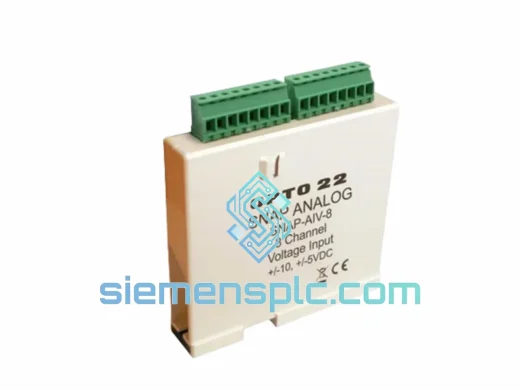
OPTO 22 SNAP-LCM4-M4SENET-100 Local Control Module
SNAP I/O Platform
Origin United States of America
Local Control Module
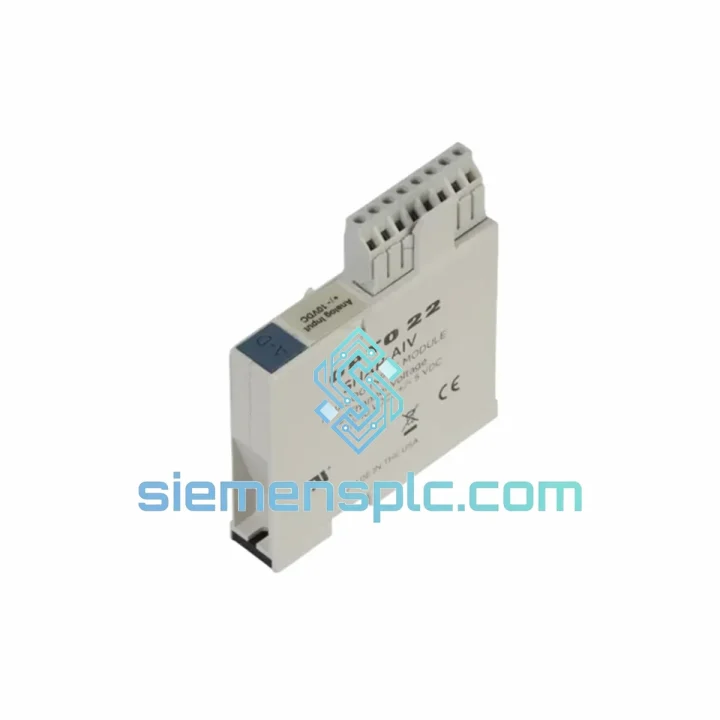
Request verified availability, condition, replacement risk review, packing options and courier lead time for SNAP-AIV.
Click Request Quote and the part number is inserted into the inquiry form automatically.
Core fields for model confirmation and RFQ routing. Detailed product narrative remains below.
Your SNAP I/O rack just threw a fault. The SNAP-AIV analog input channel is dead, your process variable is blind, and the line is stopped. You’ve already pulled the module, confirmed the failure, and now you need a replacement in hand — not in three weeks. We stock the OPTO 22 SNAP-AIV in Xiamen and ship same-day via DHL Express. That’s the only thing that matters right now.
URGENT REQUIREMENT? Contact: [email protected] | WhatsApp: +86 18359268345
| Parameter | Specification |
|---|---|
| Part Number | SNAP-AIV |
| Manufacturer | OPTO 22 |
| Series | SNAP I/O |
| Module Type | Analog Input — Voltage |
| Input Range | ±10 VDC (bipolar) |
| Resolution | 12-bit (4096 counts) |
| Channels | 1 (single-channel) |
| Input Impedance | ≥ 200 kΩ |
| Accuracy | ±0.1% full scale @ 25°C |
| Backplane Interface | SNAP I/O bus (4-position module slot) |
| Operating Temperature | 0°C to +70°C |
| Storage Temperature | -40°C to +85°C |
| Humidity | 5% to 95% RH, non-condensing |
| Certifications | CE, UL 508, RoHS, FCC Part 15 Class A |
| Country of Origin | United States |
| Stock Status | ✅ Ready to Ship — Xiamen Warehouse |
Ten years on the floor taught me that SNAP-AIV failures cluster around three root causes. Before you swap the module, rule these out or you’ll be back here in a month:
1. Confirm the fault is the module, not the field wiring. Disconnect the field signal wires at the module terminal. Measure the source voltage directly with a calibrated DMM. If the signal is clean at the source but the SNAP-PAC controller still reads a bad value or throws an analog input error, the module is the culprit. If the signal is absent or noisy at the source, fix the field side first — a new SNAP-AIV won’t save you.
2. Check for overvoltage damage. The SNAP-AIV is rated ±10 VDC. Transients from nearby VFDs, solenoid switching, or a miswired 4–20 mA transmitter (current into a voltage input) will kill the input stage. After replacement, install a signal conditioner or surge suppressor on the field wiring if the environment is electrically noisy.
3. Module addressing — no DIP switches required. Unlike older discrete I/O modules, the SNAP-AIV uses automatic slot addressing via the SNAP I/O backplane. Seat the module firmly into the rack slot. The SNAP-PAC processor will enumerate it automatically on the next I/O scan. No jumpers, no rotary switches. If PAC Control doesn’t see it, check the rack’s backplane connector for bent pins and verify the processor firmware supports the module (PAC firmware ≥ R9.4 recommended for full analog diagnostics).
4. PAC Control configuration after swap. Open your PAC Control strategy. Navigate to the I/O Unit configuration for the affected rack. The SNAP-AIV channel should already be defined. After physical replacement, do a Download & Run — do not just resume. A fresh download forces the processor to re-initialize the analog channel scaling. Verify the engineering unit range (EU Low / EU High) matches your process: a pressure transmitter outputting 0–10 V for 0–100 PSI needs EU Low = 0, EU High = 100 in the channel configuration.
5. Common fault codes to watch. If your SNAP-PAC logs show error code -28 (I/O unit communication error) after replacement, the module is not seated properly or the rack slot is damaged. Error -50 (analog channel out of range) after replacement usually means the field signal is outside ±10 V — check your transmitter output range. A persistent -1 (general I/O error) with a new module points to a rack backplane issue, not the module itself.
OPTO 22 built the SNAP I/O platform for the environments where PLCs go to die young. The SNAP-AIV’s analog front end is optically isolated — the field-side circuitry is galvanically separated from the backplane logic, which means a ground fault or high-voltage transient on the field wiring won’t propagate into your processor. That isolation barrier is rated at 4,000 V peak.
The module’s conformal-coated PCB handles the humidity swings common in coastal manufacturing facilities, food processing plants, and water treatment stations. Operating range of 0°C to 70°C covers the vast majority of industrial panel environments, and the module has been validated against IEC 61131-2 mechanical shock and vibration profiles — the kind of punishment you see near presses, compressors, and heavy rotating equipment.
No fans, no moving parts, no electrolytic capacitors in the signal path. Mean time between failures on SNAP I/O analog modules in continuous-duty applications routinely exceeds 10 years. When one does fail, it’s almost always a field-side event — overvoltage, overcurrent, or moisture ingress at the terminal block — not the module electronics themselves.
Our warehouse is in Xiamen, Fujian — one of China’s primary export hubs with direct DHL and FedEx gateway access. Here’s exactly what happens after you place your order:
Day 0 (Order confirmed before 14:00 CST): Module is pulled from stock, inspected, and packed in anti-static foam with moisture barrier bag. Commercial invoice and packing list are generated. Shipment is booked with DHL Express or FedEx International Priority — your choice.
Day 1: Carrier picks up. Tracking number issued to your email within 2 hours of pickup. HS Code 8537.10 declared on all export documentation. We handle the customs paperwork on the China side — you receive a clean, compliant shipment.
Transit times from Xiamen:
For critical shutdowns requiring next-flight-out logistics, contact us directly on WhatsApp. We have arranged airport-to-airport freight for customers facing multi-million-dollar production losses — it costs more, but it’s faster than any standard express service.
All shipments include full insurance coverage. If a package is lost or damaged in transit, we reship at no charge. No claims forms, no waiting — we send a replacement and sort the carrier claim ourselves.
📧 Email: [email protected]
💬 WhatsApp: +86 18359268345
🌐 Web: siemensplc.com
© 2026 siemensplc.com. All rights reserved.
We check the full part number, brand, series and visible nameplate information before quotation.
Sales confirms stock path, condition option, quantity and realistic lead time for export dispatch.
DHL, FedEx, UPS or buyer courier arrangements can be reviewed with packing requirements.
Similar brand or category products for fast comparison and multi-item RFQ lists.