Panasonic
RFQ Ready
Panasonic SL-VTP16C1 Safety Light Curtain Output Module – SL Series
xpansion Unit for SL Series
Origin Japan
Safety Light Curtain Output Module
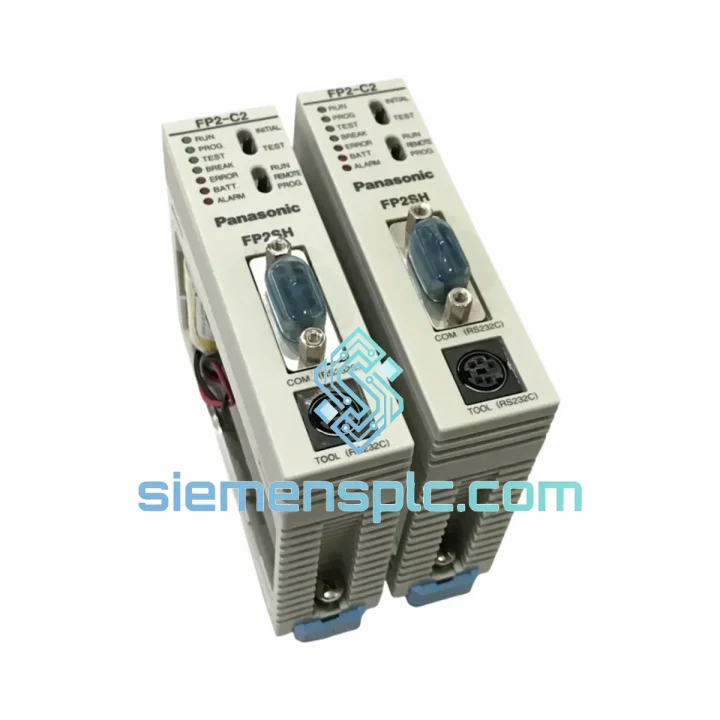
Request verified availability, condition, replacement risk review, packing options and courier lead time for FP2-C2T32.
Click Request Quote and the part number is inserted into the inquiry form automatically.
Core fields for model confirmation and RFQ routing. Detailed product narrative remains below.
Your line stopped. The FP2-C2T32 is the culprit. You’ve already pulled the rack, confirmed the fault, and now you need a verified replacement unit in hand — not in three weeks. We stock the Panasonic FP2-C2T32 in Xiamen and dispatch same-day via DHL Express or FedEx Priority. For most destinations in Asia, Europe, and North America, you’re looking at 2–5 business days door-to-door. That’s the difference between a controlled restart and a week of production loss.
This is not a refurbished unit dressed up with a new label. Every FP2-C2T32 we ship is sourced from verified supply channels, physically inspected, and confirmed against Panasonic’s original part numbering. If you need a certificate of conformity or original packaging documentation, ask — we provide it.
URGENT REQUIREMENT? Contact: [email protected] | WhatsApp: +86 18359268345
| Parameter | Specification |
|---|---|
| Part Number | FP2-C2T32 |
| Brand | Panasonic |
| Series | FP2 |
| Unit Type | CPU Unit (Programmable Logic Controller) |
| I/O Points (Onboard) | 32 points (expandable via FP2 I/O modules) |
| Program Capacity | 32K steps |
| Data Register | 32,768 words (DT0–DT32767) |
| Communication Ports | RS232C x1, RS485 x1 (tool port + COM port) |
| Network Compatibility | MEWTOCOL-COM; CC-Link via option unit |
| Power Supply Voltage | 24 VDC (via FP2 power supply unit) |
| Operating Temperature | 0 to 55 deg C |
| Storage Temperature | -20 to 70 deg C |
| Humidity | 10% to 95% RH (non-condensing) |
| Weight | Approx. 1,120 g |
| Certifications | CE, UL |
| Country of Origin | Japan |
| Stock Status | Ready to Ship — Xiamen, China |
The FP2-C2T32 fails in predictable ways after years of continuous operation. Here is what to check before you condemn the CPU and what to watch when you swap it in.
Common Fault Indicators:
Replacement Checklist:
The FP2-C2T32 was not designed for a climate-controlled server room. It was built for the plant floor. The unit operates continuously across a 0–55 deg C ambient range, handles 10–95% relative humidity without condensation issues, and is rated to withstand the vibration profiles common in press lines, compressor rooms, and mobile equipment enclosures.
The conformal-coated PCB assembly resists airborne contaminants including cutting fluid mist, hydraulic oil vapor, and fine metal particulate — conditions that destroy consumer-grade electronics within months. The backplane connector system uses gold-plated contacts with positive locking retention, maintaining signal integrity even in high-vibration installations where rack-mounted modules are subject to constant mechanical stress.
Panasonic’s FP2 platform has accumulated decades of field hours across global manufacturing. Units installed in the early 2000s are still running in automotive body shops and food processing lines today. That is not marketing — that is the reason maintenance engineers specify FP2 when they need a platform they will not have to think about for the next 15 years. When you install a replacement FP2-C2T32, you are restoring a known-good architecture with a documented failure mode history and a global base of experienced integrators who can support it.
Our dispatch warehouse is located in Xiamen, Fujian Province — one of China’s primary export hubs with direct access to DHL, FedEx, and UPS international gateways. Orders confirmed before 15:00 CST are processed for same-day dispatch.
For orders requiring formal export licenses, end-user declarations, or specific country-of-origin certificates, contact us before placing the order. We handle the paperwork — you focus on getting your line back up.
Email: [email protected]
WhatsApp: +86 18359268345
Web: siemensplc.com
© 2026 siemensplc.com. All rights reserved.
We check the full part number, brand, series and visible nameplate information before quotation.
Sales confirms stock path, condition option, quantity and realistic lead time for export dispatch.
DHL, FedEx, UPS or buyer courier arrangements can be reviewed with packing requirements.
Similar brand or category products for fast comparison and multi-item RFQ lists.