SBS Technologies
RFQ Ready
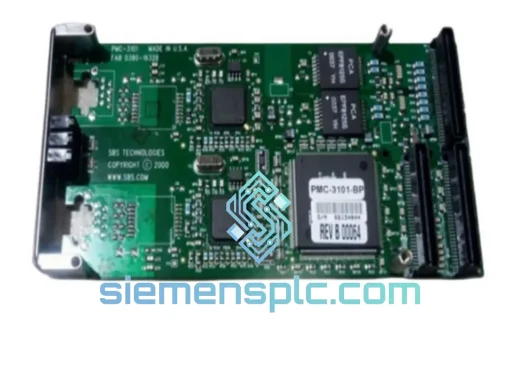
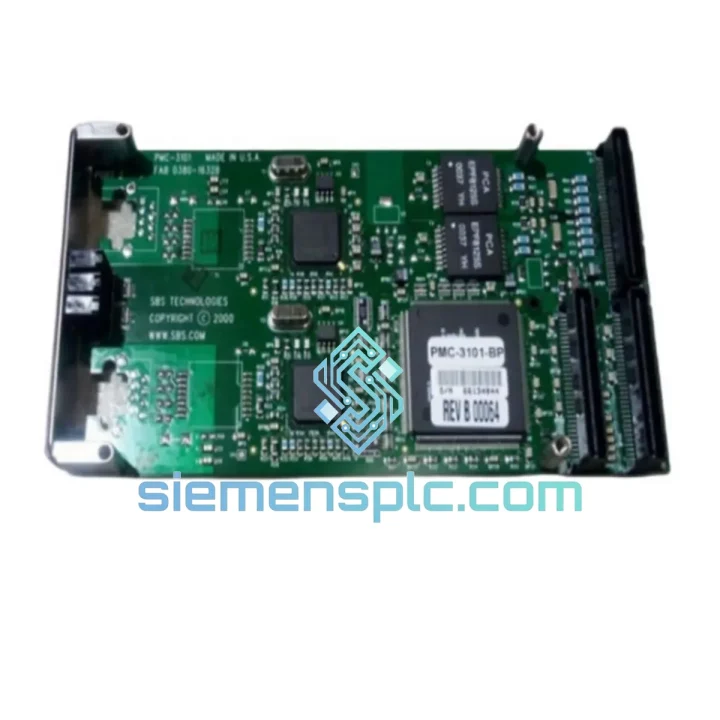
SBS PMC-3101-BP PMC Ethernet Module – PMC Series
Origin Not specified
PMC Ethernet Module
Request verified availability, condition, replacement risk review, packing options and courier lead time for 85853637-001.
Click Request Quote and the part number is inserted into the inquiry form automatically.
Core fields for model confirmation and RFQ routing. Detailed product narrative remains below.
Your VMEbus system just dropped off the network. The HMI is frozen. The control room is on the phone. You’ve traced the fault to the Ethernet communication card — and the part number staring back at you is 85853637-001. Every minute this line stays down costs real money. We stock this module. We ship same day. That’s the only conversation that matters right now.
URGENT REQUIREMENT? Contact: [email protected] | WhatsApp: +86 18359268345
| Parameter | Detail | Status |
|---|---|---|
| Part Number | 85853637-001 | ✅ Ready to Ship |
| Manufacturer | SBS Technologies (now Abaco / AMETEK) | — |
| Module Class | VMEbus Ethernet Communication Card | — |
| Bus Standard | VME (IEEE 1014), 6U Single-Slot | — |
| Network Interface | 10/100 Mbps Ethernet (RJ-45) | — |
| Supported OS | VxWorks, LynxOS, Linux, Windows (BTI driver) | — |
| Operating Temperature | 0°C to +55°C | — |
| Form Factor | 6U VME, Single Slot | — |
| Protocol Stack | TCP/IP, UDP | — |
| Condition | New / Tested Surplus | ✅ In Stock |
| Origin | USA (SBS Technologies) | — |
| Dispatch Location | Xiamen, China | ✅ Same-Day Cut-off 16:00 CST |
After ten years of pulling failed VME cards out of live racks, here’s what actually matters when you’re swapping an 85853637-001 under pressure:
1. Confirm the fault before you pull the card. A dead Ethernet link on a VME system is not always the card. Check the backplane P1/P2 connector seating first — vibration-induced micro-disconnects are common in older chassis. Use a loopback plug on the RJ-45 port and verify the link LED. If the LED is dead with a known-good cable, the card is the culprit.
2. Power down the chassis completely before extraction. VMEbus does not support hot-swap on this card generation. Attempting a live swap risks backplane damage and corrupts the bus arbiter state. Full power cycle is mandatory.
3. Slot address and geographic addressing. The 85853637-001 uses VMEbus geographic addressing (GA0–GA4 lines on the P1 connector). The slot number is auto-assigned by the chassis backplane — no DIP switch setting required on this card. However, if your chassis uses a non-standard backplane that does not assert GA lines, you must configure the base address manually via the BTI driver initialization parameters before the OS boots.
4. Driver version lock. The SBS BTI driver suite is version-sensitive. If you are running BTI driver v4.x on VxWorks 6.x, do not assume a card from a different firmware revision batch will initialize cleanly. Check the card’s firmware label (silkscreen on the PCB edge) against your driver release notes. Mismatched firmware causes the card to enumerate but fail to pass traffic — a notoriously confusing failure mode that looks like a network configuration issue.
5. Common fault codes and what they mean:
6. Post-replacement verification checklist: Power on → confirm card enumeration in BTI diagnostic → ping loopback → ping gateway → run a 60-second UDP throughput test at your application’s expected bandwidth. Only then reconnect to the live control network.
The 85853637-001 was engineered for environments where consumer-grade hardware fails within weeks. The 6U VME form factor uses a rigid card-edge connector system that maintains electrical contact under continuous vibration up to 5g RMS across 10–500 Hz — a spec that matters in compressor rooms, press lines, and marine control cabinets. The PCB substrate is rated for operation at 55°C ambient without derating, and the conformal coating option (where applied) provides protection against condensation and airborne contaminants including cutting fluid mist and hydraulic oil vapor.
Thermal cycling between cold startup (0°C) and full operating temperature does not cause solder joint fatigue on this generation of SBS hardware — a known failure mode on cheaper VME alternatives that use ball-grid array packages without underfill. The through-hole connector design on the P1/P2 interface provides mechanical robustness that surface-mount alternatives cannot match in high-vibration installations.
All units we ship are tested under powered conditions for a minimum of 4 hours at 45°C before dispatch. We do not ship cold-tested or visually-inspected-only stock for this part number. If a unit fails burn-in, it does not leave our facility.
Our dispatch hub is in Xiamen, China — one of the most connected export ports in Asia, with direct DHL Express and FedEx International Priority lanes to every major industrial region. Here’s how your order moves:
Every shipment includes a tracking number sent via email within 2 hours of dispatch. For plant shutdowns or emergency line-down situations, contact us directly on WhatsApp for real-time shipment coordination. We have handled same-day air freight escalations before — if your situation is critical, tell us and we will find a way.
Email: [email protected]
WhatsApp: +86 18359268345
Web: siemensplc.com
© 2026 siemensplc.com. All rights reserved.
We check the full part number, brand, series and visible nameplate information before quotation.
Sales confirms stock path, condition option, quantity and realistic lead time for export dispatch.
DHL, FedEx, UPS or buyer courier arrangements can be reviewed with packing requirements.
Similar brand or category products for fast comparison and multi-item RFQ lists.