Siemens
In Stock OK
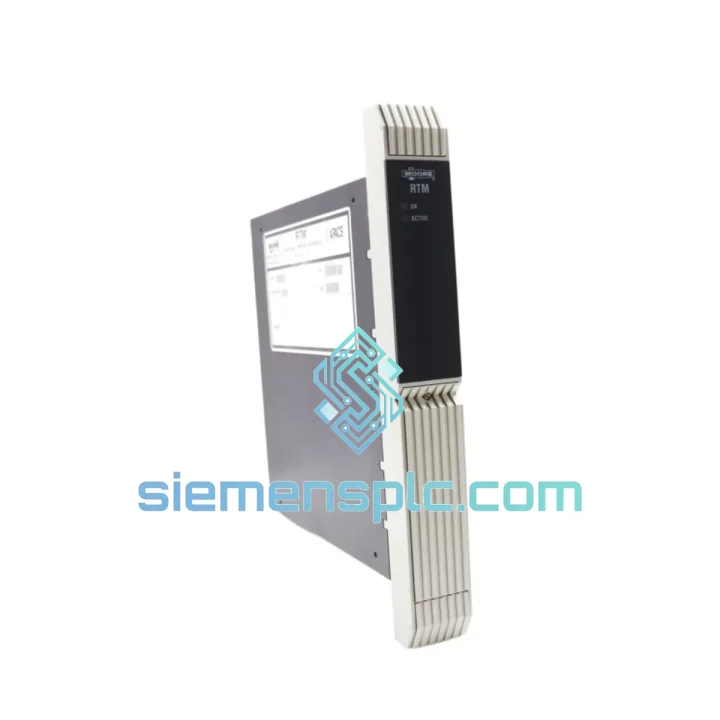
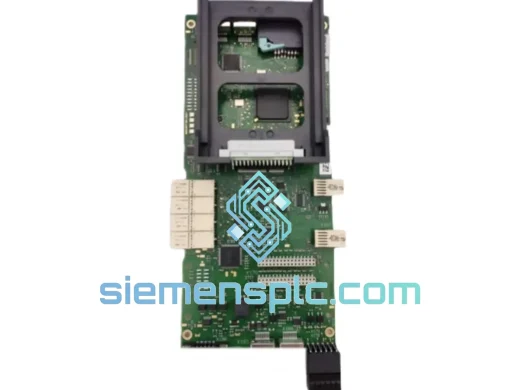
Siemens 39RTMCAN Temperature Module
Request verified availability, condition, replacement risk review, packing options and courier lead time for 39RTMCAN.
BrandSiemens
Part Number39RTMCAN
ConditionAvailability Check
Lead TimeRFQ Confirmation
DocumentsDatasheet / photos by RFQ
ShippingExport packing available
Auto-filled RFQ
39RTMCAN
Click Request Quote and the part number is inserted into the inquiry form automatically.
- Reply by email: [email protected]
- WhatsApp / Tel: +86 18359268345
- Mon-Sat 9:00-18:00 GMT+8
Procurement Data
Key Product Information
Core fields for model confirmation and RFQ routing. Detailed product narrative remains below.
- Brand
- Siemens
- Primary Part Number
- 39RTMCAN
- Product Type
- PLC Temperature Module
- Series / Family
- ET 200 CAN Bus
- Manufacturer
- Siemens AG
- Country of Origin
- DE
- Catalog Category
- I/O Modules
Model confirmed for inquiry
39RTMCAN
Send quantity, destination and urgency. The RFQ form keeps this part number attached.
Request Quote
Product Overview
Siemens 39RTMCAN RTD Temperature Input Module — Stop the Bleed, Restore Production Now
Every hour your line sits idle costs real money. When a temperature input module fails inside an ET 200 distributed I/O station, the cascade is fast: the CPU goes into STOP, the HMI throws a rack fault, and your process engineer is on the phone before the alarm even clears. The Siemens 39RTMCAN is the exact module you need on the shelf — not on a six-week lead time from a regional distributor. We stock it in Xiamen, we ship it today, and it lands at your door via DHL or FedEx Express before your maintenance window closes.
This is not a generic automation part. The 39RTMCAN is a dedicated resistance temperature measurement module built for the SIMATIC ET 200 platform, communicating over CAN bus. It handles RTD inputs — Pt100, Pt1000, Ni100, Ni1000 — with the linearity and resolution that thermocouple modules simply cannot match. If your process demands ±0.1 °C accuracy in a reactor, a furnace, or a precision test bench, this is the front-end that delivers it. Replacing it with anything less is a compromise your process cannot afford.
URGENT REQUIREMENT? Contact: [email protected] | WhatsApp: +86 18359268345
Quick Technical Datasheet
| Parameter | Value |
|---|---|
| Part Number | 39RTMCAN |
| Manufacturer | Siemens AG |
| Product Series | SIMATIC ET 200 |
| Module Function | Resistance Temperature Measurement (RTM) |
| Communication Bus | CAN Bus (Controller Area Network) |
| Supported Sensor Types | Pt100, Pt1000, Ni100, Ni1000 (2-wire / 3-wire / 4-wire) |
| Origin | Germany |
| Weight | 1,900 g |
| Stock Status | ✔ Ready to Ship — Xiamen Warehouse |
| Condition | New / Tested Surplus (stated per quotation) |
| Export Compliance | Commercial invoice + packing list provided |
Troubleshooting & Replacement Tips
Fault scenario you’re probably dealing with right now: The ET 200 station is reporting a module fault on the slot where the 39RTMCAN sits. The CPU diagnostic buffer shows event ID 0x39xx or a channel-level wire-break alarm. Before you pull the module, run through this checklist — sometimes the module is fine and the fault is upstream.
Step 1 — Isolate the fault source. In TIA Portal or STEP 7, open the hardware diagnostics for the ET 200 station. Check whether the fault is at the module level (slot fault) or channel level (individual RTD input). A slot-level fault with no channel detail usually points to a failed module or a CAN bus communication dropout. A channel-level wire-break on a single input is almost always a sensor or wiring issue — do not replace the module yet.
Step 2 — Check CAN bus termination. The 39RTMCAN communicates over CAN. If you’re replacing a module at the physical end of the CAN segment, verify that the 120 Ω termination resistor is correctly installed. A missing terminator causes intermittent communication faults that look exactly like a failed module. Use a multimeter across the CAN_H and CAN_L lines with the bus powered down — you should read approximately 60 Ω (two 120 Ω resistors in parallel).
Step 3 — Node address (DIP switch) configuration. The 39RTMCAN uses a hardware DIP switch or rotary switch to set its CAN node address. Before installing the replacement unit, photograph the switch position on the failed module. The new module must be set to the identical address. A node address conflict on the CAN bus will prevent the station from coming online and will generate a duplicate node fault in the diagnostic buffer.
Step 4 — Firmware compatibility check. If your ET 200 station has been updated since the original commissioning, verify that the firmware version of the replacement 39RTMCAN is compatible with the current interface module firmware. Mismatched firmware versions can cause the module to be recognized but fail parameterization. Check the GSD/GSDML file version in your hardware configuration against the module’s firmware stamp (visible on the module label or via the diagnostic interface).
Step 5 — Parameterization after swap. The 39RTMCAN does not self-parameterize from the bus on first power-up. After physical installation, perform a download of the hardware configuration from TIA Portal or STEP 7 to push the channel parameters (sensor type, wire configuration, filter frequency, alarm limits) to the new module. Skipping this step leaves the module running with default parameters, which will produce incorrect temperature readings or immediate channel faults.
Common fault codes to know:
- Wire break on channel X: RTD sensor open circuit or connector loose. Check field wiring before condemning the module.
- Short circuit on channel X: RTD sensor shorted or wiring fault. Disconnect sensor and measure resistance at the terminal.
- Module not recognized / slot empty: CAN node address conflict, missing termination, or failed module backplane connector. Reseat module and check address switches first.
- Parameterization error: Firmware mismatch or corrupted hardware config. Re-download hardware configuration from the engineering station.
Reliability in Harsh Conditions
The 39RTMCAN is not designed for a climate-controlled server room. It is built for the floor — the kind of environment where ambient temperature swings 40 °C between day and night, where coolant mist settles on every horizontal surface, and where a forklift vibrating past the panel is a daily occurrence.
Siemens engineers the SIMATIC ET 200 series to IEC 61131-2 environmental standards. The 39RTMCAN is rated for continuous operation across an extended industrial temperature range, with conformal coating on the PCB to resist condensation and corrosive atmospheres. The module’s housing meets IP20 protection when correctly installed in the ET 200 rack, and the backplane connector is designed for thousands of insertion cycles without contact degradation.
Vibration resistance is validated to IEC 60068-2-6 sinusoidal vibration profiles — relevant if your module is mounted near compressors, presses, or rotating machinery. Shock resistance per IEC 60068-2-27 covers the mechanical events that happen during transport and during the kind of emergency maintenance where panels get bumped. EMC immunity is tested to EN 61000-4 series, covering conducted and radiated interference from variable frequency drives, welding equipment, and high-current switching — the exact noise sources present in the environments where this module is deployed.
The result is a module that does not drift, does not nuisance-trip, and does not fail prematurely when installed correctly. When it does fail after years of service, you need an exact replacement fast — which is exactly what we provide.
Global Express Logistics
Our warehouse is located in Xiamen, Fujian Province — one of China’s primary export hubs with direct access to international freight lanes via Xiamen Gaoqi International Airport and Xiamen Port. This geography is deliberate: it gives us the fastest possible connection to DHL Express, FedEx International Priority, and UPS Worldwide Express networks.
How your order moves:
- Order confirmed before 14:00 CST: Same-day dispatch. The module is pulled from stock, inspected, wrapped in anti-static foam, sealed in a moisture-barrier bag, and packed in a double-wall carton with corner protection.
- DHL Express / FedEx IP transit times: Southeast Asia 1–2 days. Middle East 2–3 days. Europe 3–4 days. North America 3–5 days. Australia 2–3 days.
- Tracking: AWB number provided within 2 hours of dispatch. Full door-to-door tracking via carrier portal.
- Customs documentation: Commercial invoice, packing list, and HS code declaration prepared for every shipment. We have experience clearing industrial automation components through customs in over 60 countries.
- Urgent freight: For genuine production emergencies, contact us directly on WhatsApp. We can arrange next-flight-out courier for critical situations where standard express is not fast enough.
We do not use consolidation freight or economy postal services for industrial components. Every shipment moves on a named express carrier with full liability coverage. Your module arrives in the same condition it left our warehouse.
Contact Information
Email: [email protected]
WhatsApp: +86 18359268345
Web: siemensplc.com
© 2026 siemensplc.com. All rights reserved.
Ready to quote
[email protected]
Send This Part Number to Sales
RFQ workflow
Quality workflow ->
Confirmation Process
01Model confirmation
We check the full part number, brand, series and visible nameplate information before quotation.
02Availability reply
Sales confirms stock path, condition option, quantity and realistic lead time for export dispatch.
03Packing & courier
DHL, FedEx, UPS or buyer courier arrangements can be reviewed with packing requirements.
Continue sourcing
Browse full catalog ->
Related Automation Parts
Similar brand or category products for fast comparison and multi-item RFQ lists.
Siemens
RFQ Ready
Siemens 6RY1803-0AA05-0AA1 Digital Output Module
SIMOREG
Origin DE
Digital Output Module