Siemens
In Stock OK
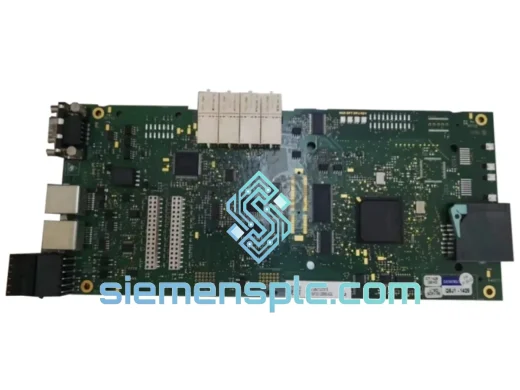
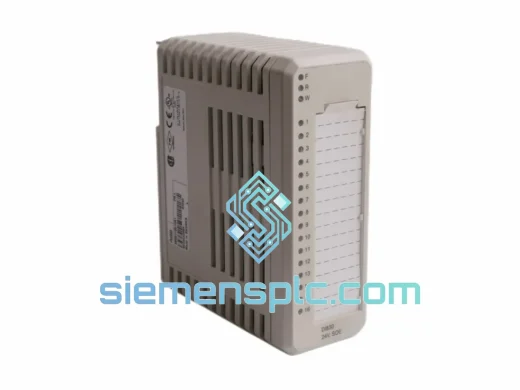
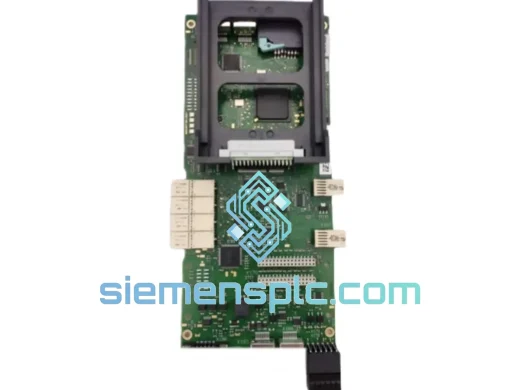
Siemens A5E40726438-001 I/O Module
Request verified availability, condition, replacement risk review, packing options and courier lead time for A5E40726438-001.
BrandSiemens
Part NumberA5E40726438-001
ConditionAvailability Check
Lead TimeRFQ Confirmation
DocumentsDatasheet / photos by RFQ
ShippingExport packing available
Auto-filled RFQ
A5E40726438-001
Click Request Quote and the part number is inserted into the inquiry form automatically.
- Reply by email: [email protected]
- WhatsApp / Tel: +86 18359268345
- Mon-Sat 9:00-18:00 GMT+8
Procurement Data
Key Product Information
Core fields for model confirmation and RFQ routing. Detailed product narrative remains below.
- Brand
- Siemens
- Primary Part Number
- A5E40726438-001
- Product Type
- I/O Module
- Product Family
- Other series
- Manufacturer
- Siemens AG
- Country of Origin
- DE
- Catalog Category
- I/O Modules
Model confirmed for inquiry
A5E40726438-001
Send quantity, destination and urgency. The RFQ form keeps this part number attached.
Request Quote
Product Overview
Siemens A5E40726438-001 SIMATIC I/O Module — Stop the Clock on Your Downtime
Every minute your line is down, you’re bleeding money. A failed I/O module shouldn’t take your plant offline for days while you chase lead times through slow distribution channels. The Siemens A5E40726438-001 is on our shelf in Xiamen — inspected, verified, and ready to ship today via DHL or FedEx Express. We’ve handled enough emergency callouts to know that the difference between a 4-hour fix and a 4-day shutdown often comes down to one thing: whether the right part is physically available right now.
This is a genuine Siemens SIMATIC I/O module. Not a substitute. Not a compatible alternative. The exact part number your system was built around — A5E40726438-001.
URGENT REQUIREMENT? Contact: [email protected] | WhatsApp: +86 18359268345
Quick Technical Datasheet
| Parameter | Detail |
|---|---|
| Part Number | A5E40726438-001 |
| Reference | A5E40726438 |
| Manufacturer | Siemens AG |
| Product Series | SIMATIC |
| Module Category | I/O Module (Input/Output) |
| Mounting | DIN Rail / SIMATIC standard backplane |
| Communication Bus | SIMATIC backplane / PROFIBUS / PROFINET (config-dependent) |
| Operating Temperature | 0 °C to +60 °C |
| Storage Temperature | −40 °C to +70 °C |
| Protection Rating | IP20 (panel-mounted) |
| Compliance | CE, UL, cULus, RoHS, IEC 61131-2 |
| Country of Origin | Germany |
| Availability | ✅ Ready to Ship — Xiamen Stock |
Troubleshooting & Replacement Tips
Swapping an I/O module mid-production is not a plug-and-pull job if you want to avoid a second callout. Here’s what actually matters on-site:
1. Confirm the fault before you pull the module. In TIA Portal or STEP 7, check the diagnostic buffer under Online & Diagnostics → Diagnostic Buffer. Common fault codes pointing to this module include 0x0A00 (module failure), 0x0A01 (channel fault), and 0x0A10 (configuration mismatch). A configuration mismatch after a previous swap is the most common reason a replaced module still shows a fault — the hardware config in the project doesn’t match what’s physically installed.
2. Check the slot address and rack assignment. SIMATIC I/O modules are slot-addressed. Before removing the faulty unit, photograph or note the exact rack number and slot position. If the replacement is inserted into the wrong slot, the CPU will generate a configuration error on startup and refuse to go to RUN mode.
3. DIP switch / rotary address settings. Some SIMATIC I/O modules — particularly ET 200 variants — use rotary switches or DIP switches to set the PROFIBUS node address or station number. The A5E40726438-001 must be set to match the address configured in your hardware configuration file. Mismatch here causes the module to appear as not found on the bus even though it’s physically seated and powered.
4. Firmware version alignment. If your system is running TIA Portal V17 or later with a newer S7-1500 CPU firmware, verify that the replacement module’s firmware is compatible. Older module firmware can cause reduced functionality or diagnostic suppression. Firmware can be updated via TIA Portal under Online → Update Firmware if the module is accessible on the network.
5. Front connector transfer. The wiring front connector is separate from the module body on SIMATIC S7-300/400 platforms. You can transfer the wired connector directly to the new module without rewiring — this is the single biggest time-saver on a live swap. Confirm the connector coding key is set correctly to prevent accidental wrong-module insertion.
6. Force a hardware re-scan after insertion. After seating the new module, perform a Download to Device → Hardware Configuration from TIA Portal to push the current hardware config and clear any residual fault states. Do not rely on the CPU auto-detecting the new module without a config download — it will often hold the previous fault in memory.
7. Verify channel-level diagnostics post-swap. Once the CPU is back in RUN, check individual channel status in the module’s online diagnostics view. A module that passes the rack-level check but shows channel faults usually indicates a field wiring issue — broken sensor cable, blown fuse on the field side, or a shorted output — not a faulty replacement module.
Reliability in Harsh Conditions
Siemens SIMATIC modules are not designed for climate-controlled server rooms. They are built for the floor — foundries, chemical plants, outdoor substations, and food processing lines where temperature swings, vibration, and humidity are daily realities.
The A5E40726438-001 is rated for continuous operation from 0 °C to +60 °C with storage down to −40 °C, covering the thermal range of most industrial environments without derating. The conformal coating on the PCB provides resistance to condensation and airborne contaminants — a critical factor in coastal plants, paper mills, and wash-down environments where humidity regularly exceeds 85% RH.
Vibration resistance is validated to IEC 60068-2-6 (sinusoidal) and IEC 60068-2-27 (shock), meaning the module maintains electrical integrity on machine frames subject to press vibration, conveyor impact, and compressor harmonics. The DIN rail mounting system with positive locking prevents the module from walking out of its slot under sustained vibration — a failure mode we’ve seen on cheaper third-party alternatives that lack the mechanical retention of genuine Siemens hardware.
EMC performance is certified to EN 61000-6-2 (industrial immunity) and EN 61000-6-4 (industrial emissions), ensuring the module does not introduce noise into sensitive analog measurement circuits and is not disrupted by the high-frequency switching transients common in VFD-heavy environments.
Global Express Logistics
Our warehouse is located in Xiamen, Fujian — one of China’s primary export hubs with direct access to DHL, FedEx, and UPS international express networks. This is not a drop-ship arrangement. The module is physically in our facility, inspected, and ready to pack.
Typical transit times from Xiamen:
- Southeast Asia (Singapore, Thailand, Malaysia, Vietnam): 2–3 business days via DHL Express
- Middle East (UAE, Saudi Arabia, Qatar): 3–4 business days via FedEx International Priority
- Europe (Germany, Netherlands, Poland, UK): 4–5 business days via DHL Express Worldwide
- North America (USA, Canada, Mexico): 4–6 business days via FedEx International Priority
- Australia / New Zealand: 3–5 business days via DHL Express
Every shipment includes a commercial invoice, packing list, and certificate of origin for customs clearance. For time-critical shipments, we can pre-file export documentation and arrange same-day pickup with the courier if your order is confirmed before 14:00 CST. HS code documentation is provided for all destinations to prevent customs holds.
For orders requiring air freight on a pallet (multiple modules or full rack assemblies), we coordinate with freight forwarders at Xiamen Gaoqi International Airport for next-flight-out options. Contact us directly to discuss emergency freight arrangements.
Contact Information
📧 Email: [email protected]
💬 WhatsApp: +86 18359268345
🌐 Web: siemensplc.com
© 2026 siemensplc.com. All rights reserved.
Ready to quote
[email protected]
Send This Part Number to Sales
RFQ workflow
Quality workflow ->
Confirmation Process
01Model confirmation
We check the full part number, brand, series and visible nameplate information before quotation.
02Availability reply
Sales confirms stock path, condition option, quantity and realistic lead time for export dispatch.
03Packing & courier
DHL, FedEx, UPS or buyer courier arrangements can be reviewed with packing requirements.
Continue sourcing
Browse full catalog ->
Related Automation Parts
Similar brand or category products for fast comparison and multi-item RFQ lists.
Siemens
RFQ Ready
Siemens 6RY1803-0AA05-0AA1 Digital Output Module
SIMOREG
Origin DE
Digital Output Module