

Siemens
RFQ Ready
Siemens 6AV7240-0HC07-0PA0 Industrial Panel PC Motherboard – SIMATIC IPC477D
SIMATIC
Origin DE
Industrial Panel PC Motherboard
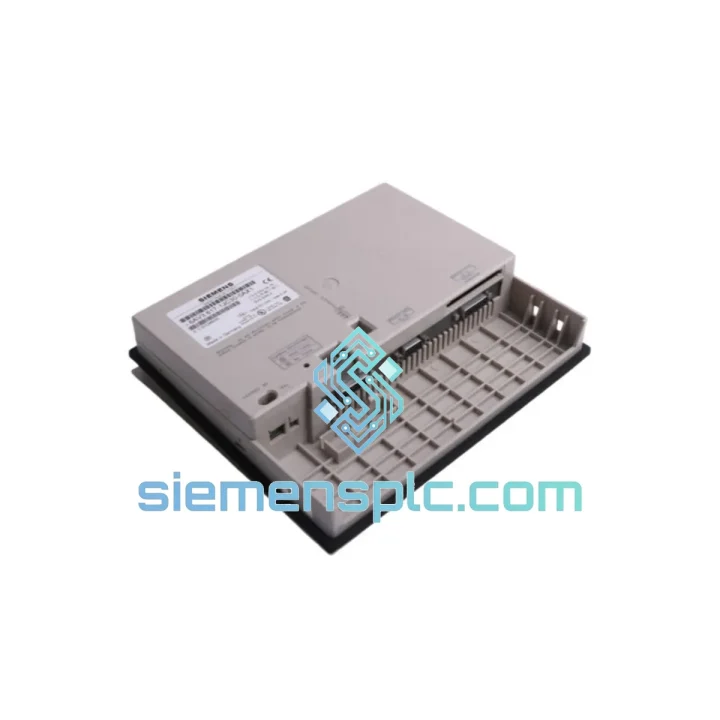
Request verified availability, condition, replacement risk review, packing options and courier lead time for 6AV3617-1JC30-0AX1.
Click Request Quote and the part number is inserted into the inquiry form automatically.
Core fields for model confirmation and RFQ routing. Detailed product narrative remains below.
Your line is down. The OP17 panel is dark. Operators can’t acknowledge alarms, can’t enter setpoints, can’t see a single process value. Every minute that screen stays black is money walking out the door — rejected batches, idle labor, missed delivery windows. You don’t need a brochure. You need the part, tested, packed, and moving toward you today.
We stock the Siemens 6AV3617-1JC30-0AX1 in Xiamen. Not “available to order” — physically on the shelf, inspected, and ready to ship via DHL or FedEx within hours of payment confirmation. This is the exact unit your S7-300 or S7-400 line expects: same MPI/PROFIBUS DP pinout, same ProTool-compatible firmware baseline, same IP65 front seal. Drop-in replacement. No surprises on the floor.
URGENT REQUIREMENT? Contact: [email protected] | WhatsApp: +86 18359268345
| Parameter | Value | Status |
|---|---|---|
| Part Number | 6AV3617-1JC30-0AX1 | ✅ Ready to Ship |
| Series | SIMATIC OP17 | |
| Brand | Siemens AG | |
| Device Type | Text-Based HMI Operator Panel | |
| Display | LCD, backlit, multi-line text | |
| Communication | MPI / PROFIBUS DP | |
| Config Software | ProTool (STEP 7 environment) | |
| Supply Voltage | 24 V DC | |
| Front Protection | IP65 | |
| Mounting | Panel cut-out, rear-mount clips | |
| Weight | ~800 g | |
| Origin | Germany (Siemens AG) | |
| Certifications | CE, UL | |
| Condition | New / Surplus New | ✅ Inspected |
| Dispatch Location | Xiamen, China | ✅ Same-Day Dispatch Available |
Most common failure modes on the 6AV3617-1JC30-0AX1:
1. Blank or flickering display. Nine times out of ten this is the backlight inverter, not the CPU board. Before condemning the panel, check your 24 V DC supply rail — anything below 20.4 V under load will cause display instability. Measure at the panel connector, not at the PSU output. Voltage drop across a corroded terminal block is a classic trap.
2. “No connection to PLC” / MPI bus fault. The OP17 stores its MPI station address in non-volatile memory. When you swap in a replacement unit, the default address is typically 1. If your existing network already has a device at address 1 (common on S7-300 networks where the CPU defaults to address 2 and the PG to address 0), you’ll get a bus collision and the panel will never connect. Set the MPI address on the new unit via the panel’s startup menu before connecting it to the live bus. Match the address from your ProTool project — it’s in the project settings under “PLC connections.”
3. PROFIBUS DP termination errors after swap. If the OP17 sits at either physical end of the PROFIBUS segment, the termination resistors on the bus connector must be active. A replacement panel installed mid-segment with termination accidentally enabled will corrupt the entire DP network. Check the bus connector DIP switch — position 1 and 2 both ON = terminated. Mid-segment units must have termination OFF.
4. Project download fails / “Wrong device” error in ProTool. ProTool ties the compiled project to a specific panel type and firmware version. If the replacement unit has a different firmware revision than the original, you may need to recompile and re-download the project. Connect via MPI programming cable, open the ProTool project, verify the target device matches “OP17” exactly, then transfer. Do not attempt to load an OP15 or OP27 project — the tag mapping will be wrong.
5. Function key LED assignments lost. The OP17’s LED assignments for F-keys are stored in the downloaded project, not in panel hardware. After replacing the unit and downloading the project, LEDs should restore automatically. If they don’t, check that the PLC DB (data block) referenced for LED control is correctly initialized on first scan.
Replacement checklist before powering up:
The SIMATIC OP17 was engineered for environments that destroy consumer-grade electronics. The 6AV3617-1JC30-0AX1 carries an IP65 front rating — that means a sustained water jet from any direction will not penetrate the display area. On a food processing line where washdown happens every shift, or a foundry floor where coolant mist is constant, that seal is the difference between a panel that lasts a decade and one that fails in six months.
Vibration tolerance is built into the mechanical design. The rear housing uses reinforced mounting clips that distribute panel stress across the cut-out frame rather than concentrating it at screw points. In press shops and compressor rooms where 10–150 Hz vibration is continuous, this matters. Panels that rely on single-point fastening crack their PCB solder joints within months under those conditions.
Operating temperature range covers -20°C to +60°C for storage and 0°C to +50°C in operation. In practice, a properly ventilated control cabinet running at 40°C ambient will keep the OP17 well within its thermal envelope. The LCD backlight is the component most sensitive to sustained high temperature — if your cabinet regularly exceeds 45°C internal, consider adding a cabinet cooler. The panel will function, but backlight life shortens measurably above that threshold.
Humidity tolerance extends to 95% non-condensing. The front IP65 seal handles external moisture, but the rear of the panel is not sealed. In high-humidity environments, ensure the cabinet itself is properly sealed and consider desiccant packs if the cabinet is opened frequently in humid conditions.
Stock is held in Xiamen, Fujian — one of China’s primary export hubs with direct access to Xiamen Gaoqi International Airport and the Port of Xiamen. For urgent shipments, this geography matters: DHL and FedEx both operate daily freighter flights from Xiamen, meaning a same-day dispatch can realistically reach Frankfurt, Dubai, or Singapore within 48–72 hours door-to-door.
Standard express routing (DHL / FedEx Priority):
Every shipment includes full export documentation: commercial invoice, packing list, and certificate of origin. For destinations requiring import permits or specific HS code declarations for industrial electronics, we prepare documentation in advance to prevent customs holds. The HS code for this product is 8537.10 (boards, panels, consoles for electric control). We have cleared this commodity through customs in 40+ countries without incident.
ESD-safe inner packaging with moisture barrier bag is standard. The panel is double-boxed with foam inserts cut to the unit’s profile — not generic bubble wrap. We’ve shipped to offshore platforms, remote mining sites, and island facilities where a damaged shipment means weeks of additional delay. The packaging reflects that reality.
For orders confirmed before 14:00 CST, same-day dispatch is available on in-stock units. Tracking numbers are provided within 2 hours of carrier pickup. WhatsApp updates are available on request throughout transit.
📧 Email: [email protected]
💬 WhatsApp: +86 18359268345
🌐 Web: siemensplc.com
© 2026 siemensplc.com. All rights reserved.
We check the full part number, brand, series and visible nameplate information before quotation.
Sales confirms stock path, condition option, quantity and realistic lead time for export dispatch.
DHL, FedEx, UPS or buyer courier arrangements can be reviewed with packing requirements.
Similar brand or category products for fast comparison and multi-item RFQ lists.


