

Siemens
RFQ Ready
Siemens 6AV7240-0HC07-0PA0 Industrial Panel PC Motherboard – SIMATIC IPC477D
SIMATIC
Origin DE
Industrial Panel PC Motherboard
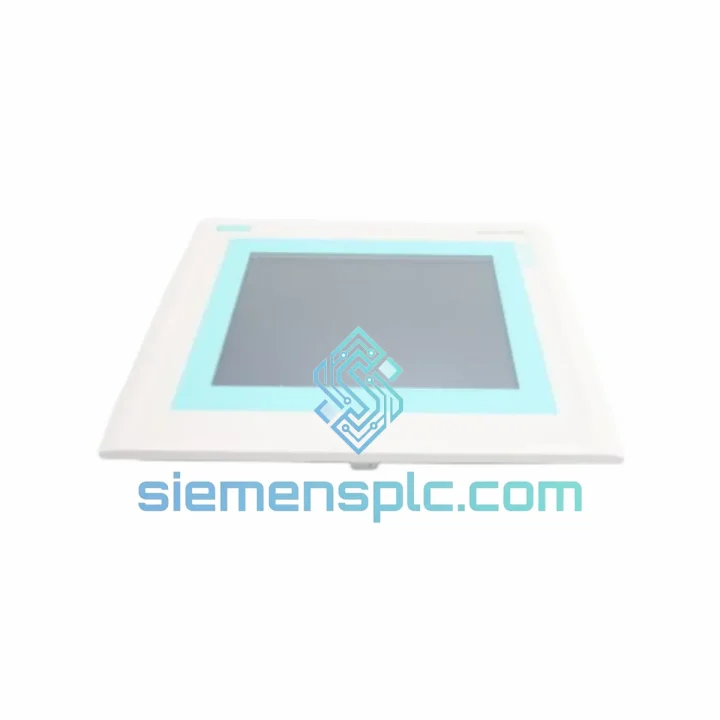
Request verified availability, condition, replacement risk review, packing options and courier lead time for 6AV6545-0CC10-0AX0.
Click Request Quote and the part number is inserted into the inquiry form automatically.
Core fields for model confirmation and RFQ routing. Detailed product narrative remains below.
Your TP270 panel goes dark and the entire line stops. Operators are blind. Alarms pile up unacknowledged. Maintenance is on the phone with procurement, procurement is calling distributors, and nobody has stock. That scenario costs real money — $5,000, $50,000, or more per hour depending on your process. We built this listing for exactly that moment.
The Siemens 6AV6545-0CC10-0AX0 is the 10.4″ STN color variant of the SIMATIC TP270 series — a panel that has been the operator interface backbone of S7-300 and S7-400 installations across automotive, food & beverage, water treatment, and pharmaceutical lines for over two decades. When it fails, there is no generic substitute. You need the exact part, tested, packed, and moving toward your facility within hours — not weeks.
We stock verified units in Xiamen. Same-day dispatch via DHL Express or FedEx International Priority is standard for orders confirmed before 15:00 CST. Most destinations in Southeast Asia receive delivery within 48–72 hours. Europe and North America typically within 3–5 business days.
⚡ URGENT REQUIREMENT? Contact: [email protected] | WhatsApp: +86 18359268345
| Part Number | 6AV6545-0CC10-0AX0 |
| Series | SIMATIC TP270 |
| Display | 10.4″ STN Color LCD, 640×480 px, 256 colors |
| Touch Interface | Resistive analog (glove-compatible) |
| Processor | 133 MHz RISC |
| User Memory | 512 KB project memory |
| OS | Windows CE 3.0 |
| Communication | MPI / PROFIBUS DP, RS-422/485 |
| Supply Voltage | 24 V DC (20.4–28.8 V) |
| Power Consumption | ≈ 18 W |
| Operating Temp. | 0°C to +50°C |
| Protection Rating | IP65 (front panel) |
| Dimensions (W×H×D) | 310 × 240 × 60 mm |
| Weight | ≈ 3.2 kg |
| Config Software | ProTool v6.0 / WinCC flexible 2008 |
| Certifications | CE, UL, cULus |
| Stock Status | ✅ Ready to Ship — Xiamen Warehouse |
Before you pull the panel, confirm the fault is the panel — not the cable or the PLC port. Swap the MPI cable first. A degraded 6XV1830-0EH10 cable causes identical symptoms: blank screen on boot, communication timeout errors (fault code 140:0 or 140:1 in the TP270 diagnostic buffer). If the cable checks out, measure 24 V DC at the panel’s power connector under load — a sagging SITOP supply will cause random resets that look like panel failure.
Common failure modes on aged 6AV6545-0CC10-0AX0 units:
Step-by-step hot-swap procedure:
The SIMATIC TP270 was engineered for the factory floor, not the office. The 6AV6545-0CC10-0AX0 front panel carries IP65 certification — fully sealed against dust ingress and protected against direct water jets. This matters in food processing washdown zones, outdoor pump stations, and foundry environments where coolant mist is a daily reality.
The resistive touch overlay operates across the full temperature range without calibration drift caused by thermal expansion — a known weakness of capacitive panels in environments with rapid temperature cycling. The 133 MHz RISC processor runs Windows CE 3.0, a deterministic real-time OS with no background update processes, no antivirus overhead, and no unexpected reboots. Mean time between failures (MTBF) for the TP270 series exceeds 100,000 hours under rated conditions.
Vibration resistance meets IEC 60068-2-6 (sinusoidal, 10–58 Hz, 0.075 mm amplitude; 58–500 Hz, 1g). Shock resistance meets IEC 60068-2-27 (15g, 11 ms half-sine). These are not marketing numbers — they are the same specs that kept TP270 panels running on automotive body-shop conveyor lines and offshore platform control rooms for 20+ years.
Every unit we ship has been powered on, display-verified, and touch-calibrated. Units showing backlight degradation below 70% rated brightness are quarantined. You receive a panel that works on day one.
Our warehouse is located in Xiamen, Fujian — one of China’s primary export hubs with direct access to DHL, FedEx, and UPS international gateways. Orders confirmed before 15:00 CST are dispatched same day. Here is what the timeline looks like from your purchase order to your receiving dock:
Full export documentation is included with every shipment: commercial invoice, packing list, certificate of origin (Form E for ASEAN preferential tariff where applicable), and DHL/FedEx airway bill. We handle export customs clearance from the China side. Import duties and local customs clearance are the buyer’s responsibility — we provide all documentation required to facilitate smooth import.
For orders requiring formal export licenses or end-user certificates (EUC), contact us in advance. We have experience with dual-use goods documentation for industrial automation components shipped to regulated markets.
📧 Email: [email protected]
💬 WhatsApp: +86 18359268345
🌐 Web: siemensplc.com
© 2026 siemensplc.com. All rights reserved.
We check the full part number, brand, series and visible nameplate information before quotation.
Sales confirms stock path, condition option, quantity and realistic lead time for export dispatch.
DHL, FedEx, UPS or buyer courier arrangements can be reviewed with packing requirements.
Similar brand or category products for fast comparison and multi-item RFQ lists.


