

Siemens
RFQ Ready
Siemens 6AV7240-0HC07-0PA0 Industrial Panel PC Motherboard – SIMATIC IPC477D
SIMATIC
Origin DE
Industrial Panel PC Motherboard
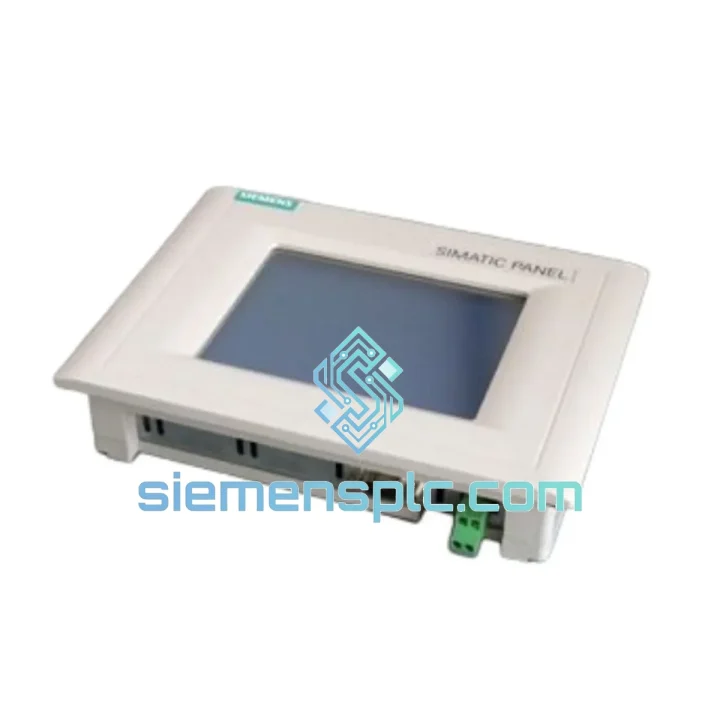
Request verified availability, condition, replacement risk review, packing options and courier lead time for 6AV6640-0CA11-0AX0.
Click Request Quote and the part number is inserted into the inquiry form automatically.
Core fields for model confirmation and RFQ routing. Detailed product narrative remains below.
Your OP73 panel just went dark. The line is stopped. Maintenance is on the phone. You’ve already pulled the wiring diagram and confirmed the fault — it’s the Siemens 6AV6640-0CA11-0AX0. You don’t need a sales pitch. You need the part, boxed, labeled, and moving toward your dock before end of business.
That’s exactly what siemensplc.com delivers. We maintain physical stock of the SIMATIC OP73 (6AV6640-0CA11-0AX0) in Xiamen, China, with same-day dispatch on confirmed orders placed before 15:00 CST. DHL Express and FedEx IP are pre-arranged. Your replacement panel can be on-site within 24–72 hours depending on your region.
URGENT REQUIREMENT? Contact: [email protected] | WhatsApp: +86 18359268345
| Parameter | Specification |
|---|---|
| Part Number | 6AV6640-0CA11-0AX0 |
| Product Family | SIMATIC HMI OP73 |
| Manufacturer | Siemens AG |
| Display Type | 3.8″ STN Monochrome LCD |
| Resolution | 320 × 240 px (QVGA) |
| Function Keys | 12 configurable F-keys + system keys |
| Communication | MPI / PROFIBUS DP, RS-422/485 |
| Supply Voltage | 24 V DC (18–30 V DC range) |
| Operating Temp | 0 °C to +50 °C |
| Storage Temp | -20 °C to +60 °C |
| Protection Rating | IP65 front panel / IP20 rear |
| User Memory | 512 KB |
| Config Software | WinCC flexible 2008 SP3 or later |
| Dimensions (W×H×D) | 196 × 141 × 46 mm |
| Weight | approx. 700 g |
| Certifications | CE, UL, cULus, RoHS |
| Stock Status | ✅ Ready to Ship – Xiamen Warehouse |
The OP73 fails in predictable ways. Here’s what field experience actually looks like on this unit:
Fault 1 — Blank display, power LED on: Nine times out of ten this is a failed backlight inverter or a corrupted project file. Before condemning the panel, attempt a forced project download via WinCC flexible. If the display stays dark after a fresh transfer, the LCD assembly is gone. Replace the unit.
Fault 2 — “No connection to PLC” alarm on startup: Check MPI address conflicts first. The OP73 ships with a default MPI address of 1. If your S7-300 CPU is also at address 1 (common on unconfigured spares), you’ll get a bus collision that looks like a panel fault. Use a PC Adapter USB (6ES7972-0CB20-0XA0) to reassign the panel address via the Start Center menu before connecting to the network.
Fault 3 — F-key inputs not registering: The membrane keypad on the OP73 is a known wear item after 5–7 years of continuous use. If individual keys are unresponsive and the display is fine, the keypad overlay has delaminated internally. This is not field-repairable — swap the unit.
Replacement Procedure (condensed field steps):
Firmware note: The 6AV6640-0CA11-0AX0 does not have user-upgradeable firmware in the field. The OS version is fixed at manufacture. Ensure your WinCC flexible project was compiled against a compatible runtime version — mismatches cause silent transfer failures with no error message on older SP releases.
The SIMATIC OP73 was engineered for the factory floor, not the office. The IP65-rated front bezel keeps coolant mist, cutting fluid spray, and wash-down water out of the display assembly — a critical spec in food processing, machining, and chemical environments. The operating temperature ceiling of +50 °C means it survives inside poorly ventilated control cabinets during summer shutdowns without thermal throttling or memory corruption.
Vibration resistance is validated to IEC 60068-2-6: 10–58 Hz at 0.075 mm amplitude, 58–500 Hz at 1 g. In practice, this covers most conveyor drives, compressor skids, and press-brake installations without additional shock mounts. The STN LCD panel itself has no moving parts and no spinning media — the only mechanical wear items are the keypad membrane and the 24 V DC connector, both of which are accessible failure modes with clear diagnostic signatures.
Units in our Xiamen stock are stored in climate-controlled conditions at 18–25 °C with humidity maintained below 60% RH. Each unit is individually bagged with desiccant and inspected for connector pin integrity and label authenticity before dispatch. We do not ship units that show any sign of prior installation, repackaging, or label tampering.
Our dispatch workflow is built around one objective: getting your replacement panel through customs and onto your receiving dock with zero surprises.
Same-day dispatch: Orders confirmed with payment before 15:00 CST (UTC+8) ship the same business day from our Xiamen warehouse. Orders after cutoff ship next morning.
Carrier options:
Documentation included with every shipment: Commercial invoice with HS code 8537.10 pre-filled, packing list, country of origin declaration, and our inspection checklist. For EU imports, we can provide an EUR.1 movement certificate on request. For US imports, we include a Section 321 eligibility note where applicable.
Incoterms available: EXW Xiamen, FOB Xiamen, CIF destination port. DAP available for DHL/FedEx door-to-door shipments — duties and taxes are the buyer’s responsibility unless otherwise agreed in writing.
We’ve shipped to over 40 countries. If your customs broker needs pre-clearance documentation or a proforma invoice before payment, contact us and we’ll turn it around within the hour.
Email: [email protected]
WhatsApp: +86 18359268345
Web: siemensplc.com
© 2026 siemensplc.com. All rights reserved.
We check the full part number, brand, series and visible nameplate information before quotation.
Sales confirms stock path, condition option, quantity and realistic lead time for export dispatch.
DHL, FedEx, UPS or buyer courier arrangements can be reviewed with packing requirements.
Similar brand or category products for fast comparison and multi-item RFQ lists.


