Siemens
RFQ Ready
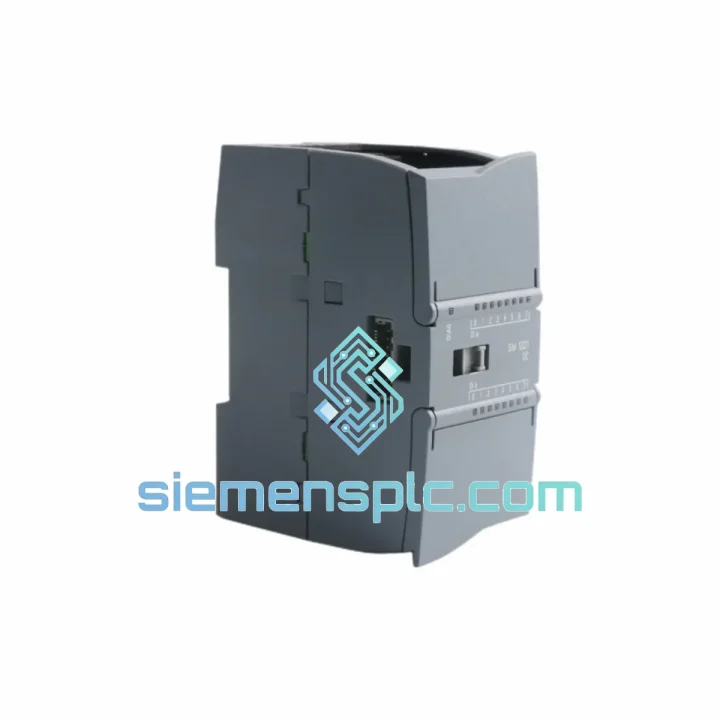
Siemens 6ES7321-1BL00-0AA0 Digital Input Module
SIMATIC
Origin DE
PLC Digital Input Module
Request verified availability, condition, replacement risk review, packing options and courier lead time for 6ES7221-1BH32-0XB0.
Click Request Quote and the part number is inserted into the inquiry form automatically.
Core fields for model confirmation and RFQ routing. Detailed product narrative remains below.
Every minute your line sits idle, you’re bleeding money. A failed SM 1221 input module shouldn’t cost you a shift — or a production run. We stock the 6ES7221-1BH32-0XB0 in Xiamen, verified and ready to pull from the shelf the moment your order lands. No lead-time games, no broker markups, no waiting on a distributor’s next container. You call it urgent — we treat it that way.
URGENT REQUIREMENT? Contact: [email protected] | WhatsApp: +86 18359268345
| Parameter | Specification | Status |
|---|---|---|
| Order No. (MLFB) | 6ES7221-1BH32-0XB0 | ✔ Ready to Ship |
| Module Family | SM 1221 — SIMATIC S7-1200 | |
| Digital Inputs | 16 × DI | |
| Rated Input Voltage | 24 V DC | |
| Input Voltage Range | 20.4 – 28.8 V DC | |
| Logic “1” Threshold | ≥ 15 V DC / 2.5 mA | |
| Logic “0” Threshold | ≤ 5 V DC / 1 mA | |
| Input Type | Sink / Source (IEC Type 1 sink) | |
| Galvanic Isolation | 500 V AC (optical) | |
| Input Filter Delay | 0.2 / 0.4 / 0.8 / 1.6 / 3.2 / 6.4 / 12.8 ms (selectable) | |
| 5 V DC Bus Current Draw | 105 mA | |
| Max. Cable Length (shielded) | 500 m | |
| Dimensions (W × H × D) | 45 × 100 × 75 mm | |
| Weight | approx. 180 g | |
| Operating Temperature | 0 °C to +55 °C (horizontal mount) | |
| Storage Temperature | −40 °C to +70 °C | |
| Protection Rating | IP20 | |
| Certifications | CE, UL, cULus, ATEX Zone 2, FM, RCM, KC | |
| Compatible CPUs | S7-1200: CPU 1211C / 1212C / 1214C / 1215C / 1217C | |
| Minimum Firmware | V2.0 | |
| Origin | Germany |
Pulled from real field experience — not the manual.
Step 1 — Confirm the fault is the module, not the wiring. Before you pull the SM 1221, check the CPU’s diagnostic buffer in TIA Portal (Online & Diagnostics → Diagnostic Buffer). A genuine module hardware fault will log an event code in the range 16#0x0521 or similar I/O access errors. If you’re only seeing program-level faults, the module may be fine — check your 24 V DC field supply first.
Step 2 — No address configuration needed. Unlike older S7-300 DP slaves, the SM 1221 uses automatic slot-based addressing. When you seat the replacement module, the S7-1200 CPU auto-assigns the process image address (default starts at I0.0 for slot 1, incrementing per slot). You do not need to set DIP switches or rotary encoders — there are none on this module. Address remapping, if required, is done entirely in TIA Portal Device Configuration.
Step 3 — Hot-swap procedure. The S7-1200 supports module replacement under power if the CPU is in STOP mode and the project is configured for it. Power down the 24 V DC field supply to the module first. Slide the module off the side bus connector — it unclips from the DIN rail with the orange lever. Seat the replacement, restore field power, and set the CPU back to RUN. The CPU will re-initialize the module within one scan cycle.
Step 4 — Firmware check. The SM 1221 carries no independently updatable firmware — its behavior is governed by the CPU firmware. If your CPU is running V1.x, upgrade to V2.0 minimum before installing this module. Mismatched firmware versions will cause the CPU to log a configuration mismatch fault and refuse to enter RUN mode.
Step 5 — Common fault codes after replacement.
Step 6 — Input filter tuning. If you’re seeing spurious input transitions after replacement — especially on inductive proximity sensors — increase the input filter delay from the default 6.4 ms to 12.8 ms in TIA Portal (Device Configuration → Module Properties → Digital Inputs → Input Filter). This eliminates contact bounce without any hardware change.
The SM 1221 was not designed for a climate-controlled server room. It was built for the cabinet floor of a stamping press, a coastal water treatment plant, and a foundry auxiliary panel — environments where temperature swings, vibration, and humidity are daily realities, not edge cases.
The module’s optical isolation barrier — rated at 500 V AC between field wiring and the logic bus — is the first line of defense against ground loops and inductive transients from motor starters and solenoid valves sharing the same cabinet. In high-vibration environments such as compressor skids or mobile machinery, the side bus connector maintains positive mechanical engagement through the DIN rail clip mechanism; there are no edge-card connectors that can work loose under shock loads.
Operating temperature ceiling of +55 °C (horizontal mount) covers the vast majority of industrial cabinet installations without forced cooling. For vertical mounting — common in space-constrained panels — the rating drops to +45 °C, which still accommodates most ambient conditions when the cabinet is properly ventilated. Storage down to −40 °C means the module survives unheated warehouse conditions in northern climates without degradation to the optical isolators or PCB substrate.
Humidity tolerance up to 95% non-condensing, combined with the IP20 enclosure rating, handles the moisture levels found in food processing washdown-adjacent areas and coastal installations — provided the cabinet door seal is maintained. The conformal coating on the PCB provides an additional barrier against airborne contaminants: cutting fluid mist, hydraulic oil vapor, and fine metallic dust that penetrate even well-sealed enclosures over time.
Certifications for ATEX Zone 2 and FM Class I Division 2 extend the module’s deployment envelope to light hazardous-area applications — oil & gas wellhead panels, chemical plant junction boxes, and paint booth control systems — where standard industrial modules cannot be used without additional barriers.
Our warehouse is located in Xiamen, Fujian — one of China’s primary export hubs with direct access to international freight lanes via Xiamen Gaoqi International Airport and Xiamen Port. This geography is not accidental: it puts us within same-day handoff distance of DHL Express, FedEx International Priority, and UPS Worldwide Express cut-off times for most weekday orders.
Standard dispatch timeline: Orders confirmed before 14:00 CST ship the same business day. Orders confirmed after 14:00 CST ship the following morning. You receive a tracking number by email within 2 hours of handoff to the carrier.
Transit times (estimated, door-to-door):
All shipments include commercial invoice, packing list, and — where required — a certificate of origin. For customers in countries with import duty exemptions on industrial automation components, we can prepare documentation to support customs clearance. Dangerous goods classification does not apply to this module (non-hazardous, non-lithium). No special import permits are required in most jurisdictions.
For time-critical situations — line-down emergencies where every hour counts — contact us directly via WhatsApp before placing the order. We can confirm real-time stock availability, arrange priority pick-and-pack, and coordinate with the carrier for earliest possible flight booking.
Email: [email protected]
WhatsApp: +86 18359268345
Web: siemensplc.com
© 2026 siemensplc.com. All rights reserved.
We check the full part number, brand, series and visible nameplate information before quotation.
Sales confirms stock path, condition option, quantity and realistic lead time for export dispatch.
DHL, FedEx, UPS or buyer courier arrangements can be reviewed with packing requirements.
Similar brand or category products for fast comparison and multi-item RFQ lists.