Siemens
RFQ Ready
Siemens A5E03378158 Communication Processor – SIMATIC S7-300 CP 343-1
SIMATIC S7-300
Origin DE
Communication Processor
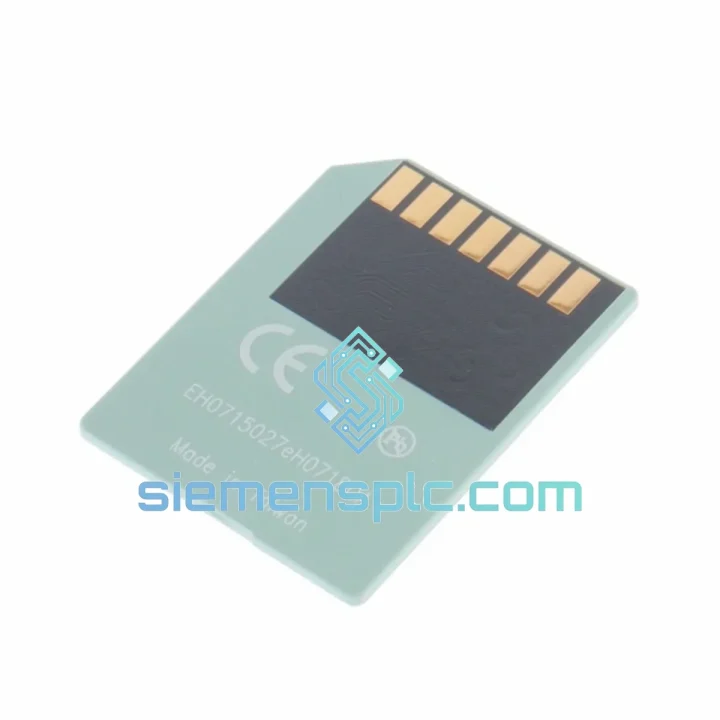
Request verified availability, condition, replacement risk review, packing options and courier lead time for 6ES7953-8LJ20-0AA0.
Click Request Quote and the part number is inserted into the inquiry form automatically.
Core fields for model confirmation and RFQ routing. Detailed product narrative remains below.
Your S7-300 line is down. The CPU is throwing a red SF LED and the MMC slot is the culprit — either a failed card, a corrupted program load, or a card that was never seated correctly after the last maintenance window. Every minute costs you. The 6ES7953-8LJ20-0AA0 is on our shelf right now in Xiamen. We cut the paperwork, pull the stock, and hand it to DHL the same day you confirm. That is the only thing that matters when production is stopped.
URGENT REQUIREMENT? Contact: [email protected] | WhatsApp: +86 18359268345
| Order Number (MLFB) | 6ES7953-8LJ20-0AA0 ✅ Ready to Ship |
| Brand | Siemens AG – SIMATIC Division |
| Series | SIMATIC Micro Memory Card (MMC) |
| Compatible Platforms | SIMATIC S7-300, C7, ET 200 CPU variants |
| Storage Capacity | 512 KB Flash EEPROM |
| Memory Type | Non-volatile, battery-free |
| Data Retention | ≥ 10 years without power |
| Write Endurance | ≥ 100,000 write cycles |
| Operating Temperature | 0 °C to +60 °C |
| Storage Temperature | −20 °C to +85 °C |
| Supply Voltage | 3.3 V DC (via CPU slot) |
| Write Protection | Hardware write-protect switch |
| Dimensions | 24 × 32 × 1.4 mm |
| Certifications | CE, UL, cULus, ATEX Zone 2 |
| Country of Origin | Germany |
| Replaces | 6ES7953-8LJ11-0AA0 (previous hardware revision) |
| Stock Status | ✅ In Stock – Same-Day Dispatch Available |
Fault Scenario 1 — SF LED solid red on power-up, CPU stays in STOP
This is the most common MMC failure signature. The CPU boot loader cannot read the card. Before condemning the card, check the slot contacts for oxidation — a cotton swab with isopropyl alcohol on the gold fingers fixes roughly 30% of these calls. If the card is genuinely dead, the replacement procedure is straightforward but sequence matters:
Fault Scenario 2 — CPU runs but program behaves unexpectedly after a power interruption
Retentive data blocks (DBs with RETAIN attribute) are written back to the MMC on a controlled power-down. An uncontrolled power loss — no UPS, breaker trip, or E-stop without proper shutdown — can leave the MMC with a partially written DB. Symptom: recipe values reset to defaults, counters at zero, setpoints wrong. Fix: restore the DB from your last known-good backup, download to the MMC, and invest in a 24 V DC UPS for the CPU rack before the next shift starts.
Fault Scenario 3 — CPU firmware update stuck or CPU not recognizing OS update file
The 6ES7953-8LJ20-0AA0 is the only supported carrier for S7-300 CPU OS updates. If the update is not applying: confirm the .UPD file is in the root directory of the MMC (not in a subfolder), verify the file is not write-protected at the OS level before transfer, and ensure the CPU hardware revision supports the target firmware version — check the CPU’s order number suffix against the Siemens firmware compatibility matrix in SIOS. After a successful update, the CPU automatically deletes the .UPD file from the MMC.
Configuration note — no DIP switches, no addressing
Unlike I/O modules, the MMC requires zero hardware configuration. There are no DIP switches, no slot addressing, no jumpers. The only physical setting is the write-protect switch. The CPU auto-detects the card capacity and adjusts load memory allocation accordingly. If you are migrating from a 256 KB card (LF20 variant) to this 512 KB card, no CPU parameter changes are required.
Industrial panels are not server rooms. The 6ES7953-8LJ20-0AA0 is engineered for the environments where S7-300 systems actually live: steel mill switchgear rooms with 55 °C ambient, coastal chemical plants with 95% relative humidity, automotive press lines with 2–150 Hz continuous vibration from hydraulic presses running three shifts. The flash EEPROM architecture has no moving parts — no spinning platters, no mechanical read heads, nothing to fatigue under vibration. The card’s operating temperature ceiling of +60 °C covers the vast majority of panel interiors even without forced-air cooling. The −20 °C lower storage limit means cards can be kept in unheated spare-parts stores through winter without degradation.
Siemens qualifies the MMC family to IEC 61131-2 environmental requirements, which include vibration testing at 10–57 Hz / 0.075 mm amplitude and 57–150 Hz / 1 g, shock testing at 15 g / 11 ms half-sine, and humidity cycling per IEC 60068-2-30. The ATEX Zone 2 certification (when used with an appropriately certified CPU) covers installations in areas with occasional explosive atmospheres — wellhead panels, solvent storage, paint booths. This is not a consumer flash card repurposed for industrial use; it is a purpose-built component with a qualification pedigree that matches the CPU it serves.
ESD sensitivity is Class 2 (HBM, 2 kV). Handle with standard ESD precautions: wrist strap or ESD mat when inserting or removing from the CPU slot. Our warehouse stores all MMC stock in ESD-controlled conditions at 20–25 °C and 40–60% RH. Cards ship in original Siemens anti-static blister packaging — not repackaged, not bulk-bagged.
Our dispatch hub is in Xiamen, Fujian — one of China’s primary export ports with direct DHL and FedEx gateway access. Here is exactly what happens after you confirm your order:
For orders requiring air freight consolidation, sea freight, or hand-carry courier to a specific site, contact us directly. We have handled emergency hand-carry deliveries to offshore platforms and remote mining sites — if there is a flight, we can get the part on it.
📧 Email: [email protected]
💬 WhatsApp: +86 18359268345
🌐 Web: siemensplc.com
© 2026 siemensplc.com. All rights reserved.
We check the full part number, brand, series and visible nameplate information before quotation.
Sales confirms stock path, condition option, quantity and realistic lead time for export dispatch.
DHL, FedEx, UPS or buyer courier arrangements can be reviewed with packing requirements.
Similar brand or category products for fast comparison and multi-item RFQ lists.