Siemens
In Stock OK
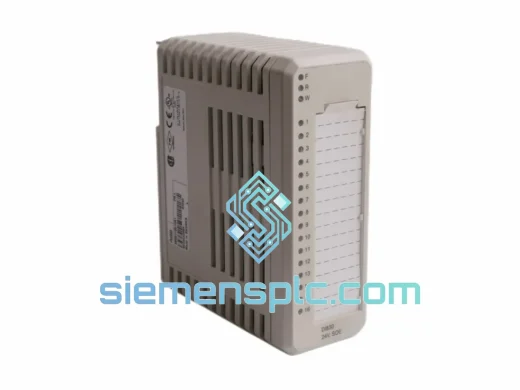
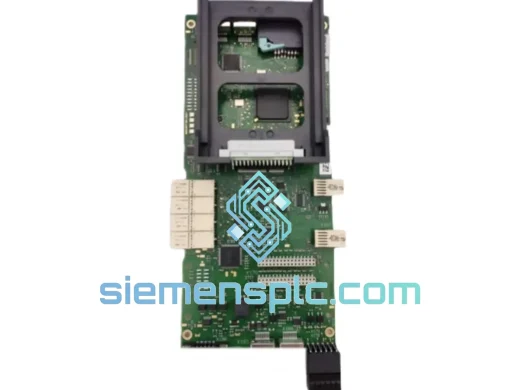
Siemens EZ-0310-03 Digital Input Module
Request verified availability, condition, replacement risk review, packing options and courier lead time for EZ-0310-03.
BrandSiemens
Part NumberEZ-0310-03
ConditionAvailability Check
Lead TimeRFQ Confirmation
DocumentsDatasheet / photos by RFQ
ShippingExport packing available
Auto-filled RFQ
EZ-0310-03
Click Request Quote and the part number is inserted into the inquiry form automatically.
- Reply by email: [email protected]
- WhatsApp / Tel: +86 18359268345
- Mon-Sat 9:00-18:00 GMT+8
Procurement Data
Key Product Information
Core fields for model confirmation and RFQ routing. Detailed product narrative remains below.
- Brand
- Siemens
- Primary Part Number
- EZ-0310-03
- Product Type
- PLC Digital Input Module
- Series / Family
- 24VDC SM 321 Series
- Country of Origin
- DE
- Catalog Category
- I/O Modules
- Operating Temp.
- 0°C to +60°C (horizontal), 0°C to +40°C (vertical)
Model confirmed for inquiry
EZ-0310-03
Send quantity, destination and urgency. The RFQ form keeps this part number attached.
Request Quote
Product Overview
Siemens EZ-0310-03 Digital Input Module — Every Hour of Downtime Costs You Money. We Ship Today.
Your line is down. The HMI is throwing a red fault. Maintenance is on the phone. You’ve already pulled the rack and confirmed it: the Siemens EZ-0310-03 Digital Input Module has failed. You don’t need a sales pitch — you need the part, configured correctly, on your doorstep before the next shift. That’s exactly what we do.
At siemensplc.com, we maintain live stock of Siemens S7-300 series I/O modules specifically for emergency replacement scenarios. The EZ-0310-03 is a 24VDC digital input module in the SM 321 family, designed for high-density discrete signal acquisition in demanding industrial environments. Whether you’re running a bottling line in Germany, a stamping press in Thailand, or a water treatment facility in the Middle East — this module ships from Xiamen within hours of order confirmation via DHL Express or FedEx International Priority.
URGENT REQUIREMENT? Contact: [email protected] | WhatsApp: +86 18359268345
Quick Technical Datasheet
| Parameter | Specification |
|---|---|
| Part Number | EZ-0310-03 |
| Brand | Siemens |
| Series | SM 321 / SIMATIC S7-300 |
| Module Type | Digital Input (DI) |
| Input Voltage | 24 VDC |
| Number of Inputs | 32 DI (4 groups of 8) |
| Input Current (per channel) | 7 mA typical at 24 VDC |
| Signal Delay | 0.1 ms / 0.5 ms / 3 ms (parameterizable) |
| Isolation | Optocoupler, group-isolated (8 channels per group) |
| Backplane Bus Current Draw | 80 mA at 5 VDC |
| Power Dissipation | 2.5 W max |
| Operating Temperature | 0°C to +60°C (horizontal), 0°C to +40°C (vertical) |
| Storage Temperature | -40°C to +70°C |
| Dimensions (W×H×D) | 40 mm × 125 mm × 120 mm |
| Weight | Approx. 220 g |
| Country of Origin | Germany |
| Availability | ✔ Ready to Ship — Xiamen Warehouse |
Troubleshooting & Replacement Tips
After handling hundreds of S7-300 field replacements, these are the failure patterns and swap pitfalls that actually matter:
Common Fault Indicators for EZ-0310-03:
- SF LED solid red on the module — hardware fault detected by the CPU. Pull the module diagnostics via STEP 7 or TIA Portal: navigate to PLC → Module Information → Diagnostic Buffer. Look for event ID 0x0A00 (module removed/inserted) or 0x0E00 (channel fault). A solid SF with no channel faults typically points to internal ASIC failure — the module needs replacement, not reconfiguration.
- Intermittent input signals on specific channels — before condemning the module, check the 20-pin front connector for corrosion or bent pins. Vibration-induced micro-fretting on the connector is a common culprit in press and compressor environments. Clean with contact cleaner, re-seat, and monitor. If the fault migrates to different channels after re-seating, the module’s input ASIC is degraded.
- All inputs reading 0 despite field signals present — verify 24 VDC supply to the module’s L+ and M terminals on the front connector. A blown fuse on the field supply rail will kill all inputs simultaneously. Also check that the group isolation is intact: measure resistance between M terminals of different groups — should be open circuit.
- CPU goes to STOP after module swap — this is almost always a configuration mismatch. The replacement module’s order number must match exactly what’s in the hardware configuration (HW Config). If you’re swapping in a module with a different firmware revision, the CPU may reject it. Check the module’s firmware version label and compare against the configured module properties in STEP 7.
Replacement Procedure — Step by Step:
- Power down the field supply to the module group. The S7-300 backplane can remain powered for hot-swap on some configurations, but disconnecting field power first eliminates arc risk on the 20-pin connector.
- Label and photograph the front connector wiring before removal. The 20-pin connector is keyed but wiring errors during re-installation are the #1 cause of post-swap faults.
- Unlock and remove the front connector — press the orange release tab, swing the connector forward, and lift clear. Do not pull by the wires.
- Release the module from the DIN rail — open the bus connector lever on the left side, slide the module to the right to disengage the backplane bus connector, then lift off the rail.
- Install the replacement EZ-0310-03 — hook the top of the module onto the rail, swing down, and slide left until the bus connector engages with a positive click. Verify the bus connector lever closes fully.
- Re-attach the front connector — align the keying notch, swing into position, and press until the latch clicks. Restore field supply power.
- Perform a CPU memory reset if required — if the CPU was in STOP due to the fault, cycle the mode switch: STOP → MRES (hold 3 seconds until SF LED blinks) → RUN. The CPU will reload the program from the memory card and perform a hardware scan. The new module should be recognized within one scan cycle.
- Verify channel-by-channel in the variable table — force known field signals and confirm each input bit toggles correctly in the process image. Do not release the line until all 32 channels are verified.
Configuration Notes:
- The EZ-0310-03 uses automatic slot addressing — the module’s logical address is determined by its physical slot position in the rack. No DIP switches or manual address assignment required. If you’re moving the module to a different slot, update the HW Config accordingly and download to the CPU.
- Input filter time is parameterizable per channel group (0.1 / 0.5 / 3 ms). Default is 3 ms. For high-speed proximity sensor applications, reduce to 0.1 ms. For noisy environments with long cable runs, keep at 3 ms to suppress interference.
- Firmware compatibility: Verify the replacement module’s firmware version is compatible with your CPU firmware. Mismatches between module FW and CPU FW can cause diagnostic errors even when the module is electrically functional. Check the Siemens compatibility matrix (Industry Online Support) for your specific CPU order number.
Reliability in Harsh Conditions
The SM 321 series was engineered for environments where consumer-grade electronics fail within weeks. The EZ-0310-03 carries the following validated environmental ratings:
- Vibration resistance: 10–58 Hz at 0.075 mm amplitude; 58–150 Hz at 1g — per IEC 60068-2-6. This covers the resonance bands of most industrial machinery including reciprocating compressors, punch presses, and conveyor drive systems. The module’s PCB is conformal-coated and the backplane connector is mechanically locked, preventing vibration-induced intermittent contact.
- Shock resistance: 15g / 11 ms half-sine — per IEC 60068-2-27. Sufficient for forklift impact events and door-slam transients in mobile equipment enclosures.
- Humidity: 10–95% RH non-condensing (operating), 5–95% RH non-condensing (storage). The conformal coating on the PCB provides additional protection against condensation events during temperature cycling in unheated enclosures.
- EMC immunity: Compliant with EN 61000-4-2 (ESD), EN 61000-4-4 (EFT/Burst), EN 61000-4-5 (Surge). The optocoupler isolation between field and backplane provides inherent common-mode rejection, protecting the CPU backplane from field-side transients.
- Pollution degree: 2 (per IEC 60664-1) — suitable for industrial control panels with normal levels of airborne contamination. For higher pollution environments (foundries, cement plants), install with positive-pressure purged enclosures.
- MTBF: >500,000 hours at 40°C ambient — Siemens published figure for SM 321 series. In practice, field failures are almost exclusively connector-related or caused by external overvoltage events, not internal component degradation.
Global Express Logistics
Our Xiamen warehouse operates on a same-day dispatch model for orders confirmed before 15:00 CST. Here’s exactly what happens after you place your order:
- Order confirmation (0–30 min): Our team verifies stock, pulls the unit, and performs a visual and functional pre-shipment check. You receive a confirmation email with the specific serial number of the unit being shipped.
- Export documentation (30–90 min): Commercial invoice, packing list, and certificate of origin are prepared. For destinations requiring import licenses or specific HS code declarations, we coordinate with your freight forwarder or handle directly.
- Carrier handoff (same day): DHL Express and FedEx International Priority pickups from our facility occur at 16:30 CST daily. Orders confirmed before 15:00 CST make the same-day pickup. Late orders ship next morning.
- Transit times (typical): Southeast Asia 1–2 business days; Middle East / Europe 2–3 business days; Americas 3–4 business days. These are DHL Express door-to-door estimates, not postal service estimates.
- Tracking: AWB number provided within 2 hours of carrier handoff. Real-time tracking link sent via email and WhatsApp.
- Customs clearance support: We provide complete documentation packages for customs clearance in all major markets. For EU imports, we can provide EUR.1 movement certificates where applicable. For US imports, we provide ECCN classification documentation.
- Emergency freight: For true production-critical situations, we can arrange charter courier or hand-carry service to any major international airport. Contact us directly on WhatsApp to discuss options.
Contact Information
Email: [email protected]
WhatsApp: +86 18359268345
Web: siemensplc.com
© 2026 siemensplc.com. All rights reserved.
Ready to quote
[email protected]
Send This Part Number to Sales
RFQ workflow
Quality workflow ->
Confirmation Process
01Model confirmation
We check the full part number, brand, series and visible nameplate information before quotation.
02Availability reply
Sales confirms stock path, condition option, quantity and realistic lead time for export dispatch.
03Packing & courier
DHL, FedEx, UPS or buyer courier arrangements can be reviewed with packing requirements.
Continue sourcing
Browse full catalog ->
Related Automation Parts
Similar brand or category products for fast comparison and multi-item RFQ lists.
Siemens
RFQ Ready
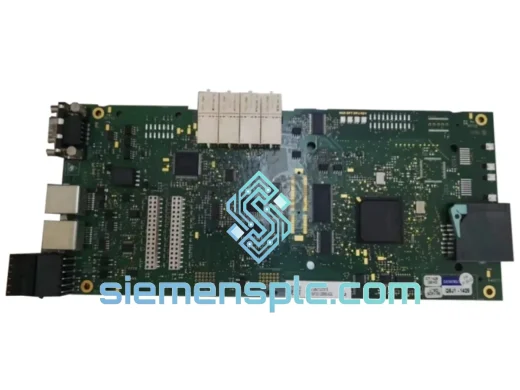
Siemens 6RY1803-0AA05-0AA1 Digital Output Module
SIMOREG
Origin DE
Digital Output Module