ABB
RFQ Ready
ABB YPK114A 3ASD399002B20 Drive Communications Module
Origin SE
Drive Communications Module
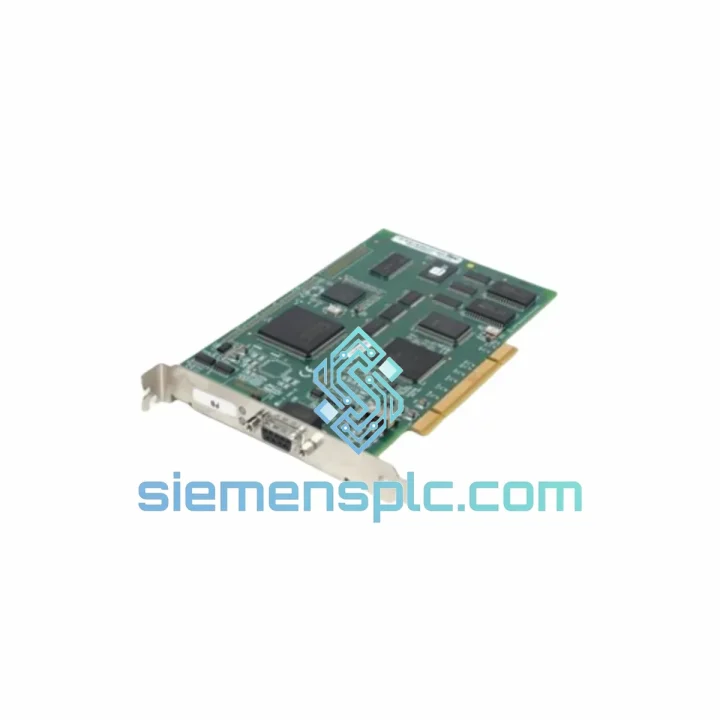
Request verified availability, condition, replacement risk review, packing options and courier lead time for PB3-PCI-e.
Click Request Quote and the part number is inserted into the inquiry form automatically.
Core fields for model confirmation and RFQ routing. Detailed product narrative remains below.
Your PROFIBUS network just went silent. The master card in your industrial PC is dead, and the entire segment — drives, remote I/O, valve positioners — has dropped off the bus. Production is at zero. Maintenance is on the phone. Every minute without a replacement is money walking out the door. The SST PB3-PCI-e / PB3-PCU is the exact card you need, and we have it on the shelf in Xiamen right now.
This is not a generic fieldbus card. The PB3-PCI-e and PB3-PCU are SST’s (Woodhead / Molex SST) purpose-built PROFIBUS DP interface cards for PC-based control systems. The PB3-PCI-e drops into any PCIe x1 or higher slot on a modern industrial PC or panel PC. The PB3-PCU fits the legacy 32-bit PCI slot still found in thousands of active HMI and SCADA host machines. Both cards run the same SST driver stack and configuration suite — swap the hardware, reinstall the driver, restore your GSD configuration, and you are back online. No re-engineering. No surprises.
URGENT REQUIREMENT? Contact: [email protected] | WhatsApp: +86 18359268345
| Parameter | Specification | Status |
|---|---|---|
| Part Numbers | PB3-PCI-e / PB3-PCU | ✅ Ready to Ship |
| Brand | SST (Woodhead / Molex SST) | 100% Original |
| Series | SST PROFIBUS Series | — |
| Protocol | PROFIBUS DP (EN 50170 / IEC 61158) | — |
| Form Factor | PCI Express (PB3-PCI-e) / PCI 32-bit (PB3-PCU) | — |
| Operating Mode | Master or Slave (software-configurable) | — |
| Baud Rate | 9.6 kbps – 12 Mbps (auto-detect) | — |
| Physical Connector | DB9 Female (standard PROFIBUS pinout) | — |
| OS Support | Windows (32/64-bit, refer to SST driver release notes) | — |
| Certifications | CE, UL (verify revision-specific compliance) | — |
| Origin | USA (SST / Molex SST) | — |
| Ship From | Xiamen, China | DHL / FedEx Express |
Failure Pattern #1 — Card Not Recognized After Reboot: The most common failure mode on aging PB3-PCU units is a corrupted firmware state triggered by a power surge or OS crash. Windows Device Manager shows the card with a yellow exclamation mark or lists it as an unknown device. Before condemning the card, try it in a different PCI slot on the same machine. If the problem follows the card, the onboard FPGA or firmware has failed — replacement is the only fix. Do not attempt to reflash firmware on a card that is not recognized by the driver installer.
Failure Pattern #2 — Bus Fault / All Slaves Lost: If the card is recognized by the OS but all PROFIBUS slaves drop off simultaneously, check the DB9 connector first. A bent pin on pin 3 (RxD/TxD-P) or pin 8 (RxD/TxD-N) will kill the entire segment. Inspect under magnification. If the connector is intact, the card’s RS-485 transceiver has likely failed — a common wear-out mechanism in high-cycle environments. Replace the card.
Replacement Procedure — Step by Step:
Firmware & Driver Version Matching: SST has released multiple driver versions for the PB3 series across Windows XP through Windows 10/11. Running a mismatched driver version is the single most common cause of post-replacement instability. Confirm your OS build number and cross-reference against the SST driver compatibility matrix before installing. If your system runs a legacy OS (XP, Win7 32-bit), contact us — we can advise on the correct legacy driver package.
Bus Termination After Swap: If the failed card was at either physical end of the PROFIBUS segment, confirm that the bus termination is correctly re-established after the swap. The PB3 series does not provide onboard active termination — termination must be handled at the DB9 connector or at the cable end. Missing termination on a 12 Mbps segment will cause immediate communication errors.
Industrial PCs running PROFIBUS master cards are rarely in air-conditioned server rooms. They sit inside control cabinets on the factory floor — subject to vibration from nearby presses and compressors, ambient temperatures that swing from 5°C at startup to 55°C at peak load, and humidity that condenses on cold mornings. The SST PB3 series was designed with this reality in mind.
The card’s PCB uses conformal coating on production variants, providing a moisture barrier that prevents corrosion on the signal traces and connector pads. The onboard oscillator is a temperature-compensated type, maintaining baud rate accuracy across the full operating temperature range — critical for 12 Mbps PROFIBUS segments where timing tolerance is tight. The DB9 connector is a heavy-duty, gold-contact variant rated for hundreds of mating cycles, resisting the oxidation that plagues cheaper connectors in humid environments.
Vibration resistance is achieved through a combination of the card’s low-profile component layout and the standard PCIe/PCI retention bracket. In high-vibration environments (>2g continuous), we recommend adding a card retention clip to the chassis — a standard practice for any expansion card in mobile or press-adjacent installations. The card itself has no moving parts and no electrolytic capacitors in the signal path, eliminating the two most common vibration-induced failure mechanisms.
Every unit we ship from Xiamen is inspected for physical integrity: connector alignment, bracket straightness, and visible PCB damage. Cards showing any sign of prior installation stress — bent bracket, scratched connector, reflow residue — are rejected before packaging. You receive a card that is ready to install, not one that has been cycled through a grey-market supply chain.
We operate from Xiamen, China — one of the country’s primary export hubs with direct access to DHL, FedEx, and UPS international express networks. When you confirm an order, the card is packaged in anti-static foam within a rigid outer carton and handed to the carrier the same business day for orders confirmed before 15:00 CST.
Typical transit times from Xiamen: Europe (Germany, Netherlands, UK) — 3 to 5 business days via DHL Express. Southeast Asia (Singapore, Thailand, Malaysia) — 2 to 3 business days. Middle East (UAE, Saudi Arabia) — 3 to 4 business days. North America (USA, Canada) — 4 to 6 business days via FedEx International Priority. All shipments include a commercial invoice, packing list, and HS code declaration pre-filled for customs clearance. We have zero tolerance for shipment delays caused by incomplete documentation.
For genuine emergencies — line-down situations where every hour counts — contact us directly on WhatsApp. We will coordinate with the carrier for priority pickup and provide you with a tracking number within 2 hours of shipment. We have handled same-day dispatch for customers in critical downtime situations across Europe, the Middle East, and Asia-Pacific. This is not a marketing claim — it is a service commitment backed by our logistics process.
All export documentation is prepared in compliance with Chinese customs regulations and the import requirements of your destination country. For customers in the EU, we provide the necessary documentation for CE compliance verification. For customers in regulated industries (pharmaceutical, nuclear, defense-adjacent), contact us in advance to discuss documentation requirements specific to your procurement process.
📧 Email: [email protected]
💬 WhatsApp: +86 18359268345
🌐 Web: siemensplc.com
© 2026 siemensplc.com. All rights reserved.
We check the full part number, brand, series and visible nameplate information before quotation.
Sales confirms stock path, condition option, quantity and realistic lead time for export dispatch.
DHL, FedEx, UPS or buyer courier arrangements can be reviewed with packing requirements.
Similar brand or category products for fast comparison and multi-item RFQ lists.