ABB
RFQ Ready
ABB YPK114A 3ASD399002B20 Drive Communications Module
Origin SE
Drive Communications Module
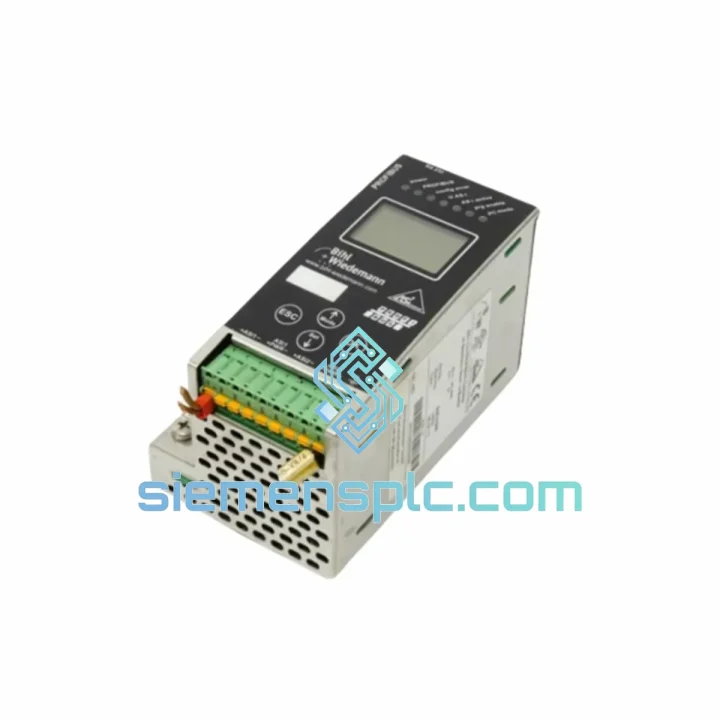
Request verified availability, condition, replacement risk review, packing options and courier lead time for BWU1568 AS-I 3.0.
Click Request Quote and the part number is inserted into the inquiry form automatically.
Core fields for model confirmation and RFQ routing. Detailed product narrative remains below.
Your AS-Interface segment is down. Slaves are dark. The PLC is throwing diagnostics you already know by heart. Every hour that gateway stays dead, your production manager is standing behind you. The WIEDERMANN BWU1568 AS-I 3.0 is not a substitute or a compatible alternative — it is the exact OEM unit your BIH1 network was built around. We have it in stock at our Xiamen warehouse. It ships today. It arrives before your next maintenance window.
This is not a catalog listing. This is a field-ready replacement sourced directly, stored in climate-controlled conditions, and dispatched with full export documentation. If your line is down, stop reading and contact us now.
⚡ URGENT REQUIREMENT? Contact: [email protected] | WhatsApp: +86 18359268345
| Parameter | Specification |
|---|---|
| Part Number / SKU | BWU1568 AS-I 3.0 |
| Series | BIH1 |
| Manufacturer | WIEDERMANN |
| Device Function | AS-Interface 3.0 Gateway / Segment Master |
| AS-i Specification | Version 3.0 — backward compatible with AS-i 2.1 slaves |
| Max. Slaves per Segment | 62 (A/B extended addressing) |
| Enclosure | Stainless Steel — IP67 rated |
| Supply Voltage | 24 V DC via AS-i power supply |
| Fieldbus Interface | PROFIBUS DP / PROFINET / EtherNet/IP (variant-dependent) |
| Mounting | 35 mm DIN rail |
| Operating Temperature | -25 °C to +70 °C |
| Humidity | Up to 95% RH, non-condensing |
| Weight | 1,970 g |
| Compliance | CE, RoHS, AS-i Specification 3.0 |
| Origin | Germany |
| Condition | New — 100% Original OEM |
| Stock Status | ✅ Ready to Ship — Xiamen Warehouse |
| Dispatch Lead Time | Same-day on orders confirmed before 14:00 CST |
Ten years of field calls on AS-i networks teaches you that the BWU1568 fails in a narrow set of predictable ways. Here is what you need to know before you pull the unit and before you commission the replacement.
Fault Code 0x8181 / 0x8182 — Gateway Not Responding on Fieldbus: Nine times out of ten, the gateway has lost its internal configuration table. Before condemning the unit, verify the AS-i power supply is delivering a stable 29.5–31.6 V on the AS-i cable. A sagging PSU — even one that reads 28 V — will corrupt the gateway’s EEPROM over weeks without triggering an obvious alarm. If voltage is confirmed good and the unit is still unresponsive, the EEPROM is gone. There is no field-recoverable firmware reflash on the BWU1568. Replace the unit.
Slave Address Conflicts After Unit Swap: The BWU1568 stores the LPS (List of Projected Slaves) in non-volatile memory. A new unit boots in Protected Operating Mode and will refuse to activate slaves until the detected slave list matches the stored LPS. You have two options: run the front-panel auto-address routine if your slaves support automatic addressing, or push the saved configuration from your PLC project via the fieldbus master. Skipping this step produces intermittent I/O faults that are nearly impossible to trace without a protocol analyzer — do not skip it.
Rotary Address Switch — Set Before Power-Up: On BIH1-series units, the fieldbus node address is configured via the rotary switch on the front face. This must be set to match your PROFIBUS or PROFINET configuration before the unit is energized. A mismatch presents as the gateway being invisible to the PLC — not as an AS-i fault — and wastes diagnostic time chasing the wrong subsystem.
Firmware Revision Matching: The BWU1568 AS-I 3.0 build is not interchangeable with BWU1568 AS-I 2.1 firmware variants. Check the firmware revision label on the replacement unit against your existing network master revision. Mixed-revision masters on the same AS-i segment cause slave polling errors under high bus load — errors that appear random but are entirely deterministic once you know the cause.
Field-Proven Replacement Sequence:
Field Note: The single most common commissioning error is energizing the fieldbus before the AS-i segment has stabilized. The PLC logs a configuration fault, the gateway enters error mode, and you spend 20 minutes chasing a problem that does not exist. AS-i first, always.
The stainless steel enclosure on the BWU1568 is not a premium cosmetic option — it is a functional engineering decision made for environments where painted steel housings corrode and fail within 18 months. IP67 certification means the unit survives direct water jets and temporary immersion. In food and beverage facilities where daily caustic washdowns are standard operating procedure, this rating is the difference between a gateway that lasts a maintenance cycle and one that lasts a decade.
Vibration resistance is validated to IEC 60068-2-6 — sinusoidal vibration from 10 to 150 Hz at 1 g. On press lines, compressor skids, and conveyor frames where the DIN rail itself vibrates continuously, cheaper gateways develop intermittent connector faults within months. The BWU1568’s internal PCB mounting and conformal coating prevent the micro-fractures that generate those ghost faults — the ones that appear in the diagnostic log at 2:00 AM and are gone by the time the maintenance team arrives.
The operating temperature range of -25 °C to +70 °C is not theoretical headroom. In outdoor enclosures in northern European or Canadian installations, or in enclosures mounted adjacent to furnace exhausts in steel and glass plants, this range is the margin between a gateway that survives a cold startup and one that does not. Humidity tolerance to 95% non-condensing covers coastal installations, tropical climates, and indoor environments with poor HVAC without requiring additional enclosure conditioning.
Every unit we dispatch has been stored in a climate-controlled warehouse in Xiamen. We do not move shelf-aged stock that has been through uncontrolled temperature cycling. The unit you receive has the same operational life expectancy as a factory-fresh delivery from the OEM.
Our dispatch hub is in Xiamen — one of China’s primary export ports with direct DHL Express and FedEx gateway connections operating daily. Here is exactly what happens after your order is confirmed.
Same-Day Dispatch: Orders confirmed with payment before 14:00 CST are picked, inspected against the part number, and handed to the carrier the same business day. A tracking number reaches you within 2 hours of dispatch — not the next morning.
DHL Express Worldwide Transit Times (real-world averages from our shipment history):
FedEx International Priority is available as an alternative for destinations where FedEx has stronger last-mile coverage. We select the carrier with the fastest confirmed transit for your specific postal code — you do not need to specify a preference.
Export Documentation: Every shipment includes a commercial invoice, packing list, and HS code declaration (HS 8537.10). Certificate of Origin and specific customs valuation documentation are available at no additional charge — notify us at order confirmation.
Bulk Orders (5+ units): We offer consolidated air freight with a dedicated shipment coordinator. Lead time is confirmed at order — we do not quote generic lead times for volume requirements.
Emergency Freight: If your plant is down and standard express transit is not fast enough, contact us directly on WhatsApp. We have arranged next-flight-out courier shipments for critical production outages. The cost is higher, but it is a real option when the alternative is a line standing still.
📧 Email: [email protected]
💬 WhatsApp: +86 18359268345
🌐 Web: siemensplc.com
© 2026 siemensplc.com. All rights reserved.
We check the full part number, brand, series and visible nameplate information before quotation.
Sales confirms stock path, condition option, quantity and realistic lead time for export dispatch.
DHL, FedEx, UPS or buyer courier arrangements can be reviewed with packing requirements.
Similar brand or category products for fast comparison and multi-item RFQ lists.