ABB
In Stock OK
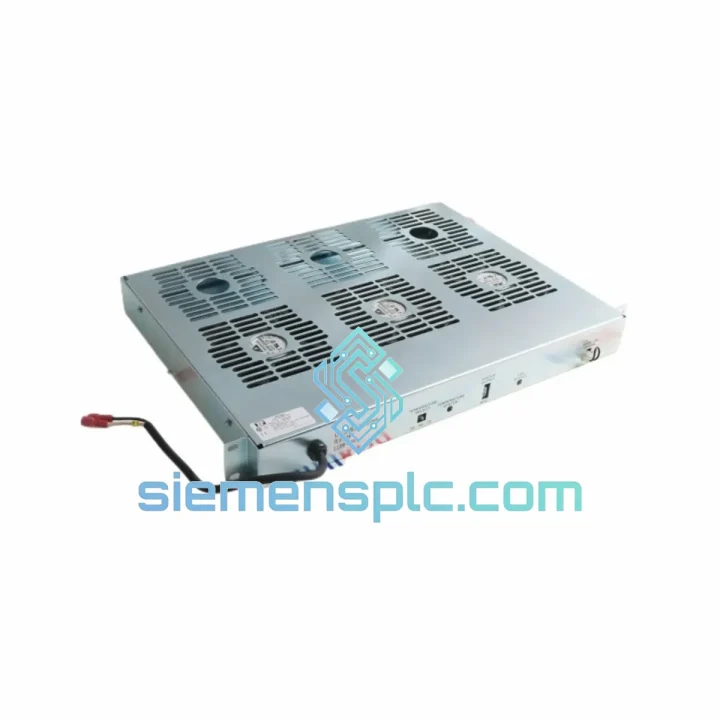
ABB IPFAN12 Fan Module
Request verified availability, condition, replacement risk review, packing options and courier lead time for IPFAN12.
BrandABB
Part NumberIPFAN12
ConditionAvailability Check
Lead TimeRFQ Confirmation
DocumentsDatasheet / photos by RFQ
ShippingExport packing available
Auto-filled RFQ
IPFAN12
Click Request Quote and the part number is inserted into the inquiry form automatically.
- Reply by email: [email protected]
- WhatsApp / Tel: +86 18359268345
- Mon-Sat 9:00-18:00 GMT+8
Procurement Data
Key Product Information
Core fields for model confirmation and RFQ routing. Detailed product narrative remains below.
- Brand
- ABB
- Primary Part Number
- IPFAN12
- Product Type
- PLC Fan Module
- Series / Family
- AC500
- Manufacturer
- ABB
- Country of Origin
- SE
- Catalog Category
- PLCs & Controllers
- Operating Temp.
- −25 °C to +60 °C
- Warranty
- 12 months from dispatch date
Model confirmed for inquiry
IPFAN12
Send quantity, destination and urgency. The RFQ form keeps this part number attached.
Request Quote
Product Overview
ABB IPFAN12 AC500 PLC Cooling Fan Module – Stop the Clock on Downtime
Every hour a process line sits idle costs money. When thermal shutdown takes down an AC500 controller because the IPFAN12 fan module has failed, the clock starts immediately. This page exists for one reason: to get a verified, ready-to-ship ABB IPFAN12 into your hands as fast as physically possible. We hold stock in Xiamen, China, with same-day dispatch available for orders confirmed before 15:00 CST. DHL Express and FedEx International Priority put this module on your bench within 2–5 business days to most global destinations.
The IPFAN12 is not a generic cooling accessory — it is a purpose-engineered thermal management module for the ABB AC500 PLC platform. Its brushless DC fan assembly, integrated speed monitoring, and direct backplane power draw are matched to the AC500’s thermal envelope. Substituting a non-OEM fan risks inadequate airflow, missing fault feedback to the CPU, and voided system certification. Use the correct part.
⚡ URGENT REQUIREMENT? Contact: [email protected] | WhatsApp: +86 18359268345
Quick Technical Datasheet
| Part Number | IPFAN12 |
| Manufacturer | ABB |
| Series | AC500 (PM5xx CPU family) |
| Module Function | Active forced-air cooling for AC500 CPU and I/O rack |
| Fan Type | Brushless DC, electronically commutated |
| Power Supply | Backplane-fed (no external wiring required) |
| Fan Speed Monitoring | Tachometer feedback to AC500 system diagnostics |
| Operating Temperature | −25 °C to +60 °C |
| Storage Temperature | −40 °C to +70 °C |
| Relative Humidity | 5–95 % RH, non-condensing |
| Weight | approx. 1,300 g |
| Mounting | Direct plug-in to AC500 mounting base / rack |
| Certifications | CE, RoHS, ISO 9001 manufacturing |
| Warranty | 12 months from dispatch date |
| Stock Status | ✅ Ready to Ship — Xiamen, China |
Troubleshooting & Replacement Tips
Field experience with AC500 thermal faults points to a consistent failure pattern. Before condemning the IPFAN12, run through this sequence:
Symptom: CPU raises overtemperature warning (diagnostic code 0x8C10 or equivalent in your firmware version)
First check ambient temperature inside the panel. If ambient is within spec (<40 °C at the rack face), the fan module is the primary suspect. Confirm by navigating to the AC500 hardware configuration in Automation Builder → Device → Diagnostics → Module Status. A fan fault will appear as a hardware error on the IPFAN12 slot.
Symptom: Intermittent CPU restarts under high I/O load
This is a classic thermal throttle signature. The AC500 CPU will attempt a controlled restart before reaching hard thermal limits. If the IPFAN12 is running at reduced speed (partial bearing failure), the tachometer feedback will show a speed below the nominal threshold — visible in the diagnostic log as a fan speed deviation event.
Replacement procedure — key steps:
- Step 1 — Power state: The IPFAN12 can be replaced with the rack powered in most AC500 configurations, but confirm with your site safety procedure. If the CPU is in RUN mode, switch to STOP before physical removal to avoid a spurious I/O event.
- Step 2 — No address switches: The IPFAN12 carries no DIP switches or rotary address selectors. It is identified by slot position on the mounting base. No re-addressing is required after swap.
- Step 3 — Firmware: The fan module contains no user-programmable firmware. No firmware download is needed post-replacement. The CPU automatically re-establishes tachometer monitoring within one scan cycle of module insertion.
- Step 4 — Verify in diagnostics: After insertion, confirm the fan fault clears in Automation Builder diagnostics. If the overtemperature warning persists, check for blocked ventilation slots or a secondary heat source in the panel.
- Step 5 — Log the event: Record the replacement in your maintenance log with the serial number of the failed unit. ABB field service may request this data if a warranty claim is raised on the CPU.
Common misdiagnosis: Engineers occasionally replace the CPU (PM5xx) when the root cause is a failed IPFAN12. The IPFAN12 costs a fraction of a CPU module. Always eliminate the fan module as a cause before escalating to CPU replacement.
Reliability in Harsh Conditions
The IPFAN12 is built to ABB’s industrial-grade mechanical and electrical specifications. The brushless DC motor eliminates brush wear as a failure mode, extending mean time between failures (MTBF) well beyond conventional brushed fan assemblies. Bearing selection uses sealed, lubricated ball bearings rated for continuous operation across the full −25 °C to +60 °C temperature range — no re-lubrication interval required.
Vibration resistance is validated to IEC 60068-2-6 (sinusoidal vibration) and IEC 60068-2-27 (mechanical shock), covering the transport and operational shock profiles typical of heavy industrial environments: compressor rooms, press lines, and mobile equipment enclosures. The fan housing is constructed from flame-retardant polymer (UL 94 V-0 rated), providing an additional barrier in panel fire scenarios.
Humidity performance is validated to 95 % RH non-condensing. The PCB assembly uses conformal coating on critical signal traces, reducing the risk of dendritic growth and leakage current in high-humidity environments such as food processing facilities and coastal installations. EMC performance meets EN 61000-4 series immunity requirements, ensuring the fan’s switching electronics do not introduce conducted or radiated interference into the AC500 backplane.
Global Express Logistics
Stock is held at our Xiamen, China facility. Xiamen Gaoqi International Airport (XMN) provides direct cargo connections to major hubs in Europe, North America, Southeast Asia, and the Middle East, enabling consistent 2–5 business day door-to-door transit on DHL Express and FedEx International Priority services.
Dispatch timeline: Orders with payment confirmed before 15:00 CST are processed for same-day dispatch. Orders confirmed after 15:00 CST ship the following business day. A tracking number is issued within 2 hours of handover to the carrier.
Documentation included with every shipment:
- Commercial invoice (declared value per your instruction for customs purposes)
- Packing list with part number, quantity, and serial number
- Certificate of origin (China) — available on request for preferential duty treatment
- Authenticity declaration confirming sourcing chain
Freight options: DHL Express (2–4 days, most destinations) | FedEx International Priority (2–5 days) | SF International Economy (5–10 days, cost-sensitive shipments) | Sea freight consolidation available for bulk orders of 10+ units.
We handle export classification and HS code declaration. For destinations with import restrictions on industrial electronics, contact us before ordering — we will advise on documentation requirements and any applicable export licensing obligations.
Contact Information
📧 Email: [email protected]
📱 WhatsApp: +86 18359268345
🌐 Web: siemensplc.com
📍 Location: Xiamen, China
© 2026 siemensplc.com. All rights reserved.
Ready to quote
[email protected]
Send This Part Number to Sales
RFQ workflow
Quality workflow ->
Confirmation Process
01Model confirmation
We check the full part number, brand, series and visible nameplate information before quotation.
02Availability reply
Sales confirms stock path, condition option, quantity and realistic lead time for export dispatch.
03Packing & courier
DHL, FedEx, UPS or buyer courier arrangements can be reviewed with packing requirements.
Continue sourcing
Browse full catalog ->
Related Automation Parts
Similar brand or category products for fast comparison and multi-item RFQ lists.
ABB
RFQ Ready
ABB 1SVR427075R0000 CP-A CM PLC CPU Module – AC500 Compact Series
AC500
Origin SE
PLC CPU Module