Siemens
RFQ Ready
Siemens 6RY1803-1DA04 Motor Protection Relay
SINAMICS
Origin DE
Motor Protection Relay
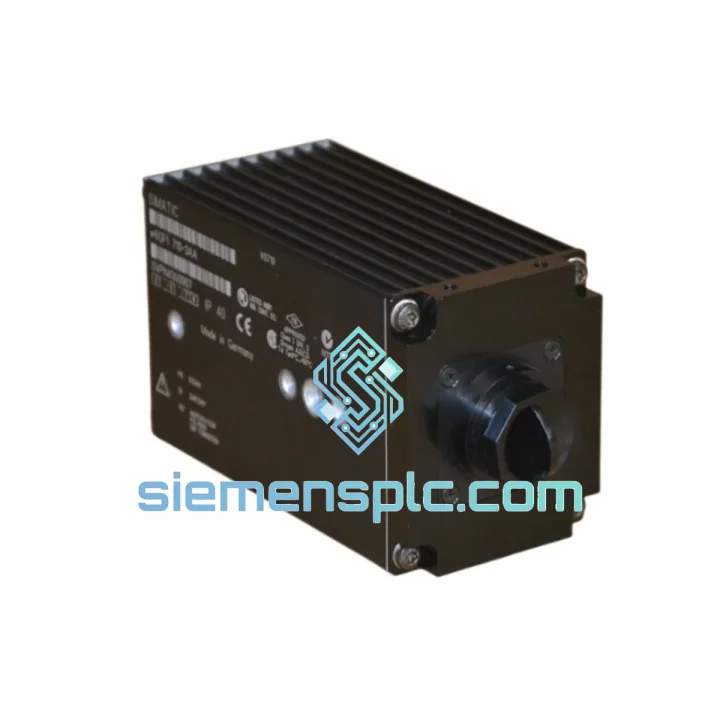
Request verified availability, condition, replacement risk review, packing options and courier lead time for 6GF1710-3AA.
Click Request Quote and the part number is inserted into the inquiry form automatically.
Core fields for model confirmation and RFQ routing. Detailed product narrative remains below.
Every hour your line sits idle waiting on a vision sensor, you’re burning money. The Siemens 6GF1710-3AA is a compact PROFINET-native vision sensor that integrates directly into your S7-1200 or S7-1500 architecture — no gateway, no third-party software, no re-engineering. We stock it. We ship it. You get back to production.
Whether you’re dealing with a sudden sensor failure on a stamping line, a corrupted firmware event that’s locked the unit, or a physical impact that’s cracked the housing — this is the exact replacement you need, sourced from verified channels, inspected before dispatch, and on a DHL express pallet within 24 hours of order confirmation.
URGENT REQUIREMENT? Contact: [email protected] | WhatsApp: +86 18359268345
| Part Number | 6GF1710-3AA |
| Product Series | SIMATIC VS710 |
| Manufacturer | Siemens AG |
| Device Type | Compact Industrial Vision Sensor |
| Image Sensor | CMOS, Monochrome, Global Shutter |
| Resolution | 752 × 480 px (0.36 MP) |
| Frame Rate | Up to 60 fps |
| Working Distance | 50 – 300 mm |
| Communication | PROFINET IO (IRT capable) |
| Supply Voltage | 24 V DC (18 – 30 V DC) |
| Digital I/O | 2 × DI / 2 × DO |
| Protection Rating | IP67 |
| Operating Temperature | 0 °C to +50 °C |
| Housing | Die-cast zinc alloy, 46 × 46 × 68 mm |
| Illumination | Integrated red LED ring, no external strobe needed |
| Configuration Tool | SIMATIC Vision Configurator (TIA Portal add-in) |
| Certifications | CE, UL, cULus, RoHS |
| Origin | Germany |
| Stock Status | ✔ Ready to Ship — Xiamen Warehouse |
Most common failure modes on the 6GF1710-3AA in the field:
1. PROFINET Station Name Conflict After Swap
This is the #1 issue engineers hit during emergency replacement. The VS710 ships with a blank station name. If your TIA Portal project has the old sensor’s name hardcoded, the new unit will show up as an unknown IO device and the PLC will throw a diagnostic alarm (OB 82 / OB 86). Fix: before powering the new unit, use the TIA Portal “Assign Device Name” function (Online → Accessible Devices) to push the correct PROFINET station name to the replacement sensor. Do this before going online with the PLC — saves you 30 minutes of head-scratching.
2. IP Address Not Assigned — Sensor Unreachable
The VS710 does not retain a static IP by default. It relies on the PROFINET IO controller to assign the IP via DCP (Discovery and Configuration Protocol) at startup. If the sensor is reachable on the network but the PLC can’t establish IO communication, check that the IP address in the hardware configuration matches the subnet of your PROFINET interface. A common mistake after replacement: the old sensor had a manually assigned IP that was never documented. Use PRONETA or TIA Portal’s network scan to confirm what address the new unit is broadcasting.
3. Recipe / Inspection Job Lost After Power Cycle
The VS710 stores inspection recipes in internal flash. A unit that has been in storage or was previously used on a different line will not have your recipes. You must download the correct recipe from SIMATIC Vision Configurator before the sensor can produce valid pass/fail results. Keep a backup of your .vcp project file — if you don’t have it, you’ll need to rebuild the inspection from scratch using the original teach images.
4. Firmware Mismatch with TIA Portal Version
If your TIA Portal project was built with a newer GSD file than the firmware on the replacement unit, you’ll see a “Module mismatch” error in the diagnostic buffer. Check the firmware version via the sensor’s web interface (http://[sensor-IP]) and compare against the GSD file version in your project. Firmware updates are applied through SIMATIC Vision Configurator over PROFINET — no hardware access required.
5. Lens Fogging / Contamination on Optical Window
In high-humidity or washdown environments, the optical window can accumulate condensation or residue that degrades detection reliability before the sensor fully fails. If you’re seeing intermittent false rejects with no electrical fault, clean the window with isopropyl alcohol and a lint-free cloth before condemning the unit. If the problem persists after cleaning, the CMOS sensor or LED ring is likely degraded — replace the unit.
Replacement Checklist (field-ready):
The 6GF1710-3AA was not designed for a climate-controlled lab. It was built for the floor — stamping presses, welding cells, food processing lines, and outdoor logistics conveyors. The die-cast zinc alloy housing is not a marketing claim; it’s the same material used in industrial connector housings because it dissipates heat, resists deformation under mechanical load, and doesn’t crack when a forklift clips the mounting bracket.
IP67 sealing means the sensor survives full immersion in water up to 1 meter for 30 minutes — relevant when your maintenance crew hoses down the line at shift change. The integrated LED ring eliminates the external strobe controller that’s typically the first component to fail in a vibration-heavy environment. Fewer components in the signal chain means fewer failure points.
Operating range of 0 °C to +50 °C covers the vast majority of industrial environments. For applications approaching the upper limit — foundry proximity, oven-adjacent conveyors — verify ambient temperature at the mounting point, not just the room temperature. Radiant heat from nearby processes can push the local environment 10–15 °C above ambient. If you’re consistently running near the thermal ceiling, consider a short standoff bracket to improve airflow around the housing.
The global shutter eliminates the rolling-shutter distortion that causes false rejects on fast-moving targets. At a conveyor speed of 1.5 m/s and a working distance of 100 mm, the VS710 captures a sharp image with no motion blur — the kind of reliability that keeps your OEE numbers honest.
Our warehouse is in Xiamen, China — one of the most logistics-efficient export hubs on the mainland, with direct DHL and FedEx express lanes to major industrial hubs in Europe, North America, Southeast Asia, and the Middle East.
Standard dispatch timeline:
Every shipment is packed in anti-static foam with the original Siemens carton where available, or equivalent industrial packaging. The sensor is secured against shock loads that occur during air freight handling — we’ve seen too many units arrive with cracked connectors from inadequate packing. That doesn’t happen here.
If your procurement team requires a formal export document, EAR99 classification confirmation, or a specific carrier account number for billing, include that in your RFQ and we’ll accommodate it before dispatch.
Email: [email protected]
WhatsApp: +86 18359268345
Web: siemensplc.com
© 2026 siemensplc.com. All rights reserved.
We check the full part number, brand, series and visible nameplate information before quotation.
Sales confirms stock path, condition option, quantity and realistic lead time for export dispatch.
DHL, FedEx, UPS or buyer courier arrangements can be reviewed with packing requirements.
Similar brand or category products for fast comparison and multi-item RFQ lists.