

Siemens
RFQ Ready
SIEMENS 6GK5108-0BA00-2AA3 Industrial Ethernet Switch
SIMATIC
Origin DE
Industrial Ethernet Switch
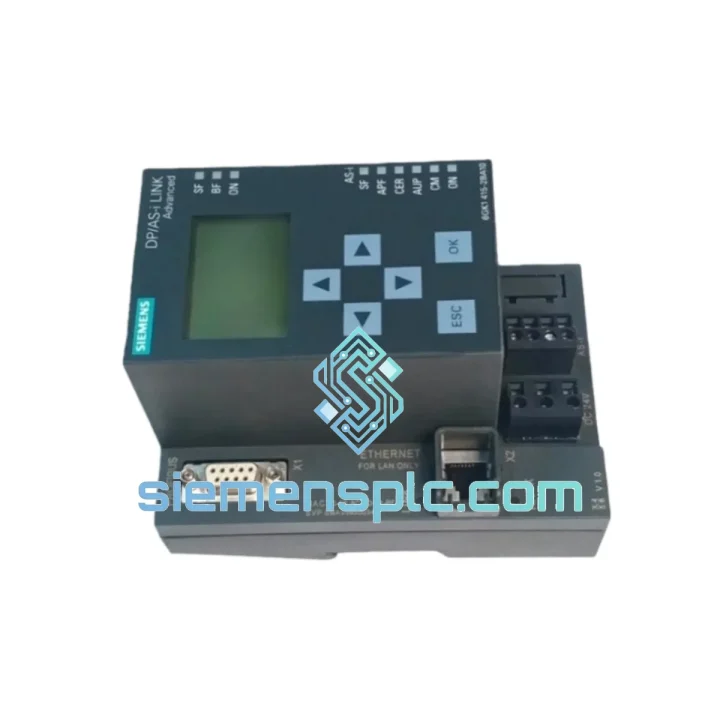
Request verified availability, condition, replacement risk review, packing options and courier lead time for 6GK1415-2BA10.
Click Request Quote and the part number is inserted into the inquiry form automatically.
Core fields for model confirmation and RFQ routing. Detailed product narrative remains below.
Your PROFIBUS DP network just lost its AS-Interface gateway. The line is stopped. Maintenance is on the phone. You need a Siemens 6GK1415-2BA10 DP/AS-Interface Link Advanced — not in two weeks, not “subject to availability” — now. We stock it in Xiamen and we move fast. DHL Express to most destinations in 3–5 business days. One call, one part, line back up.
This is not a listing. This is a recovery plan.
URGENT REQUIREMENT? Contact: [email protected] | WhatsApp: +86 18359268345
| Parameter | Value |
|---|---|
| Part Number | 6GK1415-2BA10 |
| Brand | Siemens |
| Series | SIMATIC NET |
| Function | DP/AS-Interface Link Advanced Module |
| PROFIBUS DP Role | Slave (connects to DP master) |
| AS-i Segments | 2 independent segments |
| Max AS-i Slaves | 62 (31 per segment) |
| PROFIBUS Baud Rate | Auto-detect, up to 12 Mbit/s |
| Supply Voltage | 24 V DC (±20%) |
| AS-i Power | External AS-i PSU required (e.g. 3RX9501) |
| Mounting | 35 mm DIN rail |
| Operating Temp | 0 °C to +60 °C |
| Protection Rating | IP20 |
| Certifications | CE, UL, cUL, FM |
| Country of Origin | Germany |
| Stock Status | ✅ Ready to Ship – Xiamen Warehouse |
Ten years of field calls on this module. Here is what actually goes wrong and what to check before you even open the box:
Fault 1 — BF LED solid red on the DP master side. The 6GK1415-2BA10 is configured as a DP slave. If the DP master cannot find it, the first suspect is a GSD file mismatch. Pull the GSD file version from the label on the old module and match it exactly in your STEP 7 or TIA Portal hardware config. A version delta of even one revision will cause the master to reject the slave address.
Fault 2 — AS-i slaves not detected after swap. The 6GK1415-2BA10 stores its AS-i slave address table in non-volatile memory. On a cold replacement unit, this table is blank. You have two options: (a) use the “Automatic Address Assignment” mode via the front-panel button sequence to let the module re-learn the network, or (b) restore the configuration from a STEP 7 / TIA Portal project download. Do not skip this step — a blank address table means zero AS-i I/O, even if the DP link is healthy.
Fault 3 — Segment 2 shows no slaves, Segment 1 OK. Check the AS-i power supply feeding Segment 2. The 6GK1415-2BA10 does not share AS-i power between segments. Each segment needs its own 30 V DC AS-i PSU. A failed PSU on one segment will not affect the other — which is exactly why this fault is easy to misdiagnose as a module failure.
Replacement checklist before powering up:
Firmware note: If your DP master is running TIA Portal V17+ and the replacement module has firmware below V3.0, you may see a “Module not compatible” warning in the diagnostics buffer. Update the module firmware via the SIMATIC NET CD or download from Siemens Industry Online Support before going live.
Control cabinets in automotive stamping lines, cement plants, and offshore platforms are not gentle environments. The 6GK1415-2BA10 is built to the same industrial-grade standard Siemens applies across the SIMATIC NET portfolio — and that standard is not marketing language, it is a measurable specification.
The module is rated for continuous operation at 60 °C ambient without derating. Its conformal-coated PCB resists condensation and airborne contaminants common in food processing and chemical plants. Vibration resistance meets IEC 60068-2-6 (sinusoidal, 10–58 Hz, 0.075 mm amplitude; 58–500 Hz, 1 g) — which means it survives the kind of cabinet rattle that kills cheaper gateways within months. EMC immunity is tested to EN 61000-6-2, the industrial immunity standard, covering conducted and radiated RF, ESD, and fast transients from relay coils and VFD switching.
In practice: we have shipped this module to steel mills in Hebei, petrochemical plants in the Middle East, and automotive body shops in Germany. The failure rate on genuine Siemens units in properly installed cabinets is extremely low. When they do fail, it is almost always due to sustained overvoltage on the 24 V supply rail or physical damage from a cabinet flood — not component wear.
Buy genuine. The counterfeit market for SIMATIC NET modules is active. A fake 6GK1415-2BA10 will pass a visual inspection and may even boot — but it will fail under thermal stress or high AS-i bus load. The cost of a second downtime event dwarfs the price difference.
Our warehouse is in Xiamen, Fujian — one of China’s primary export hubs with direct access to Xiamen Gaoqi International Airport and Xiamen Port. This matters for your lead time.
Standard express flow:
For orders requiring formal import documentation (HS code 8517.62, commercial value declaration, or specific COO format for customs clearance), advise us at order time and we will prepare the full package. We have shipped to 60+ countries and know the documentation requirements for most major industrial import markets.
Bulk orders (5+ units) qualify for sea freight consolidation with 7–14 day transit to major ports. Contact us for a freight comparison quote.
Ready to order or need a quote? Reach us directly — no ticket system, no chatbot, a real engineer picks up.
📧 Email: [email protected]
💬 WhatsApp: +86 18359268345
🌐 Web: siemensplc.com
© 2026 siemensplc.com. All rights reserved.
We check the full part number, brand, series and visible nameplate information before quotation.
Sales confirms stock path, condition option, quantity and realistic lead time for export dispatch.
DHL, FedEx, UPS or buyer courier arrangements can be reviewed with packing requirements.
Similar brand or category products for fast comparison and multi-item RFQ lists.


