

Siemens
RFQ Ready
Siemens 6AV7240-0HC07-0PA0 Industrial Panel PC Motherboard – SIMATIC IPC477D
SIMATIC
Origin DE
Industrial Panel PC Motherboard
Request verified availability, condition, replacement risk review, packing options and courier lead time for 6AV3607-1JC20-0AX1.
Click Request Quote and the part number is inserted into the inquiry form automatically.
Core fields for model confirmation and RFQ routing. Detailed product narrative remains below.
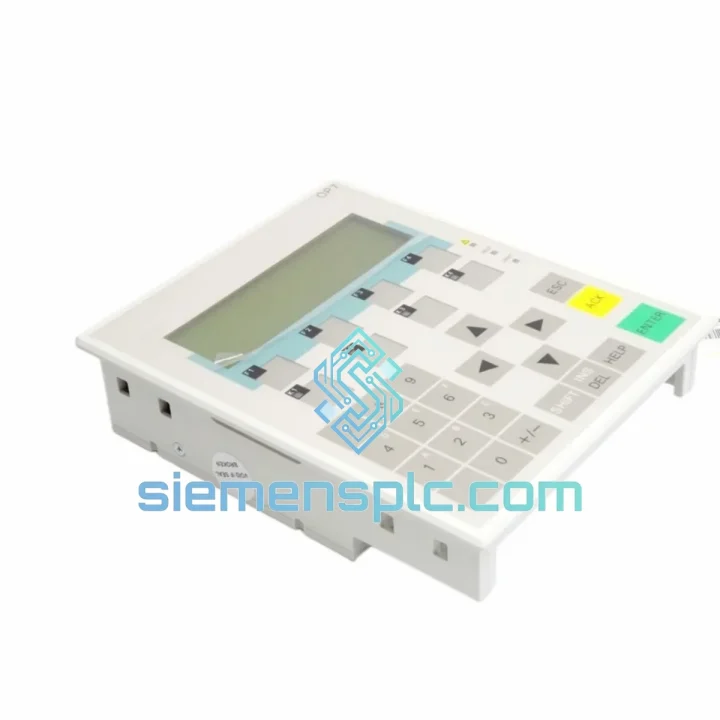
Your line stopped. The OP7 panel is dead — blank screen, no comms, operators standing around. You’ve already lost the first hour. The question now is whether you lose the next 72 hours waiting on a distributor’s lead time, or whether you get back online by tomorrow morning. The Siemens 6AV3607-1JC20-0AX1 is in stock at our Xiamen warehouse. We process same-day. DHL Express is on standby. This is not a pre-order listing.
URGENT REQUIREMENT? Contact: [email protected] | WhatsApp: +86 18359268345
| Parameter | Specification |
|---|---|
| Part Number | 6AV3607-1JC20-0AX1 |
| Series | SIMATIC HMI OP7 |
| Manufacturer | Siemens AG |
| Display Type | LCD, 4-line text, backlit |
| Communication Interface | MPI / PROFIBUS-DP |
| Supply Voltage | 24 V DC (±20%) |
| Current Consumption | Max. 400 mA at 24 V DC |
| Front Panel Protection | IP65 |
| Operating Temperature | 0 °C to +50 °C |
| Storage Temperature | -20 °C to +70 °C |
| Dimensions (W × H × D) | 144 × 108 × 60 mm |
| Weight | Approx. 900 g |
| Programming Tool | ProTool v6.x / WinCC flexible 2004+ |
| Compatible PLCs | S7-200, S7-300, S7-400, S5 (via adapter) |
| Certifications | CE, UL, RoHS |
| Stock Status | ✔ Ready to Ship — Xiamen Stock |
The OP7 fails in predictable patterns after years of continuous duty. Here is what shows up most often on site and how to handle the swap without creating new problems.
Fault 1 — Blank Display, No Backlight: Nine times out of ten this is the 24 V DC supply rail, not the panel itself. Before condemning the 6AV3607-1JC20-0AX1, measure voltage at the X1 connector pins under load. Anything below 19.2 V will cause a silent shutdown. Replace the SITOP or check the fuse block first. If supply is clean and the panel still will not boot, the internal DC/DC converter has failed and the panel needs replacement.
Fault 2 — No Connection to PLC / MPI Timeout: This is a bus address conflict or baud rate mismatch 80% of the time. The OP7 stores its MPI address in non-volatile memory. A new replacement unit defaults to MPI address 1. If any other node on the bus shares address 1, you get a collision and the panel loops on the connection screen. Use the panel’s own setup menu — hold F1 and F4 simultaneously on power-up — to reassign the MPI address before connecting to the live bus. Baud rate must match the CPU’s MPI port setting, typically 187.5 kbps for S7-300.
Fault 3 — Project Transfer Fails / Wrong Panel Type Error: The 6AV3607-1JC20-0AX1 runs a specific firmware version. If your ProTool project was compiled against a newer OP7 firmware and the replacement unit carries an older version, the transfer will abort. Check firmware via the panel’s diagnostic menu under Setup → System → Version. If there is a mismatch, update the panel firmware via ProTool before transferring the project. Keep a copy of the original .fwl firmware file on your laptop — this saves hours on night shifts.
Fault 4 — Membrane Keypad Unresponsive: Individual keys stop registering after years of high-cycle use, especially F1 through F8. This is mechanical wear of the membrane contact layer. There is no field repair — the panel must be replaced. When installing the new unit, avoid pressing keys during the boot sequence as this can corrupt the startup configuration.
Replacement Procedure (Condensed):
The SIMATIC OP7 was built for the factory floor. The 6AV3607-1JC20-0AX1 carries IP65 protection on the front face — it withstands directed water jets and heavy dust ingress. In practice this matters in food processing lines where washdown is daily, in cement plants where fine particulate is constant, and in outdoor pump stations where humidity swings from 20% to 95% RH without warning.
The unit is rated for continuous operation from 0 °C to +50 °C ambient. Inside a sealed control cabinet in summer, ambient can push 45 °C before the cabinet thermostat activates. The OP7 handles this without throttling or shutdown. LCD contrast may shift slightly at temperature extremes, which is normal and adjustable via the setup menu.
Vibration resistance meets IEC 60068-2-6 requirements — sinusoidal vibration up to 10–58 Hz at 0.075 mm amplitude and 58–500 Hz at 1 g. This covers most conveyor, compressor, and pump applications. For installations on equipment with severe shock loads such as presses or hammers, mount the panel on a vibration-isolated sub-plate rather than directly on the machine frame.
The housing is ABS/PC blend — impact-resistant and chemically resistant to most industrial cleaning agents. Avoid prolonged contact with ketones or chlorinated solvents on the front membrane.
Stock is held at our Xiamen warehouse, Fujian Province, China. Xiamen is a primary DHL and FedEx express gateway — not a consolidation hub. What that means for your downtime calculation:
All shipments include a commercial invoice, packing list, and certificate of origin. HS Code 8537.10 applies in most jurisdictions — confirm with your customs broker for import classification. Proforma invoices for advance customs clearance are available on request. For time-critical orders, contact us directly on WhatsApp and we coordinate the shipment in real time.
We respond within 30 minutes during business hours (08:00–20:00 CST, Monday–Saturday).
Email: [email protected]
WhatsApp: +86 18359268345
Web: siemensplc.com
© 2026 siemensplc.com. All rights reserved.
We check the full part number, brand, series and visible nameplate information before quotation.
Sales confirms stock path, condition option, quantity and realistic lead time for export dispatch.
DHL, FedEx, UPS or buyer courier arrangements can be reviewed with packing requirements.
Similar brand or category products for fast comparison and multi-item RFQ lists.


