SST
RFQ Ready
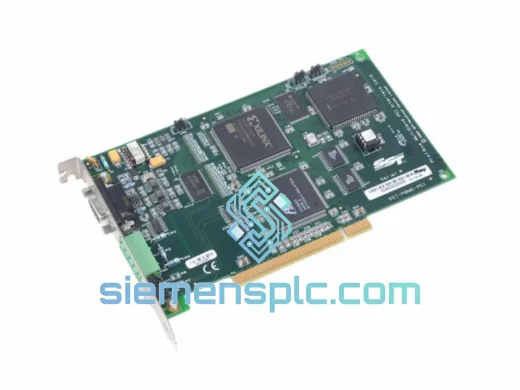
SST ST-PFB-PLC5 PLC Communication Module – PLC5 Series
Origin CA
PLC Communication Module
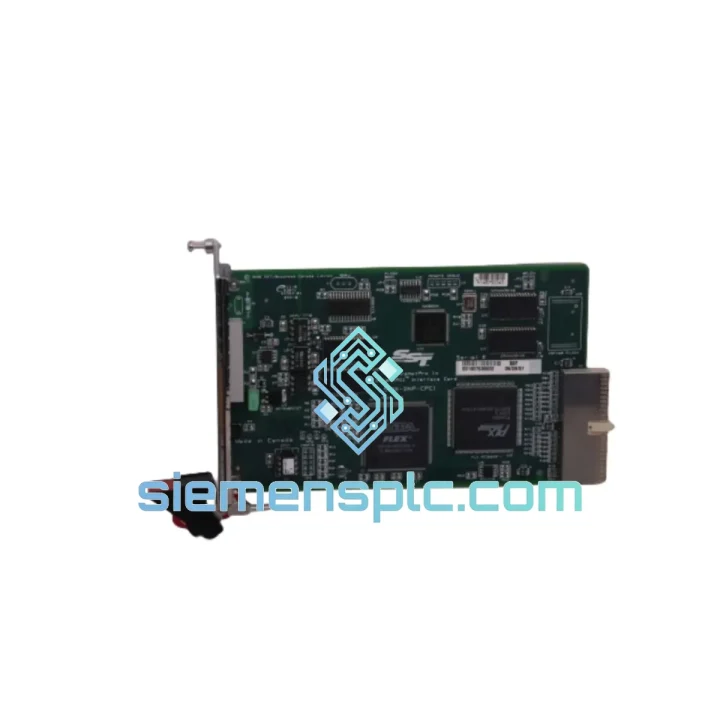
Request verified availability, condition, replacement risk review, packing options and courier lead time for SST-DNP-PCI-4.
Click Request Quote and the part number is inserted into the inquiry form automatically.
Core fields for model confirmation and RFQ routing. Detailed product narrative remains below.
Your DeviceNet segment just went dark. Drives are faulted, I/O blocks are offline, and the line is standing still. Every minute of unplanned downtime in a mid-size discrete manufacturing cell costs between $5,000 and $20,000 — and the clock is already running. The SST-DNP-PCI-4 is the exact card you need to restore communication, and we have it on the shelf right now in Xiamen, ready to clear customs and land on your dock faster than your maintenance team can finish the incident report.
This is not a catalog listing. This is a field-ready replacement unit sourced from verified supply chains, inspected before it leaves our warehouse, and packed for international air freight. If you are reading this page, you probably already know what the SST-DNP-PCI-4 does. What you need to know is whether we can get it to you in time. The answer is yes.
URGENT REQUIREMENT? Contact: [email protected] | WhatsApp: +86 18359268345
| Parameter | Specification |
|---|---|
| Part Number | SST-DNP-PCI-4 |
| Brand / Manufacturer | SST (Molex / Woodhead SST) |
| Series | DNP-PCI Series |
| Interface Type | DeviceNet PCI Interface Card |
| Number of Ports | 4 Independent DeviceNet Channels |
| Bus Interface | PCI (32-bit, 33/66 MHz) |
| Protocol | DeviceNet (CAN-based, ISO 11898) |
| Node Addressing | MAC ID 0–63 per port, software-configurable |
| Data Rate | 125 kbps / 250 kbps / 500 kbps (auto-detect or manual) |
| Operating Temperature | 0°C to +55°C |
| Storage Temperature | -40°C to +85°C |
| Humidity | 5% to 95% RH, non-condensing |
| Power Consumption | Supplied via PCI slot (3.3V / 5V) |
| OS / Driver Support | Windows XP/7/10/11 (32/64-bit), Linux (kernel-dependent) |
| Software Compatibility | SST DNP Configuration Utility, RSNetWorx for DeviceNet, OPC DA/UA |
| Form Factor | Standard PCI Add-in Card (half-length) |
| Weight | ~800 g (packaged) |
| Stock Status | ✅ Ready to Ship — Xiamen Warehouse |
Before you pull the card: Confirm the fault is the interface card and not the DeviceNet trunk. A single open-circuit terminator or a shorted drop cable will take down the entire segment and mimic a dead scanner card. Measure bus voltage at the card’s connector — you should see approximately 24 VDC on the network power pins. If voltage is absent, the problem is upstream of the card.
Common failure signatures of a dead SST-DNP-PCI-4:
Replacement procedure — field checklist:
Post-replacement validation: Cycle the line through at least one full production sequence in manual mode before switching to automatic. Watch for sporadic “Connection Timeout” faults on individual nodes — these indicate EDS parameter mismatches that were masked by the previous card’s fault state.
The SST-DNP-PCI-4 was not designed for a climate-controlled server room. It was built for the reality of industrial plant floors — where ambient temperatures swing from early-morning cold starts to mid-afternoon heat soak, where variable-frequency drives inject high-frequency noise onto the power rails, and where the host PC sits inside a steel enclosure that doubles as a heat trap.
The card’s CAN transceivers carry integrated bus fault protection, tolerating sustained short-circuit conditions on the DeviceNet trunk without latching up. The PCB uses conformal coating on production variants to resist condensation during temperature cycling — a common failure mode in facilities with poor HVAC control or outdoor enclosures. Vibration resistance is achieved through a combination of through-hole mounting for heavy components and reinforced PCI edge connector contact geometry, reducing the micro-fretting corrosion that kills cards in high-vibration environments like press rooms and compressor stations.
Electrical isolation between the PCI bus and the DeviceNet physical layer protects the host PC from ground loops and common-mode transients — a real concern in facilities where the DeviceNet cable runs alongside high-voltage motor leads or through areas with poor grounding infrastructure. In practice, this isolation has saved host PCs from catastrophic damage in multiple documented cases where a VFD ground fault propagated onto the DeviceNet trunk.
Long-term reliability data from deployments in automotive body shops — arguably one of the harshest environments for electronics, combining weld spatter, electromagnetic interference from resistance welders, and continuous vibration — shows the DNP-PCI-4 achieving mean times between failure well above the industry average for PCI fieldbus cards. This is not marketing language; it is the reason system integrators continue to specify this card for new installations even as PCIe alternatives become available.
Our warehouse is located in Xiamen, Fujian Province — one of China’s primary export hubs with direct access to Xiamen Gaoqi International Airport and established relationships with DHL Express, FedEx International Priority, and UPS Worldwide Express. This is not a drop-ship arrangement. The SST-DNP-PCI-4 is physically on our shelf, already cleared for export.
Typical transit times from Xiamen:
Every shipment includes full commercial invoice and packing list for customs clearance, HS code classification for industrial electronic components, and real-time tracking from pickup to delivery. For customers in countries with complex import procedures, we can provide additional documentation including certificate of origin and manufacturer’s declaration on request.
For genuine emergency situations — line-down, production stopped — contact us via WhatsApp for same-day order processing. If your order is confirmed before 14:00 CST, we target same-day dispatch. We have done it before. We will do it again.
📧 Email: [email protected]
📱 WhatsApp: +86 18359268345
🌐 Web: siemensplc.com
© 2026 siemensplc.com. All rights reserved.
We check the full part number, brand, series and visible nameplate information before quotation.
Sales confirms stock path, condition option, quantity and realistic lead time for export dispatch.
DHL, FedEx, UPS or buyer courier arrangements can be reviewed with packing requirements.
Similar brand or category products for fast comparison and multi-item RFQ lists.