Siemens PLC sourcing desk · Multi-brand automation spares [email protected] +86 18359268345
Siemens In Stock OK

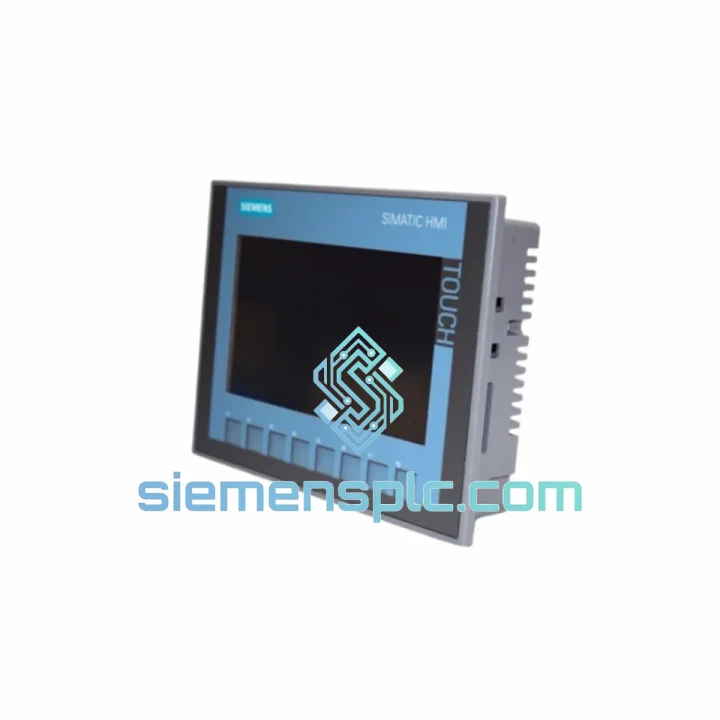
Siemens 6AV2123-2GB03-0AX0 HMI Panel

Request verified availability, condition, replacement risk review, packing options and courier lead time for 6AV2123-2GB03-0AX0.

Exact part6AV2123-2GB03-0AX0 RFQ auto-fillPart number attached Export packingDHL / FedEx / UPS Sales replyEmail or WhatsApp
BrandSiemens Part Number6AV2123-2GB03-0AX0 ConditionAvailability Check Lead TimeRFQ Confirmation DocumentsDatasheet / photos by RFQ ShippingExport packing available
Auto-filled RFQ 6AV2123-2GB03-0AX0

Click Request Quote and the part number is inserted into the inquiry form automatically.

Procurement Data

Key Product Information

Core fields for model confirmation and RFQ routing. Detailed product narrative remains below.

Brand
Siemens
Primary Part Number
6AV2123-2GB03-0AX0
Product Type
HMI Panel
Series / Family
SIMATIC
Country of Origin
DE
Catalog Category
HMI Panels
Model confirmed for inquiry 6AV2123-2GB03-0AX0 Send quantity, destination and urgency. The RFQ form keeps this part number attached.
Request Quote
Product Overview

6AV2123-2GB03-0AX0 KTP700 Basic — Every Hour of Downtime Costs You Money. We Ship Today.

Your line is stopped. The operator panel is dead. Maintenance is standing by and every minute the conveyor sits idle is burning through your production budget. The Siemens 6AV2123-2GB03-0AX0 KTP700 Basic is a 7-inch PROFINET HMI panel — one of the most widely deployed operator interfaces in discrete and process manufacturing worldwide. When it fails, there is no workaround. You need an exact replacement, verified, tested, and on a plane today.

We stock the 6AV2123-2GB03-0AX0 in Xiamen and ship globally via DHL and FedEx Express. Most international destinations receive their unit within 3–5 business days from order confirmation. No waiting on distributor lead times. No back-order queues. Stock on the shelf, ready to move.

URGENT REQUIREMENT? Contact: [email protected] | WhatsApp: +86 18359268345

Quick Technical Datasheet

Parameter Specification
Part Number 6AV2123-2GB03-0AX0
Series SIMATIC HMI KTP700 Basic
Display Size 7″ TFT Widescreen
Resolution 800 × 480 px, 65,536 colors
Input Method Resistive single-touch + 8 function keys
Communication PROFINET (1× RJ45)
Engineering Tool TIA Portal V13 SP1+ / WinCC Basic or Comfort
Supply Voltage 24 V DC (20.4 – 28.8 V)
Front Protection IP65
Operating Temp. 0 °C to +50 °C
Storage Temp. −20 °C to +60 °C
Dimensions (W×H×D) 214 × 158 × 46 mm
Weight ~0.72 kg
Certifications CE, UL, cULus, RCM, RoHS
Stock Status ✔ Ready to Ship — Xiamen Warehouse

Troubleshooting & Replacement Tips

After ten years of field work, these are the failure modes and swap pitfalls I see most often with the KTP700 Basic:

Common Failure Symptoms

  • Blank screen on power-up, backlight on: Typically a corrupted project image or failed flash memory. Before condemning the panel, attempt a forced OS update via the TIA Portal “Update OS” function over PROFINET. If the panel does not enumerate on the network at all, the hardware is gone — replace the unit.
  • Touch input offset or dead zones: Resistive digitizer degradation from repeated point-of-use contact. Recalibration via the Start Center (hold touch during boot) buys time, but drift will return. Plan the swap.
  • “No connection to PLC” alarm on startup: First check the PROFINET device name. The replacement panel ships with a blank device name. You must assign the correct PROFINET device name using TIA Portal → Online → Assign Device Name before the PLC will recognize it. This is the single most common commissioning error on a swap.
  • Project download fails after swap: Confirm TIA Portal project HMI version matches the panel firmware. If the original panel ran firmware V15.1 and your TIA project was compiled under V16, you must update the panel OS first. Mismatched firmware versions cause silent download failures or runtime crashes within minutes of startup.
  • Function keys unresponsive after project load: Check the project’s key assignment in WinCC — function key mappings are stored in the project, not the panel hardware. A fresh panel with an old project backup will behave identically to the original once the project is loaded correctly.

Step-by-Step Replacement Procedure

  1. Power down the panel and disconnect the 24 V DC supply and PROFINET cable.
  2. Release the panel from the cutout using the mounting clamps (typically 4–8 clamps depending on enclosure). Note the cutout dimensions: 197 × 141 mm.
  3. Install the replacement unit. Torque mounting clamps to 0.2 Nm — overtightening cracks the front bezel.
  4. Reconnect PROFINET and 24 V DC. The panel will boot to the Start Center (no project loaded).
  5. From TIA Portal, go to Online → Accessible Devices. The panel will appear with a temporary IP. Assign the correct PROFINET device name and IP address matching your network configuration.
  6. Download the HMI project. Verify firmware compatibility before initiating the transfer.
  7. Confirm all alarms, trends, and recipe data are loading correctly. Run a 10-minute observation cycle before handing back to operations.

Reliability in Harsh Conditions

The KTP700 Basic was engineered for the factory floor, not the office. The aluminum front frame and IP65-rated front panel seal keep out metal dust, coolant mist, and high-pressure wash-down spray — common in machining, food processing, and chemical environments. The resistive touch technology functions with gloved hands and in the presence of surface moisture, where capacitive screens fail entirely.

Vibration resistance meets IEC 60068-2-6 standards, covering the frequency ranges typical of compressor rooms, press lines, and mobile equipment installations. The operating temperature ceiling of +50 °C handles most non-climate-controlled enclosures in tropical and desert climates without derating. The wide supply voltage tolerance (20.4–28.8 V DC) absorbs the voltage sags common in facilities with heavy motor loads on shared distribution panels.

In short: this panel was built to run in the same environment where it will fail — and when it does fail, the replacement needs to be equally robust. Every unit we ship has been stored in climate-controlled conditions and undergoes a power-on functional check before dispatch.

Global Express Logistics

Our warehouse is located in Xiamen, Fujian — one of China’s primary export hubs with direct access to DHL, FedEx, and UPS international gateways. Here is how the logistics chain works from the moment you confirm your order:

  • Order Confirmation → Same-Day Pick & Pack: Orders confirmed before 14:00 CST are picked, tested, and packed the same business day. Anti-static bag, foam-lined carton, and a functional test declaration are standard.
  • Export Documentation: Commercial invoice, packing list, and certificate of origin are prepared in parallel with packing. HS Code 8537.10 is used for customs classification. We handle all export formalities.
  • DHL Express / FedEx International Priority: Transit times — Southeast Asia: 2–3 days; Europe: 3–5 days; North America: 4–6 days; Middle East & Africa: 4–7 days. These are door-to-door estimates under normal customs clearance conditions.
  • Tracking: A waybill number is sent to your email within 2 hours of carrier pickup. Real-time tracking is available via the carrier’s portal.
  • Customs Clearance Support: We provide all documentation required for import clearance in the EU, US, and most GCC countries. For destinations with specific import licensing requirements, contact us before ordering.

If your situation is critical — line down, shift starting in 6 hours — contact us directly on WhatsApp. We will confirm stock, cut the paperwork, and get the unit moving before the end of the business day.

Contact Information

📧 Email: [email protected]
💬 WhatsApp: +86 18359268345
🌐 Web: siemensplc.com

© 2026 siemensplc.com. All rights reserved.

Ready to quote

Send This Part Number to Sales

[email protected]
RFQ workflow

Confirmation Process

Quality workflow ->
01Model confirmation

We check the full part number, brand, series and visible nameplate information before quotation.

02Availability reply

Sales confirms stock path, condition option, quantity and realistic lead time for export dispatch.

03Packing & courier

DHL, FedEx, UPS or buyer courier arrangements can be reviewed with packing requirements.