

Siemens
RFQ Ready
SIEMENS 6GK5108-0BA00-2AA3 Industrial Ethernet Switch
SIMATIC
Origin DE
Industrial Ethernet Switch
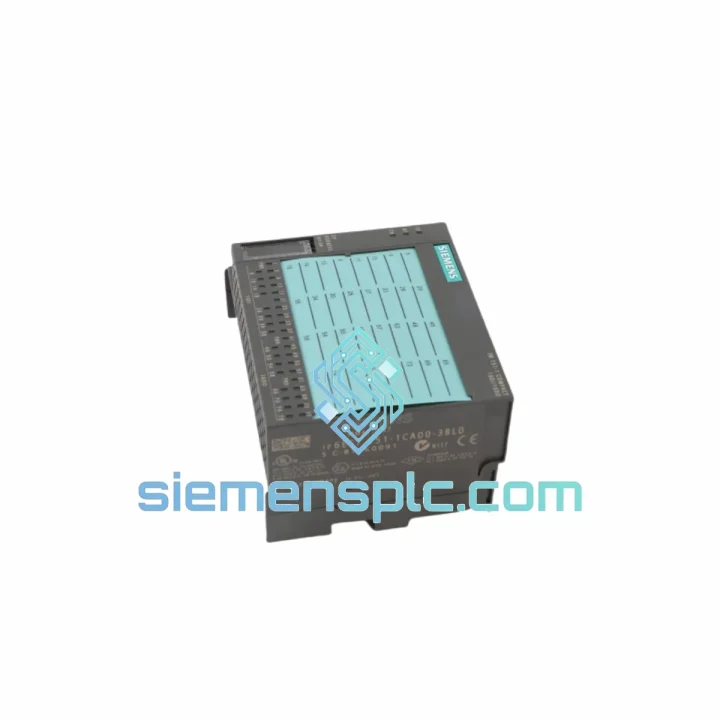
Request verified availability, condition, replacement risk review, packing options and courier lead time for 6ES7151-1CA00-3BL0.
Click Request Quote and the part number is inserted into the inquiry form automatically.
Core fields for model confirmation and RFQ routing. Detailed product narrative remains below.
Your ET 200S station just went dark. The IM151-1 is dead, the PROFIBUS DP link is severed, and the CPU is throwing BF faults across every affected rack. Production is stopped. Maintenance is standing by. The clock is running. This is exactly the scenario the Siemens 6ES7151-1CA00-3BL0 stock at siemensplc.com was built for — verified units, packed and ready to leave Xiamen within hours of your order confirmation.
We don’t sell theory. We sell the part you need, with the lead time you can’t afford to gamble on.
⚡ URGENT REQUIREMENT? Contact: [email protected] | WhatsApp: +86 18359268345
| Parameter | Specification |
|---|---|
| Order Number | 6ES7151-1CA00-3BL0 |
| Product Family | SIMATIC ET 200S |
| Module Designation | IM151-1 Standard |
| Fieldbus Protocol | PROFIBUS DP (Slave, IEC 61158) |
| Max. Transfer Rate | 12 Mbit/s (auto-negotiated) |
| Supply Voltage | 24 V DC |
| Max. I/O Modules per Station | 63 |
| Max. Process Data | 244 bytes IN / 244 bytes OUT |
| Diagnostics | Station + module-level via DP diagnostic frame |
| Degree of Protection | IP20 |
| Operating Temperature | 0 °C to +60 °C |
| Storage Temperature | −40 °C to +70 °C |
| Relative Humidity | 10 % – 95 % (non-condensing) |
| Mounting | 35 mm DIN rail |
| Dimensions (W × H × D) | 60 × 125 × 117 mm |
| Weight | ~240 g |
| Certifications | CE, UL, cULus, ATEX Zone 2 |
| Firmware Update | Via SIMATIC Manager / TIA Portal |
| Stock Status | ✅ Ready to Ship — Xiamen Warehouse |
Replacing an IM151-1 in a live plant is not a plug-and-play exercise. Here is what ten years of field calls have taught us about this specific module:
Fault Code BF (Bus Fault) on CPU: Before condemning the IM151-1, verify the PROFIBUS cable termination resistors at both ends of the segment. A failed terminator mimics a dead interface module. Swap the terminator first — it takes 30 seconds and costs nothing. If BF persists after terminator check, measure bus voltage between A and B lines: should be 3–5 V DC at idle. Zero volts = cable break or shorted segment. Correct voltage but still BF = the IM151-1 is the culprit.
PROFIBUS Address Conflict: The IM151-1 address is set via the rotary switches on the front face of the module — two switches, tens digit and units digit. Before installing the replacement unit, photograph the switch positions on the failed module. Set the new unit to the identical address before powering up. Failure to match the address will result in the CPU not recognizing the station, and you will waste time chasing a software fault that is actually a hardware misconfiguration.
Firmware Mismatch: If the replacement unit carries a different firmware revision than the original, TIA Portal or STEP 7 may generate a hardware mismatch warning. This is non-fatal in most configurations — the module will still operate — but update the firmware to the target revision using the online firmware update function in SIMATIC Manager to eliminate the warning and ensure full feature parity.
Power Module Sequencing: The IM151-1 draws its 24 V supply from the leftmost PM-E power module on the DIN rail. When replacing the IM151-1, confirm the PM-E is powered and its green LED is solid before inserting the new interface module. A PM-E with a blown fuse will prevent the IM151-1 from initializing, and the symptom looks identical to a dead interface module.
Re-download Hardware Configuration: After physical replacement, always perform a hardware configuration download from TIA Portal or STEP 7 to the CPU. This re-initializes the DP slave parameters for the station and clears any residual fault entries in the diagnostic buffer. Skip this step and you risk intermittent communication errors that are nearly impossible to trace.
Hot-Swap Caution: The ET 200S supports hot-swapping of I/O modules, but the IM151-1 itself is not hot-swappable. The station must be de-energized before removing or inserting the interface module. Attempting a live swap risks corrupting the backplane bus and damaging adjacent I/O modules.
The 6ES7151-1CA00-3BL0 was engineered for environments that would destroy consumer-grade electronics within weeks. Siemens designed the IM151-1 to IEC 61131-2 mechanical and climatic requirements — the same standard that governs industrial control equipment deployed in steel mills, offshore platforms, and chemical processing plants.
Vibration resistance is rated to 10–58 Hz at 0.075 mm amplitude and 58–150 Hz at 1 g — sufficient for installation on machine frames subject to continuous mechanical vibration from motors, compressors, and presses. The conformal coating on the PCB provides a barrier against condensation, airborne particulates, and mild chemical vapors that are common in food processing and pharmaceutical environments.
Operating across 0 °C to +60 °C without derating means the module performs identically in a climate-controlled control room and in an unventilated outdoor cabinet in a subtropical climate. Storage down to −40 °C ensures units held in unheated warehouses or shipped through cold-chain logistics arrive fully functional.
The IP20 enclosure rating, combined with the DIN rail mounting system, keeps the module mechanically secure under shock loads up to 15 g / 11 ms (half-sine) — relevant for installations on mobile equipment or in facilities subject to seismic activity. Every unit we ship from Xiamen has been stored in climate-controlled conditions and inspected for physical integrity before dispatch.
Our Xiamen warehouse operates on a same-business-day dispatch model for in-stock items. Here is the exact sequence from your order to your receiving dock:
Step 1 — Order Confirmation: Submit your purchase order or inquiry to [email protected]. Our team confirms stock availability and generates a proforma invoice within 2 hours during business hours (UTC+8, Mon–Sat).
Step 2 — Quality Inspection & Packing: Each 6ES7151-1CA00-3BL0 unit is inspected for label authenticity, housing integrity, and connector condition. The module is packed in an ESD-safe anti-static bag, placed in foam-lined inner packaging, and sealed in a moisture-barrier outer carton. Packing list and certificate of conformity are included.
Step 3 — Carrier Handoff: Shipments leave our Xiamen facility via DHL Express or FedEx International Priority — both services offer door-to-door tracking from pickup to delivery. For time-critical orders, we can arrange same-day courier pickup with pre-booked airfreight slots.
Step 4 — Transit Times (estimated): Southeast Asia 1–2 business days. Europe 3–5 business days. North America 3–5 business days. Middle East / Africa 4–6 business days. All transit times are estimates based on carrier schedules and subject to customs clearance at destination.
Step 5 — Customs Documentation: We provide a commercial invoice with accurate HS code classification (HS 8537.10), country of origin declaration, and packing list. For destinations requiring import licenses or specific customs documentation, notify us at order placement and we will coordinate accordingly.
Track your shipment in real time via the DHL or FedEx tracking number provided at dispatch. Our team monitors all active shipments and proactively contacts you if any delay is detected.
📧 Email: [email protected]
💬 WhatsApp: +86 18359268345
🌐 Web: siemensplc.com
© 2026 siemensplc.com. All rights reserved.
We check the full part number, brand, series and visible nameplate information before quotation.
Sales confirms stock path, condition option, quantity and realistic lead time for export dispatch.
DHL, FedEx, UPS or buyer courier arrangements can be reviewed with packing requirements.
Similar brand or category products for fast comparison and multi-item RFQ lists.


