ABB
In Stock OK
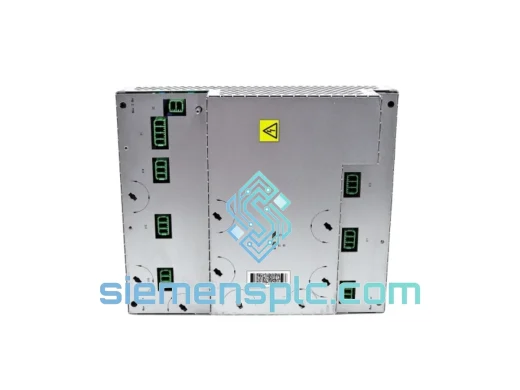
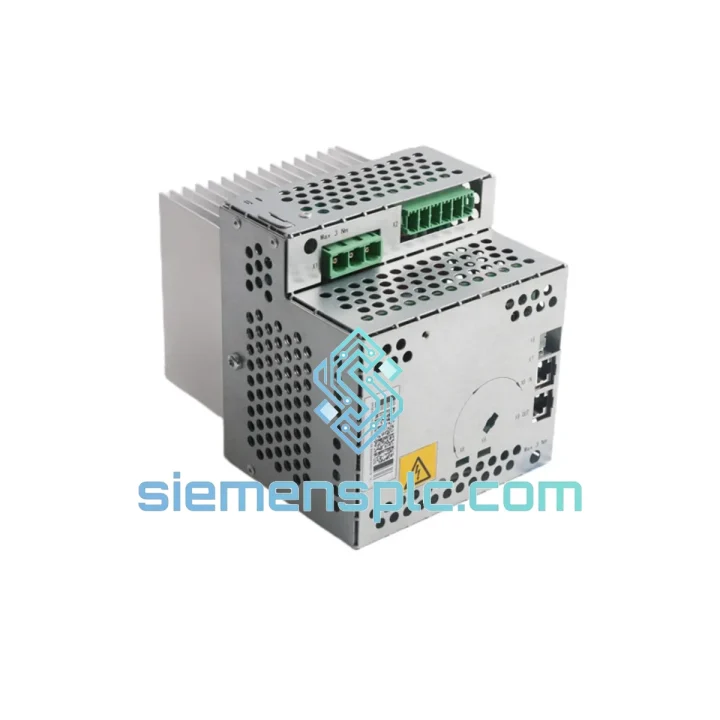
ABB DSQC664 3HAC030923-001 Drive Unit
Request verified availability, condition, replacement risk review, packing options and courier lead time for 3HAC030923-001.
BrandABB
Part Number3HAC030923-001
ConditionAvailability Check
Lead TimeRFQ Confirmation
DocumentsDatasheet / photos by RFQ
ShippingExport packing available
Auto-filled RFQ
3HAC030923-001
Click Request Quote and the part number is inserted into the inquiry form automatically.
- Reply by email: [email protected]
- WhatsApp / Tel: +86 18359268345
- Mon-Sat 9:00-18:00 GMT+8
Procurement Data
Key Product Information
Core fields for model confirmation and RFQ routing. Detailed product narrative remains below.
- Brand
- ABB
- Primary Part Number
- 3HAC030923-001
- Product Type
- Robot Controller Drive Unit
- Series / Family
- IRC5
- Manufacturer
- ABB Robotics
- Country of Origin
- SE
- Catalog Category
- Motor Drives
- Operating Temp.
- 0 °C to +52 °C
- Warranty
- 12 months from dispatch
Model confirmed for inquiry
3HAC030923-001
Send quantity, destination and urgency. The RFQ form keeps this part number attached.
Request Quote
Product Overview
ABB DSQC664 3HAC030923-001 IRC5 Drive Unit – Stop the Clock on Your Downtime
Every minute your IRC5 controller sits dead on the floor, you’re bleeding money. A failed DSQC664 drive unit doesn’t care about your production schedule — but we do. We stock the ABB DSQC664 (3HAC030923-001) in Xiamen and ship same-day via DHL Express or FedEx International Priority. From the moment you call us to the moment the courier picks up the box, our target is under four hours. That’s not a marketing line — that’s how we’ve kept plants running across three continents.
URGENT REQUIREMENT? Contact: [email protected] | WhatsApp: +86 18359268345
Quick Technical Datasheet
| Parameter | Value |
|---|---|
| Manufacturer | ABB Robotics |
| Part Number | DSQC664 |
| Reference Number | 3HAC030923-001 |
| Module Type | Drive Unit – Axis Computer |
| Compatible Controller | ABB IRC5 (Single Cabinet / Dual Cabinet / PMC) |
| Compatible Robot Series | IRB 140, IRB 1600, IRB 2400, IRB 4400, IRB 6640 and more |
| Supply Voltage | 24 VDC (internal bus) |
| Communication Interface | Ethernet / Internal backplane |
| Firmware | Must match RobotWare version on controller (see replacement tips) |
| Weight | 2,360 g (approx.) |
| Operating Temperature | 0 °C to +52 °C |
| Condition | New / OEM-spec verified |
| Warranty | 12 months from dispatch |
| Stock Status | ✅ Ready to Ship – Xiamen, China |
Troubleshooting & Replacement Tips
After handling hundreds of IRC5 drive failures in the field, here’s what actually matters when you’re standing in front of a dead cabinet at 2 AM:
Common Failure Signatures for DSQC664:
- Error 38026 / 38027 (Drive Unit Communication Lost) — The controller’s main computer has lost contact with the drive unit over the internal Ethernet bus. First check the RJ45 cable between the DSQC652 (main computer) and DSQC664. If the cable is intact and the LED on the drive unit is off or blinking amber, the drive unit itself has failed.
- Error 50071 (Drive Unit Overtemperature) — Before condemning the module, verify cabinet fan operation and check that the air filter is not clogged. If thermal conditions are normal and the error persists after a cold restart, the internal temperature sensor circuit on the DSQC664 has likely failed.
- Error 38301 (Drive Unit Configuration Mismatch) — This fires after a swap if the replacement unit carries a different firmware revision than the RobotWare version installed on the DSQC652. Do not ignore this error and force a restart — it will corrupt the axis calibration data.
- Axis motor not responding / torque fault on specific axis — Isolate by swapping drive channels. The DSQC664 handles multiple axes; a single-axis fault that follows the module after a channel swap confirms the module, not the motor or cable.
Step-by-Step Replacement Procedure:
- Place the IRC5 controller in Manual Mode and execute a controlled program stop. Do not hot-swap — the DSQC664 is not designed for live insertion.
- Power down the controller via the main disconnect. Wait a full 5 minutes for the DC bus capacitors to discharge before opening the cabinet. Measure with a multimeter if you’re unsure — 600 VDC on a charged bus will kill you.
- Photograph the existing cable routing before disconnecting anything. The DSQC664 has multiple motor power connectors (X1–X6 depending on robot model) and the internal Ethernet cable. Mis-routing a motor phase will cause an immediate overcurrent fault on first power-up.
- Remove the four M4 mounting screws and slide the module out along the DIN rail guides. Note the orientation — the module is keyed but it’s easy to force it in backwards if you’re rushing.
- Before installing the replacement, verify the firmware label on the new unit. The RobotWare version on the DSQC652 main computer must be compatible. Check via FlexPendant: ABB Menu → System Info → RobotWare Version. If the firmware on the replacement unit is older, a RobotWare upgrade or downgrade may be required — contact ABB service or our technical team for the correct image file.
- Seat the new DSQC664, reconnect all cables in the photographed order, and torque the mounting screws to 1.5 Nm. Do not overtighten — the PCB standoffs crack.
- Power up and watch the LED sequence: solid green within 30 seconds indicates normal boot. If you see a blinking red pattern, count the blinks — each pattern maps to a specific boot error in the IRC5 service manual (Section 5.4).
- Run a full axis calibration check via Calibration → Update Revolution Counters on the FlexPendant before returning the robot to automatic mode. A missed calibration step is the most common cause of post-replacement crashes.
Reliability in Harsh Conditions
The DSQC664 was engineered for the inside of an IRC5 cabinet — not a server room. ABB designed this module to operate continuously in environments that would destroy consumer-grade electronics. The conformal coating on the PCB resists condensation and airborne contaminants common in foundry, food processing, and chemical plant environments. The module’s thermal management is passive-convection based, meaning there are no internal fans to fail — a deliberate design choice for high-vibration installations such as press-shop and stamping-line robots where mechanical resonance is constant.
Vibration tolerance is rated to IEC 60068-2-6 (sinusoidal) and IEC 60068-2-64 (random), covering the frequency ranges typical of heavy stamping and forging equipment. The connectors use positive-locking latches rather than friction-fit, which means they stay seated even when the cabinet is subject to the shock loads of a nearby hydraulic press cycling at 60 strokes per minute.
Units we supply are stored in climate-controlled, ESD-protected warehousing. Every module is individually bagged in anti-static packaging with desiccant and sealed before dispatch. If your plant environment is particularly aggressive — high humidity, salt air, or chemical fumes — request our pre-shipment inspection report, which documents the physical and functional condition of the specific unit being shipped to you.
Global Express Logistics
Our dispatch hub is in Xiamen, Fujian Province — one of China’s primary export ports with direct DHL and FedEx gateway access. Here’s how a typical urgent order moves:
- Hour 0–1: You contact us via email or WhatsApp. We confirm stock, issue a pro-forma invoice, and lock the unit for your order.
- Hour 1–3: Payment confirmed (T/T, PayPal, or credit card). Our warehouse team pulls the unit, performs a final visual inspection, and prepares export documentation — commercial invoice, packing list, and certificate of origin.
- Hour 3–4: Unit is packed in double-wall carton with foam inserts and ESD bag. Shipment booked with DHL Express or FedEx International Priority depending on destination and your preference.
- Hour 4–6: Courier collects. Tracking number sent to your email within 30 minutes of pickup scan.
- Day 1–3: Delivery to most of Europe, North America, Southeast Asia, and the Middle East. Remote destinations may require an additional 24–48 hours.
We prepare all export paperwork in-house. HS Code 8537.10 is pre-declared for this module type, which clears customs in most jurisdictions without delay. For DDP (Delivered Duty Paid) shipments, contact us before ordering — we can arrange duty pre-payment for most EU and UK destinations to eliminate customs holds on your end.
Contact Information
📧 Email: [email protected]
📱 WhatsApp: +86 18359268345
🌐 Web: siemensplc.com
© 2026 siemensplc.com. All rights reserved.
Ready to quote
[email protected]
Send This Part Number to Sales
RFQ workflow
Quality workflow ->
Confirmation Process
01Model confirmation
We check the full part number, brand, series and visible nameplate information before quotation.
02Availability reply
Sales confirms stock path, condition option, quantity and realistic lead time for export dispatch.
03Packing & courier
DHL, FedEx, UPS or buyer courier arrangements can be reviewed with packing requirements.
Continue sourcing
Browse full catalog ->
Related Automation Parts
Similar brand or category products for fast comparison and multi-item RFQ lists.