ABB
In Stock OK
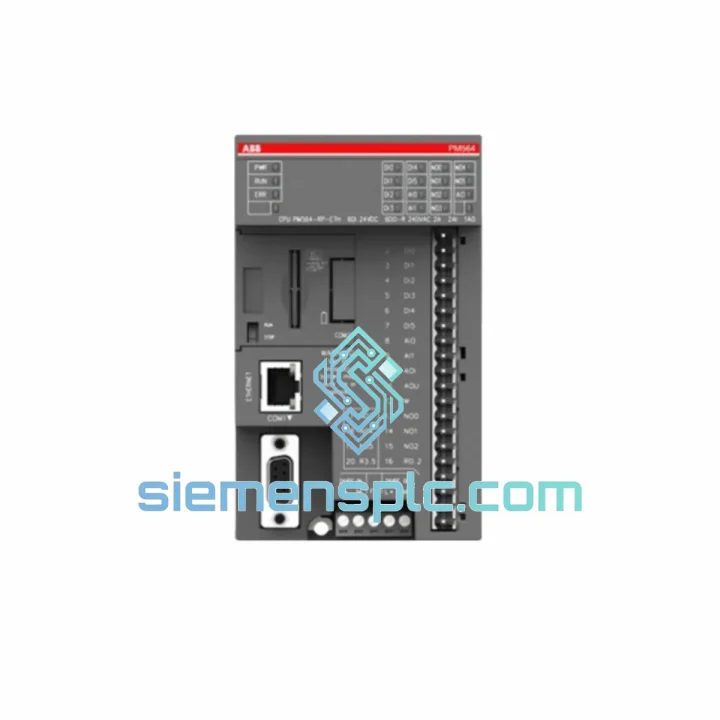
ABB PM564-RP-ETH-AC 1SAP121100R0071 PLC CPU Module
Request verified availability, condition, replacement risk review, packing options and courier lead time for PM564-RP-ETH-AC.
BrandABB
Part NumberPM564-RP-ETH-AC
ConditionAvailability Check
Lead TimeRFQ Confirmation
DocumentsDatasheet / photos by RFQ
ShippingExport packing available
Auto-filled RFQ
PM564-RP-ETH-AC
Click Request Quote and the part number is inserted into the inquiry form automatically.
- Reply by email: [email protected]
- WhatsApp / Tel: +86 18359268345
- Mon-Sat 9:00-18:00 GMT+8
Procurement Data
Key Product Information
Core fields for model confirmation and RFQ routing. Detailed product narrative remains below.
- Brand
- ABB
- Primary Part Number
- PM564-RP-ETH-AC
- Product Type
- PLC CPU Module
- Series / Family
- AC500
- Manufacturer
- ABB
- Country of Origin
- SE
- Catalog Category
- Industrial Automation Spares
Model confirmed for inquiry
PM564-RP-ETH-AC
Send quantity, destination and urgency. The RFQ form keeps this part number attached.
Request Quote
Product Overview
PM564-RP-ETH-AC 1SAP121100R0071 — Stop the Clock on Your Downtime
Every minute your line is down, you’re bleeding money. A failed CPU module in an AC500 rack doesn’t just halt one machine — it can cascade across an entire production cell, triggering safety shutdowns, batch losses, and penalty clauses. The ABB PM564-RP-ETH-AC (Order No. 1SAP121100R0071) is a mid-range AC500 CPU with onboard Ethernet, and we keep verified stock ready to ship from Xiamen within hours of your order confirmation. No lead-time games, no broker markups — just the part you need, moving toward your dock today.
URGENT REQUIREMENT? Contact: [email protected] | WhatsApp: +86 18359268345
Quick Technical Datasheet
| Manufacturer | ABB |
| Part Number | PM564-RP-ETH-AC |
| Order Number | 1SAP121100R0071 |
| Series | AC500 |
| Module Type | CPU / Central Processing Unit |
| Power Supply Input | AC 100–240 V (integrated PSU) |
| Communication Ports | Ethernet RJ45 (onboard), RS-232, RS-485 |
| Supported Protocols | Modbus TCP/RTU, EtherNet/IP (via CM), PROFIBUS DP, CANopen |
| Program Memory | 512 KB (SD card expandable) |
| Max I/O Expansion | Up to 512 DI/DO with expansion modules |
| Operating Temperature | −25 °C to +60 °C |
| Protection Rating | IP20 |
| Mounting | 35 mm DIN rail |
| Certifications | CE, UL, cUL, RCM, RoHS |
| Country of Origin | Germany |
| Stock Status | ✔ Ready to Ship — Xiamen Warehouse |
Troubleshooting & Replacement Tips
Pulled from real field scenarios. These are the failure modes and swap pitfalls that catch engineers off guard on the PM564-RP-ETH-AC:
1. Firmware Version Mismatch After Swap
The most common post-replacement headache. If the replacement unit carries a different firmware revision than the failed CPU, the I/O expansion modules may throw configuration errors on startup. Before powering up, check the firmware version on the SD card backup from the old unit. Use ABB Automation Builder to flash the replacement to the matching version before inserting it into the rack. Do not assume factory firmware matches your site version.
2. IP Address Conflict on Ethernet Port
The PM564-RP-ETH-AC ships with a default IP of 192.168.1.1. If your plant network already has a device at that address, you’ll get a communication fault the moment the CPU comes online. Connect a laptop directly to the CPU’s RJ45 port first, set the correct static IP via Automation Builder’s online device scan, then reconnect to the plant network. Never hot-plug a replacement CPU into a live SCADA network without pre-configuring the IP.
3. SD Card Program Restore Sequence
The AC500 CPU reads the program from the SD card on cold boot if the internal flash is blank. Insert the SD card with the backed-up project before applying power. If you power up first without the SD card, the CPU boots into STOP mode with no program loaded — this is normal, not a hardware fault. Insert the card, cycle power, and the CPU will auto-load the project.
4. Backplane Bus Seating
The PM564 connects to expansion modules via the AC500 backplane connector on its right side. After physical installation, apply firm, even pressure until you hear the locking tab click. A partially seated CPU will cause intermittent I/O communication faults that look like software issues but are purely mechanical. Inspect the connector pins for bent contacts if the previous failure involved overcurrent or physical impact.
5. Common Diagnostic LEDs
- RUN (green, steady): Normal operation.
- RUN (green, flashing): CPU in STOP mode — program loaded but not executing. Check run/stop switch or Automation Builder online command.
- ERR (red, steady): Hardware fault or configuration error. Pull the diagnostic log via Automation Builder → Device → System Log.
- ERR (red, flashing): Fieldbus communication error. Check CM module seating and cable integrity on PROFIBUS/CANopen lines.
- ETH (yellow, flashing): Active Ethernet traffic — expected during SCADA polling.
- ETH (off): No link. Check cable, switch port, and IP configuration before assuming CPU fault.
6. Run/Stop Switch Position
Physical run/stop switch is located on the CPU front face. Engineers frequently overlook this after a swap — if the switch is in STOP, the CPU will not execute the program regardless of software commands. Confirm switch position before escalating to a firmware or program issue.
Reliability in Harsh Conditions
The AC500 platform was engineered for environments where consumer-grade electronics fail within weeks. The PM564-RP-ETH-AC carries a −25 °C to +60 °C operating range, making it viable in unheated outdoor enclosures in northern climates and in high-ambient machine rooms without forced cooling. Vibration resistance meets IEC 60068-2-6 (sinusoidal) and IEC 60068-2-27 (shock) standards — the same benchmarks used for railway and marine certification.
Humidity tolerance extends to 95% RH non-condensing, which matters in coastal plants, food processing facilities, and paper mills where moisture ingress is a constant threat. The conformal-coated PCB on production variants provides an additional barrier against airborne contaminants including sulfur compounds common in chemical processing environments.
The integrated AC power supply eliminates a common single point of failure seen in DC-input CPU variants — a failing 24 VDC rail from an external PSU will not take down this CPU. The onboard supply handles input voltage fluctuations from 100 VAC to 240 VAC without derating, which is critical in regions with unstable grid quality.
All units in our inventory are stored in climate-controlled conditions with anti-static packaging. Each module is inspected for physical integrity — connector pins, housing, label authenticity, and date code — before dispatch. We do not ship modules with evidence of prior field use unless explicitly quoted as refurbished with full disclosure.
Global Express Logistics
Our dispatch hub is located in Xiamen, Fujian Province — one of China’s primary export ports with direct access to DHL, FedEx, and UPS international express networks. Here’s how a typical urgent order moves:
- Order confirmed before 14:00 CST: Same-day dispatch. Tracking number issued by 18:00 CST.
- DHL Express Worldwide: Europe in 2–4 business days, North America in 3–5 business days, Southeast Asia in 1–2 business days.
- FedEx International Priority: Available for time-critical shipments with guaranteed delivery windows to major industrial hubs.
- Export Documentation: Commercial invoice, packing list, and certificate of origin prepared same day. HS Code 8537.10 applied for customs clearance. We can provide a proforma invoice for advance customs pre-clearance on request.
- Packaging Standard: Anti-static bag → foam-lined inner box → double-wall outer carton. Fragile and ESD labels applied. Suitable for air freight handling without additional preparation.
- Shipment Tracking: Real-time tracking link sent via email and WhatsApp immediately after dispatch. We monitor shipments proactively and flag customs holds before they cause delays.
For projects requiring multiple modules or phased delivery, we can split shipments and coordinate with your site logistics team directly. Contact us before placing the order to align on delivery schedule.
Contact Information
Email: [email protected]
WhatsApp: +86 18359268345
Web: siemensplc.com
© 2026 siemensplc.com. All rights reserved.
Ready to quote
[email protected]
Send This Part Number to Sales
RFQ workflow
Quality workflow ->
Confirmation Process
01Model confirmation
We check the full part number, brand, series and visible nameplate information before quotation.
02Availability reply
Sales confirms stock path, condition option, quantity and realistic lead time for export dispatch.
03Packing & courier
DHL, FedEx, UPS or buyer courier arrangements can be reviewed with packing requirements.
Continue sourcing
Browse full catalog ->
Related Automation Parts
Similar brand or category products for fast comparison and multi-item RFQ lists.
ABB
RFQ Ready
ABB GJR2370800R0200 88FN02A-E Bus Coupling Device – S500 I/O
AC500
Origin SE
Bus Coupling Device
ABB
RFQ Ready
ABB 87TS01E GJR2368900R2340 PROFIBUS DP Coupler
AC500
Origin SE
PROFIBUS DP Coupler Module