Siemens PLC sourcing desk · Multi-brand automation spares [email protected] +86 18359268345
Request Quote
Allen-Bradley In Stock OK

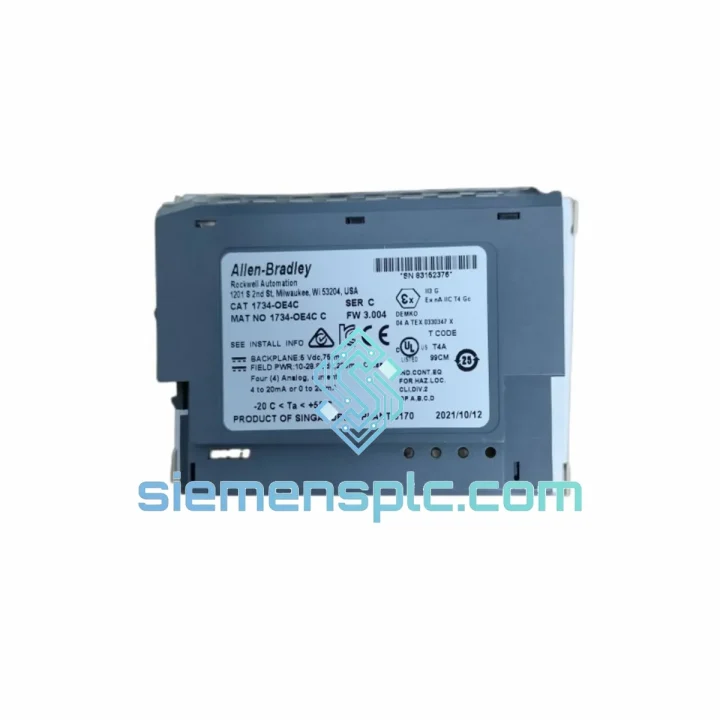
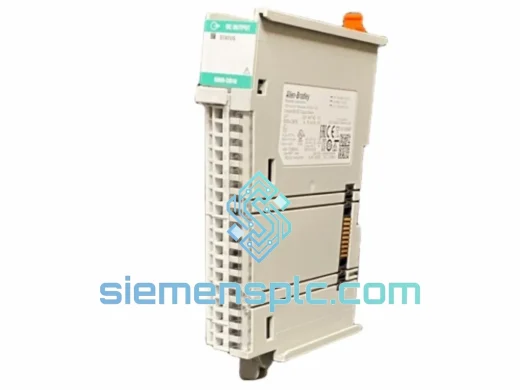
Allen-Bradley 1734-OE4C Analog Output Module

Request verified availability, condition, replacement risk review, packing options and courier lead time for 1734-OE4C.

Exact part1734-OE4C RFQ auto-fillPart number attached Export packingDHL / FedEx / UPS Sales replyEmail or WhatsApp
BrandAllen-Bradley Part Number1734-OE4C ConditionAvailability Check Lead TimeRFQ Confirmation DocumentsDatasheet / photos by RFQ ShippingExport packing available
Auto-filled RFQ 1734-OE4C

Click Request Quote and the part number is inserted into the inquiry form automatically.

Procurement Data

Key Product Information

Core fields for model confirmation and RFQ routing. Detailed product narrative remains below.

Brand
Allen-Bradley
Primary Part Number
1734-OE4C
Product Type
Analog Output Module
Product Family
Other series
Manufacturer
Allen-Bradley / Rockwell Automation
Country of Origin
US
Catalog Category
I/O Modules
Humidity
5–95% RH, non-condensing
Model confirmed for inquiry 1734-OE4C Send quantity, destination and urgency. The RFQ form keeps this part number attached.
Request Quote
Product Overview

1734-OE4C Down? Every Minute of Downtime Has a Price Tag — We Ship Today

A failed analog output module doesn’t just trip an alarm — it kills your process loop, stalls your actuators, and starts a clock that costs real money. The Allen-Bradley 1734-OE4C is a 4-channel, 4–20 mA analog current output module on the POINT I/O platform. When yours fails, you need an exact replacement in hand before the next shift, not next week. We stock verified units in Xiamen and ship globally via DHL and FedEx Express — same-day dispatch on confirmed orders before 15:00 CST.

URGENT REQUIREMENT? Contact: [email protected] | WhatsApp: +86 18359268345

Quick Technical Datasheet

Catalog Number 1734-OE4C  ✅ Ready to Ship
Manufacturer Allen-Bradley / Rockwell Automation
Platform POINT I/O
Module Type Analog Current Output
Output Channels 4 (single-ended, independent)
Output Range 4–20 mA standard; 0–21 mA extended
Resolution 16-bit DAC (≈0.3 µA per count)
Accuracy ±0.1% full scale @ 25 °C
Max Loop Resistance 750 Ω @ 24 VDC supply
Supply Voltage 24 VDC (18–32 VDC range)
Bus Current Draw 65 mA from POINT I/O backplane
Channel Isolation 100 VDC continuous, channel-to-backplane
Operating Temp 0 °C to +60 °C
Storage Temp -40 °C to +85 °C
Humidity 5–95% RH, non-condensing
Required Base Unit 1734-TB3 or 1734-TBS3 (spring clamp)
Compatible Adapters 1734-AENT, 1734-ADN, 1734-ACN, 1734-APB
Programming Studio 5000 Logix Designer v21+
Certifications UL, CE, C-Tick, ATEX Zone 2 (with 1734-AENTR)
Dimensions (H×W×D) 94 × 12 × 60 mm
Weight ~200 g
Stock Status ✅ In Stock — Ships from Xiamen, China

Troubleshooting & Replacement Tips

Most common failure modes on the 1734-OE4C:

  • Output stuck at 4 mA or 0 mA: Nine times out of ten this is a communication fault, not a dead DAC. Check the adapter’s connection status LED first. If the adapter is faulted, the module defaults to its configured fault state — which may be “hold last value” or “go to zero” depending on your Studio 5000 config. Don’t swap the module before you’ve ruled out the adapter.
  • Open-wire fault (Bit 8 in the input data word): The module reports open-wire on any channel where it cannot source current — typically a broken field wire, a disconnected actuator, or a load resistance exceeding 750 Ω. Measure loop resistance at the terminal block before condemning the module.
  • Module not recognized after hot-swap: Electronic keying mismatch. The replacement module’s series letter or firmware revision doesn’t match what’s stored in the controller project. In Studio 5000, go to the module properties → General tab → Electronic Keying and temporarily set it to “Compatible Module” to allow the swap, then restore keying after commissioning.
  • Outputs drifting over time: Thermal drift on aging units. Verify ambient temperature inside the panel — if it’s consistently above 50 °C, the ±0.1% accuracy spec is no longer guaranteed. Add panel cooling or derate the load.

Step-by-step replacement procedure:

  1. Document the current module’s series letter and firmware revision from the existing label before removal — you need this to match the replacement or update your Studio 5000 project accordingly.
  2. In Studio 5000, note the configured fault state for each channel (hold / zero / user-defined). Screenshot or export the module configuration before pulling power.
  3. If your adapter supports hot-swap (1734-AENT / 1734-AENTR), you can replace under power. Otherwise, de-energize the POINT I/O node — not the entire panel if avoidable.
  4. Remove the 1734-TB3 or 1734-TBS3 base unit wiring connector first (it unplugs as a block — no need to rewire individual terminals). Label it before removal.
  5. Slide the old module off the base unit. Seat the replacement 1734-OE4C firmly until the locking tab clicks.
  6. Reconnect the wiring connector block. Restore power. The adapter will auto-configure the module if electronic keying is set to “Compatible Module” or “Exact Match” with a matching series.
  7. Verify all four channel outputs in Studio 5000 → Controller Tags. Force each channel to 4 mA and 20 mA and confirm field device response before releasing to production.
  8. Restore electronic keying to your site standard. Log the replacement in your maintenance record with the new module’s serial number.

Common fault codes to know:

  • Fault Type 16 (Module Fault): Hardware self-test failure on power-up. Unit is defective — replace immediately.
  • Fault Type 10 (Connection Timeout): Controller lost communication with the module. Check adapter health and network cable before assuming module failure.
  • Fault Type 8 (Configuration Mismatch): The module’s stored configuration doesn’t match the controller project. Re-download the module configuration from Studio 5000.

Reliability in Harsh Conditions

The 1734-OE4C is built for the realities of industrial panel environments — not a lab bench. The 16-bit DAC is housed in a conformal-coated PCB assembly that resists moisture ingress and corrosive atmospheres common in chemical and wastewater facilities. The module’s 12 mm slim profile reduces thermal mass, but the internal design accounts for the heat generated by adjacent modules in a densely packed POINT I/O node.

Vibration tolerance meets IEC 61131-2 standards — the module stays seated and operational on machinery with continuous vibration profiles up to 5g, 10–500 Hz. The spring-clamp terminal option (1734-TBS3 base) is specifically recommended for high-vibration installations because screw terminals can back off over time under mechanical stress.

For installations in Zone 2 hazardous areas, the 1734-OE4C paired with the 1734-AENTR adapter carries ATEX certification. Ensure your installation complies with the ATEX installation drawing and that the enclosure IP rating matches the area classification — the module itself is not rated for direct exposure.

Units we ship have passed incoming inspection: visual examination for physical damage, label verification against Rockwell Automation’s catalog matrix (series letter, firmware revision, date code), and a functional power-on check. We do not ship modules with cracked housings, missing labels, or unverifiable provenance.

Global Express Logistics

Our warehouse is located in Xiamen, Fujian Province — one of China’s primary export hubs with direct access to DHL, FedEx, and UPS international gateways. Here’s how a typical urgent order moves:

  • Order confirmed before 15:00 CST: Same-day pick, pack, and handover to carrier.
  • DHL Express Worldwide: Southeast Asia 1–2 days, Europe 2–3 days, North America 3–4 days, Middle East 2–3 days.
  • FedEx International Priority: Available as an alternative for destinations where FedEx has stronger last-mile coverage.
  • Export documentation: Commercial invoice, packing list, and certificate of origin prepared same day. HS Code 8537.10 declared for customs clearance. We handle all export formalities — you receive a clean AWB and tracking number within 2 hours of dispatch.
  • Customs advisory: For EU imports, EORI number required from the buyer. For US imports, we declare accurate value — no undervaluation. Duties and taxes are buyer’s responsibility (DAP/DDP available on request for high-value orders).
  • Tracking: Full end-to-end tracking link sent via email and WhatsApp immediately after dispatch. We monitor shipments proactively and flag any customs holds within 24 hours.

If your line is down and every hour matters, tell us when you place the order. We will prioritize your shipment in the pick queue and confirm dispatch time explicitly.

Contact Information

📧 Email: [email protected]
💬 WhatsApp: +86 18359268345
🌐 Web: siemensplc.com
© 2026 siemensplc.com. All rights reserved.

Ready to quote

Send This Part Number to Sales

[email protected]
RFQ workflow

Confirmation Process

Quality workflow ->
01Model confirmation

We check the full part number, brand, series and visible nameplate information before quotation.

02Availability reply

Sales confirms stock path, condition option, quantity and realistic lead time for export dispatch.

03Packing & courier

DHL, FedEx, UPS or buyer courier arrangements can be reviewed with packing requirements.