Allen-Bradley
RFQ Ready
Allen-Bradley 1756-L81E ControlLogix Controller
ControlLogix
Origin US
PLC Controller
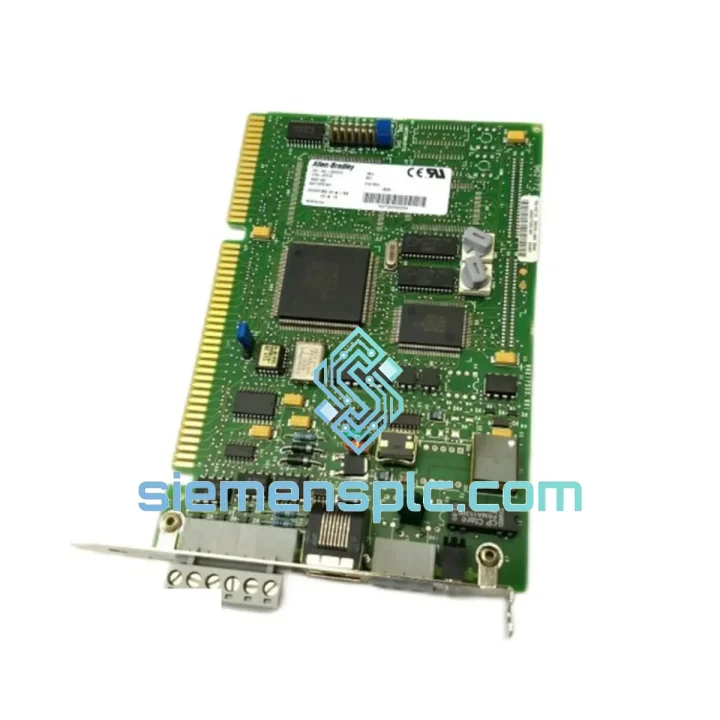
Request verified availability, condition, replacement risk review, packing options and courier lead time for 1784-KTX.
Click Request Quote and the part number is inserted into the inquiry form automatically.
Core fields for model confirmation and RFQ routing. Detailed product narrative remains below.
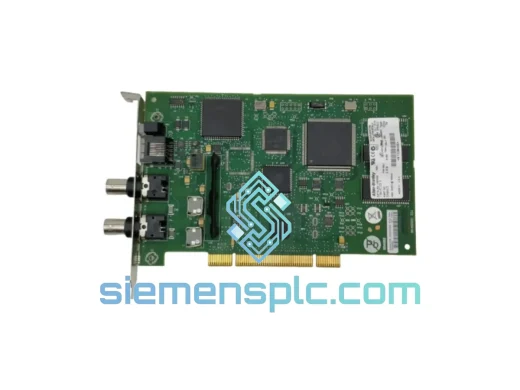
Your ISA-bus communication card just failed. The RSLinx driver is throwing a “KT card not found” error. Your programming terminal has gone dark. The PLC-5 is still running on its last downloaded program, but you have zero visibility — no diagnostics, no online edits, no fault acknowledgment. Every minute that passes without a replacement 1784-KTX in that ISA slot is costing you production output, maintenance overtime, and customer confidence. We stock the Allen-Bradley 1784-KTX and ship same-day from Xiamen. That is the only thing that matters right now.
URGENT REQUIREMENT? Contact: [email protected] | WhatsApp: +86 18359268345
| Parameter | Specification |
|---|---|
| Part Number | 1784-KTX |
| Manufacturer | Allen-Bradley / Rockwell Automation |
| Series | 1784 PC Communication Cards |
| Bus Interface | ISA 16-bit |
| Supported Networks | Data Highway Plus (DH+), Remote I/O (RIO) |
| DH+ Baud Rate | 57.6 Kbps (max) |
| Ports | Dual-port — simultaneous DH+ and RIO |
| Compatible PLCs | PLC-5, SLC 500, MicroLogix 1500 |
| Required Software | RSLinx Classic (Rockwell Automation) |
| IRQ / I/O Address | Jumper-configurable (see DIP switch table below) |
| Operating Temperature | 0 °C to 60 °C |
| Weight | Approx. 200 g |
| Origin | USA |
| Stock Status | ✅ Ready to Ship — Xiamen Warehouse |
Fault Scenario 1 — RSLinx “KT Card Not Found” Error
This is the most common failure mode. Before condemning the card, rule out the obvious: IRQ conflict with another ISA device. Pull up Device Manager on the industrial PC and check for IRQ sharing on IRQ 5, 7, 10, or 11. The 1784-KTX uses jumpers JP1–JP4 to set the IRQ. If another card is already sitting on IRQ 10 (common with legacy NICs), move the KTX to IRQ 5 and update the RSLinx driver configuration to match. If the error persists after IRQ isolation, the card is dead — order the replacement now.
Fault Scenario 2 — DH+ Network Drops Intermittently
Intermittent DH+ dropouts on the 1784-KTX are almost always a termination problem, not a card failure. Check both ends of the DH+ trunk for 82-ohm terminating resistors (Rockwell part 1770-XD). A missing or failed terminator causes reflections that corrupt token-passing and look exactly like a bad communication card. Swap the terminator first. If dropouts continue, check the 1770-CD cable for shield continuity — a broken shield on a long DH+ run will induce noise that kills communication at high baud rates.
Fault Scenario 3 — Card Recognized but RIO Scanner Faults
If RSLinx sees the 1784-KTX but your RIO rack is faulting, the issue is almost certainly a node address conflict or a baud rate mismatch. The 1784-KTX RIO port baud rate is set via software in RSLinx — confirm it matches the physical baud rate switches on your 1771-ASB or 1747-ASB adapter. RIO runs at 57.6K, 115.2K, or 230.4K baud. A one-step mismatch will cause the scanner to fault immediately on startup.
Replacement Procedure — Step by Step
Firmware & Revision Notes
The 1784-KTX and 1784-KTX/B are functionally interchangeable — the /B suffix denotes a minor PCB revision with no impact on DH+ or RIO performance. Both use the same RSLinx Classic driver. If your RSLinx version is older than 2.57, update it before installing the replacement card to avoid driver incompatibility errors on Windows 7 or later.
The 1784-KTX was designed for continuous 24/7 operation in industrial environments that would destroy consumer-grade hardware within weeks. The PCB uses conformal coating on critical signal traces to resist moisture ingress — a real concern in food processing plants, coastal facilities, and tropical climates where humidity regularly exceeds 85% RH. The ISA edge connector is gold-plated to prevent oxidation-related contact resistance, which is the primary cause of intermittent communication faults in cards that have been in service for 10+ years.
Vibration tolerance is achieved through through-hole component mounting rather than surface-mount technology for the high-stress connector areas. In automotive stamping plants and heavy machinery environments where floor vibration is constant, this construction difference is what separates a card that lasts a decade from one that develops cold solder joints within two years. The onboard oscillator is temperature-compensated to maintain accurate DH+ timing across the full 0–60 °C operating range, preventing baud rate drift that causes communication errors during summer shutdowns when panel temperatures spike.
Units shipped from our Xiamen warehouse are stored in climate-controlled conditions with desiccant packs and anti-static packaging. Every card undergoes a bench communication test — DH+ handshake verification and RIO scanner enumeration — before it leaves our facility. We do not ship untested stock. If a card does not pass the bench test, it does not ship. That is the only quality standard that matters when your line is down.
Our Xiamen warehouse is located 40 minutes from Xiamen Gaoqi International Airport (XMN), one of China’s primary cargo hubs with direct freight connections to Frankfurt, Los Angeles, Dubai, Singapore, and Sydney. This geography is not accidental — it was chosen specifically to minimize the time between “order confirmed” and “package on aircraft.”
Standard process: order confirmed before 14:00 CST ships same business day via DHL Express or FedEx International Priority. Export documentation — commercial invoice, packing list, and HS code declaration — is prepared in parallel with packing. We do not hold shipments for paperwork. Tracking numbers are sent via email within 2 hours of dispatch.
Typical transit times from Xiamen: Germany / Netherlands 2–3 business days, USA (East Coast) 3–4 business days, USA (West Coast) 2–3 business days, UAE / Saudi Arabia 2–3 business days, Australia / New Zealand 3–5 business days, Southeast Asia 1–2 business days. These are DHL Express and FedEx IP transit times under normal customs clearance conditions.
For customers in countries with complex import requirements (Brazil, India, Russia), we provide a detailed commercial invoice with accurate HS code 8537.10 classification and declared value documentation to minimize customs hold risk. We have shipped to 60+ countries and understand the documentation requirements that prevent clearance delays. If your procurement team needs a proforma invoice before payment, we generate it within 30 minutes of your inquiry.
Emergency orders — where a plant shutdown is active — are flagged as priority in our system. We will call the DHL or FedEx station directly to confirm the shipment is on the next available flight. This is not a standard service we advertise; it is what we do when a customer tells us their line is down.
📧 Email: [email protected]
💬 WhatsApp: +86 18359268345
🌐 Web: siemensplc.com
© 2026 siemensplc.com. All rights reserved.
We check the full part number, brand, series and visible nameplate information before quotation.
Sales confirms stock path, condition option, quantity and realistic lead time for export dispatch.
DHL, FedEx, UPS or buyer courier arrangements can be reviewed with packing requirements.
Similar brand or category products for fast comparison and multi-item RFQ lists.