GE Fanuc
In Stock OK
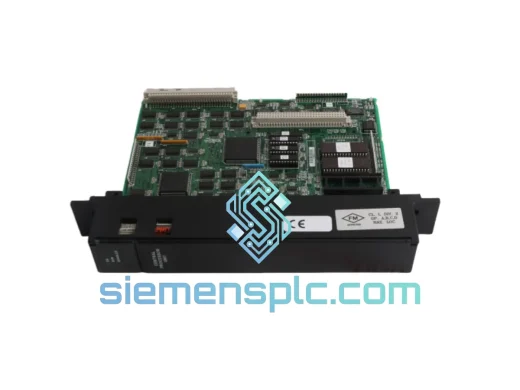
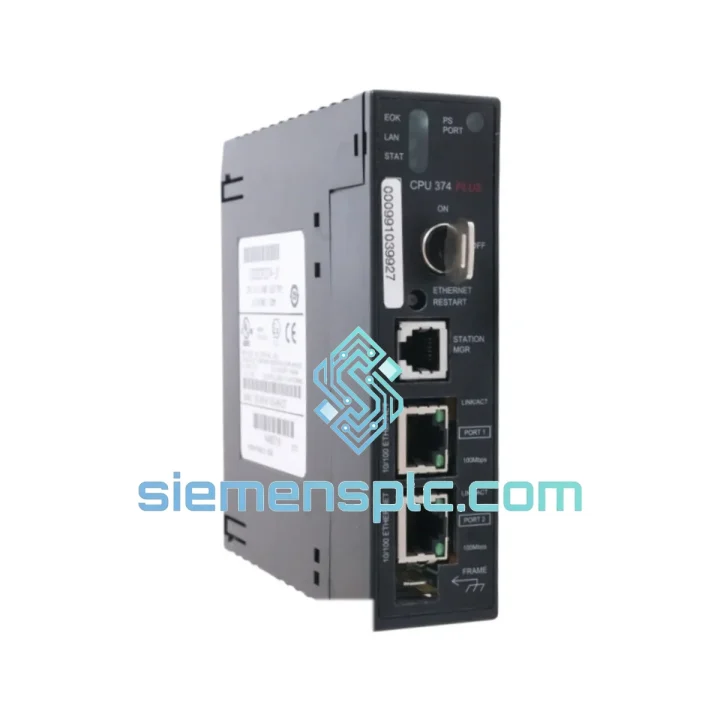
GE IC693CPU374-PLUS PLC CPU Module
Request verified availability, condition, replacement risk review, packing options and courier lead time for IC693CPU374-PLUS.
BrandGE Fanuc
Part NumberIC693CPU374-PLUS
ConditionAvailability Check
Lead TimeRFQ Confirmation
DocumentsDatasheet / photos by RFQ
ShippingExport packing available
Auto-filled RFQ
IC693CPU374-PLUS
Click Request Quote and the part number is inserted into the inquiry form automatically.
- Reply by email: [email protected]
- WhatsApp / Tel: +86 18359268345
- Mon-Sat 9:00-18:00 GMT+8
Procurement Data
Key Product Information
Core fields for model confirmation and RFQ routing. Detailed product narrative remains below.
- Brand
- GE Fanuc
- Primary Part Number
- IC693CPU374-PLUS
- Product Type
- PLC CPU Module
- Series / Family
- Fanuc
- Country of Origin
- US
- Catalog Category
- Robotics & Motion
- Operating Temp.
- 0°C to 60°C
Model confirmed for inquiry
IC693CPU374-PLUS
Send quantity, destination and urgency. The RFQ form keeps this part number attached.
Request Quote
Product Overview
IC693CPU374-PLUS: Stop the Clock on Your Downtime — Ship Today from Xiamen
Your Series 90-30 rack is dark. The line is stopped. Every minute without a functioning CPU is costing you — in lost throughput, in penalty clauses, in the kind of pressure that makes a 2 AM phone call feel routine. The GE Fanuc IC693CPU374-PLUS is on our shelf right now. Not “available to order.” Not “lead time TBD.” In stock. Tested. Ready to leave Xiamen today.
We’ve handled enough emergency callouts to know that the difference between a 4-hour fix and a 3-day nightmare is almost always parts availability. That’s why we stock the IC693CPU374-PLUS specifically — because when a Series 90-30 CPU fails, there’s no graceful degradation. The rack stops. You need an exact replacement, fast, with zero configuration surprises. That’s exactly what we deliver.
URGENT REQUIREMENT? Contact: [email protected] | WhatsApp: +86 18359268345
Quick Technical Datasheet
| Parameter | Specification | Status |
|---|---|---|
| Part Number | IC693CPU374-PLUS | ✅ Ready to Ship |
| Platform / Series | GE Fanuc Series 90-30 | — |
| Processor Speed | 12 MHz | — |
| User Memory | 512 KB (program + data combined) | — |
| Discrete I/O Capacity | Up to 2,048 points | — |
| Analog I/O Capacity | Up to 512 channels | — |
| Serial Port 1 | RS-232 — SNP / SNPX / Modbus RTU | — |
| Serial Port 2 | RS-485 — multi-drop, up to 32 nodes | — |
| Ethernet | Via IC693CMM321 (optional) | — |
| Rack Compatibility | IC693CHS391 / 392 / 393 / 398 | — |
| Slot Position | Slot 1 (fixed) | — |
| Operating Temperature | 0°C to 60°C | — |
| Relative Humidity | 5% – 95% non-condensing | — |
| Battery (memory retention) | IC693ACC301 lithium (not included) | — |
| Firmware Upgrade | Field-upgradeable via serial port | — |
| Programming Software | GE Proficy Machine Edition v8.0+ | — |
| Certifications | CE, UL 508, cUL | — |
| Country of Origin | USA | — |
| Weight | 400 g | — |
| Dispatch Location | Xiamen, China | ✅ Same-Day Dispatch Available |
Troubleshooting & Replacement Tips
Step 1 — Confirm the fault before you pull the module. On a live rack, check the CPU’s LED indicators first. A solid red FAULT LED with no RUN LED typically points to a hardware fault on the CPU itself — not a program error. If you’re seeing a flashing FAULT LED, the issue may be a corrupted program or a failed I/O module downstream. Don’t swap the CPU until you’ve ruled out a bad I/O card causing a persistent fault loop.
Step 2 — Back up the program if the CPU is still partially responsive. If Port 1 is still communicating, connect via Proficy Machine Edition and do a full program upload before powering down. Even a corrupted program upload gives you a reference baseline. If the CPU is completely unresponsive, check whether your site has a program backup on a laptop or USB — Series 90-30 sites running legacy code often don’t have recent backups. This is the moment you find out.
Step 3 — Power down the entire rack before removal. The IC693CPU374-PLUS is not hot-swappable at the CPU level. Cut power at the power supply (IC693PWR321/322/330/331). Ground yourself. Remove the CPU by releasing the two captive screws at top and bottom of the module faceplate, then pull straight out. Inspect the backplane connector pins for corrosion or physical damage before inserting the replacement.
Step 4 — Check the battery on the replacement unit. The IC693CPU374-PLUS uses an IC693ACC301 lithium battery for program and data memory retention. If the replacement unit has been in storage, verify battery voltage before installation. A dead battery means your program won’t survive a power cycle — you’ll need to reload from your backup immediately after first power-on.
Step 5 — Firmware version matching. If your site uses Proficy Machine Edition with a specific firmware-dependent feature (e.g., certain Genius Bus configurations or SNP protocol extensions), verify the firmware version on the replacement CPU matches your original. Firmware version is readable via PME’s “Target Properties” dialog when connected online. Mismatched firmware rarely causes a hard fault but can produce subtle communication timing issues that are difficult to diagnose under pressure.
Step 6 — Program download and I/O forcing check. After installing the replacement and powering up, download your backed-up program. Before switching to RUN mode, verify that no I/O forces are active in the program — a forced output left over from a previous maintenance session can cause immediate process upsets on startup. Clear all forces, confirm I/O module status LEDs are green, then transition to RUN.
Common fault codes to know:
- %S0001 (PLC_FAULT_TABLE full): Clear the fault table via PME before restarting. A full fault table prevents normal RUN mode entry.
- %S0006 (I/O fault): An I/O module is not responding. Isolate by removing modules one at a time to identify the failed card — don’t assume the CPU is the root cause.
- %S0013 (Battery low): Replace IC693ACC301 immediately. Program memory is at risk.
- Watchdog timeout on startup: Usually caused by a program scan time exceeding the configured watchdog limit. Increase the watchdog timer in CPU configuration or reduce scan load before going to RUN.
Reliability in Harsh Conditions
The Series 90-30 platform was engineered for the factory floor, not the server room. The IC693CPU374-PLUS carries a conformal coating on its PCB as standard, providing a measurable barrier against condensation, airborne particulates, and corrosive atmospheres common in chemical processing and coastal industrial facilities. The module is rated to operate continuously at 60°C ambient — a specification that holds up in poorly ventilated control cabinets where actual internal temperatures routinely exceed nominal room conditions.
Vibration resistance meets IEC 68-2-6 standards, which translates to real-world durability on press lines, compressor skids, and mobile equipment where mechanical shock is a daily reality. The backplane connector is a high-cycle-rated design — it tolerates the repeated insertion and removal that comes with active maintenance environments without the pin wear that plagues lower-grade industrial connectors.
Every IC693CPU374-PLUS unit we ship has passed a functional power-on test and visual inspection for PCB damage, connector integrity, and LED functionality. Units sourced from OEM surplus channels are verified against GE Fanuc’s original part markings and date codes. We do not ship units with evidence of prior repair, re-marking, or counterfeit indicators — a problem that has become increasingly common in the secondary market for legacy GE Fanuc parts.
Global Express Logistics
Our warehouse is located in Xiamen, Fujian Province — one of China’s primary export hubs with direct access to DHL, FedEx, and UPS international gateways. For emergency orders confirmed before 15:00 CST, same-day dispatch is available. Standard international transit times from Xiamen are 2–4 business days to Southeast Asia, 3–5 days to Europe and the Middle East, and 4–6 days to North and South America, depending on customs clearance at the destination.
All shipments are packed in anti-static bags with foam-lined outer cartons. A humidity indicator card is included in each package — if the card shows exposure during transit, contact us immediately before installation. Commercial invoice, packing list, and certificate of conformance are included with every shipment as standard. For customers requiring an ATA Carnet or specific customs documentation for their country, notify us at the time of order and we will prepare the paperwork in advance to avoid clearance delays.
Tracking numbers are issued within 2 hours of dispatch via email. For time-critical shipments, we recommend DHL Express Worldwide — in our experience, it consistently outperforms other carriers for industrial parts delivery to manufacturing sites in Europe, the Americas, and the Gulf region. If your site has a preferred carrier account number, we can ship on your account to maximize your negotiated rates.
Contact Information
Email: [email protected]
WhatsApp: +86 18359268345
Web: siemensplc.com
© 2026 siemensplc.com. All rights reserved.
Ready to quote
[email protected]
Send This Part Number to Sales
RFQ workflow
Quality workflow ->
Confirmation Process
01Model confirmation
We check the full part number, brand, series and visible nameplate information before quotation.
02Availability reply
Sales confirms stock path, condition option, quantity and realistic lead time for export dispatch.
03Packing & courier
DHL, FedEx, UPS or buyer courier arrangements can be reviewed with packing requirements.
Continue sourcing
Browse full catalog ->
Related Automation Parts
Similar brand or category products for fast comparison and multi-item RFQ lists.