
Sensaphone
In Stock OK
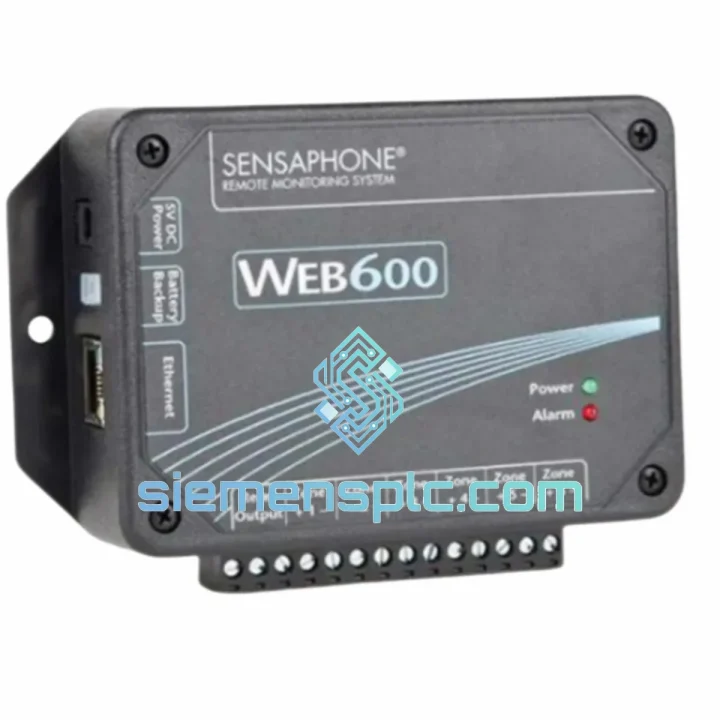
Sensaphone WEB600 FGD-W600 Remote Monitoring System
Request verified availability, condition, replacement risk review, packing options and courier lead time for FGD-W600.
BrandSensaphone
Part NumberFGD-W600
ConditionAvailability Check
Lead TimeRFQ Confirmation
DocumentsDatasheet / photos by RFQ
ShippingExport packing available
Auto-filled RFQ
FGD-W600
Click Request Quote and the part number is inserted into the inquiry form automatically.
- Reply by email: [email protected]
- WhatsApp / Tel: +86 18359268345
- Mon-Sat 9:00-18:00 GMT+8
Procurement Data
Key Product Information
Core fields for model confirmation and RFQ routing. Detailed product narrative remains below.
- Brand
- Sensaphone
- Primary Part Number
- FGD-W600
- Product Type
- Remote Monitoring System
- Product Family
- Other series
- Country of Origin
- USA
- Catalog Category
- Industrial Automation Spares
- Operating Temp.
- 0°C to 50°C (32°F to 122°F)
- Compliance
- FCC, CE
Model confirmed for inquiry
FGD-W600
Send quantity, destination and urgency. The RFQ form keeps this part number attached.
Request Quote
Product Overview
Sensaphone WEB600 FGD-W600 — Stop the Clock on Downtime. Ship Today.
Every minute your facility runs blind is money walking out the door. A cold-storage unit drifting above threshold, a server room silently cooking at 3 AM, a remote pump station flooding with zero alert — these are not hypotheticals. They happen, and when they do, the first question your operations manager asks is: why didn’t we know sooner? The Sensaphone WEB600 FGD-W600 is the answer you should have had installed yesterday. We keep verified stock in Xiamen, ready to clear customs and land on your dock faster than your maintenance team can write the incident report.
URGENT REQUIREMENT? Contact: [email protected] | WhatsApp: +86 18359268345
Quick Technical Datasheet
| Parameter | Specification | Status |
|---|---|---|
| Model / SKU | WEB600 / FGD-W600 | ✅ Ready to Ship |
| Brand | Sensaphone | 100% Original |
| Series | WEB600 | Current Production |
| Monitoring Interface | Web-based via Ethernet / IP | — |
| Input Channels | 8 Universal Analog / Digital | — |
| Sensor Types Supported | Temperature, Humidity, Flood, Smoke, AC Power, Dry Contact | — |
| Alarm Notification | Email, Voice Call (PSTN), SMS via email-to-SMS gateway | — |
| Alarm Contacts | Up to 8 configurable contacts per channel | — |
| Data Logging | Internal, web-accessible historical graphs | — |
| Network Port | 10/100 Ethernet RJ-45 | — |
| Power Supply | 12V DC adapter (included) + internal battery backup | — |
| Operating Temperature | 0°C to 50°C (32°F to 122°F) | — |
| Compliance | FCC, CE | — |
| Country of Origin | USA | — |
| Weight | Approx. 2.2 kg (unit with accessories) | — |
| Enclosure | Desktop / Wall-mount plastic | — |
| SNMP Support | Yes — trap output for NMS integration | — |
| Relay Output | Dry-contact relay for external device control | — |
| Ship-From Location | Xiamen, China | ✅ In Stock |
Troubleshooting & Replacement Tips
Swapping a WEB600 FGD-W600 in a live facility is not a plug-and-play exercise if you skip the pre-work. Here is what ten years of field calls have taught me about getting this unit back online without a second truck roll.
1. Backup the Configuration Before You Pull the Old Unit
If the existing WEB600 is still partially functional, log into its web interface and export the configuration file. This saves you from manually re-entering all 8 channel thresholds, alarm contacts, and notification schedules on the replacement unit. If the unit is completely dead, check with the facility manager — most sites with a proper CMMS will have a last-known-good config snapshot.
2. IP Address Conflict — The #1 Cause of a “Failed” Replacement
The WEB600 ships with a default IP of 192.168.1.200. If your network already has a device at that address, the unit will appear unresponsive. Before connecting to the LAN, connect directly via a crossover cable or isolated switch port, access the web interface, and assign the correct static IP (or configure DHCP) to match your network scheme. Only then plug it into the production network.
3. Sensor Channel Re-Mapping
The WEB600 uses universal inputs — each channel must be manually configured for the correct sensor type (temperature, humidity, dry contact, analog 0–5V, or 4–20mA). A common field error is leaving a channel in its default “dry contact” mode when a temperature probe is connected, resulting in a constant alarm state. Verify each channel type in the web interface under Inputs > Channel Configuration before declaring the unit operational.
4. Alarm Contact Verification — Do Not Skip This
After configuration, trigger a test alarm on each channel and confirm that all 8 notification contacts receive the alert. Email delivery failures are frequently caused by incorrect SMTP relay settings or firewall rules blocking outbound port 25/587. If voice call notifications are used, verify the PSTN line is active and the correct dial-out prefix is configured.
5. Battery Backup Condition Check
If you are installing a refurbished or long-stored unit, the internal battery may have self-discharged below the recovery threshold. Connect AC power and allow a minimum 4-hour charge cycle before testing battery backup functionality. A unit that fails to hold alarm state during a power-cut test is not field-ready.
6. Common Fault Indicators
- All LEDs off, no web interface response: Check 12V DC adapter output with a multimeter. Adapter failure is more common than unit failure on aged installations.
- Continuous alarm on all channels: Channel type mismatch — see point 3 above.
- Web interface accessible but no alarm emails sent: SMTP configuration error or outbound email blocked by network firewall.
- Unit reboots intermittently: Marginal power supply voltage. Replace the 12V adapter before condemning the unit.
- Historical data graph blank: Internal clock not set. Configure NTP server or manually set date/time in system settings.
Reliability in Harsh Conditions
The WEB600 FGD-W600 is not designed for a climate-controlled office — it is built to operate in the environments where monitoring matters most. The unit’s operating range of 0°C to 50°C covers the majority of industrial utility rooms, telecommunications shelters, and outdoor-rated enclosures encountered in real deployments. The internal battery backup is not a marketing feature; it is a functional requirement for any site where power interruptions are a known risk, and the WEB600 delivers sustained alarm capability through outages without requiring an external UPS.
The plastic enclosure is rated for desktop and wall-mount installation in standard industrial environments. For deployments in high-humidity zones — coastal facilities, food processing areas, or tropical climates — the unit should be installed inside a sealed NEMA 4X enclosure with appropriate cable gland fittings. The sensor inputs are designed to tolerate the cable runs and ground loop conditions typical of large industrial facilities, and the Ethernet interface includes basic surge protection adequate for most structured cabling environments.
Vibration tolerance is adequate for equipment room and control panel installations. For mobile or transportation applications, additional mechanical isolation is recommended. The unit has been deployed successfully in offshore platform control rooms, mining site communications shelters, and pharmaceutical cold-chain facilities across multiple continents — environments where a monitoring failure is not an inconvenience but a compliance event or a safety incident.
Global Express Logistics
Our warehouse is located in Xiamen, Fujian Province — one of China’s primary export hubs with direct access to international freight lanes via Xiamen Gaoqi International Airport and Xiamen Port. This geography is not accidental; it is chosen specifically to minimize transit time to Southeast Asia, the Middle East, Europe, and the Americas.
Standard dispatch process: order confirmed before 14:00 CST ships same business day. DHL Express and FedEx International Priority are our primary carriers for urgent shipments. Typical transit times from Xiamen: Southeast Asia 2–3 days, Middle East 3–4 days, Europe 4–5 days, North America 5–7 days. All shipments include full commercial invoice, packing list, and certificate of origin documentation to support customs clearance. For regulated industries requiring additional documentation (material safety data, country-of-origin certification, or end-user declarations), contact us at the time of order.
We handle export classification and HS code declaration for all standard industrial automation components. Customers in countries with import licensing requirements for electronic monitoring equipment should advise us at the time of inquiry so we can prepare the appropriate documentation package in advance. Partial shipments and split deliveries for large orders are available on request. Real-time tracking numbers are provided within 2 hours of dispatch confirmation.
Contact Information
📧 Email: [email protected]
💬 WhatsApp: +86 18359268345
🌐 Web: siemensplc.com
© 2026 siemensplc.com. All rights reserved.
Ready to quote
[email protected]
Send This Part Number to Sales
RFQ workflow
Quality workflow ->
Confirmation Process
01Model confirmation
We check the full part number, brand, series and visible nameplate information before quotation.
02Availability reply
Sales confirms stock path, condition option, quantity and realistic lead time for export dispatch.
03Packing & courier
DHL, FedEx, UPS or buyer courier arrangements can be reviewed with packing requirements.
Continue sourcing
Browse full catalog ->
Related Automation Parts
Similar brand or category products for fast comparison and multi-item RFQ lists.
ABB
RFQ Ready
ABB 3HAC9330-1 Robot Speed Reducer – IRB6640-205/2.7
lRB240046 RB460
Origin SE
Robot Speed Reducer
ABB
RFQ Ready
ABB YT204001-JJ Speed Measurement Board
Ready to Ship
Origin SE
Speed Measurement Board