

Siemens
RFQ Ready
SIEMENS 6GK5108-0BA00-2AA3 Industrial Ethernet Switch
SIMATIC
Origin DE
Industrial Ethernet Switch
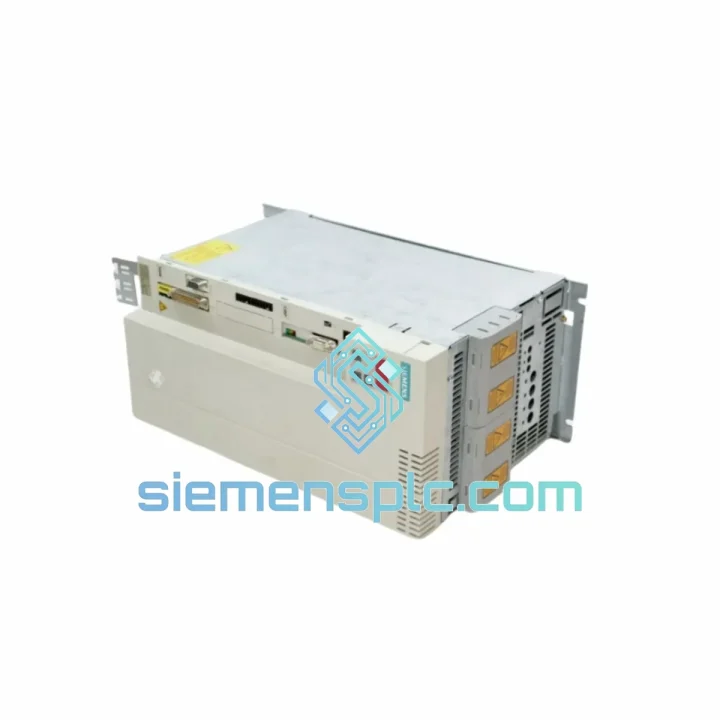
Request verified availability, condition, replacement risk review, packing options and courier lead time for 6ES7023-8TP60-Z.
Click Request Quote and the part number is inserted into the inquiry form automatically.
Core fields for model confirmation and RFQ routing. Detailed product narrative remains below.
Your S7-300 rack just dropped offline. The CPU is throwing a bus fault, the line is cold, and every minute is burning money. The Siemens 6ES7023-8TP60-Z Z-G91-K80 is the exact sending interface module you need to restore rack-to-rack communication — and we have it on the shelf right now in Xiamen, ready for same-day DHL dispatch to your plant, wherever it is.
This is not a grey-market pull. It is a 100% original Siemens SIMATIC S7-300 IM module, sourced from verified industrial channels, inspected before it ships, and backed by a 12-month replacement guarantee. When your maintenance team is standing in front of a dead rack at 2 AM, you need a supplier who picks up the phone and ships the part — not one who asks you to fill out a quote form and wait three days.
URGENT REQUIREMENT? Contact: [email protected] | WhatsApp: +86 18359268345
| Part Number | 6ES7023-8TP60-Z |
| Order Suffix | Z-G91-K80 |
| Series | SIMATIC S7-300 |
| Module Function | Sending Interface Module (IM) — rack-to-rack expansion |
| Bus Interface | S7-300 K-Bus (backplane) |
| Supply Voltage | 24 V DC via backplane bus |
| Max Expansion Racks | Up to 3 expansion racks (ER1/ER2) |
| Operating Temperature | 0 °C to +60 °C |
| Storage Temperature | -40 °C to +70 °C |
| Protection Rating | IP20 |
| Certifications | CE, UL, cULus, RoHS |
| Origin | Germany |
| Stock Status | ✔ Ready to Ship — Xiamen Warehouse |
Ten years of field work teaches you that most S7-300 IM failures fall into three buckets. Know which one you are dealing with before you pull the module.
Fault 1 — BUSF LED solid red on CPU. This is the most common symptom of a failed sending IM. The CPU has lost synchronization with the expansion rack. Before condemning the 6ES7023-8TP60-Z, check the ribbon cable or fiber-optic link between the sending IM and the receiving IM (typically a 6ES7368 or 6ES7153 series). A damaged cable will produce identical symptoms. Swap the cable first — it is cheaper and faster. If the fault persists after cable replacement, the sending IM is the culprit.
Fault 2 — Intermittent rack dropout under vibration or thermal cycling. The K-Bus connector on the backplane develops micro-fractures over years of thermal expansion. When you seat the replacement module, apply firm, even pressure until you hear the locking tab click. Do not rely on visual alignment alone. After seating, power-cycle the rack and monitor the BUSF LED through three full thermal cycles before signing off.
Fault 3 — Module recognized but expansion rack I/O not updating. This points to a firmware mismatch between the sending IM and the CPU firmware revision. Check the CPU firmware version in STEP 7 (HW Config → CPU properties → General tab). The 6ES7023-8TP60-Z Z-G91-K80 suffix encodes specific factory options — confirm your STEP 7 hardware catalog version supports this exact order suffix. If you are running TIA Portal V16 or later, import the updated GSD/HSP file from the Siemens support portal before downloading the hardware configuration.
Replacement Procedure (field-verified, 8-step):
No address switch or DIP configuration is required on this module. The 6ES7023-8TP60-Z is auto-addressed by the CPU during startup — plug-and-play replacement with no STEP 7 download needed if the hardware configuration is unchanged.
Siemens designed the S7-300 platform for the floor, not the lab. The 6ES7023-8TP60-Z carries an operating temperature range of 0 °C to +60 °C with storage down to -40 °C — covering everything from a Siberian compressor station in winter to a Southeast Asian foundry in summer. The conformal-coated PCB (standard on Z-suffix special versions) resists condensation and airborne contaminants including cutting fluid mist, hydraulic oil vapor, and sulfur compounds common in chemical processing environments.
Vibration resistance meets IEC 60068-2-6 (sinusoidal, 10–58 Hz, 0.075 mm amplitude; 58–500 Hz, 1 g). Shock resistance meets IEC 60068-2-27 (15 g, 11 ms half-sine). These are not marketing numbers — they are the same specs that keep S7-300 racks running on offshore drilling platforms and automotive stamping presses where the floor shakes continuously. The K-Bus backplane connector is rated for a minimum of 100 insertion cycles, meaning a module that has been pulled and reseated during routine maintenance will not degrade bus signal integrity.
EMC immunity is certified to EN 61000-6-2, covering conducted and radiated immunity levels appropriate for heavy industrial environments with large VFD installations and high-current switching equipment nearby. If your plant has a history of nuisance faults on other brands of PLC hardware, the S7-300 platform’s EMC design is one of the reasons engineers keep specifying it for new projects even as newer platforms become available.
Our warehouse is located in Xiamen, Fujian Province — one of China’s primary export hubs with direct access to DHL, FedEx, and UPS international gateways. Orders confirmed before 15:00 CST ship same day. Here is what the logistics chain looks like from your purchase order to your receiving dock:
For plant shutdowns or emergency line restarts, contact us directly on WhatsApp for real-time shipment tracking and customs status updates. We have cleared urgent shipments through Frankfurt, Los Angeles, and Singapore customs in under 4 hours when pre-notification was provided to the freight forwarder.
Email: [email protected]
WhatsApp: +86 18359268345
Web: siemensplc.com
© 2026 siemensplc.com. All rights reserved.
We check the full part number, brand, series and visible nameplate information before quotation.
Sales confirms stock path, condition option, quantity and realistic lead time for export dispatch.
DHL, FedEx, UPS or buyer courier arrangements can be reviewed with packing requirements.
Similar brand or category products for fast comparison and multi-item RFQ lists.


