
Siemens
In Stock OK
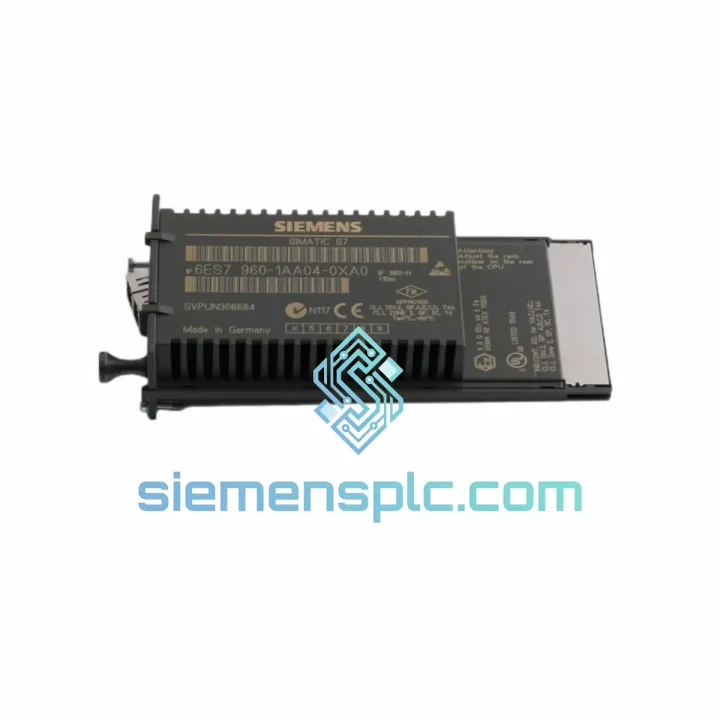
Siemens 6ES7960-1AA04-0XA0 Sync Submodule
Request verified availability, condition, replacement risk review, packing options and courier lead time for 6ES7960-1AA04-0XA0.
BrandSiemens
Part Number6ES7960-1AA04-0XA0
ConditionAvailability Check
Lead TimeRFQ Confirmation
DocumentsDatasheet / photos by RFQ
ShippingExport packing available
Auto-filled RFQ
6ES7960-1AA04-0XA0
Click Request Quote and the part number is inserted into the inquiry form automatically.
- Reply by email: [email protected]
- WhatsApp / Tel: +86 18359268345
- Mon-Sat 9:00-18:00 GMT+8
Procurement Data
Key Product Information
Core fields for model confirmation and RFQ routing. Detailed product narrative remains below.
- Brand
- Siemens
- Primary Part Number
- 6ES7960-1AA04-0XA0
- Product Type
- Synchronization Submodule
- Series / Family
- SIMATIC S7-400
- Manufacturer
- Siemens AG
- Country of Origin
- DE
- Catalog Category
- PLCs & Controllers
- Operating Temp.
- 0 °C to +60 °C
Model confirmed for inquiry
6ES7960-1AA04-0XA0
Send quantity, destination and urgency. The RFQ form keeps this part number attached.
Request Quote
Product Overview
Siemens 6ES7960-1AA04-0XA0 — Your S7-400H Redundancy Link Is Down. Every Minute Costs Money. We Ship Today.
When the sync submodule on your S7-400H fails, your redundant system collapses to simplex mode. One CPU fault away from a full process shutdown. Whether you’re running a refinery, a pharmaceutical batch reactor, or an automotive body-in-white line, that exposure is unacceptable. The 6ES7960-1AA04-0XA0 is in stock at our Xiamen warehouse. Confirmed orders before 14:00 CST ship same day via DHL Express or FedEx Priority. You get a tracking number within two hours of dispatch.
URGENT REQUIREMENT? Contact: [email protected] | WhatsApp: +86 18359268345
Quick Technical Datasheet
| Parameter | Value |
|---|---|
| Part Number (MLFB) | 6ES7960-1AA04-0XA0 |
| Manufacturer | Siemens AG |
| Product Series | SIMATIC S7-400H |
| Module Function | CPU-to-CPU Synchronization Submodule |
| Physical Interface | LC Duplex Fiber-Optic (Multi-mode, OM2/OM3) |
| Max Sync Cable Length | 10 m standard; extended via fiber repeater |
| Redundancy Architecture | Hot-Standby (1oo2 CPU active, bumpless switchover) |
| Compatible CPUs | SIMATIC S7-400H CPU 41x-5H series |
| Operating Temperature | 0 °C to +60 °C |
| Storage Temperature | −40 °C to +70 °C |
| Relative Humidity | 10–95 % RH, non-condensing |
| Degree of Protection | IP20 (rack-mounted) |
| Power Supply | Via CPU backplane — no external wiring |
| Weight | ~80 g |
| Certifications | CE, UL, cULus |
| Software Compatibility | STEP 7 V5.x / TIA Portal V13+ |
| Stock Status | ✔ Ready to Ship — Xiamen Warehouse |
Troubleshooting & Replacement Tips
Common Failure Signatures
Before you pull the module, confirm the fault is actually the sync submodule and not the fiber cable or the CPU slot. The S7-400H CPU logs diagnostic events in OB82 and OB86. Check the following first:
- SF LED on both CPUs lit simultaneously: Classic sync link loss. Check fiber cable continuity with an optical power meter before condemning the module. A dirty or cracked LC connector accounts for roughly 40% of reported sync failures in the field.
- CPU event ID 16#75D2 or 16#75D3: Synchronization timeout. The standby CPU could not re-establish the sync handshake within the configured timeout window. Module replacement is likely warranted if cable checks out clean.
- Intermittent switchover events in the diagnostic buffer: Suspect vibration-induced fiber connector micro-disconnects or a degrading fiber transceiver inside the module. Swap the patch cable first — if the problem persists, replace the submodule.
- Standby CPU stuck in SYNCUP indefinitely: The replacement CPU cannot complete memory image transfer from the master. This typically indicates a firmware mismatch between the new sync submodule and the existing CPU firmware revision. See firmware note below.
Step-by-Step Replacement Procedure
- Verify system state: Confirm CPU-1 is in RUN-Redundant and CPU-2 is in STOP or SYNCUP. Do not replace the module while both CPUs are in RUN-Redundant — you will lose redundancy protection during the swap.
- Force CPU-2 to STOP: Via STEP 7 / TIA Portal online view or the mode selector switch on the CPU front panel.
- Disconnect the fiber patch cable: Cap both LC connectors immediately with dust caps. Fiber end-face contamination is the leading cause of repeat failures after module replacement.
- Remove the faulty module: The submodule slides into the slot on the left side of the CPU front face. Press the release latch and pull straight out. No tools required.
- Inspect the replacement unit: Verify the firmware revision sticker on the new module matches your CPU firmware. The revision is printed on the label as “FW: Vx.x”. Cross-reference with Siemens Industry Online Support compatibility matrix (Entry ID: 18234736).
- Insert the new module: Slide in until the latch clicks. Do not force — misalignment will damage the backplane connector.
- Reconnect the fiber cable: Clean both LC connectors with an IEC 61300-3-35 compliant cleaner before insertion. Verify TX/RX orientation — TX on one module connects to RX on the other.
- Bring CPU-2 to RUN: The H-system initiates the SYNCUP sequence automatically. Monitor the diagnostic buffer. SYNCUP duration depends on program and data block size — typically 30 seconds to several minutes on large configurations.
- Confirm RUN-Redundant on both CPUs: Both CPUs should show RUN-Redundant in the online view. The SF LED should extinguish. Log the replacement with the new module serial number and firmware revision.
Firmware Matching — Critical Note
The 6ES7960-1AA04-0XA0 is hardware revision 4 (HW: 4) of the sync submodule family. It is not backward-compatible with CPU firmware versions below V6.0.3 on the CPU 414-5H and CPU 416-5H. If your CPUs are running older firmware, update the CPU firmware before installing this module, or contact us to source an earlier hardware revision. Send us your CPU order number and current firmware version — we will confirm compatibility before shipment.
Reliability in Harsh Conditions
The S7-400H platform is designed for environments that would destroy consumer-grade electronics within weeks. Siemens qualifies the S7-400 series to IEC 61131-2 as a baseline, with additional testing covering the following:
Vibration & Mechanical Shock: Qualified to IEC 60068-2-6 (sinusoidal vibration, 10–58 Hz, 0.075 mm amplitude; 58–150 Hz, 1g) and IEC 60068-2-27 (shock, 15g, 11 ms half-sine). This covers the vibration environment of compressor stations, pump halls, and heavy press lines without additional shock mounts.
Thermal Cycling: Rated for continuous operation at 60 °C ambient. In high-density rack configurations with poor airflow, internal temperatures can exceed this threshold. The fiber-optic transceiver inside the sync submodule is the component most sensitive to sustained over-temperature — it degrades gradually before failing, manifesting as increasing bit error rates on the sync link before a hard failure occurs. Size your cabinet cooling for actual thermal load, not nameplate ratings.
Humidity & Condensation: Rated to 95% RH non-condensing. In coastal or tropical installations, condensation during plant startup after a cold shutdown is a real risk. Maintain cabinet internal temperature at least 5 °C above the dew point using anti-condensation heaters. A single condensation event on the fiber connector can cause a sync fault that takes hours to diagnose.
EMI & Conducted Interference: The fiber-optic sync link provides galvanic isolation between the two CPU racks — a significant advantage in environments with heavy variable-frequency drives, large motor starters, or welding equipment on the same power distribution system. Ground loops that would corrupt a copper-based sync link have zero effect on the fiber path.
Global Express Logistics
Our dispatch hub is in Xiamen, Fujian Province — one of China’s primary export logistics centers with direct access to DHL Express, FedEx International Priority, and UPS Worldwide Express gateways.
- Order Cutoff: 14:00 CST (UTC+8). Orders confirmed with payment before this time ship the same business day.
- Export Documentation: Commercial invoice, packing list, and certificate of origin prepared same-day. Orders requiring end-user declarations allow one additional business day.
- Packaging: Anti-static ESD bag inside a rigid cardboard box with foam inserts. Double-walled outer carton. Gross weight ~0.5 kg. No dangerous goods surcharge applies.
-
Transit Times (estimated, door-to-door):
- Southeast Asia (SG, MY, TH, VN): 2–3 business days via DHL Express
- Middle East (AE, SA, QA): 3–4 business days via FedEx International Priority
- Europe (DE, NL, FR, PL, UK): 3–5 business days via DHL Express Worldwide
- North America (US, CA, MX): 4–6 business days via FedEx International Priority
- Australia / New Zealand: 4–5 business days via DHL Express
- Tracking: Tracking number sent to your registered email within 2 hours of dispatch. We proactively monitor shipments and notify you of any customs holds or delays.
- Customs & Import Duties: Declared at actual transaction value. HS Code 8537.10 applies in most jurisdictions. DDP (Delivered Duty Paid) arrangements available on request for high-value orders.
- Emergency Plant-Down Courier: For critical shutdown situations, we can arrange a dedicated courier to Xiamen Gaoqi International Airport for the earliest available flight. Contact us via WhatsApp for real-time coordination.
Contact Information
Email: [email protected]
WhatsApp: +86 18359268345
Web: siemensplc.com
© 2026 siemensplc.com. All rights reserved.
Ready to quote
[email protected]
Send This Part Number to Sales
RFQ workflow
Quality workflow ->
Confirmation Process
01Model confirmation
We check the full part number, brand, series and visible nameplate information before quotation.
02Availability reply
Sales confirms stock path, condition option, quantity and realistic lead time for export dispatch.
03Packing & courier
DHL, FedEx, UPS or buyer courier arrangements can be reviewed with packing requirements.
Continue sourcing
Browse full catalog ->
Related Automation Parts
Similar brand or category products for fast comparison and multi-item RFQ lists.
Siemens
RFQ Ready
Siemens 6ES7648-2BF02-0XG0 Compact Flash Card
SIMATIC S7-400
Origin DE
Industrial Memory Card