Siemens
RFQ Ready
Siemens 6ES7 315-2EH14-0AB0 CPU 315-2 PN/DP PLC Module
SIMATIC S7-300
Origin DE
PLC CPU Module
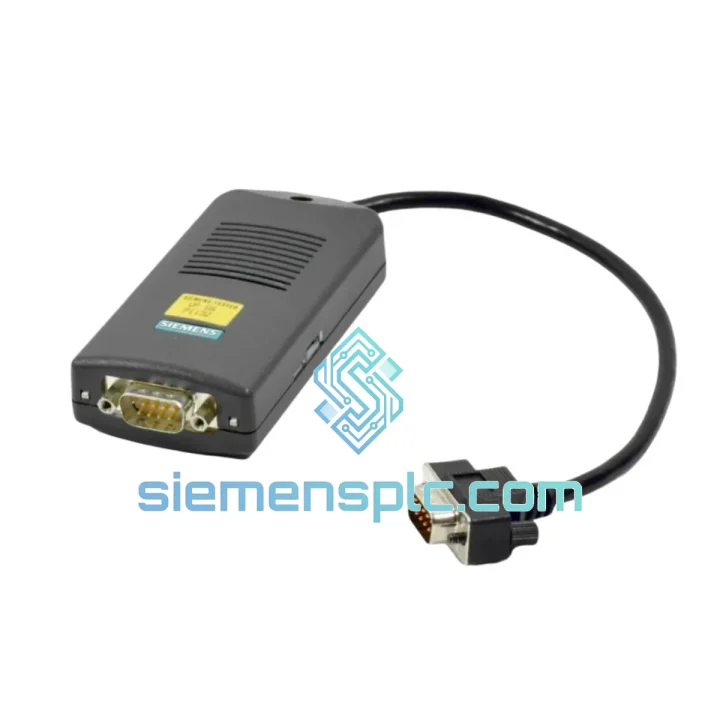
Request verified availability, condition, replacement risk review, packing options and courier lead time for 6ES7972-0CA23-0XA0.
Click Request Quote and the part number is inserted into the inquiry form automatically.
Core fields for model confirmation and RFQ routing. Detailed product narrative remains below.
You’ve lost MPI communication. The S7-300 CPU is online but your laptop can’t talk to it. The shift supervisor is standing behind you. You already know the adapter is dead — you’ve seen this before. The Siemens 6ES7972-0CA23-0XA0 is the exact OEM replacement you need, and we have it on the shelf in Xiamen right now. No substitutes. No grey-market clones. Original Siemens hardware, verified, packed, and ready to move.
URGENT REQUIREMENT? Contact: [email protected] | WhatsApp: +86 18359268345
| Part Number / SKU | 6ES7972-0CA23-0XA0 ✅ Ready to Ship |
| Brand | Siemens |
| Series | SIMATIC S7 PC-Adapter |
| Revision | -0CA23- (latest production revision) |
| PC Interface | USB 2.0 Type-A — bus-powered, no external PSU |
| PLC Interface | 9-pin Sub-D female — MPI / PROFIBUS-DP |
| Supported Protocols | MPI, PROFIBUS-DP (single adapter, both networks) |
| Compatible PLCs | SIMATIC S7-200, S7-300, S7-400, ET 200 distributed I/O |
| Compatible Software | STEP 7 v5.x, TIA Portal V13–V18, WinCC, S7-PLCSIM |
| MPI Baud Rate | Up to 187.5 kbps |
| PROFIBUS-DP Baud Rate | Up to 12 Mbps |
| Operating Temperature | 0 °C to +60 °C |
| Storage Temperature | -25 °C to +70 °C |
| Weight | 150 g |
| OS Compatibility | Windows 7 / 10 / 11 (32-bit & 64-bit) |
| Certifications | CE, UL, RoHS 2, PROFIBUS International |
| Origin | Germany |
| Stock Status | ✅ In Stock — Ships within 24 hours |
Symptom: “No MPI/DP partner found” in STEP 7 or TIA Portal
Ninety percent of the time this is a dead adapter, not a PLC fault. Before you pull the CPU, swap the adapter first. The 6ES7972-0CA23-0XA0 is bus-powered — if Windows Device Manager shows the USB device but STEP 7 still can’t go online, the internal MPI transceiver has failed. Replace the unit.
Step-by-step replacement procedure:
Common fault codes and what they actually mean:
Firmware and revision notes: The -0CA23- revision supersedes -0CA20- and -0CA21-. It incorporates improved EMC shielding and a revised USB controller that resolves intermittent disconnection issues reported on high-EMI production floors. If you are replacing an older revision, no configuration changes are required — the adapter is transparent to STEP 7 and TIA Portal regardless of hardware revision.
Industrial environments are not kind to electronics. Vibration from press lines and compressors, temperature swings between a cold morning startup and a fully loaded afternoon shift, humidity from wash-down areas and coastal facilities — the 6ES7972-0CA23-0XA0 is built to operate through all of it.
The housing is a reinforced plastic enclosure with a strain-relief boot on the Sub-D connector — the mechanical failure point on cheaper clones. The USB cable is shielded and rated for repeated flexing, which matters when you’re pulling the adapter in and out of a laptop bag fifty times a year. The internal MPI/DP transceiver meets IEC 61131-2 environmental requirements: 5–95% relative humidity non-condensing, vibration resistance per IEC 60068-2-6, and shock resistance per IEC 60068-2-27.
On PROFIBUS-DP segments running at 12 Mbps in electrically noisy environments — variable frequency drives, large servo systems, induction furnaces — the -0CA23- revision’s improved EMC shielding makes a measurable difference. Engineers who have dealt with intermittent communication dropouts on older adapter revisions consistently report stable operation after switching to the -0CA23-. This is not marketing language; it is the reason Siemens issued the revision.
Every unit we ship has been stored in original Siemens anti-static packaging in a climate-controlled warehouse. We do not sell units that have been opened, tested on a bench, and repackaged. What you receive is what Siemens shipped to distribution.
Our warehouse is located in Xiamen, Fujian Province, China — one of the most logistics-efficient export hubs in Asia, with direct access to DHL, FedEx, and UPS international gateways. For urgent replacement orders, we operate on a same-day dispatch model: orders confirmed before 15:00 CST ship the same business day.
Typical transit times from Xiamen:
Every shipment includes a commercial invoice, packing list, and certificate of origin for customs clearance. HS Code 8537.10 applies to this product in most jurisdictions. For customers in the EU, we can provide EORI-compliant documentation. For customers in the US, we provide the necessary data for ISF (Importer Security Filing) upon request.
Tracking numbers are issued within 2 hours of dispatch and sent directly to your order email. For time-critical shipments, contact us via WhatsApp for real-time logistics coordination — we monitor shipments actively and will escalate with the carrier if a delay is detected.
📧 Email: [email protected]
💬 WhatsApp: +86 18359268345
🌐 Web: siemensplc.com
© 2026 siemensplc.com. All rights reserved.
We check the full part number, brand, series and visible nameplate information before quotation.
Sales confirms stock path, condition option, quantity and realistic lead time for export dispatch.
DHL, FedEx, UPS or buyer courier arrangements can be reviewed with packing requirements.
Similar brand or category products for fast comparison and multi-item RFQ lists.