

Siemens
RFQ Ready
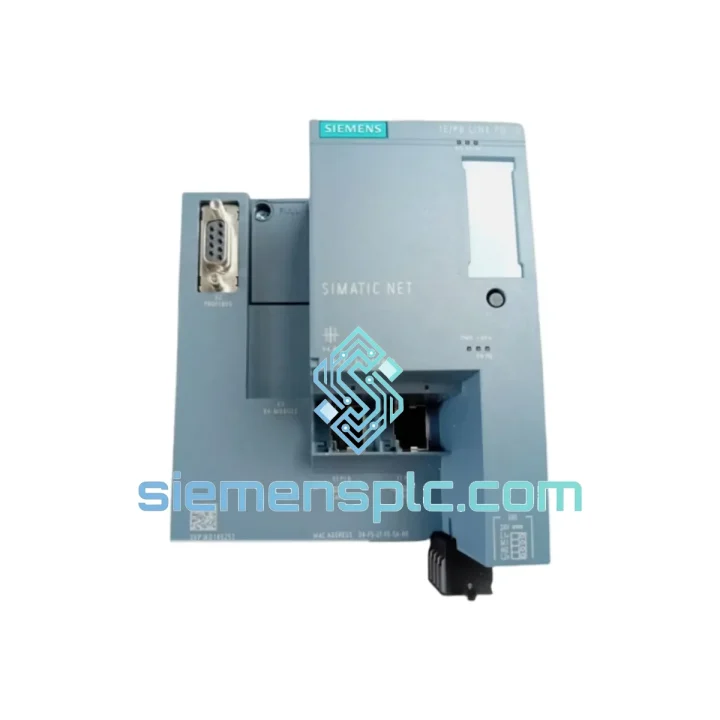
SIEMENS 6GK5108-0BA00-2AA3 Industrial Ethernet Switch
SIMATIC
Origin DE
Industrial Ethernet Switch
Request verified availability, condition, replacement risk review, packing options and courier lead time for 6GK1411-5AB10.
Click Request Quote and the part number is inserted into the inquiry form automatically.
Core fields for model confirmation and RFQ routing. Detailed product narrative remains below.
Every minute your PROFIBUS segment is dark, the production loss clock is running. The Siemens 6GK1411-5AB10 IE/PB Link PN IO is the single component standing between your PROFINET controller and up to 64 legacy PROFIBUS DP slaves. When this gateway fails, the entire downstream field device chain goes silent — drives, valves, remote I/O, all of it. We stock this module in Xiamen and ship same-day on confirmed orders. No waiting on Siemens lead times. No broker markups. One call, one part, line back up.
URGENT REQUIREMENT? Contact: [email protected] | WhatsApp: +86 18359268345
| Parameter | Specification | Status |
|---|---|---|
| Part Number | 6GK1411-5AB10 | ✔ Ready to Ship |
| Product Series | IE/PB Link PN IO — SIMATIC NET | — |
| Function | PROFIBUS DP ↔ PROFINET IO Proxy Gateway | — |
| PROFINET Ports | 2 × RJ45, 10/100 Mbit/s, Auto-MDI(X), integrated switch | — |
| PROFIBUS Interface | 1 × RS-485, 9-pin Sub-D, 9.6 kbit/s – 12 Mbit/s auto-detect | — |
| Max. DP Slaves | 64 per PROFIBUS segment | — |
| Supply Voltage | 24 V DC (18–32 V DC) | — |
| Power Draw | ≤ 4 W | — |
| Operating Temperature | 0 °C to +60 °C | — |
| Storage Temperature | −40 °C to +70 °C | — |
| Protection Class | IP20 | — |
| Mounting | 35 mm DIN rail | — |
| Configuration Tool | TIA Portal V13 SP1+ / STEP 7 V5.5+ (GSDML) | — |
| Certifications | CE, UL, cUL, ATEX Zone 2 | — |
| Country of Origin | Germany | — |
| Successor To | 6GK1411-5AB00 (backward-compatible) | — |
Common failure signatures on the 6GK1411-5AB10:
Step-by-step hot-swap replacement procedure:
Firmware note: If replacing a -5AB00 with a -5AB10, re-import the GSDML file for the new hardware version in TIA Portal. The GSDML files are not interchangeable between hardware revisions. Download the correct GSDML from the Siemens Industry Online Support portal (SIOS) before starting the swap.
The 6GK1411-5AB10 is not office hardware. It is designed to run continuously in environments that would kill consumer-grade electronics within weeks. The module’s conformal-coated PCB resists condensation and airborne contaminants common in food processing and chemical plants. Vibration resistance meets IEC 60068-2-6, covering the mechanical shock profiles found on machine tool bases and compressor skids. EMC immunity is certified to EN 61000-6-2, the industrial heavy-duty standard — meaning it holds communication integrity in the presence of variable-frequency drive switching noise, arc welding interference, and high-voltage bus transients that routinely disrupt lesser hardware.
The operating temperature ceiling of 60 °C is not a marketing number. It reflects continuous-duty testing in sealed enclosures with no forced airflow — the real-world condition in most field control cabinets during summer production peaks. The storage rating of −40 °C means units held in unheated warehouses or shipped through cold-chain logistics arrive fully functional. ATEX Zone 2 certification extends deployment to petrochemical and gas processing facilities where explosive atmospheres are a classified risk.
Every unit we ship has been stored in anti-static, humidity-controlled conditions. Humidity indicator cards are included in packaging. If the card shows exposure, we replace the unit — no argument.
Our warehouse is located in Xiamen, Fujian — one of China’s primary industrial export hubs with direct access to DHL, FedEx, and UPS international gateways. Orders confirmed before 15:00 CST ship same business day. Here is what the logistics chain looks like from your purchase order to your receiving dock:
If your line is down and every hour counts, tell us when you contact us. We will prioritize your order in the pick queue and confirm dispatch before end of business.
Email: [email protected]
WhatsApp: +86 18359268345
Web: siemensplc.com
© 2026 siemensplc.com. All rights reserved.
We check the full part number, brand, series and visible nameplate information before quotation.
Sales confirms stock path, condition option, quantity and realistic lead time for export dispatch.
DHL, FedEx, UPS or buyer courier arrangements can be reviewed with packing requirements.
Similar brand or category products for fast comparison and multi-item RFQ lists.


