

Siemens
RFQ Ready
SIEMENS 6GK5108-0BA00-2AA3 Industrial Ethernet Switch
SIMATIC
Origin DE
Industrial Ethernet Switch
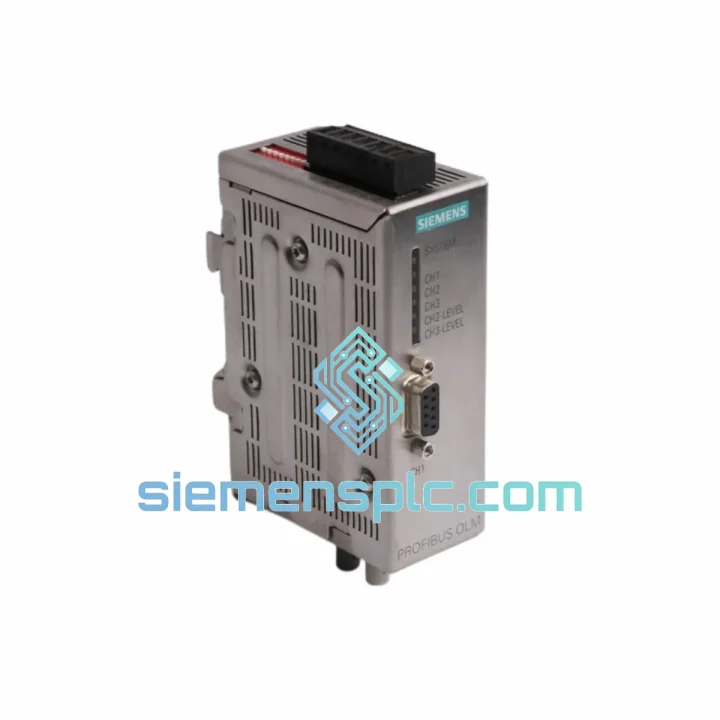
Request verified availability, condition, replacement risk review, packing options and courier lead time for 6GK1503-2CB00.
Click Request Quote and the part number is inserted into the inquiry form automatically.
Core fields for model confirmation and RFQ routing. Detailed product narrative remains below.
Every minute your PROFIBUS optical segment is down, the production line is bleeding money. A failed OLM/G11 doesn’t announce itself politely — it kills the entire fiber segment, drops all slaves on that ring, and leaves your S7 master throwing BF/SF faults with no obvious hardware culprit. If you’ve already ruled out the fiber cable and the connectors, the 6GK1503-2CB00 is the next swap. We stock it in Xiamen. It ships today.
URGENT REQUIREMENT? Contact: [email protected] | WhatsApp: +86 18359268345
| Parameter | Specification | Status |
|---|---|---|
| Part Number (MLFB) | 6GK1503-2CB00 | ✔ Ready to Ship |
| Designation | OLM/G11 V4.0 | |
| Series | SIMATIC NET PROFIBUS OLM | |
| Fiber Type | Glass multimode 62.5/125 µm or 50/125 µm | |
| Optical Port | 1 × ST connector (820 nm LED) | |
| RS-485 Ports | 2 × Sub-D 9-pin (BUS1 / BUS2) | |
| Baud Rate | 9.6 kbps – 12 Mbps (auto-detect) | |
| Max Optical Segment | 3,000 m (62.5/125 µm glass fiber) | |
| Supply Voltage | 24 V DC (18–32 V DC) | |
| Power Consumption | ≤ 4 W | |
| Operating Temperature | 0 °C to +60 °C | |
| Protection Class | IP20 | |
| Mounting | 35 mm DIN rail or wall mount | |
| Dimensions (W×H×D) | 45 × 99 × 114 mm | |
| Weight | ~340 g | |
| Certifications | CE, UL, cUL, FM Class I Div. 2 | |
| Galvanic Isolation | Yes — optical vs. RS-485 segments | |
| Ring Redundancy Switchover | < 1 ms | |
| Origin | Germany |
Fault Pattern Recognition
When the 6GK1503-2CB00 fails in service, the symptom profile is consistent: the PROFIBUS master reports a bus fault (BF LED solid red on the CP or IM module), all slaves on the optical segment drop simultaneously, and the OLM’s own FAULT LED is either solid or flashing. A flashing FAULT LED with OPT LED off almost always means the optical receive power has dropped below threshold — check the fiber first. If the fiber checks out clean and the OPT LED still won’t come on, the OLM’s photodiode receiver has degraded. Replace the unit.
Step-by-Step Hot-Swap Procedure
Common Fault Codes & LED Interpretation
| LED State | Meaning | Action |
|---|---|---|
| FAULT solid red, OPT off | No optical receive signal | Check fiber, clean ST connectors, test far-end OLM |
| FAULT flashing, BUS1/2 off | No RS-485 bus activity detected | Check Sub-D cable, verify master is running |
| PWR off | No 24 V DC supply | Check fuse, terminal block, power supply output |
| All LEDs off after power-on | Internal power failure | Replace OLM — internal DC/DC converter failed |
| OPT flashing | Optical signal marginal / intermittent | Clean connectors, check fiber bend radius, replace OLM if persists |
The OLM/G11 V4.0 was not designed for a clean server room. It was designed for the kind of cabinet that sits 10 meters from a 2,000-amp welding robot, in a plant where the ambient temperature swings from 5 °C at shift start to 55 °C by midday, and where the maintenance crew hoses down the floor twice a day. The 6GK1503-2CB00 carries FM Class I Division 2 certification, meaning it has been independently verified for use in locations where flammable gases or vapors may be present under abnormal conditions — a bar that most industrial networking hardware never clears.
The galvanic isolation between the optical port and both RS-485 ports is not a marketing feature. In a steel mill or automotive body shop, ground potential differences between cabinets routinely reach tens of volts. Without optical isolation, those ground loops destroy RS-485 transceivers within months. The OLM/G11’s optical barrier breaks that ground path entirely, protecting both the module and the PLC’s communication interface card.
Vibration tolerance is validated to IEC 60068-2-6 (sinusoidal, 10–150 Hz, 1 g). The DIN rail mounting clip uses a positive-latch mechanism that does not back off under sustained vibration — a known failure mode on cheaper third-party optical repeaters. Units are tested across the full operating temperature range (0 °C to +60 °C) with thermal cycling to verify that the LED transmitter’s optical output power remains within specification at temperature extremes. The 820 nm LED emitter is rated for >100,000 hours MTBF at 25 °C — in practice, the fiber connectors will need cleaning long before the LED degrades.
Humidity performance is rated to 95% RH non-condensing. The conformal coating on the PCB provides additional protection against condensation in environments where temperature cycling causes moisture ingress. If your cabinet breathes — and most field cabinets do — the OLM/G11 will handle it.
Stock is held in Xiamen, Fujian Province, China — one of the most logistics-connected export hubs in Asia. When you confirm an order before 14:00 CST, the unit is inspected, ESD-bagged, bubble-wrapped, and handed to the carrier the same afternoon. No warehouse queues, no consolidation delays.
Typical transit times from Xiamen:
| Destination | Carrier | Transit Time |
|---|---|---|
| Germany / EU | DHL Express / FedEx IP | 3–5 business days |
| USA / Canada | FedEx International Priority | 3–5 business days |
| Southeast Asia | DHL Express | 2–3 business days |
| Middle East | DHL Express | 3–4 business days |
| Australia / NZ | FedEx / DHL | 4–6 business days |
| South America | FedEx International | 5–7 business days |
Every shipment includes a commercial invoice and packing list formatted for customs clearance. HS code 8517.62 is pre-declared on all PROFIBUS networking hardware. For customers in the EU, we provide the EUR.1 movement certificate on request to support preferential duty treatment where applicable. DDP (Delivered Duty Paid) terms are available for select destinations — ask at the time of order.
Tracking numbers are issued within 2 hours of dispatch and sent directly to your procurement contact by email and WhatsApp. If your shipment is held at customs, we provide the supporting documentation — datasheet, CE declaration, and product authentication records — within the same business day to unblock clearance.
For plant shutdowns or emergency maintenance windows where every hour counts, contact us directly on WhatsApp before placing the order. We will confirm stock availability, cut-off time, and the earliest possible delivery date to your site in real time.
Email: [email protected]
WhatsApp: +86 18359268345
Web: siemensplc.com
© 2026 siemensplc.com. All rights reserved.
We check the full part number, brand, series and visible nameplate information before quotation.
Sales confirms stock path, condition option, quantity and realistic lead time for export dispatch.
DHL, FedEx, UPS or buyer courier arrangements can be reviewed with packing requirements.
Similar brand or category products for fast comparison and multi-item RFQ lists.


