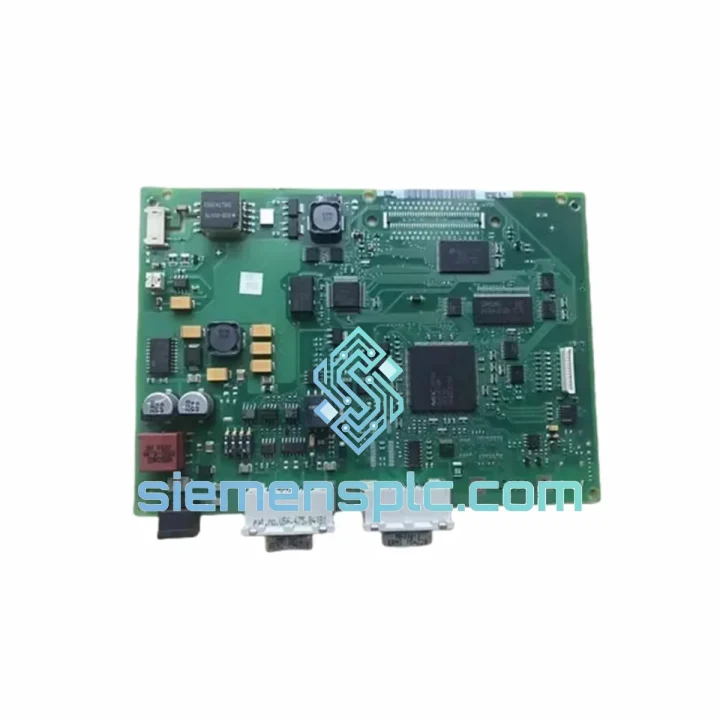
Siemens A5E00120261-02 HMI Motherboard
Request verified availability, condition, replacement risk review, packing options and courier lead time for A5E00120261-02.
Click Request Quote and the part number is inserted into the inquiry form automatically.
- Reply by email: [email protected]
- WhatsApp / Tel: +86 18359268345
- Mon-Sat 9:00-18:00 GMT+8
Key Product Information
Core fields for model confirmation and RFQ routing. Detailed product narrative remains below.
- Brand
- Siemens
- Primary Part Number
- A5E00120261-02
- Product Type
- HMI Motherboard
- Series / Family
- SIMATIC
- Country of Origin
- DE
- Model Function
- Main CPU / Motherboard Assembly
- Catalog Category
- HMI Panels
- Warranty
- 90-day DOA replacement
A5E00120261-02 — Stop the Clock on Your OP270 Downtime. Ship Today.
Every minute your OP270 panel is dark, your line is bleeding money. The Siemens A5E00120261-02 motherboard — the central processing assembly behind the 6AV6545-0BA15-2AX0 operator panel — is one of the most failure-prone boards in aging SIMATIC HMI fleets. Capacitor degradation, corrupted flash, failed MPI transceivers: we’ve seen every failure mode. We stock this board in Xiamen, tested and ready. You call, we ship — same day if your order lands before 15:00 CST.
URGENT REQUIREMENT? Contact: [email protected] | WhatsApp: +86 18359268345
Quick Technical Datasheet
| Parameter | Value | Status |
|---|---|---|
| Part Number | A5E00120261-02 | ✅ Ready to Ship |
| Reference Order No. | 6AV6545-0BA15-2AX0 | — |
| Series | SIMATIC OP270 (10″ STN) | — |
| Function | Main CPU / Motherboard Assembly | — |
| Operating System | Windows CE 5.0 | — |
| Communication Interfaces | MPI / PROFIBUS DP, RS-232, RS-422/485 | — |
| Power Supply | 24 V DC | — |
| Compatible PLC Families | S7-200, S7-300, S7-400 | — |
| SCADA Software | WinCC flexible 2004–2008 SP5 | — |
| Country of Origin | Germany | — |
| Packaging | ESD bag + foam-lined carton | — |
| Warranty | 90-day DOA replacement | — |
| Lead Time (in-stock) | Ships within 24 hours | ✅ Ready to Ship |
Troubleshooting & Replacement Tips
Common failure signatures on A5E00120261-02:
- Blank screen on power-up, backlight active: Nine times out of ten this is a corrupted boot flash or failed DRAM. Before condemning the board, pull the CF card if fitted and attempt a cold boot. If the panel still hangs at the Siemens splash screen, the motherboard is the culprit.
- MPI communication lost (error 0x0000 / “No connection to PLC”): The RS-485 transceiver on the MPI port is a known weak point after years of bus noise. Swap the board and re-terminate the MPI segment — 220 Ω at each physical end. Verify bus address is unique (default OP270 address = 1; PLC typically at 2).
- Touchscreen unresponsive but display normal: This is NOT a motherboard fault — it points to the touch controller daughterboard or the ribbon cable. Reseat the ZIF connector before ordering a new main board.
- Random reboots / watchdog resets: Check 24 V DC supply ripple first (should be <5% peak-to-peak). If supply is clean, suspect electrolytic capacitors on the motherboard power rail — a common failure after 10+ years of continuous operation in warm enclosures.
- “Project not found” after board swap: The project is stored in flash on the motherboard, not on an external card. You must re-download the WinCC flexible project via ProTool/WinCC flexible transfer after fitting the replacement board. Have your STEP 7 / WinCC flexible project archive ready before the swap.
Step-by-step replacement procedure:
- De-energize the panel — disconnect 24 V DC supply and all communication cables. Tag out per your site LOTO procedure.
- Remove the OP270 from the cabinet cutout. Four M4 mounting clamps on the rear bezel.
- Open the rear housing (six Torx T10 screws). Ground yourself with an ESD wrist strap before touching the PCB.
- Photograph all cable routing and connector positions before disconnecting anything.
- Disconnect the display ribbon, backlight inverter cable, touch controller cable, and all I/O connectors from the motherboard.
- Remove the four PCB standoff screws (M3) and lift the A5E00120261-02 board clear.
- Fit the replacement board. Verify hardware revision label matches or is a confirmed compatible revision. Reconnect all cables in reverse order — the display ribbon ZIF connector is the most fragile; lock it gently.
- Reassemble housing, reinstall panel in cutout, reconnect 24 V DC and MPI/PROFIBUS cable.
- Power up — panel should reach the Windows CE desktop within 45–60 seconds.
- Transfer the WinCC flexible project from your engineering PC via the MPI or Ethernet port. Confirm all tag connections are live before handing back to operations.
Firmware note: The -02 hardware revision runs a specific bootloader version. Do not attempt to flash firmware intended for -01 or -03 revisions — contact us if you need firmware matching guidance.
Reliability in Harsh Conditions
The OP270 platform was engineered for the factory floor, not the office. The A5E00120261-02 motherboard carries the same industrial-grade design DNA: conformal-coated PCB to resist condensation and airborne contaminants, wide-temperature-range components rated for continuous operation from 0 °C to 50 °C ambient, and a vibration tolerance of 10–58 Hz / 0.075 mm amplitude per IEC 60068-2-6. Shock resistance is validated to 15 g / 11 ms half-sine per IEC 60068-2-27.
In practice, we see these boards pulled from steel mills, cement plants, and offshore platform control rooms — environments where humidity regularly hits 95% non-condensing and enclosure temperatures spike well above nominal. The boards that fail are almost always victims of power quality issues or physical connector damage, not inherent component weakness. A properly installed replacement, with clean 24 V DC power and correctly terminated MPI bus, will run for another decade without complaint.
Every unit we ship has been function-tested on a live OP270 chassis: display output verified, MPI communication confirmed with an S7-300 CPU, and all I/O ports checked. We do not ship untested boards.
Global Express Logistics
Our warehouse is located in Xiamen, Fujian, China — one of the country’s primary export hubs with direct access to DHL, FedEx, and UPS international gateways. Here’s what happens after you confirm your order:
- Same-day dispatch for orders confirmed before 15:00 CST (Monday–Saturday). The board is packed in a double-layer ESD bag inside a foam-lined rigid carton — no corners cut on packaging for a component this critical.
- DHL Express Worldwide: Xiamen → Europe in 2–4 business days. Xiamen → North America in 3–5 business days. Xiamen → Southeast Asia in 1–2 business days.
- FedEx International Priority: Available as an alternative carrier. Transit times comparable to DHL; preferred by some customers for customs brokerage relationships.
- Tracking provided immediately upon dispatch — AWB number sent to your email within 2 hours of collection.
- Export documentation: Commercial invoice, packing list, and certificate of origin issued for every shipment. HS code 8537.10 declared. We handle export customs from the China side; import duties are the buyer’s responsibility per destination country regulations.
- Emergency freight: If your plant is down and standard express is not fast enough, contact us directly on WhatsApp. We have access to next-flight-out courier options for genuine production emergencies.
We have shipped A5E00120261-02 boards to Germany, the United States, Australia, Brazil, India, Saudi Arabia, and over 40 other countries. Customs clearance issues are rare — but if they occur, we work with you to resolve them, not around you.
Contact Information
📧 Email: [email protected]
💬 WhatsApp: +86 18359268345
🌐 Web: siemensplc.com
© 2026 siemensplc.com. All rights reserved.
Send This Part Number to Sales
Confirmation Process
We check the full part number, brand, series and visible nameplate information before quotation.
Sales confirms stock path, condition option, quantity and realistic lead time for export dispatch.
DHL, FedEx, UPS or buyer courier arrangements can be reviewed with packing requirements.