

Siemens
RFQ Ready
Siemens 6AV7240-0HC07-0PA0 Industrial Panel PC Motherboard – SIMATIC IPC477D
SIMATIC
Origin DE
Industrial Panel PC Motherboard
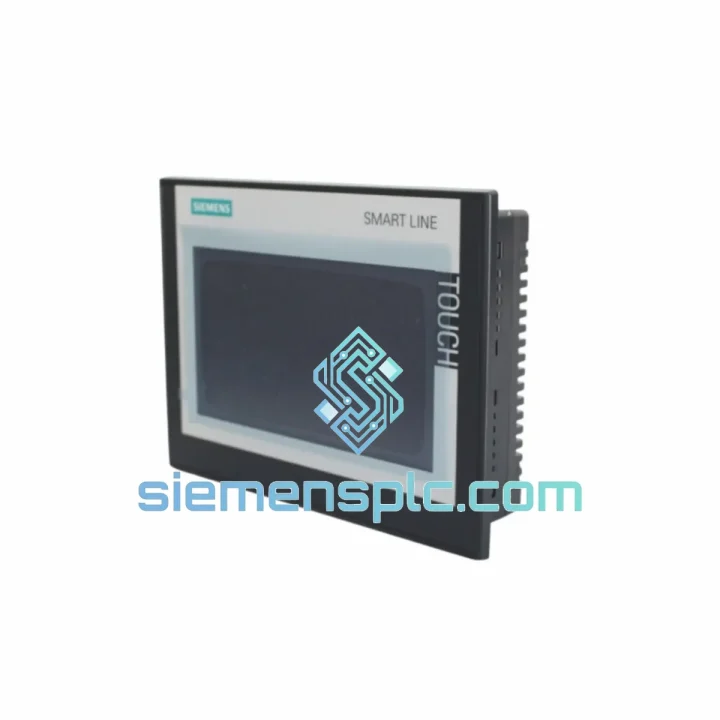
Request verified availability, condition, replacement risk review, packing options and courier lead time for 6AV6648-0CC11-3AX0.
Click Request Quote and the part number is inserted into the inquiry form automatically.
Core fields for model confirmation and RFQ routing. Detailed product narrative remains below.
When the SIMATIC HMI SMART 700 IE V3 goes dark, your operators lose visibility into every process parameter — alarms pile up unacknowledged, manual overrides become guesswork, and production throughput collapses. This is not a scheduled maintenance window. This is a crisis. The Siemens 6AV6648-0CC11-3AX0 is a 7-inch widescreen resistive touch panel built for exactly the environments where failure is not an option: packaging lines running three shifts, textile machines with zero tolerance for idle time, water treatment stations that cannot go unmanned. We stock this unit in Xiamen and ship globally via DHL/FedEx Express — because your line cannot wait for a four-week factory lead time.
URGENT REQUIREMENT? Contact: [email protected] | WhatsApp: +86 18359268345
| Parameter | Specification |
|---|---|
| Part Number | 6AV6648-0CC11-3AX0 |
| Series | SIMATIC HMI SMART 700 IE V3 |
| Display | 7″ Widescreen TFT, 65,536 colors |
| Resolution | 800 × 480 px |
| Touch Technology | Resistive single-touch |
| Supply Voltage | 24 V DC (20.4–28.8 V) |
| Communication Ports | 1× PROFINET (RJ45), 1× RS-422/485, 2× USB-A |
| Front Protection | IP65 |
| Operating Temperature | 0 °C to +50 °C |
| Storage Temperature | −20 °C to +60 °C |
| Engineering Software | WinCC flexible SMART V3 / TIA Portal (SMART) |
| Panel Cutout | Compatible with SMART 700 IE V2 cutout |
| Weight | Approx. 900 g |
| Stock Status | ✅ Ready to Ship — Xiamen Warehouse |
Ten years on the floor taught me that most 6AV6648-0CC11-3AX0 failures fall into four categories. Here is how to diagnose fast and swap clean:
1. Blank Screen / No Backlight on Power-Up
First check: measure 24 V DC at the panel’s power terminals before pulling the unit. A dead backlight with the OS still running (you can hear USB enumeration) points to a failed CCFL or LED driver board — the panel needs replacement, not the PLC. If voltage is absent, trace back to the SITOP or panel PSU. Do not assume the HMI is dead until you confirm clean 24 V supply.
2. Touch Calibration Drift / Ghost Touches
Resistive touch panels degrade under sustained pressure or chemical exposure. If operators report cursor drift or phantom inputs, enter the calibration utility via the Control Panel in the SMART panel OS (Start → Settings → Control Panel → TP Calibration). If recalibration does not hold across reboots, the touch overlay is mechanically compromised — replacement is the only fix. Do not attempt to re-laminate the overlay in the field.
3. PROFINET Communication Loss (Error 0x0000 / Device Unreachable)
After swapping the panel, the replacement unit must be assigned the same IP address and device name as the failed unit — otherwise the S7-200 SMART or S7-1200 PLC will not establish the HMI connection. Steps: (a) Boot the new panel into the Transfer mode. (b) Open WinCC flexible SMART V3 on your engineering laptop. (c) Use the Ethernet interface to push the project — the IP and device name are embedded in the project file. (d) Confirm the PLC’s HMI connection block shows “Connected” before handing back to operations. If you are replacing a V2 panel with a V3, verify the WinCC flexible SMART version — V3 projects are not backward-compatible with V2 firmware.
4. RS-485 / PPI Communication Errors with S7-200 SMART
The 6AV6648-0CC11-3AX0 uses a combined RS-422/485 port. When connecting to S7-200 SMART via PPI, confirm the baud rate in the HMI project matches the PLC’s port configuration (default: 187.5 kbps). A mismatch causes intermittent read errors that look like PLC faults but are purely a communication layer issue. Also check the cable — PPI cables are not standard RS-485; pin 3 and pin 8 carry the data lines, and a generic cable will cause silent failures.
5. Firmware Version Mismatch After Replacement
If the replacement panel ships with an older firmware than the project was compiled against, you will see a “Version Conflict” warning on first transfer. Do not ignore it. Update the panel firmware via USB using the ProSave utility before loading the project. Firmware files are available from Siemens Industry Online Support — match the firmware version to the WinCC flexible SMART V3 version used to compile the project.
Replacement Checklist (Field-Ready):
The SIMATIC HMI SMART 700 IE V3 is not a consumer-grade tablet bolted into a panel door. The enclosure is rated IP65 at the front face — tested against sustained water jets and fine dust ingress under IEC 60529 conditions. The resistive touch overlay operates correctly with gloved hands, which matters on packaging lines where operators wear cut-resistant gloves. The TFT display maintains contrast and readability across the full 0–50 °C operating range without active cooling, making it viable in non-air-conditioned machine rooms in tropical climates.
Vibration resistance is validated per IEC 60068-2-6: the panel withstands sinusoidal vibration across the 10–58 Hz range at 0.075 mm amplitude and 58–150 Hz at 1 g — covering the vibration profiles of most conveyor drives, compressors, and pump skids. Shock resistance per IEC 60068-2-27 (15 g, 11 ms half-sine) means the panel survives the mechanical transients common in press and stamping environments. The conformal-coated PCB assembly provides additional protection against humidity and condensation in coastal or high-humidity facilities.
Mean time between failures (MTBF) for the SMART 700 IE V3 series exceeds 100,000 hours under rated conditions — roughly 11 years of continuous operation. In practice, the most common failure mode is the backlight assembly after 50,000–70,000 hours, not the logic board. This means a well-maintained unit in a clean environment will outlast most machine redesign cycles.
Our Xiamen warehouse operates on a same-day dispatch model for in-stock units confirmed before 15:00 CST. Here is exactly what happens after you place your order:
For critical plant shutdowns, contact us directly on WhatsApp for real-time stock confirmation and priority dispatch arrangement before placing a formal order.
📧 Email: [email protected]
💬 WhatsApp: +86 18359268345
🌐 Web: siemensplc.com
© 2026 siemensplc.com. All rights reserved.
We check the full part number, brand, series and visible nameplate information before quotation.
Sales confirms stock path, condition option, quantity and realistic lead time for export dispatch.
DHL, FedEx, UPS or buyer courier arrangements can be reviewed with packing requirements.
Similar brand or category products for fast comparison and multi-item RFQ lists.


