
ABB
In Stock OK
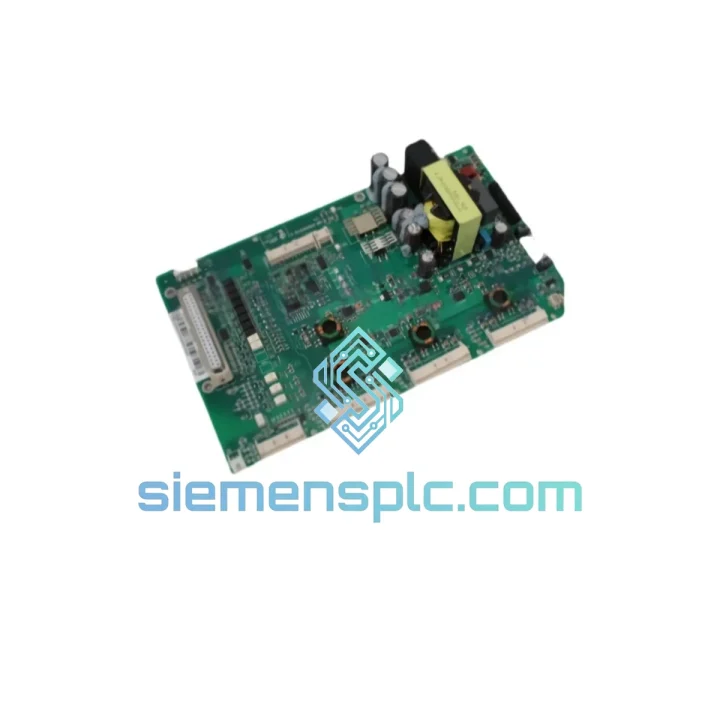
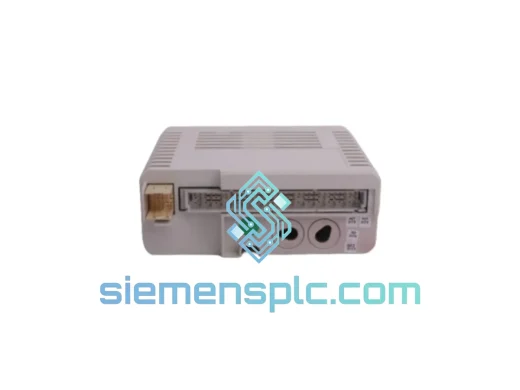
ABB 3AXD50000037997P ZINT-571 Interface Board
Request verified availability, condition, replacement risk review, packing options and courier lead time for ZINT-571.
BrandABB
Part NumberZINT-571
ConditionAvailability Check
Lead TimeRFQ Confirmation
DocumentsDatasheet / photos by RFQ
ShippingExport packing available
Auto-filled RFQ
ZINT-571
Click Request Quote and the part number is inserted into the inquiry form automatically.
- Reply by email: [email protected]
- WhatsApp / Tel: +86 18359268345
- Mon-Sat 9:00-18:00 GMT+8
Procurement Data
Key Product Information
Core fields for model confirmation and RFQ routing. Detailed product narrative remains below.
- Brand
- ABB
- Primary Part Number
- ZINT-571
- Product Type
- Interface Board
- Series / Family
- ACS880
- Manufacturer
- ABB Ltd.
- Country of Origin
- SE
- Model Function
- Drive Interface / Signal Conditioning Board
- Catalog Category
- Industrial Automation Spares
- Warranty
- 12 months functional warranty
Model confirmed for inquiry
ZINT-571
Send quantity, destination and urgency. The RFQ form keeps this part number attached.
Request Quote
Product Overview
ABB ZINT-571 (3AXD50000037997P) — Stop the Clock on Your ACS880 Downtime
Every minute an ACS880 drive sits dead on your line, you’re bleeding money. A failed ZINT-571 interface board is one of the most common culprits behind sudden drive faults and communication blackouts in ACS880 installations — and it’s also one of the fastest fixes when you have the right part on hand. We stock the ABB ZINT-571 (P/N: 3AXD50000037997P) in Xiamen, verified, boxed, and ready to clear customs today. No lead-time games, no broker markups, no waiting three weeks for a factory order.
This is the board that sits between your ACS880 drive’s control unit and the external I/O or fieldbus interface layer. When it fails, you lose signal continuity — drives trip on communication faults, fieldbus nodes drop off the network, and your PLC starts throwing alarms it can’t explain. Swap this board correctly and your drive comes back clean. Get the wrong part or a counterfeit, and you’re chasing ghost faults for days.
URGENT REQUIREMENT? Contact: [email protected] | WhatsApp: +86 18359268345
Quick Technical Datasheet
| Parameter | Value |
|---|---|
| Manufacturer | ABB Ltd. |
| Part Number | 3AXD50000037997P |
| Module Designation | ZINT-571 |
| Compatible Drive Series | ABB ACS880 (Single Drive & Multidrive) |
| Module Function | Drive Interface / Signal Conditioning Board |
| Mounting | Direct slot-mount on ACS880 control unit |
| Communication Role | Internal drive-to-I/O interface layer |
| Firmware Dependency | Must match ACS880 primary control unit firmware revision |
| Weight | ~460 g |
| Condition | New / Surplus New — 100% Original ABB |
| Origin | China (Xiamen warehouse) |
| Stock Status | ✅ Ready to Ship |
| Lead Time | Same-day dispatch (orders confirmed before 15:00 CST) |
| Warranty | 12 months functional warranty |
Troubleshooting & Replacement Tips
Common fault signatures pointing to a failed ZINT-571:
- ACS880 trips on fault code 7081 (DDCS communication loss) or 7082 (DDCS link error) — these are the two most frequent indicators of a degraded or dead ZINT board.
- Drive powers up but fieldbus adapter (e.g., FPBA-01, FENA-21) shows no link — the ZINT-571 is the handshake layer; if it’s gone, the adapter sees nothing.
- Intermittent fault resets that clear on power cycle but return within minutes under load — classic sign of a thermally stressed ZINT board with cracked solder joints on the DDCS connector.
- Control panel (ACS-AP-I/W) connects fine but remote I/O or PLC loses the drive from the network — the panel uses a separate path; the ZINT handles the fieldbus side.
Step-by-step replacement procedure:
- Full de-energization first. ACS880 capacitors hold charge for up to 5 minutes after mains disconnect. Measure DC bus voltage at the drive terminals — wait until it drops below 50 VDC before touching any internal boards. Do not skip this.
- Document your current parameter set. Before pulling the board, use Drive Composer or the ACS-AP panel to export a full parameter backup to a USB stick or laptop. The ZINT-571 itself doesn’t store drive parameters, but a board swap is a good time to confirm your backup is current.
- Note the firmware revision on the existing board label. The ZINT-571 must be firmware-compatible with the ACS880 primary control unit (ZCU-12 or ZCU-14). Check the firmware version in parameter 07.05 (Firmware version) before ordering if you’re unsure. Mismatched firmware will cause the drive to fault immediately on startup with a board incompatibility error.
- Slot extraction. The ZINT-571 is secured by two captive screws on the front face of the control unit. Loosen both, then pull the board straight out — it’s a direct PCB-edge connector, no ribbon cables. Avoid rocking it sideways; the edge connector pins are fine-pitch and bend easily.
- Inspect the slot before insertion. Check the PCB edge connector in the drive for bent pins or debris. A can of compressed air and a visual check takes 30 seconds and prevents a second fault call.
- Seat the new ZINT-571 firmly. Push straight in until you feel the connector fully engage, then tighten both captive screws finger-tight plus a quarter turn. Do not overtorque — the board mounting points are plastic-backed.
- Power up and check parameter 07.05. The drive should recognize the new board automatically. If it prompts for a firmware update, follow the ACS880 firmware update procedure using Drive Composer. Do not interrupt power during a firmware flash.
- Restore fieldbus configuration. After the board swap, re-verify your fieldbus adapter settings (parameters 50.01–50.13 for EtherNet/IP or PROFIBUS, depending on your adapter). The ZINT-571 replacement does not reset these parameters, but confirm node address and baud rate are still correct before going live.
- Run a communication test. From your PLC or DCS, force a read/write cycle to the drive before returning the line to production. Confirm cyclic data exchange is stable for at least 5 minutes under no-load conditions.
Dip switch / addressing note: The ZINT-571 itself has no user-configurable dip switches. Node addressing for fieldbus adapters is handled via drive parameters, not hardware switches on this board. If you’re migrating from an older RINT-series board, be aware the parameter map is different — do not assume a 1:1 parameter transfer.
Reliability in Harsh Conditions
The ACS880 platform is deployed in some of the most punishing industrial environments on the planet — offshore platforms in the North Sea, cement kilns in the Middle East, underground mining operations in Chile. The ZINT-571 is engineered to survive in these conditions, and the units we supply are verified to meet ABB’s original manufacturing specifications.
- Vibration resistance: Designed to IEC 60068-2-6 (sinusoidal) and IEC 60068-2-64 (random vibration) standards. The PCB uses conformal coating on critical signal traces to prevent micro-fractures under sustained mechanical stress — a common failure mode in cheaper third-party substitutes.
- Thermal tolerance: Rated for operation from -10°C to +55°C ambient (drive enclosure internal). The DDCS optical transceiver on the board is thermally derated above 45°C — ensure your drive cabinet ventilation is functioning before blaming the board for intermittent faults in hot environments.
- Humidity and condensation: Conformal coating provides protection against humidity up to 95% RH (non-condensing). If your installation is in a coastal or high-humidity environment and you’re seeing repeated ZINT failures, check for condensation ingress at the cabinet door seals before replacing the board again.
- EMI immunity: The ZINT-571’s optical DDCS interface provides galvanic isolation between the drive’s power section and the control/communication layer — this is a key reason ABB chose fiber-optic DDCS over copper for this interface. It eliminates ground loop interference that plagues copper-based communication boards in high-power drive environments.
Every unit we ship has been stored in climate-controlled, ESD-safe conditions. We do not sell boards that have been sitting in uncontrolled warehouse environments for years — humidity and ESD damage are invisible killers of interface boards, and we take storage conditions seriously.
Global Express Logistics
Our warehouse is located in Xiamen, Fujian, China — one of China’s primary export hubs with direct access to international courier networks and a dedicated customs clearance team that handles industrial electronics daily.
- DHL Express: Transit time 2–4 business days to most of Europe, North America, Southeast Asia, and the Middle East. Tracking provided from pickup to delivery. DHL is our default recommendation for urgent single-unit replacements.
- FedEx International Priority: 1–3 business days to the US, Canada, and major EU hubs. Preferred for North American customers with time-critical shutdowns.
- Export documentation: Commercial invoice, packing list, and HS code declaration (HS 8537.10 or 8543.70 depending on destination customs requirements) are prepared same-day. We have handled export compliance for shipments to over 60 countries — we know what your customs broker needs.
- Packaging: Anti-static bag → foam-lined rigid box → outer carton with fragile labeling. The ZINT-571 PCB edge connector is protected with a dedicated plastic cover during transit. We have had zero transit damage claims on interface boards in the past 24 months.
- Order cutoff: Orders confirmed and paid before 15:00 CST are dispatched same business day. Orders after cutoff ship next morning. We do not hold orders over weekends for urgent shipments — contact us directly via WhatsApp for weekend dispatch arrangements.
For customers in Southeast Asia (Singapore, Malaysia, Thailand, Vietnam), we also offer economy air freight options with 4–7 day transit at significantly lower cost — suitable when the line is down but not in a full emergency shutdown scenario.
Contact Information
📧 Email: [email protected]
💬 WhatsApp: +86 18359268345
🌐 Web: siemensplc.com
© 2026 siemensplc.com. All rights reserved.
Ready to quote
[email protected]
Send This Part Number to Sales
RFQ workflow
Quality workflow ->
Confirmation Process
01Model confirmation
We check the full part number, brand, series and visible nameplate information before quotation.
02Availability reply
Sales confirms stock path, condition option, quantity and realistic lead time for export dispatch.
03Packing & courier
DHL, FedEx, UPS or buyer courier arrangements can be reviewed with packing requirements.
Continue sourcing
Browse full catalog ->
Related Automation Parts
Similar brand or category products for fast comparison and multi-item RFQ lists.
ABB
RFQ Ready
ABB 3HAC9330-1 Robot Speed Reducer – IRB6640-205/2.7
lRB240046 RB460
Origin SE
Robot Speed Reducer