
ABB
In Stock OK
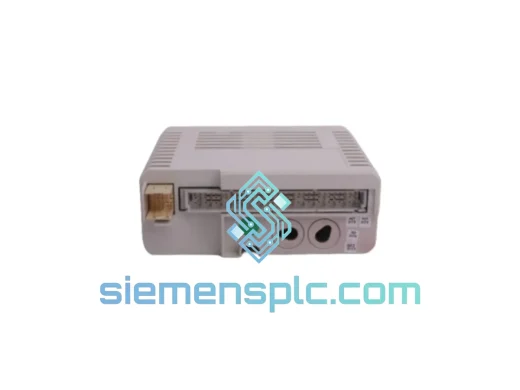
ABB DPMP-06 3AXD50000371082 Panel Mount
Request verified availability, condition, replacement risk review, packing options and courier lead time for DPMP-06.
BrandABB
Part NumberDPMP-06
ConditionAvailability Check
Lead TimeRFQ Confirmation
DocumentsDatasheet / photos by RFQ
ShippingExport packing available
Auto-filled RFQ
DPMP-06
Click Request Quote and the part number is inserted into the inquiry form automatically.
- Reply by email: [email protected]
- WhatsApp / Tel: +86 18359268345
- Mon-Sat 9:00-18:00 GMT+8
Procurement Data
Key Product Information
Core fields for model confirmation and RFQ routing. Detailed product narrative remains below.
- Brand
- ABB
- Primary Part Number
- DPMP-06
- Product Type
- Drive Accessories
- Series / Family
- ACS880
- Country of Origin
- SE
- Model Function
- Control panel door / surface mounting platform
- Catalog Category
- Industrial Automation Spares
Model confirmed for inquiry
DPMP-06
Send quantity, destination and urgency. The RFQ form keeps this part number attached.
Request Quote
Product Overview
ABB DPMP-06 (3AXD50000371082) — Stop the Clock on Your ACS880 Downtime
Every minute your ACS880 drive sits idle without its operator panel is money bleeding out of your process. A failed or missing mounting platform sounds trivial — until your commissioning engineer can’t access the drive parameters, your operators can’t jog the motor, and your production manager is standing behind you asking for an ETA. The ABB DPMP-06, part number 3AXD50000371082, is the OEM-specified mounting bracket that locks the ACS-AP-I, ACS-AP-S, and ACS-AP-W control panels onto your cabinet door or enclosure surface. We stock it in Xiamen. It ships today.
URGENT REQUIREMENT? Contact: [email protected] | WhatsApp: +86 18359268345
Quick Technical Datasheet
| Parameter | Value |
|---|---|
| Part Number | 3AXD50000371082 |
| Model | DPMP-06 |
| Brand | ABB |
| Series | ACS880 Drive Accessories |
| Function | Control panel door / surface mounting platform |
| Compatible Panels | ACS-AP-I, ACS-AP-S, ACS-AP-W |
| Compatible Drives | ACS880-01, ACS880-04, ACS880-07 (direct fit) |
| Mounting Type | Panel door or enclosure surface, snap-fit |
| Material | Engineering-grade thermoplastic housing |
| Weight | 155 g |
| IP Environment | IP21 / IP55 enclosure compatible (panel-dependent) |
| Origin | China (CN) |
| Stock Status | ✅ Ready to Ship — Xiamen warehouse |
| Lead Time | Same-day dispatch on orders confirmed before 15:00 CST |
Troubleshooting & Replacement Tips
Ten years of field calls teach you that the DPMP-06 fails or goes missing in three predictable scenarios: cabinet door replacement after a forklift incident, panel cable snag that cracks the bracket clip, or a rushed commissioning where someone borrowed the mount and never returned it. Here’s how to handle the swap without creating new problems.
Step 1 — Isolate before you touch anything. Lock out the ACS880 drive at the main isolator. Confirm the DC bus voltage has discharged below 50 V using a calibrated meter — the capacitors on an ACS880-07 frame can hold lethal charge for several minutes after power-off. Do not skip this.
Step 2 — Disconnect the panel cable at the drive end first. The ACS-AP panel cable (RJ45-style connector on the drive’s PANEL port) should be unplugged from the drive before you release the panel from the old mount. Pulling the panel while the cable is still live won’t damage the drive, but it stresses the connector housing on repeated cycles.
Step 3 — Release the old DPMP-06. Two M4 screws secure the bracket to the cabinet door. If the bracket is cracked and the clips have failed, the panel may already be loose — check that the cable hasn’t been pinched in the door hinge before removing.
Step 4 — Fit the new DPMP-06. The snap-fit design is tool-free for the panel itself. Seat the ACS-AP panel into the DPMP-06 frame until you hear the retention clips engage on both sides. Then mount the bracket to the door using the original M4 fixings. Torque to 1.5 Nm — overtightening cracks the plastic boss.
Step 5 — Reconnect and verify. Plug the panel cable back into the drive’s PANEL port. Power up the drive. The ACS-AP panel should display the drive status screen within 5 seconds. If you see fault code 7081 (Panel loss) or 7082 (Panel communication), the cable is either not fully seated or damaged — swap the cable before condemning the new mount.
Common fault codes related to panel connectivity on ACS880:
- A7081 — Panel loss alarm: drive lost communication with the control panel. Check cable seating at both ends.
- F7082 — Panel communication fault: sustained loss. Drive may trip depending on parameter 49.05 (Panel loss action). Default is fault; set to warning if panel is non-critical during run.
- A2001 — Current calibration: appears after power cycle on some firmware versions; clear with parameter 99.13 reset if persistent.
Configuration note on remote panel use: If the DPMP-06 is being used for remote mounting (panel located away from the drive via extension cable), verify parameter 49.01 (Node ID) is set correctly if multiple panels are on the same network. For single-panel installations this is irrelevant, but in multi-drive cabinets with shared panel wiring it causes intermittent A7081 alarms that are maddening to trace.
Reliability in Harsh Conditions
The DPMP-06 is not a precision electronic component, but it lives in the same cabinet as one — and that cabinet may be sitting on a compressor skid in a 45°C pump room, bolted to a vibrating conveyor frame, or mounted in a coastal substation where salt-laden humidity condenses on every surface every morning.
ABB’s engineering-grade thermoplastic housing is selected for dimensional stability across the ACS880’s rated operating range of -15°C to +50°C ambient. The snap-fit retention clips are designed to maintain panel grip under continuous vibration up to 1 G at 10–150 Hz — the same vibration envelope specified for the ACS880 drive itself per IEC 60068-2-6. In practice, this means the panel stays seated on a pump skid that would shake a cheaper bracket loose within weeks.
For high-humidity environments, the DPMP-06 is compatible with IP55-rated enclosure installations when used with the appropriate ACS880 IP55 kit. The bracket itself does not contribute to the enclosure IP rating — that’s determined by the cabinet door seal and the panel cutout gasket — but it does not compromise it either. Units supplied from our Xiamen stock are stored in climate-controlled conditions and shipped in original ABB packaging with desiccant where applicable, ensuring the bracket arrives in the same condition it left the factory.
Global Express Logistics
Our dispatch hub is in Xiamen, Fujian — one of China’s primary export ports with direct DHL and FedEx gateway access. Here’s what the timeline looks like from the moment you confirm your order:
- Order confirmed before 15:00 CST: Same-day pick, pack, and handover to DHL Express or FedEx International Priority.
- DHL Express transit times: Southeast Asia 1–2 days, Europe 2–3 days, North America 3–4 days, Middle East 2–3 days, Australia 2–3 days.
- FedEx International Priority: Available as alternative carrier; comparable transit times with different routing options for remote destinations.
- Tracking: AWB number provided within 2 hours of dispatch. Real-time tracking link sent to your email.
- Commercial invoice & packing list: Issued with accurate HS code (8538.90) and declared value for smooth customs clearance. We do not under-declare.
- Duties & taxes: Shipped DAP (Delivered At Place) as standard. DDP available on request for EU and UK destinations — ask for a quote.
For plant shutdowns and emergency maintenance windows, contact us directly on WhatsApp for real-time stock confirmation and priority dispatch. We’ve shipped to offshore platforms, remote mining sites, and island facilities — if there’s a DHL or FedEx service point within reach of your location, we can get the part there.
Contact Information
Email: [email protected]
WhatsApp: +86 18359268345
Web: siemensplc.com
© 2026 siemensplc.com. All rights reserved.
Ready to quote
[email protected]
Send This Part Number to Sales
RFQ workflow
Quality workflow ->
Confirmation Process
01Model confirmation
We check the full part number, brand, series and visible nameplate information before quotation.
02Availability reply
Sales confirms stock path, condition option, quantity and realistic lead time for export dispatch.
03Packing & courier
DHL, FedEx, UPS or buyer courier arrangements can be reviewed with packing requirements.
Continue sourcing
Browse full catalog ->
Related Automation Parts
Similar brand or category products for fast comparison and multi-item RFQ lists.
ABB
RFQ Ready
ABB 3HAC9330-1 Robot Speed Reducer – IRB6640-205/2.7
lRB240046 RB460
Origin SE
Robot Speed Reducer