ABB
In Stock OK
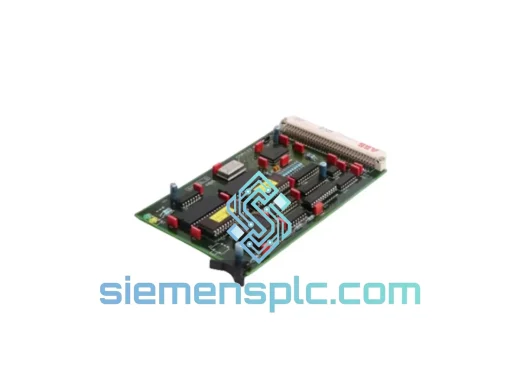
ABB 87TS01E GJR2368900R2313 Bus Coupler Module
Request verified availability, condition, replacement risk review, packing options and courier lead time for 87TS01E-GJR2368900R2313.
BrandABB
Part Number87TS01E-GJR2368900R2313
ConditionAvailability Check
Lead TimeRFQ Confirmation
DocumentsDatasheet / photos by RFQ
ShippingExport packing available
Auto-filled RFQ
87TS01E-GJR2368900R2313
Click Request Quote and the part number is inserted into the inquiry form automatically.
- Reply by email: [email protected]
- WhatsApp / Tel: +86 18359268345
- Mon-Sat 9:00-18:00 GMT+8
Procurement Data
Key Product Information
Core fields for model confirmation and RFQ routing. Detailed product narrative remains below.
- Brand
- ABB
- Primary Part Number
- 87TS01E-GJR2368900R2313
- Product Type
- Bus Coupler Module
- Series / Family
- AC500
- Manufacturer
- ABB
- Country of Origin
- SE
- Catalog Category
- PLCs & Controllers
- Operating Temp.
- -25 °C to +60 °C
Model confirmed for inquiry
87TS01E-GJR2368900R2313
Send quantity, destination and urgency. The RFQ form keeps this part number attached.
Request Quote
Product Overview
ABB 87TS01E — Stop the Clock on Your Downtime. Ship Today from Xiamen.
Your AC500 rack just dropped offline. The HMI is frozen. The line supervisor is on the phone. You’ve traced the fault to the S500 bus coupler — the 87TS01E — and you need a replacement unit in hand before the next shift. We stock it. We ship it. DHL Express from Xiamen, door-to-door in 48–72 hours to most industrial hubs worldwide. Every hour of unplanned downtime on a mid-size production line costs between $5,000 and $20,000 USD. Don’t negotiate with lead times.
URGENT REQUIREMENT? Contact: [email protected] | WhatsApp: +86 18359268345
Quick Technical Datasheet
| Parameter | Value |
|---|---|
| Manufacturer | ABB |
| Full SKU / Order Code | 87TS01E / GJR2368900R2313 |
| Series | AC500 / S500 |
| Module Function | S500 Local Bus Coupler — bridges CPU backplane to S500 I/O expansion |
| Bus Interface | S500 internal I/O bus (local expansion, not fieldbus) |
| Max I/O Modules per Coupler | Up to 7 S500 I/O modules per coupler station |
| Power Supply | Sourced via backplane bus — no external 24 VDC required on coupler itself |
| Operating Temperature | -25 °C to +60 °C |
| Storage Temperature | -40 °C to +70 °C |
| Protection Class | IP20 |
| Mounting | DIN rail, snap-fit |
| Hardware Revision | R2313 |
| Certifications | CE, UL, cUL, RoHS |
| Country of Origin | Germany |
| Stock Status | ✅ Ready to Ship — Xiamen warehouse |
Troubleshooting & Replacement Tips
Fifteen years of field calls on AC500 systems teach you the same lessons repeatedly. Here is what actually matters when you are swapping an 87TS01E under pressure:
1. Confirm the fault is the coupler, not the backplane or I/O module. Before pulling the 87TS01E, check the SF (System Fault) LED on the CPU. If it is solid red and the I/O bus LED on the coupler is off or blinking amber, the coupler is the likely culprit. If the SF LED is off but individual I/O module LEDs are red, the coupler may be fine — check the I/O module first. Swapping a healthy coupler wastes time.
2. No DIP switches on the 87TS01E — it is auto-addressed. Unlike older S500 couplers on PROFIBUS systems, the 87TS01E uses automatic slot addressing. When you seat the replacement unit and power up, the AC500 CPU will enumerate the S500 bus automatically. You do not need to set any rotary switches or DIP banks on the coupler itself. However, verify that the I/O modules are seated in the same physical slots as before — the CPU maps I/O by slot position, not by module serial number.
3. Firmware matching is not required for the coupler, but check CPU firmware. The 87TS01E coupler does not carry its own user-flashable firmware in the traditional sense. However, if your AC500 CPU is running a firmware version older than V2.4.x, you may encounter bus enumeration errors with newer hardware revisions of the coupler. Check the CPU firmware version in Automation Builder under Device > Properties > Firmware. If you are on V2.2.x or earlier, update the CPU firmware before commissioning the replacement coupler.
4. Power cycle sequence matters. After seating the new 87TS01E, power down the entire rack — do not hot-swap unless your system documentation explicitly supports it for this coupler variant. Power up the 24 VDC I/O supply first, then the CPU supply. This ensures the coupler initializes before the CPU begins its I/O scan cycle. Reversed power-up order is a common cause of spurious bus errors on first boot after replacement.
5. Common fault codes to know.
- 0x8100 / Bus Error: S500 bus communication lost. First suspect: coupler failure or loose backplane connector. Reseat the coupler and check the backplane ribbon contact.
- 0x8200 / I/O Module Missing: CPU expected a module at a slot that is now empty or unresponsive. If this appears after coupler replacement, verify all I/O modules are fully seated.
- 0x4080 / Configuration Mismatch: The physical I/O configuration does not match the project configuration in Automation Builder. Download the project again after hardware replacement to force re-synchronization.
- Coupler SF LED blinking red (2 Hz): Internal coupler fault. Unit is defective — replace immediately. This is not recoverable by power cycling.
6. Verify the hardware revision before ordering. The GJR2368900R2313 suffix denotes revision R2313. Earlier revisions (R2311, R2312) are functionally compatible but may differ in backplane connector tolerance. In most cases, R2313 is a drop-in replacement for earlier revisions. If your system is running a very early AC500 CPU (PM571 with firmware below V1.8), test the replacement in a non-production environment first.
Reliability in Harsh Conditions
The 87TS01E was not designed for a climate-controlled server room. ABB engineered it for the floor — cement dust, coolant mist, vibration from presses and compressors, and ambient temperatures that swing 40 degrees between morning startup and afternoon peak production.
The module meets IEC 61131-2 environmental requirements for industrial PLC hardware, which includes sinusoidal vibration testing at 10–57 Hz (0.075 mm amplitude) and 57–150 Hz (1g), shock resistance per IEC 60068-2-27, and humidity cycling up to 95% non-condensing. The conformal coating on the PCB provides additional protection against condensation in environments where temperature differentials cause moisture ingress — a common failure mode in coastal and tropical facilities.
Thermal management is passive. There are no fans, no moving parts, and no electrolytic capacitors in the signal path that would degrade under sustained high-temperature operation. Field data from AC500 installations in cement plants, steel mills, and offshore platforms consistently shows the S500 coupler family outlasting the I/O modules it serves. When an 87TS01E does fail, it is almost always due to a transient overvoltage event on the backplane — not wear-out failure.
Units shipped from our Xiamen warehouse are stored in climate-controlled conditions at 18–25 °C and 40–60% RH. Each unit is individually bagged with desiccant and inspected for physical integrity before dispatch. We do not ship units with damaged connector pins, cracked housings, or missing label plates — these are rejection criteria, not negotiating points.
Global Express Logistics
Our dispatch hub is in Xiamen, Fujian Province — one of China’s primary export ports with direct DHL and FedEx gateway access. Here is how a typical urgent order moves:
- Order confirmed before 14:00 CST: Same-day dispatch. DHL Express or FedEx International Priority, depending on destination country’s customs clearance profile.
- Transit time to Southeast Asia (SG, MY, TH, VN): 1–2 business days.
- Transit time to Europe (DE, NL, PL, IT, ES): 3–5 business days.
- Transit time to North America (US, CA, MX): 3–5 business days.
- Transit time to Middle East (AE, SA, QA): 2–4 business days.
- Transit time to Australia / New Zealand: 3–5 business days.
All shipments include a commercial invoice, packing list, and certificate of origin. For customers requiring ATA Carnet, FORM A (GSP), or specific HS code declarations for customs clearance, notify us at order placement — we prepare documentation in advance to prevent customs holds. Export classification for the 87TS01E falls under HS 8537.10 (boards, panels, consoles for electric control) in most jurisdictions.
Tracking numbers are issued within 2 hours of dispatch and sent via email and WhatsApp. For shipments to countries with complex import regulations (Brazil, India, Russia, Nigeria), contact us before ordering — we will advise on the most efficient routing and documentation package to avoid delays.
Contact Information
Email: [email protected]
WhatsApp: +86 18359268345
Web: siemensplc.com
© 2026 siemensplc.com. All rights reserved.
Ready to quote
[email protected]
Send This Part Number to Sales
RFQ workflow
Quality workflow ->
Confirmation Process
01Model confirmation
We check the full part number, brand, series and visible nameplate information before quotation.
02Availability reply
Sales confirms stock path, condition option, quantity and realistic lead time for export dispatch.
03Packing & courier
DHL, FedEx, UPS or buyer courier arrangements can be reviewed with packing requirements.
Continue sourcing
Browse full catalog ->
Related Automation Parts
Similar brand or category products for fast comparison and multi-item RFQ lists.
ABB
RFQ Ready
ABB 1SVR427075R0000 CP-A CM PLC CPU Module – AC500 Compact Series
AC500
Origin SE
PLC CPU Module