ABB
In Stock OK
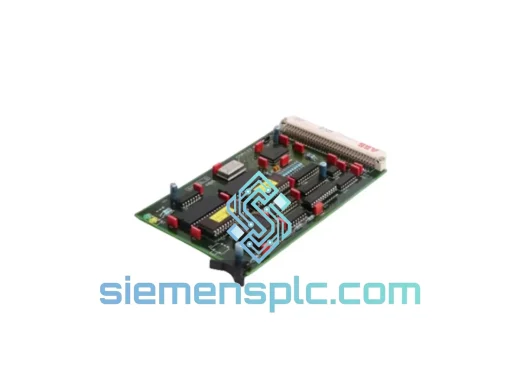
ABB PT8153B-E PLC Controller Module
Request verified availability, condition, replacement risk review, packing options and courier lead time for PT8153B-E.
BrandABB
Part NumberPT8153B-E
ConditionAvailability Check
Lead TimeRFQ Confirmation
DocumentsDatasheet / photos by RFQ
ShippingExport packing available
Auto-filled RFQ
PT8153B-E
Click Request Quote and the part number is inserted into the inquiry form automatically.
- Reply by email: [email protected]
- WhatsApp / Tel: +86 18359268345
- Mon-Sat 9:00-18:00 GMT+8
Procurement Data
Key Product Information
Core fields for model confirmation and RFQ routing. Detailed product narrative remains below.
- Brand
- ABB
- Primary Part Number
- PT8153B-E
- Product Type
- PLC Controller Module
- Series / Family
- AC500
- Country of Origin
- SE
- Catalog Category
- PLCs & Controllers
- Operating Temp.
- -25°C to +60°C
Model confirmed for inquiry
PT8153B-E
Send quantity, destination and urgency. The RFQ form keeps this part number attached.
Request Quote
Product Overview
ABB PT8153B-E: Stop the Bleeding — Get Your Line Back Online Before the Next Shift
Your AC500 controller just dropped offline. The HMI is frozen, the PROFIBUS network is throwing DP slave errors, and your maintenance team is staring at a blank screen. Every minute this drags on, you’re burning through production targets, SLA commitments, and management patience. The PT8153B-E is not a shelf item you can wait three weeks for — and you shouldn’t have to. We stock it. We ship it today. From Xiamen to your dock, fast.
URGENT REQUIREMENT? Contact: [email protected] | WhatsApp: +86 18359268345
Quick Technical Datasheet
| Parameter | Specification |
|---|---|
| Part Number | PT8153B-E |
| Brand | ABB |
| Series | AC500 |
| Module Type | Compact Programmable Controller (CPU) |
| Programming Standard | IEC 61131-3 (LD, FBD, ST, IL, SFC) |
| Programming Software | ABB Automation Builder |
| Communication Interfaces | PROFIBUS DP, Ethernet (model-dependent) |
| Operating Temperature | -25°C to +60°C |
| Protection Rating | IP20 (panel-mount) |
| Weight | 1,470 g |
| Origin | Germany |
| Condition | New / Surplus (confirmed at inquiry) |
| Stock Status | ✔ Ready to Ship — Xiamen Warehouse |
Troubleshooting & Replacement Tips
The PT8153B-E fails in predictable ways. Here’s what field experience tells you to check before you even open the cabinet:
1. Firmware Version Lock
The AC500 CPU firmware must match the project file version compiled in Automation Builder. If you’re swapping in a unit from a different production batch, check the firmware revision on the label. A mismatch will cause the CPU to boot into STOP mode with error code 0x8200 (firmware incompatible). Download the matching firmware via ABB’s portal before powering up the replacement.
2. Node Address / Station Number
The PT8153B-E does not use physical DIP switches for PROFIBUS addressing — the node address is set in software via Automation Builder’s hardware configuration. When you swap the module, the address is stored in the project download, not the hardware. As long as you download the same project to the new CPU, the address is preserved. Do not assume the old address is retained in the replacement unit’s flash.
3. Retain Data & Memory Backup
Retain variables (RETAIN, PERSISTENT) are stored in the CPU’s internal flash. A cold swap loses all retain data unless you’ve backed up via the SD card slot or Automation Builder’s online backup function. Before pulling the failed unit, attempt a memory card backup if the CPU is still partially responsive. If it’s fully dead, expect to reinitialize retain variables on first boot.
4. Common Fault Codes to Diagnose Before Ordering
- ERR LED solid red: Hardware fault — CPU internal failure. Replacement confirmed necessary.
- RUN LED off, ERR blinking: Configuration error or firmware mismatch. Check project download first.
- PROFIBUS DP slave dropout (all slaves): CPU communication processor failure — PT8153B-E replacement required.
- Watchdog timeout loop: Corrupted application program or hardware fault. Attempt factory reset; if it persists, replace the CPU.
- Power cycle doesn’t recover: Internal PSU section of the CPU module has failed. Do not waste time on further diagnostics — order the replacement now.
5. Replacement Procedure Checklist
- Power down the panel — confirm with a multimeter, not just the breaker indicator.
- Label and photograph all wiring and module positions before removal.
- Remove the failed PT8153B-E from the terminal base — it clips out without tools.
- Seat the replacement unit firmly until the locking tab clicks.
- Power up and observe LED sequence: PWR → RUN (green) within 10 seconds is normal boot.
- Connect Automation Builder, go online, and download the project.
- Verify I/O mapping and PROFIBUS slave status in the diagnostic view.
- Run a manual cycle before releasing to automatic production.
Reliability in Harsh Conditions
The AC500 platform was not designed for climate-controlled server rooms. It was built for the floor — and the PT8153B-E reflects that engineering philosophy at every level.
The module operates across a -25°C to +60°C ambient range without derating, making it viable in outdoor enclosures in northern climates and in foundry environments where panel temperatures routinely exceed what lesser hardware can tolerate. Vibration resistance is validated to IEC 60068-2-6, covering sinusoidal vibration profiles that simulate conveyor-mounted and mobile equipment installations. Shock resistance per IEC 60068-2-27 ensures the module survives the mechanical abuse of forklift traffic near control panels and the occasional dropped tool.
EMC immunity is certified to EN 61000-6-2 (industrial immunity standard), which means the PT8153B-E holds its ground in environments with variable-frequency drives, arc welders, and high-current switching equipment operating nearby. Conducted and radiated emissions are certified to EN 61000-6-4, keeping your installation compliant in regulated facilities.
Humidity tolerance extends to 95% non-condensing, and the conformal coating options available in the AC500 range provide additional protection in coastal and chemical processing environments where moisture and airborne contaminants are a constant threat. This is not a module that needs babysitting — it’s built to outlast the equipment it controls.
Global Express Logistics
Our warehouse is located in Xiamen, Fujian — one of China’s primary export hubs with direct access to international freight lanes via Xiamen Gaoqi International Airport and Xiamen Port. This geography is not accidental. It means your urgent order moves fast.
Standard Express Routing:
- Southeast Asia (SG, MY, TH, VN, ID): DHL Express / FedEx IP — 2 to 3 business days door-to-door
- Middle East (AE, SA, QA, KW): DHL Express — 3 to 4 business days
- Europe (DE, NL, FR, PL, IT): FedEx International Priority — 3 to 5 business days
- North America (US, CA, MX): DHL Express / FedEx IP — 3 to 5 business days
- Australia / New Zealand: DHL Express — 3 to 4 business days
Every shipment includes a commercial invoice, packing list, and certificate of origin. For customers requiring customs pre-clearance documentation or specific HS code declarations, we prepare these as standard — not as an add-on. Dangerous goods? The PT8153B-E ships as general cargo with no special handling restrictions.
Track your shipment in real time from the moment it leaves our dock. We send the AWB number within 2 hours of dispatch. If your freight forwarder needs a specific carrier or routing, tell us at the time of order — we accommodate custom logistics arrangements for volume customers.
For customers with standing accounts, same-day dispatch is available for orders confirmed before 14:00 CST. Don’t let a timezone difference add another day to your downtime.
Contact Information
Email: [email protected]
WhatsApp: +86 18359268345
Web: siemensplc.com
© 2026 siemensplc.com. All rights reserved.
Ready to quote
[email protected]
Send This Part Number to Sales
RFQ workflow
Quality workflow ->
Confirmation Process
01Model confirmation
We check the full part number, brand, series and visible nameplate information before quotation.
02Availability reply
Sales confirms stock path, condition option, quantity and realistic lead time for export dispatch.
03Packing & courier
DHL, FedEx, UPS or buyer courier arrangements can be reviewed with packing requirements.
Continue sourcing
Browse full catalog ->
Related Automation Parts
Similar brand or category products for fast comparison and multi-item RFQ lists.
ABB
RFQ Ready
ABB 1SVR427075R0000 CP-A CM PLC CPU Module – AC500 Compact Series
AC500
Origin SE
PLC CPU Module