

Siemens
RFQ Ready
Siemens 6AV7240-0HC07-0PA0 Industrial Panel PC Motherboard – SIMATIC IPC477D
SIMATIC
Origin DE
Industrial Panel PC Motherboard
Request verified availability, condition, replacement risk review, packing options and courier lead time for 6AV2123-2DB03-0AX0.
Click Request Quote and the part number is inserted into the inquiry form automatically.
Core fields for model confirmation and RFQ routing. Detailed product narrative remains below.
Your line stopped. The HMI is dead. Operators are standing around. Maintenance is on the phone. You already know the part number — 6AV2123-2DB03-0AX0 — and you need it now, not in three weeks from a slow distributor chain. We stock this unit in Xiamen and ship DHL/FedEx express globally within 24 hours of order confirmation. No MOQ. No waiting for a quote that takes two days. One unit or ten — same urgency, same day.
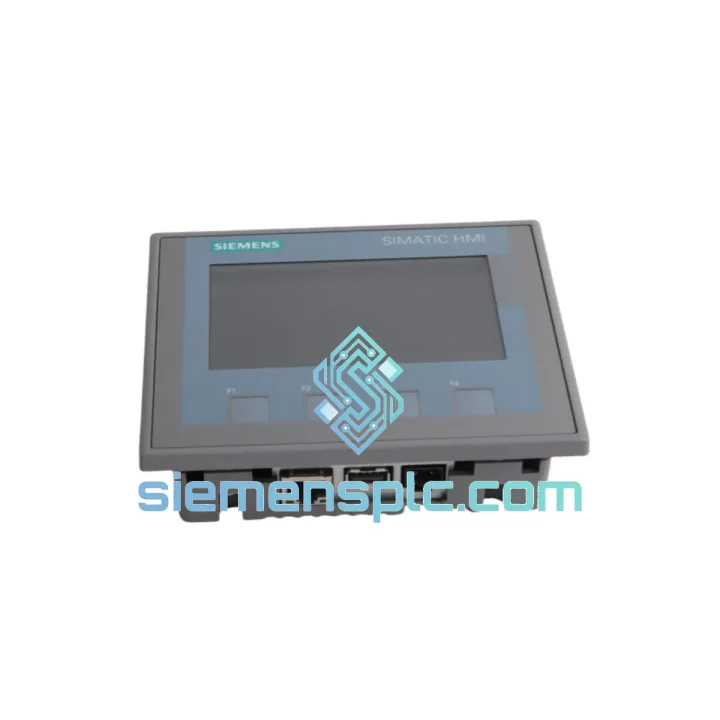
The Siemens SIMATIC HMI KTP400 Basic 6AV2123-2DB03-0AX0 is a 4.3-inch resistive touch panel with four dedicated function keys, a single PROFINET RJ45 port, and native TIA Portal integration. It runs on 24 VDC, draws under 5 W, and mounts into a 138 × 99 mm panel cutout. If you’ve worked with SIMATIC S7-1200 or S7-1500 systems, you already know this panel — it’s on thousands of machines worldwide, which is exactly why a fast replacement source matters.
⚡ URGENT REQUIREMENT? Contact: [email protected] | WhatsApp: +86 18359268345
| Part Number | 6AV2123-2DB03-0AX0 ✅ Ready to Ship |
| Series | SIMATIC HMI KTP400 Basic |
| Display | 4.3″ TFT widescreen, 480 × 272 px, 64K colors |
| Touch Type | 4-wire resistive |
| Function Keys | 4 configurable hardware keys |
| Communication | PROFINET (RJ45 × 1) — no MPI, no PROFIBUS |
| Supply Voltage | DC 24 V (20.4 – 28.8 V) |
| Power Consumption | ≈ 4.5 W |
| User Memory | 10 MB |
| Engineering Tool | TIA Portal WinCC Basic V13 SP1 minimum |
| Protection Rating | IP65 front / IP20 rear |
| Operating Temp | 0 °C to +50 °C |
| Storage Temp | -20 °C to +60 °C |
| Humidity | 10 – 90% RH, non-condensing |
| Panel Cutout | 138 × 99 mm |
| Dimensions (W×H×D) | 155 × 116 × 39 mm |
| Weight | ≈ 200 g |
| Certifications | CE, UL, cULus, RCM |
| Origin | Germany |
| Stock Status | ✅ In Stock – Ships within 24 hrs |
Ten years of field calls on KTP400 panels teach you the same failure patterns every time. Here’s what to check before you even open the box:
Fault 1 — Blank screen, panel won’t boot: Nine times out of ten this is a 24 VDC supply issue, not a dead panel. Measure at the terminal block under load. Anything below 20.4 V and the panel shuts down silently. Check your SITOP or DIN-rail PSU first. If voltage is good and the panel still won’t POST, the backlight inverter or the main board has failed — replacement is the only fix.
Fault 2 — “No connection to PLC” alarm on startup: The KTP400 Basic uses PROFINET exclusively. If you’re replacing a panel that previously ran on MPI or PROFIBUS, the new unit will not communicate without a PROFINET-capable CPU or CP module. Verify the PLC side: S7-1200 and S7-1500 are native PROFINET. S7-300 requires CP 343-1 Advanced. Check IP address assignment — the replacement panel ships with DHCP enabled by default. Assign a static IP via TIA Portal or the panel’s built-in IP configuration menu (Start Center → Settings → Network) before going online.
Fault 3 — Touch calibration drift or dead zones: The 4-wire resistive screen degrades with heavy gloved-hand use over years. Before condemning the panel, run the touch calibration routine: Start Center → Settings → Touch Calibration. If calibration doesn’t resolve the issue and dead zones persist in the same screen quadrant, the touch overlay is physically worn — replace the unit.
Fault 4 — Project download fails, “Target device not found”: Confirm the engineering PC and panel are on the same subnet. The KTP400 Basic does not support cross-subnet downloads without routing configuration. Also verify TIA Portal version: projects compiled in V17+ may not download to panels running older firmware. Update panel firmware via TIA Portal’s “Update firmware” function before attempting project transfer.
Replacement Checklist (field-tested sequence):
Firmware note: The 6AV2123-2DB03-0AX0 ships with factory firmware. If your TIA Portal project was compiled against a specific firmware version, check compatibility under “Online & Diagnostics → Device information” in TIA Portal after first connection. Firmware updates are free from Siemens Industry Online Support.
The KTP400 Basic wasn’t designed for office environments. It was built for the floor — and the 6AV2123-2DB03-0AX0 reflects that in every design decision.
The front panel carries an IP65 rating, meaning it’s fully sealed against dust ingress and withstands direct water jets. In food processing lines, beverage plants, and wash-down areas, this matters. The rear enclosure is IP20, so the cabinet itself handles the rest of the protection — standard practice for panel-mounted HMIs.
Operating temperature range of 0 °C to +50 °C covers the vast majority of industrial environments, from cold-storage adjacent control rooms to hot press areas. The panel has no moving parts, no spinning fans, no mechanical relays — the failure modes are limited to the display, touch layer, and main board, all of which degrade slowly and predictably rather than failing catastrophically without warning.
Vibration resistance meets IEC 61131-2 requirements for panel-mounted equipment. In applications with significant mechanical vibration — press lines, compressor rooms, heavy machining centers — the panel should be mounted on the cabinet door rather than directly on the machine frame. Use the supplied mounting clamps torqued to spec; loose clamps are the primary cause of vibration-induced connector failures on this form factor.
The resistive touch technology, while less glamorous than capacitive screens, has a practical advantage in industrial settings: it responds to gloved hands, stylus inputs, and even light tool contact. Capacitive panels require bare skin or special gloves — not practical on a foundry floor or in a chemical plant where PPE is mandatory.
Units we ship have been stored in climate-controlled conditions with ESD-safe packaging and desiccant. We do not warehouse panels in uncontrolled environments. Every unit is visually inspected and MLFB-verified before dispatch.
We operate from Xiamen, China — one of the most logistics-connected export hubs on the mainland, with direct DHL and FedEx gateway access. Here’s exactly how your order moves:
Day 0 — Order confirmed: Payment received, unit pulled from stock, pre-shipment inspection completed, export documentation prepared (commercial invoice, packing list, certificate of origin).
Day 1 — Shipped: DHL Express or FedEx International Priority, depending on destination and your preference. Tracking number sent to your email within 2 hours of handover to carrier.
Day 2–4 — Delivered: Most destinations in Southeast Asia, Middle East, and Europe receive within 3 business days. North America typically 3–5 business days. Remote locations may add 1–2 days.
We handle all export paperwork. HS code for the 6AV2123-2DB03-0AX0 is 8537.10 (programmable controllers / HMI panels). Declared value matches invoice — no undervaluation, no customs surprises on your end. If your facility requires specific import documentation (Form E for ASEAN preferential tariff, EUR.1 for EU, etc.), advise us at order time and we’ll prepare accordingly.
For critical downtime situations, contact us directly on WhatsApp before placing the order — we can confirm stock, provide a proforma invoice, and have the unit ready for same-day pickup by DHL before the afternoon cutoff.
📧 Email: [email protected]
💬 WhatsApp: +86 18359268345
🌐 Web: siemensplc.com
© 2026 siemensplc.com. All rights reserved.
We check the full part number, brand, series and visible nameplate information before quotation.
Sales confirms stock path, condition option, quantity and realistic lead time for export dispatch.
DHL, FedEx, UPS or buyer courier arrangements can be reviewed with packing requirements.
Similar brand or category products for fast comparison and multi-item RFQ lists.


