

Siemens
RFQ Ready
Siemens 6AV7240-0HC07-0PA0 Industrial Panel PC Motherboard – SIMATIC IPC477D
SIMATIC
Origin DE
Industrial Panel PC Motherboard
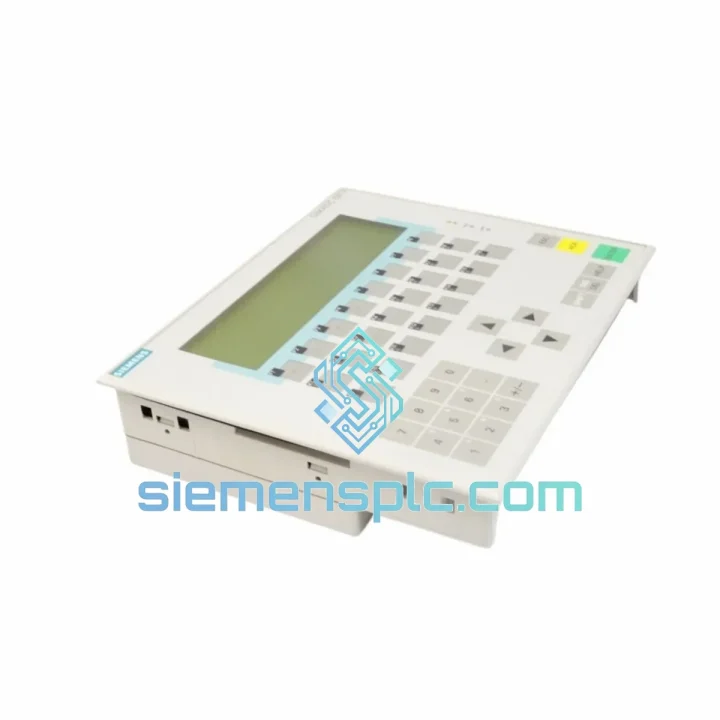
Request verified availability, condition, replacement risk review, packing options and courier lead time for 6AV3617-1JC20-0AX1.
Click Request Quote and the part number is inserted into the inquiry form automatically.
Core fields for model confirmation and RFQ routing. Detailed product narrative remains below.
Your line is down. Every hour the OP17 stays dark costs you in lost output, idle labor, and customer penalties. The Siemens 6AV3617-1JC20-0AX1 is on the shelf in Xiamen right now — not on a 12-week factory lead time, not stuck in a distributor’s backorder queue. We ship DHL/FedEx express within 24 hours of order confirmation. That’s the only number that matters when your maintenance team is standing by.
URGENT REQUIREMENT? Contact: [email protected] | WhatsApp: +86 18359268345
| Parameter | Specification |
|---|---|
| Part Number | 6AV3617-1JC20-0AX1 |
| Series | SIMATIC HMI OP17 |
| Display | LCD, 4-line x 20-character alphanumeric |
| Keypad | 40 keys — F1–F16 function keys + system + numeric |
| Communication | RS-485 / MPI (Multi-Point Interface) |
| Compatible PLCs | SIMATIC S5, S7-200, S7-300, S7-400 |
| Supply Voltage | 24 V DC (18–30 V DC range) |
| Power Draw | approx. 6 W |
| Operating Temp | 0 to +50 deg C |
| Storage Temp | -20 to +70 deg C |
| Front Protection | IP65 |
| Mounting | Panel cut-out, flush mount |
| Dimensions (WxHxD) | 202 x 152 x 55 mm |
| Weight | approx. 780 g |
| User Memory | 64 KB |
| Alarm Capacity | Up to 200 alarm messages |
| Config Software | ProTool v6.x |
| Certifications | CE, UL, cUL |
| Country of Origin | Germany |
| Stock Status | Ready to Ship — Xiamen Warehouse |
Before you pull the old panel, capture everything. The OP17 stores its project in internal flash — but if the unit is dead, that project is gone. Always keep a ProTool backup (.pdb file) on a network share. If you are replacing a failed unit and have no backup, you will need to rebuild the project from the PLC tag list. Budget 2–4 hours for that recovery, not 20 minutes.
MPI address conflict is the number one commissioning failure. The OP17 ships from the factory with MPI node address 1. Your PLC is almost certainly at address 2, and your PG/PC at address 0. Before powering the new panel, set the MPI address in the OP17 transfer menu (hold ESC + F4 at boot) to match the address configured in your ProTool project — typically node 3 or 4 in multi-device networks. A duplicate address will cause the entire MPI segment to hang, and the PLC will throw a communication fault that looks like a hardware failure.
Baud rate must match the PLC network. The OP17 auto-detects baud rate on MPI, but only within its supported range (9.6 kbps to 187.5 kbps). If your S7-300 network runs at 1.5 Mbps — common in larger installations — the OP17 cannot participate. Confirm your PLC MPI baud rate in STEP 7 Hardware Config before ordering.
Common fault codes and what they actually mean:
Replacement procedure — field-tested sequence:
The 6AV3617-1JC20-0AX1 was designed for the factory floor, not the server room. The IP65-rated front bezel seals against dust and directed water jets — it survives wash-down cycles in food processing lines and the fine metallic dust of machining environments. The membrane keypad uses a sealed overlay with tactile domes rated for millions of actuations; there are no exposed mechanical switches to corrode or jam.
Internally, the PCB assembly is conformally coated to resist condensation in environments with high humidity cycling — common in facilities that open large bay doors in winter. The operating temperature ceiling of +50 deg C covers the majority of industrial cabinet interiors even in summer without active cooling, provided the cabinet has basic ventilation. Units that have been in service for 10–15 years in automotive stamping plants and chemical processing facilities continue to operate without intervention — that is the benchmark this panel was built to.
Every unit we ship from Xiamen undergoes incoming inspection: visual examination, label and date-code verification, and a powered functional test confirming display, keypad response, and MPI communication initialization. Units are packed in anti-static bags with desiccant and foam-lined cartons to survive the express freight journey intact.
Stock is held at our Xiamen warehouse, positioned for fast access to international express hubs. Standard dispatch is within 24 hours of payment confirmation. Typical transit times: Europe 3–5 business days, North America 4–6 business days, Southeast Asia 2–3 business days, Middle East 4–7 business days via DHL Express or FedEx International Priority.
Every shipment includes a commercial invoice, packing list, and HS code declaration (8537.10) for smooth customs clearance. For EU customers, we provide EORI-compatible documentation. For US customers, we include the necessary EEI/AES filing reference where required by value threshold. If your procurement team needs a formal proforma invoice for import approval before payment, we issue that within 2 hours of inquiry.
For critical downtime situations, contact us directly on WhatsApp — we can confirm stock, issue a proforma, and have the shipment booked with DHL same-day if you reach us before 16:00 CST.
Email: [email protected]
WhatsApp: +86 18359268345
Web: siemensplc.com
© 2026 siemensplc.com. All rights reserved.
We check the full part number, brand, series and visible nameplate information before quotation.
Sales confirms stock path, condition option, quantity and realistic lead time for export dispatch.
DHL, FedEx, UPS or buyer courier arrangements can be reviewed with packing requirements.
Similar brand or category products for fast comparison and multi-item RFQ lists.


