

Siemens
RFQ Ready
Siemens 6AV7240-0HC07-0PA0 Industrial Panel PC Motherboard – SIMATIC IPC477D
SIMATIC
Origin DE
Industrial Panel PC Motherboard
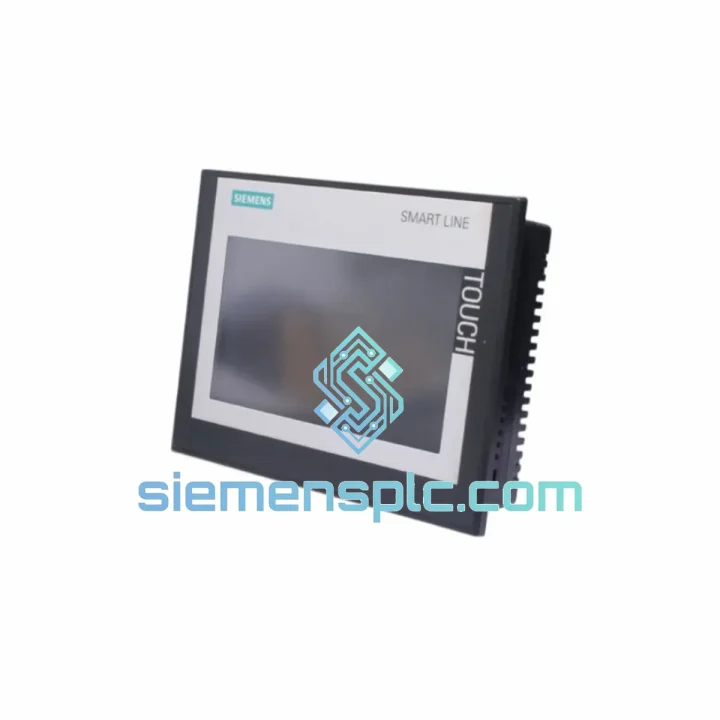
Request verified availability, condition, replacement risk review, packing options and courier lead time for 6AV6648-0CE11-3AX0.
Click Request Quote and the part number is inserted into the inquiry form automatically.
Core fields for model confirmation and RFQ routing. Detailed product narrative remains below.
Your line stopped. The operator panel is dead. Maintenance is on the phone. You’ve already pulled the unit and confirmed it’s the Siemens 6AV6648-0CE11-3AX0 — the SIMATIC SMART 700 IE V3 HMI. You don’t need a datasheet lecture. You need a replacement on a truck today.
We stock the 6AV6648-0CE11-3AX0 in Xiamen. Orders confirmed before 14:00 CST ship same day via DHL Express or FedEx Priority. Most destinations in Southeast Asia receive within 24–48 hours. Europe and North America within 3–5 business days. No minimum order. No waiting on factory lead times.
⚡ URGENT REQUIREMENT? Contact: [email protected] | WhatsApp: +86 18359268345
| Parameter | Specification |
|---|---|
| Part Number | 6AV6648-0CE11-3AX0 |
| Series | SIMATIC SMART 700 IE V3 |
| Display | 7″ Widescreen TFT, 800 × 480 px, 65,536 colors |
| Touch Type | Resistive single-touch |
| CPU | 400 MHz ARM |
| User Memory | 10 MB |
| Communication Port 1 | Ethernet RJ45 — PROFINET / TCP-IP |
| Communication Port 2 | RS-422/485 — MPI / PROFIBUS DP |
| USB | 1 × USB Type-A (host) |
| Power Supply | 24 V DC (20.4–28.8 V) |
| Power Consumption | ≈ 6 W |
| Operating Temperature | 0 °C to +50 °C |
| Storage Temperature | −20 °C to +60 °C |
| Protection Rating | IP65 (front bezel) |
| Dimensions (W×H×D) | 214 × 158 × 45 mm |
| Weight | ≈ 0.5 kg |
| Config Software | WinCC flexible SMART V3 |
| Certifications | CE, UL, cULus, RCM |
| Stock Status | ✔ Ready to Ship — Xiamen Warehouse |
Fifteen years of field calls on SMART 700 panels teach you the same failure patterns repeat. Here’s what to check before you even open the box on the replacement unit:
Fault 1 — Black screen, power LED on: Nine times out of ten this is a failed backlight inverter board, not the main PCB. Before condemning the whole panel, check 24 V at the power terminals with a meter. If voltage is solid and the LED is lit but screen is dark, the backlight has failed. The 6AV6648-0CE11-3AX0 uses an integrated LED backlight — the entire panel must be replaced, not just the lamp. Rated backlight life is 50,000 hours; panels running 24/7 in high-ambient-temperature enclosures often fail at 4–5 years.
Fault 2 — Touch input offset or dead zones: Resistive touch panels drift after thermal cycling. In WinCC Flexible SMART, navigate to Control Panel → Touch Calibration and run a 5-point calibration. If calibration fails to hold across power cycles, the touch overlay has delaminated and replacement is the only fix.
Fault 3 — Communication loss to S7-200 SMART PLC (Ethernet): Check IP address conflict first — the panel’s default IP is 192.168.0.1. Confirm the PLC and panel are on the same subnet. If the connection drops intermittently, check the RJ45 connector for corrosion; industrial environments with coolant mist are notorious for this. Also verify the Ethernet cable is shielded (STP Cat5e minimum) and the shield is grounded at one end only.
Fault 4 — Project download fails after replacement: The V3 hardware requires WinCC Flexible SMART V3 SP3 or later. If you’re running V3 SP1 on your engineering PC, the download will fail silently or throw a version mismatch error. Update the software before attempting transfer. Also confirm the panel firmware version via Control Panel → System Info — firmware must match the software version used to compile the project.
Replacement procedure (field-tested, 20-minute swap):
No DIP switches or address jumpers are present on the 6AV6648-0CE11-3AX0 — all addressing is software-configured. The RS-485 port termination resistor is enabled via a software toggle in the port settings, not a physical switch. Confirm termination is enabled only on the last device in the RS-485 chain.
The SMART 700 IE V3 was built for the kind of environments that kill consumer-grade electronics in weeks. The front bezel carries an IP65 rating — fully dust-tight and protected against low-pressure water jets from any direction. That matters in food processing lines where washdown is daily, in textile plants where fiber dust is constant, and in outdoor pump stations where humidity swings from 20% to 95% RH without warning.
The operating temperature ceiling of +50 °C is not a marketing number — it’s a tested, certified limit. Panels installed inside sealed steel enclosures in summer, where internal temperatures routinely hit 45 °C, continue to operate without throttling or display degradation. The ARM processor runs without active cooling; there are no fans to fail, no heatsink compound to dry out.
Vibration resistance meets IEC 61131-2 requirements — sinusoidal vibration up to 10–58 Hz at 0.075 mm amplitude, and 58–150 Hz at 1 g. In practice, this covers most machine tool and conveyor applications without additional shock mounts. For high-vibration environments such as compressor skids or mobile equipment, we recommend installing the panel with vibration-damping grommets on the mounting clamps.
The PCB conformal coating on production units provides additional protection against condensation and corrosive atmospheres. Units stored in our Xiamen warehouse are kept in climate-controlled conditions at 20–25 °C and 40–60% RH, with anti-static packaging maintained until the moment of shipment.
Our dispatch hub is in Xiamen, Fujian — one of China’s primary export ports with direct DHL and FedEx gateway access. Here’s how a typical urgent order moves:
Day 0 (Order confirmed before 14:00 CST): Unit pulled from stock, inspected, packed in anti-static foam with original-spec outer carton. Commercial invoice and packing list prepared. Shipment booked with DHL Express or FedEx International Priority depending on destination.
Day 1: Parcel collected by courier, cleared through Xiamen customs. HS code 8537.10 applies for HMI panels — export documentation is pre-prepared to avoid customs delays. Tracking number sent to buyer via email and WhatsApp.
Day 2–3: Arrival in destination country for most of Southeast Asia (Vietnam, Thailand, Indonesia, Malaysia, Philippines). Customs clearance typically same day for commercial importers with established accounts.
Day 3–5: Delivery to most European destinations (Germany, Netherlands, Poland, Italy). DHL Express routinely achieves 3-day transit from Xiamen to Frankfurt.
Day 4–6: North America (USA, Canada, Mexico). FedEx International Priority from Xiamen to major US hubs averages 4 business days.
For orders requiring formal export documentation, CE declarations, or country-of-origin certificates, these are prepared at no additional charge and included in the shipment. Duties and taxes are buyer’s responsibility unless DDP (Delivered Duty Paid) terms are agreed in advance — contact us to discuss DDP pricing for your country.
We do not use postal services or economy freight for industrial components. Every shipment moves on a tracked express service with full insurance coverage. If a parcel is lost or damaged in transit, we reship at no cost.
Reach our technical sales team directly — no call centers, no ticket queues. You’ll speak with someone who knows the difference between a SMART 700 and a KTP700.
📧 Email: [email protected]
📱 WhatsApp: +86 18359268345
🌐 Web: siemensplc.com
© 2026 siemensplc.com. All rights reserved.
We check the full part number, brand, series and visible nameplate information before quotation.
Sales confirms stock path, condition option, quantity and realistic lead time for export dispatch.
DHL, FedEx, UPS or buyer courier arrangements can be reviewed with packing requirements.
Similar brand or category products for fast comparison and multi-item RFQ lists.


