

Siemens
RFQ Ready
SIEMENS 6GK5108-0BA00-2AA3 Industrial Ethernet Switch
SIMATIC
Origin DE
Industrial Ethernet Switch
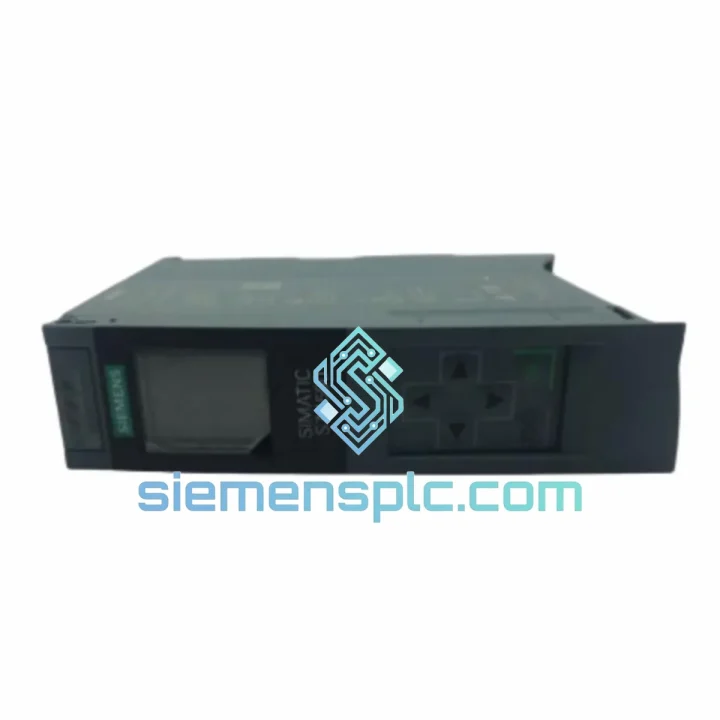
Request verified availability, condition, replacement risk review, packing options and courier lead time for 6ES7511-1AK02-0AB0.
Click Request Quote and the part number is inserted into the inquiry form automatically.
Core fields for model confirmation and RFQ routing. Detailed product narrative remains below.
Your S7-1500 rack just threw a CPU fault. The line is stopped. Maintenance is on the phone. The shift supervisor is already walking over. You’ve confirmed it’s the 6ES7511-1AK02-0AB0 — the CPU 1511-1 PN — and you need a verified, ship-ready unit in your hands before the next shift starts. That’s exactly what we do.
At siemensplc.com, we stock the Siemens 6ES7511-1AK02-0AB0 as a priority line item. This is not a catalog listing with a 6-week lead time. We ship from Xiamen within 24 hours of order confirmation via DHL Express or FedEx Priority. For plants running automotive body shops, pharmaceutical batch reactors, or food-grade filling lines — where a single hour of downtime can cost $15,000 to $80,000 — that turnaround is the difference between a recoverable incident and a production crisis.
The CPU 1511-1 PN sits at the core of the SIMATIC S7-1500 mid-range architecture. It handles program execution, PROFINET IO coordination, and HMI communication simultaneously. When it fails, nothing downstream works — not the distributed I/O, not the drives, not the safety interlocks. Replacement is not optional. Speed is everything.
⚡ URGENT REQUIREMENT? Contact: [email protected] | WhatsApp: +86 18359268345
| Parameter | Specification |
|---|---|
| Order Number | 6ES7511-1AK02-0AB0 |
| CPU Designation | CPU 1511-1 PN |
| Product Family | SIMATIC S7-1500 |
| Work Memory — Program | 150 KB |
| Work Memory — Data | 1 MB |
| Bit Processing Speed | 60 ns |
| PROFINET Interface | 1× PROFINET IO (integrated 2-port switch) |
| Front Panel Display | Yes — IP address, CPU state, fault codes |
| Firmware Compatibility | V2.0 and above (field-upgradeable via SIMATIC Memory Card) |
| TIA Portal Version | V13 SP1 minimum — V19 supported |
| Operating Temperature | 0 °C to +60 °C |
| Protection Rating | IP20 |
| Mounting | DIN rail / S7-1500 mounting rail |
| Power Supply | Via S7-1500 system power supply (PS) |
| Weight | Approx. 500 g |
| Origin | Germany |
| Stock Status | ✅ Ready to Ship — Xiamen Warehouse |
Swapping a CPU 1511-1 PN in the field is not complicated — but there are four failure points that catch engineers off guard every time. Here’s what 10 years of emergency callouts have taught us:
1. SIMATIC Memory Card — Do Not Skip This Step
The 6ES7511-1AK02-0AB0 does not retain its program in internal flash without a SIMATIC Memory Card. If the failed CPU had a card installed, transfer it to the replacement unit before powering on. If the card is missing or corrupted, you will need to reload the project from TIA Portal. Confirm the card is seated fully — a half-inserted card causes a persistent “Memory Card Error” fault that looks like a hardware defect but isn’t.
2. Firmware Version Mismatch
The most common post-swap fault: the replacement unit ships with a different firmware revision than the original. If TIA Portal throws a “CPU firmware version not compatible” error after download, update the firmware via the SIMATIC Memory Card before attempting a project download. Use the Firmware Downgrade/Upgrade function in TIA Portal under Online > Update Firmware. Match the firmware to the TIA Portal project version — not the other way around.
3. IP Address and Device Name Conflict
After installing the replacement CPU, the PROFINET device name and IP address must be reassigned. The new CPU ships with no device name configured. Use TIA Portal’s “Assign Device Name” function (Online > Assign Device Name) or the front panel display to set the IP manually. If you’re in a hurry and the network has a DHCP server, the CPU will grab an address — but PROFINET IO will not initialize until the device name matches the project configuration exactly.
4. Hardware Revision Differences (1AK00 vs 1AK01 vs 1AK02)
The 1AK02 is the current production revision. It is backward compatible with existing S7-1500 racks and I/O modules. However, if your TIA Portal project was created with an older hardware revision (1AK00 or 1AK01), you may see a hardware mismatch warning. Accept the update in TIA Portal’s hardware catalog — the project will compile and download without functional changes. Do not attempt to force the old hardware revision; it will cause unnecessary diagnostic alarms.
Common Fault Codes on CPU 1511-1 PN:
Replacement Checklist (Field Use):
The SIMATIC S7-1500 platform was engineered for environments where consumer-grade electronics would fail within weeks. The 6ES7511-1AK02-0AB0 is validated to operate continuously across the full 0–60 °C range without derating, making it suitable for unventilated control cabinets in summer foundry conditions or cold-storage facility automation where ambient temperatures swing dramatically between shifts.
Vibration resistance is tested to IEC 60068-2-6 (sinusoidal) and IEC 60068-2-27 (shock), covering the mechanical stress profiles found in press shop environments, mobile machinery, and shipboard automation. The backplane bus connector uses a positive-locking mechanism that maintains signal integrity under continuous vibration — a known failure point on older S7-300 systems that the S7-1500 architecture specifically addressed.
Humidity tolerance extends to 95% relative humidity (non-condensing) per IEC 60068-2-78, which covers coastal industrial facilities, paper mills, and food processing plants where moisture ingress is a constant concern. The conformal coating on internal PCBs provides an additional barrier against corrosive atmospheres — relevant for chemical plants and wastewater treatment facilities where airborne contaminants accelerate PCB degradation on unprotected electronics.
EMC compliance covers EN 61000-6-2 (industrial immunity) and EN 61000-6-4 (industrial emissions), meaning the CPU maintains stable operation in environments with heavy VFD switching noise, welding equipment, and high-current bus systems — exactly the conditions where PLC faults are most likely to be misdiagnosed as hardware failures when they are actually EMC-induced soft faults.
Our dispatch hub is located in Xiamen, Fujian Province — one of China’s primary industrial export corridors with direct access to DHL Express, FedEx International Priority, and UPS Worldwide Express gateways. This is not a drop-ship arrangement. Stock is physically held in our warehouse and can be inspected, photographed, and shipped same-day for orders confirmed before 15:00 CST.
Typical Transit Times from Xiamen:
Every shipment includes a commercial invoice, packing list, and certificate of origin for customs clearance. For customers in the EU, we provide the necessary documentation for CE-marked goods. HS Code for the 6ES7511-1AK02-0AB0 is 8537.10 (programmable controllers). We can declare at actual value or provide a proforma invoice for insurance purposes — your choice.
For critical downtime situations, we offer a same-day dispatch guarantee for orders confirmed with payment before 14:00 CST Monday–Friday. WhatsApp us directly for real-time stock confirmation and shipping quotes before placing your order.
📧 Email: [email protected]
💬 WhatsApp: +86 18359268345
🌐 Web: siemensplc.com
© 2026 siemensplc.com. All rights reserved.
We check the full part number, brand, series and visible nameplate information before quotation.
Sales confirms stock path, condition option, quantity and realistic lead time for export dispatch.
DHL, FedEx, UPS or buyer courier arrangements can be reviewed with packing requirements.
Similar brand or category products for fast comparison and multi-item RFQ lists.


