

Siemens
RFQ Ready
SIEMENS 6GK5108-0BA00-2AA3 Industrial Ethernet Switch
SIMATIC
Origin DE
Industrial Ethernet Switch
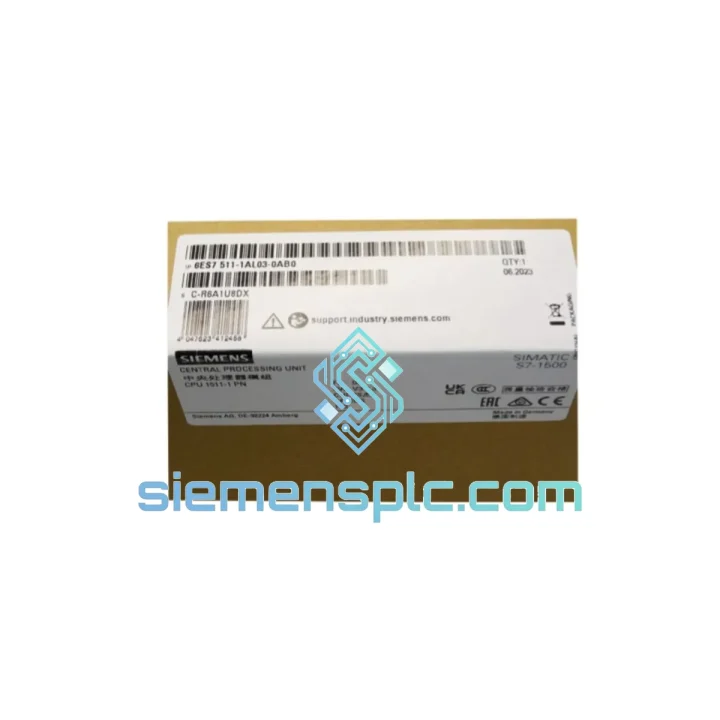
Request verified availability, condition, replacement risk review, packing options and courier lead time for 6ES7511-1AL03-0AB0.
Click Request Quote and the part number is inserted into the inquiry form automatically.
Core fields for model confirmation and RFQ routing. Detailed product narrative remains below.
Your S7-1500 rack is dead. The line is stopped. Maintenance is standing by. You’ve already pulled the CPU and confirmed the fault — now you need a verified replacement in hand, not a lead-time quote. The Siemens 6ES7511-1AL03-0AB0 CPU 1511-1 PN is on our shelf in Xiamen right now. We’ve handled enough plant-down calls to know that 48 hours of lost production can exceed the cost of this module ten times over. Stop the bleeding — contact us now.
URGENT REQUIREMENT? Contact: [email protected] | WhatsApp: +86 18359268345
| Parameter | Value |
|---|---|
| Order Number (MLFB) | 6ES7511-1AL03-0AB0 |
| CPU Designation | CPU 1511-1 PN |
| Product Family | SIMATIC S7-1500 |
| Hardware Revision | V03 |
| Firmware | V2.9 (TIA Portal V16+ required) |
| Work Memory — Program | 150 KB |
| Work Memory — Data | 1 MB |
| Load Memory (integrated) | 4 MB (expandable via SIMATIC Memory Card) |
| Bit Processing Speed | 60 ns |
| PROFINET Interface | 1× PN (2-port switch, IRT capable) |
| OPC UA Server | Native, no extra license |
| Motion Control Axes | Up to 6 technology objects |
| Max PROFINET IO Devices | 256 |
| Supply Voltage | 24 V DC (via system PS) |
| Operating Temperature | 0 °C to +60 °C |
| Protection Class | IP20 |
| Dimensions (W×H×D) | 35 × 147 × 129 mm |
| Weight | ~420 g |
| Country of Origin | Germany |
| Stock Status | ✅ Ready to Ship — Xiamen Warehouse |
Swapping a CPU 1511-1 PN is not plug-and-play if you skip these steps. Fifteen minutes of prep here saves you three hours of re-commissioning grief.
Step 1 — Back up before you touch anything. If the original CPU still powers on, use TIA Portal’s “Upload from device” to pull the current project, including hardware configuration and all DB values. If the display is dead, retrieve the project from the SIMATIC Memory Card directly — it stores the last loaded program automatically.
Step 2 — Note the PROFINET device name. The CPU holds its own PROFINET device name in non-volatile memory. After replacement, you must assign the same device name via TIA Portal → Online → Assign PROFINET device name, or the IO controller will throw F-address errors on every distributed I/O station.
Step 3 — Match the firmware revision. The V03 hardware revision (suffix -0AB0) runs firmware V2.9. Do not attempt to load a project compiled under TIA Portal V15.1 without first checking compatibility — Motion Control technology objects compiled in V16 will fault on download to a CPU running older firmware. Update firmware via SIMATIC Automation Tool or TIA Portal before loading the project.
Step 4 — SIMATIC Memory Card transfer. The 6ES7511-1AL03-0AB0 uses a SIMATIC Memory Card (not a standard SD card). If your replacement ships without one, order 6ES7954-8LC03-0AA0 (12 MB) alongside. Insert the card before first power-on; the CPU will not boot to RUN without it if the project exceeds internal load memory.
Step 5 — IP address assignment. The replacement CPU ships with no IP address. Assign via TIA Portal → Accessible Devices, or use the front panel display (Menu → Settings → Addresses). Confirm the subnet matches your PROFINET segment before going online.
Common fault codes on this CPU:
The CPU 1511-1 PN is not a office-grade controller dressed up in industrial packaging. Siemens designed the S7-1500 series to operate continuously in environments that would kill consumer electronics within weeks. The conformal-coated PCB assembly resists condensation and airborne contaminants common in food processing, chemical plants, and coastal installations. Vibration resistance meets IEC 60068-2-6 (sinusoidal, 5–150 Hz, 1g) and IEC 60068-2-27 (shock, 15g / 11 ms), making it suitable for mounting near presses, compressors, and heavy machinery without isolation mounts.
Thermal management is passive — no fans, no moving parts inside the CPU itself. The aluminum front panel acts as a heat spreader, and the backplane bus connector is rated for 500,000 insertion cycles. In high-humidity environments (up to 95% RH non-condensing), the module maintains full specification. EMC immunity is certified to IEC 61000-4 series, covering conducted and radiated immunity levels that exceed typical industrial site requirements. This is the module you install once and forget about for a decade.
Our warehouse is located in Xiamen, Fujian Province — one of China’s primary export hubs with direct access to international freight lanes. We ship via DHL Express and FedEx International Priority as standard for urgent orders. Here is what the timeline looks like from the moment you confirm your order:
Every shipment includes a commercial invoice with accurate HS code (8537.10) for customs clearance, a packing list, and a certificate of conformity on request. We handle export documentation in-house — no third-party freight forwarder delays. For orders requiring EUC (End-User Certificate) or import permits, contact us 24 hours in advance and we will prepare the paperwork. Tracking numbers are sent via email and WhatsApp within 2 hours of dispatch. If your shipment is held at customs, we provide full documentation support at no additional charge.
For plant-down situations where standard express is not fast enough, ask about our charter courier option for same-day delivery within mainland China and next-day delivery to major Asian hubs.
Email: [email protected]
WhatsApp: +86 18359268345
Web: siemensplc.com
© 2026 siemensplc.com. All rights reserved.
We check the full part number, brand, series and visible nameplate information before quotation.
Sales confirms stock path, condition option, quantity and realistic lead time for export dispatch.
DHL, FedEx, UPS or buyer courier arrangements can be reviewed with packing requirements.
Similar brand or category products for fast comparison and multi-item RFQ lists.


